
1. Important Safety Instructions
Read all safety warnings, instructions, illustrations, and specifications provided with this power tool. Failure to follow all instructions listed below may result in electric shock, fire, and/or serious injury.
General Power Tool Safety Warnings:
- Work Area Safety: Keep work area clean and well lit. Cluttered or dark areas invite accidents. Do not operate power tools in explosive atmospheres, such as in the presence of flammable liquids, gases, or dust.
- Electrical Safety: Power tool plugs must match the outlet. Never modify the plug in any way. Avoid body contact with earthed or grounded surfaces.
- Personal Safety: Stay alert, watch what you are doing, and use common sense when operating a power tool. Do not use a power tool while you are tired or under the influence of drugs, alcohol, or medication. Always wear eye protection.
- Power Tool Use and Care: Do not force the power tool. Use the correct power tool for your application. Disconnect the plug from the power source and/or remove the battery pack before making any adjustments, changing accessories, or storing power tools.
- Battery Tool Use and Care: Recharge only with the charger specified by the manufacturer. Use power tools only with specifically designated battery packs.
- Service: Have your power tool serviced by a qualified repair person using only identical replacement parts.
Circular Saw Specific Safety Warnings:
- Cutting Procedure: DANGER: Keep hands away from cutting area and the blade. Keep your second hand on the auxiliary handle, or motor housing. If both hands are holding the saw, they cannot be cut by the blade.
- Guard Operation: Never reach underneath the workpiece. The guard cannot protect you from the blade below the workpiece.
- Kickback Prevention: Avoid kickback. Kickback is a sudden reaction to a pinched, bound, or misaligned saw blade, causing an uncontrolled saw to lift up and out of the workpiece toward the operator.
- Blade Selection: Always use blades of the correct size and type for your saw.
- Workpiece Support: Support the workpiece properly. Do not hold the workpiece in your hand or across your leg. Secure the workpiece to a stable platform.
2. Product Overview and Components
Familiarize yourself with the parts of your NEWONE 20V Cordless Circular Saw before operation.

Figure 2.1: Labeled components of the NEWONE 20V Cordless Circular Saw.
- 1. Lock-off Button
- 2. ON/OFF Switch Trigger
- 3. Auxiliary Handle
- 4. Lock Button (for blade change)
- 5. Dust Port
- 6. Lower Blade Guard
- 7. Guide Ruler
- 8. Lock Knob for Angle Adjustment (0-45°)
- 9. Aluminum Base
- 10. Comfortable Grip (made of silicone)
- 11. Lock Knob for Edge Guide (0-45°)
- 12. 20V 2000mAh Battery
- 13. Power Display
- 14. LED Light

Figure 2.2: Overall dimensions of the NEWONE 20V Cordless Circular Saw.
3. Setup and Assembly
3.1. Battery Installation and Charging
- Ensure the battery is fully charged before first use. Connect the charger to a power outlet and insert the battery pack. The charger indicator will show charging status.
- To install the battery, align the battery pack with the tool's battery port and slide it in until it clicks into place.
- To remove the battery, press the release button on the battery pack and slide it out.
3.2. Blade Installation and Removal
WARNING: Always disconnect the battery pack before changing the blade.
- Press and hold the spindle lock button (Lock Button, Figure 2.1, item 4) to prevent the blade from rotating.
- Using the provided wrench, loosen the blade bolt by turning it counter-clockwise.
- Remove the outer flange and the old blade.
- Clean the inner and outer flanges.
- Place the new 5-inch blade onto the spindle, ensuring the teeth are pointing in the direction of the arrow on the blade guard.
- Replace the outer flange and tighten the blade bolt securely by turning it clockwise. Do not overtighten.
- Release the spindle lock button.
3.3. Adjusting Cutting Depth
The cutting depth can be adjusted to match the thickness of your workpiece.
- Loosen the depth adjustment lever/knob.
- Raise or lower the saw base to achieve the desired cutting depth. The blade should extend approximately 1/8 inch (3mm) below the workpiece.
- Tighten the depth adjustment lever/knob securely.
3.4. Adjusting Bevel Angle (0-45°)
The saw allows for bevel cuts up to 45 degrees.

Figure 3.1: Adjusting the cutting angle for bevel cuts.
- Loosen the lock knob for angle adjustment (Figure 2.1, item 8).
- Tilt the saw base to the desired angle (0-45 degrees) using the angle scale.
- Tighten the lock knob for angle adjustment firmly to secure the setting.
4. Operating Instructions
4.1. General Operation
- Ensure the workpiece is securely clamped or supported.
- Hold the saw firmly with both hands, one on the main handle and one on the auxiliary handle.
- Press the lock-off button (Figure 2.1, item 1) and then squeeze the ON/OFF switch trigger (Figure 2.1, item 2) to start the saw. Allow the blade to reach full speed before contacting the workpiece.
- Guide the saw smoothly through the workpiece, maintaining a consistent speed. Do not force the saw.
- When the cut is complete, release the trigger and allow the blade to stop completely before lifting the saw from the workpiece.
4.2. Using the Parallel Guide
The parallel guide (Guide Ruler, Figure 2.1, item 7) helps make straight, accurate rip cuts.
- Insert the parallel guide into the slots on the front of the saw base.
- Adjust the guide to the desired cutting width and tighten the lock knob for edge guide (Figure 2.1, item 11).
- Rest the guide against the edge of the workpiece and proceed with your cut as described in General Operation.
4.3. Dust Collection
For a cleaner work environment, connect a vacuum dust adapter to the dust port (Figure 2.1, item 5).
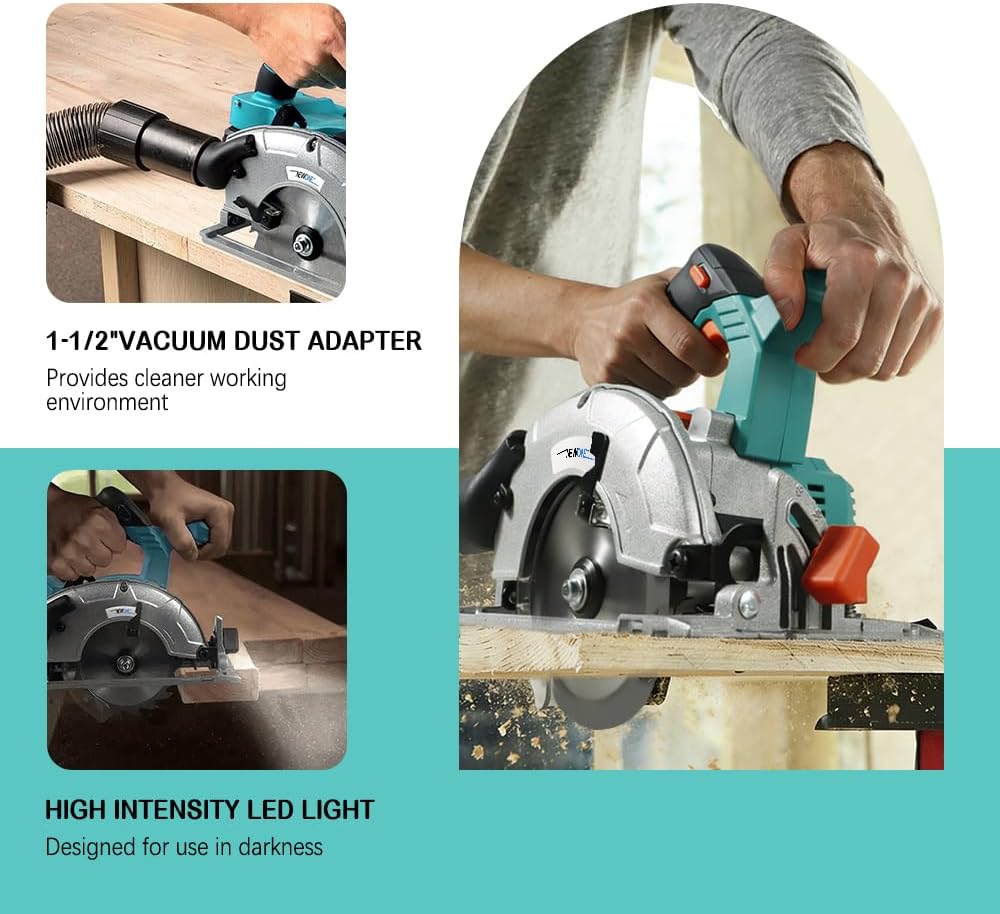
Figure 4.1: Using the 1-1/2" vacuum dust adapter for a cleaner workspace and the integrated LED light.
4.4. Applicable Cutting Materials
This circular saw is designed for cutting various materials, including:

Figure 4.2: Examples of materials suitable for cutting with the NEWONE 20V Cordless Circular Saw.
- Wood
- PVC
- Plastic
- Bamboo
- Soft Metals (with appropriate blade)
5. Maintenance
Regular maintenance ensures the longevity and safe operation of your circular saw.
- Cleaning: After each use, clean the tool with a soft, damp cloth. Remove any sawdust or debris from the blade guard, motor vents, and base plate. Do not use harsh chemicals or abrasive cleaners.
- Blade Inspection: Regularly inspect the saw blade for sharpness, cracks, or missing teeth. Replace dull or damaged blades immediately.
- Battery Care: Store batteries in a cool, dry place. Do not store fully discharged batteries for extended periods.
- General Inspection: Check all screws and fasteners for tightness. Ensure the lower blade guard moves freely and retracts properly.
6. Troubleshooting
If you encounter issues with your circular saw, refer to the following common troubleshooting steps:
| Problem | Possible Cause | Solution |
|---|---|---|
| Saw does not start | Battery not charged or improperly installed. Lock-off button not pressed. | Ensure battery is fully charged and correctly inserted. Press lock-off button before trigger. |
| Blade not cutting efficiently | Dull or incorrect blade. Incorrect cutting depth. | Replace with a sharp, appropriate blade. Adjust cutting depth. |
| Excessive vibration | Loose blade or damaged blade. | Check blade for tightness and damage. Replace if necessary. |
| Saw stalls during cut | Forcing the saw. Overloading. | Reduce feed rate. Ensure blade is sharp. |
If the problem persists after trying these solutions, please contact NEWONE customer support.
7. Specifications
Technical specifications for the NEWONE 20V Cordless Circular Saw.
| Feature | Detail |
|---|---|
| Brand | NEWONE |
| Model Number | NEWONE circularsaw |
| Voltage | 20 Volts |
| No Load Speed | 5000 RPM |
| Blade Diameter | 5 inches (125mm) |
| Max. Cutting Depth (90°) | 47mm (1.85 inches) |
| Max. Cutting Depth (45°) | 33mm (1.3 inches) |
| Battery Capacity | 2.0Ah (2000mAh) |
| Motor Type | Brushless |
| Item Weight | 7 Pounds |
| Dimensions (L x W x H) | 7.67"L x 10.43"W x 10.63"H |
| Included Components | Saw, 5-inch blade, 2.0Ah Battery, Charger, Parallel Guide |
8. Warranty and Support
NEWONE products are manufactured to high-quality standards and are warranted against defects in materials and workmanship.
For warranty claims, technical assistance, or any questions regarding your NEWONE 20V Cordless Circular Saw, please contact our customer support team. Our support team is always ready to help.
Please refer to your purchase documentation for specific warranty period details and contact information.