
1. Important Safeguards
When using electrical appliances, basic safety precautions should always be followed, including the following:
- Read all instructions before operating the toaster.
- Do not touch hot surfaces. Use handles or knobs.
- To protect against electrical shock, do not immerse cord, plugs, or toaster in water or other liquid.
- Close supervision is necessary when any appliance is used by or near children.
- Unplug from outlet when not in use and before cleaning. Allow to cool before putting on or taking off parts.
- Do not operate any appliance with a damaged cord or plug, or after the appliance malfunctions or has been damaged in any manner.
- Do not use outdoors.
- Do not let cord hang over edge of table or counter, or touch hot surfaces.
- Do not place on or near a hot gas or electric burner, or in a heated oven.
- Do not use appliance for other than intended use.
- Oversize foods, metal foil packages, or utensils must not be inserted in a toaster as they may involve a risk of fire or electric shock.
- A fire may occur if toasters are covered or touching flammable material, including curtains, draperies, walls, and the like, when in operation.
- Do not attempt to dislodge food when toaster is plugged in.
- Do not operate unattended.
2. Product Overview
The Foyoconven TA1428E-UL is a 2-slice smart digital toaster featuring a responsive touchscreen interface and 900W heating elements for consistent toasting. It includes 1.5-inch wide slots to accommodate various bread types, 6 browning levels, and specialized functions like Defrost, Reheat, and Single-Slice mode. The memory function allows you to save your preferred settings for future use.

Image: Foyoconven 2-slice toaster with touchscreen display, illustrating the 5 bread modes (Pastry, Bread, Muffin, Bagel, Waffle) and a digital timer set to 2:00.
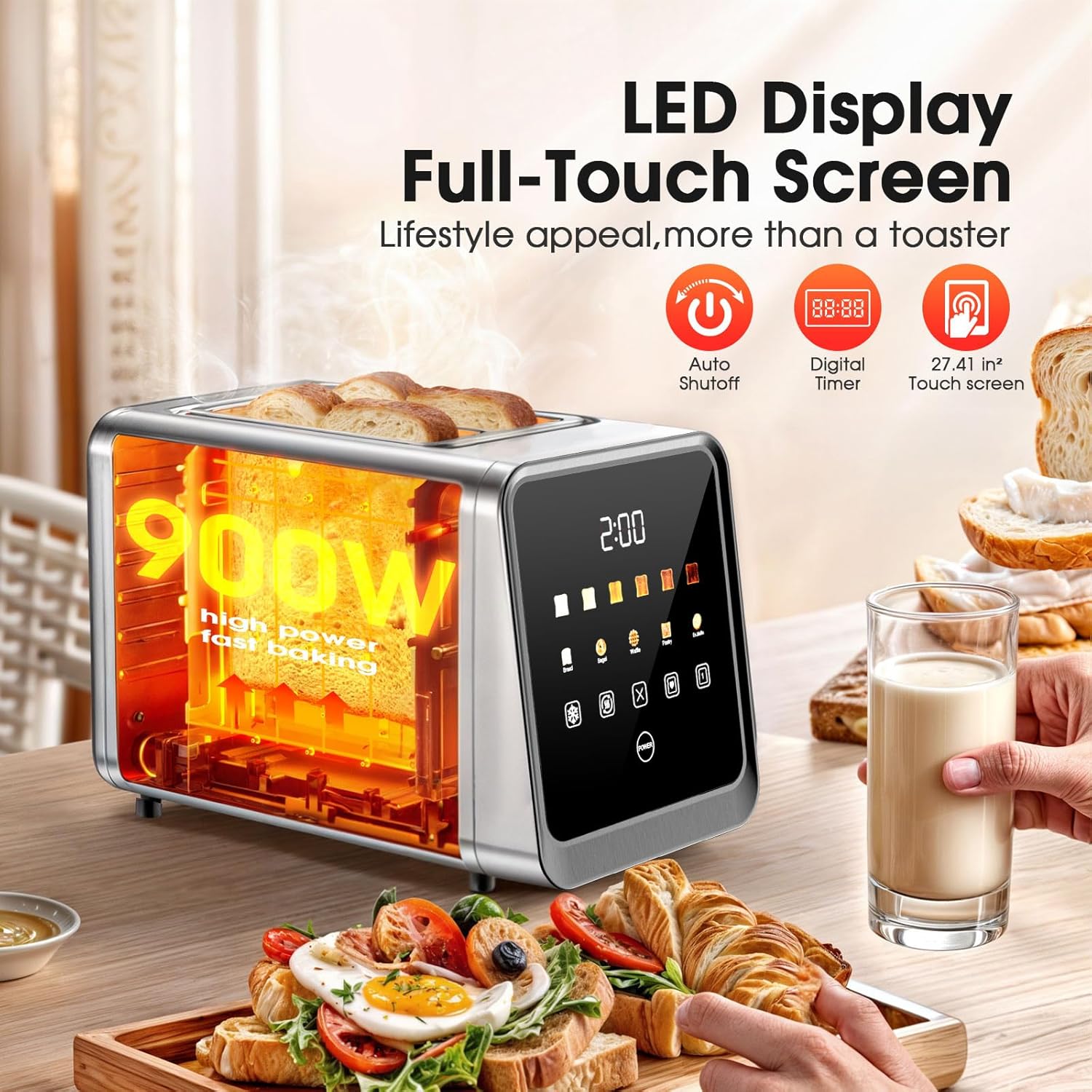
Image: Close-up of the toaster's LED full-touch screen, highlighting its 900W power, auto shutoff, digital timer, and touch screen capabilities. Toasted bread is visible in the slots.
3. Package Contents
Verify that all components are present in the package:
- 1 x Foyoconven Digital Toaster 2 Slice with Touch Screen
4. Setup
4.1 Unpacking
- Carefully remove the toaster and all packaging materials from the box.
- Remove any protective film or stickers from the toaster's surfaces.
4.2 Placement
- Place the toaster on a stable, flat, heat-resistant surface, away from flammable materials such as curtains or walls.
- Ensure there is adequate ventilation around the toaster.
- Plug the power cord into a standard 120V AC electrical outlet.

Image: The Foyoconven toaster with dimensions indicated (6.14"D x 7.44"W x 10.98"H) and highlighting its 1.5-inch extra-wide slots, suitable for thick bread and bagels.
4.3 First Use
- Before toasting food for the first time, operate the toaster without bread on the highest shade setting (Level 6) to burn off any manufacturing residues. A slight odor or smoke may be present; this is normal and will dissipate.
- Allow the toaster to cool completely before its first actual use with food.
5. Operating Instructions
5.1 Basic Toasting Steps
- Place Bread: Insert up to two slices of bread or other items into the toaster slots. The 1.5-inch wide slots accommodate various thicknesses.
- Select Bread Type: On the touchscreen, select the appropriate bread type icon (Bread, Bagel, Waffle, Pastry, Muffin). This optimizes toasting for different textures.
- Adjust Browning Level: Choose your desired browning level from 1 (lightest) to 6 (darkest) using the shade setting indicators on the touchscreen.
- Start Toasting: Press the lever down firmly until it locks into place. The toaster will begin the toasting cycle.
- Automatic Pop-Up: Once the toasting cycle is complete, the toast will automatically pop up.

Image: A visual guide showing the 4 steps to baking bread: 1. Place bread in any slot, 2. Select bread type and browning level on the touchscreen, 3. Press the lever down firmly, 4. Toast pops up automatically.
5.2 Browning Levels
The toaster offers 6 browning levels to suit individual preferences:
- Level 1 (70s): Lightly warm soft
- Level 2 (90s): Lightly crispy tender
- Level 3 (115s): Golden soft center
- Level 4 (130s): Crisp golden brown
- Level 5 (145s): Crunchy rich flavor
- Level 6 (160s): Very crispy hearty crunch
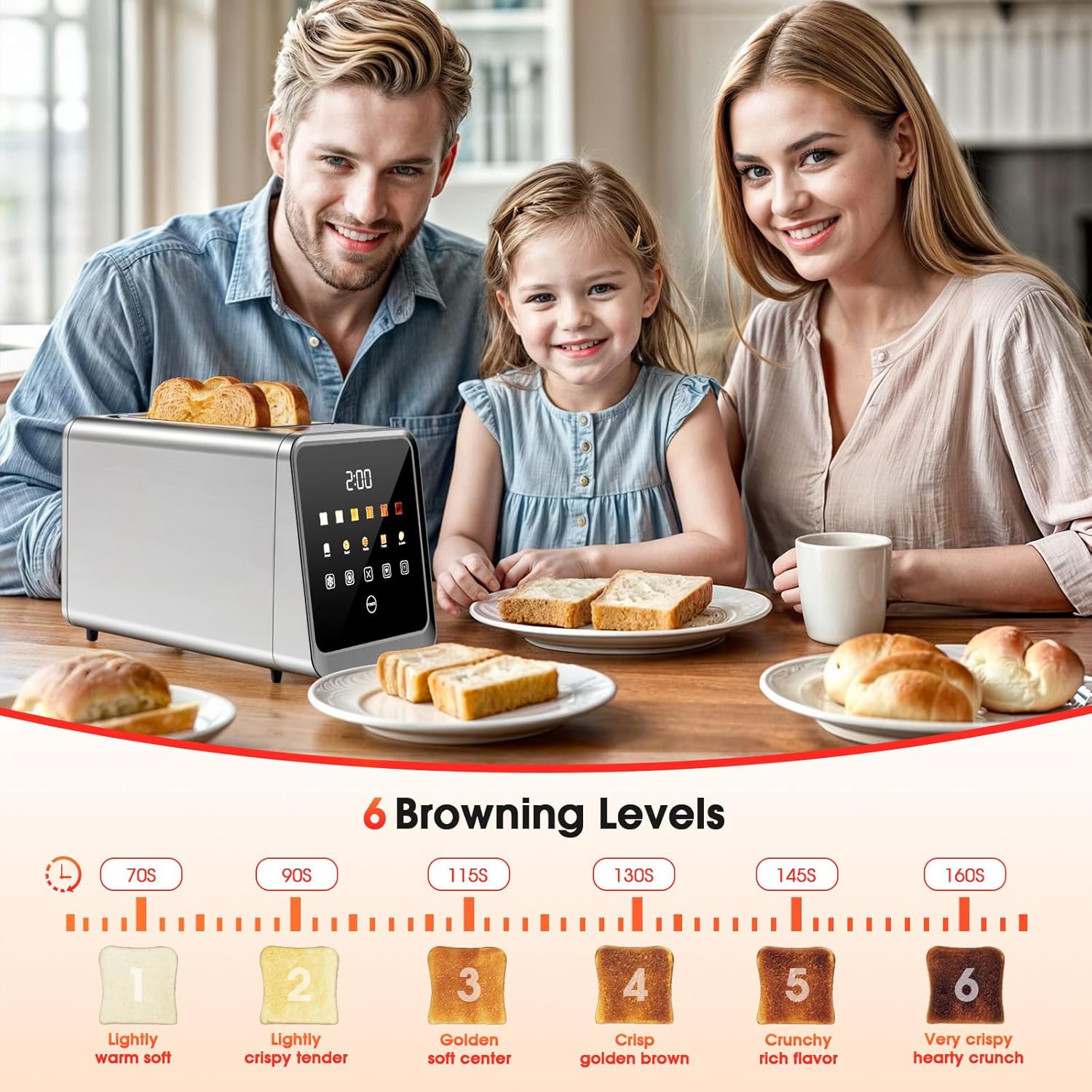
Image: The Foyoconven toaster on a kitchen table with a family, illustrating the 6 browning levels from 'Lightly warm soft' to 'Very crispy hearty crunch' with corresponding toast images and approximate times.
5.3 Special Functions
The touchscreen offers several dedicated functions:
- Defrost Mode: Use this setting for frozen bread or waffles. The toaster will automatically adjust the toasting time to first thaw and then toast the item.
- Reheat Mode: This function warms previously toasted items without further browning. Ideal for refreshing cold toast.
- Single-Slice Mode: When toasting only one slice of bread, select this mode to reduce energy consumption by heating only the occupied slot.
- Memory Function: After selecting your preferred bread type and browning level, you can save these settings. Refer to the touchscreen interface for the specific memory icon. Once saved, you can recall these settings with a single tap for future toasting.
- Cancel Function: To stop the toasting cycle at any time, press the cancel button on the touchscreen.
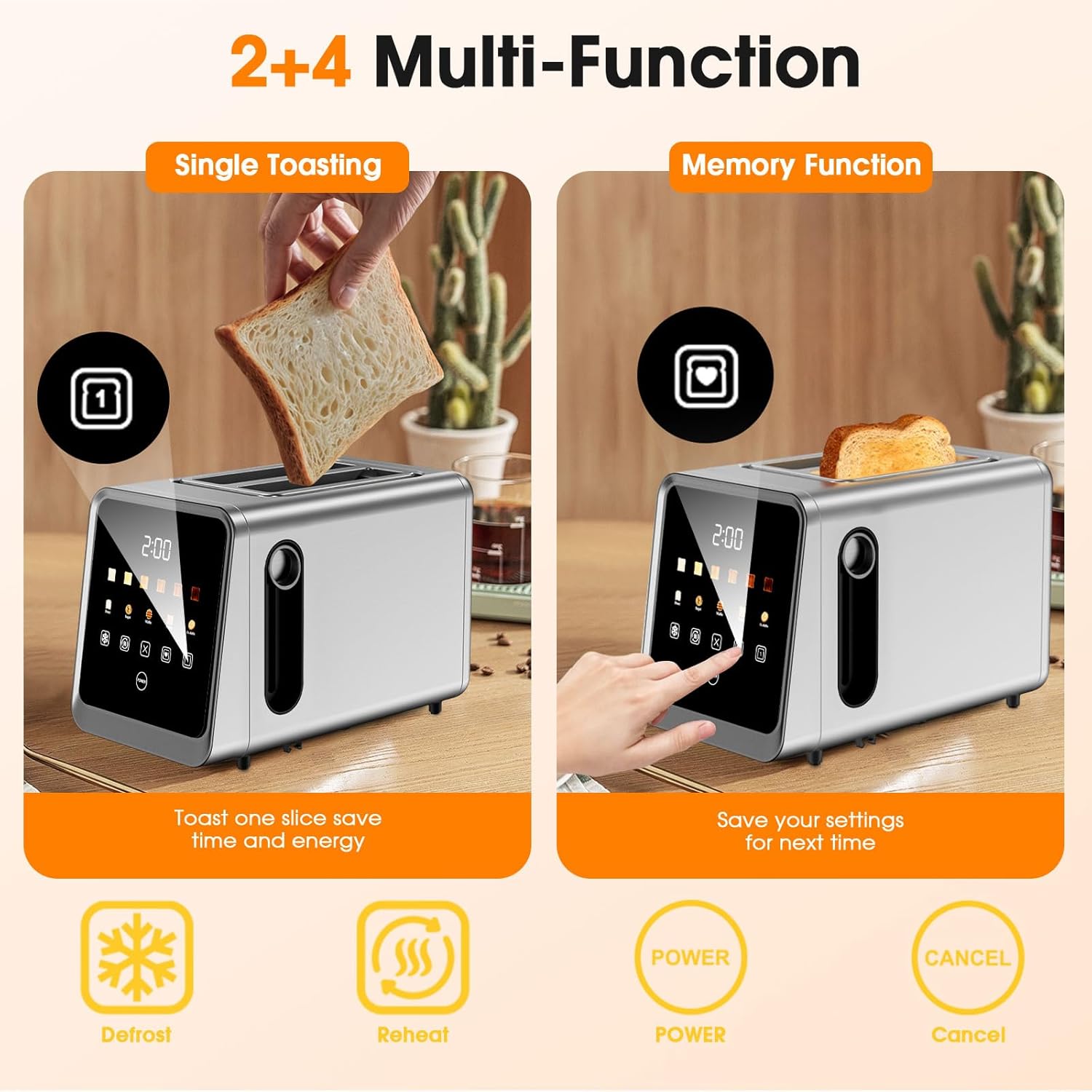
Image: The toaster demonstrating 'Single Toasting' (toasting one slice to save energy) and 'Memory Function' (saving settings for next time). Icons for Defrost, Reheat, Power, and Cancel are also visible.
Video: An official product video demonstrating the features of the Foyoconven 2-slice smart digital touchscreen toaster, including its single-slot technology and memory function.
6. Maintenance and Cleaning
6.1 Crumb Tray Cleaning
- Always unplug the toaster and allow it to cool completely before cleaning.
- Locate the removable crumb tray at the bottom of the toaster.
- Pull the crumb tray out to remove accumulated crumbs.
- Discard crumbs and wipe the tray clean with a damp cloth. Dry thoroughly before reinserting.
- Push the crumb tray back into place until it clicks securely.
6.2 Exterior Cleaning
- Wipe the exterior of the toaster with a soft, damp cloth. Do not use abrasive cleaners or scouring pads, as they may scratch the stainless steel finish.
- Ensure no moisture enters the toasting slots or electrical components.
- For stubborn marks, a mild stainless steel cleaner can be used, applied to a cloth first, not directly to the toaster.
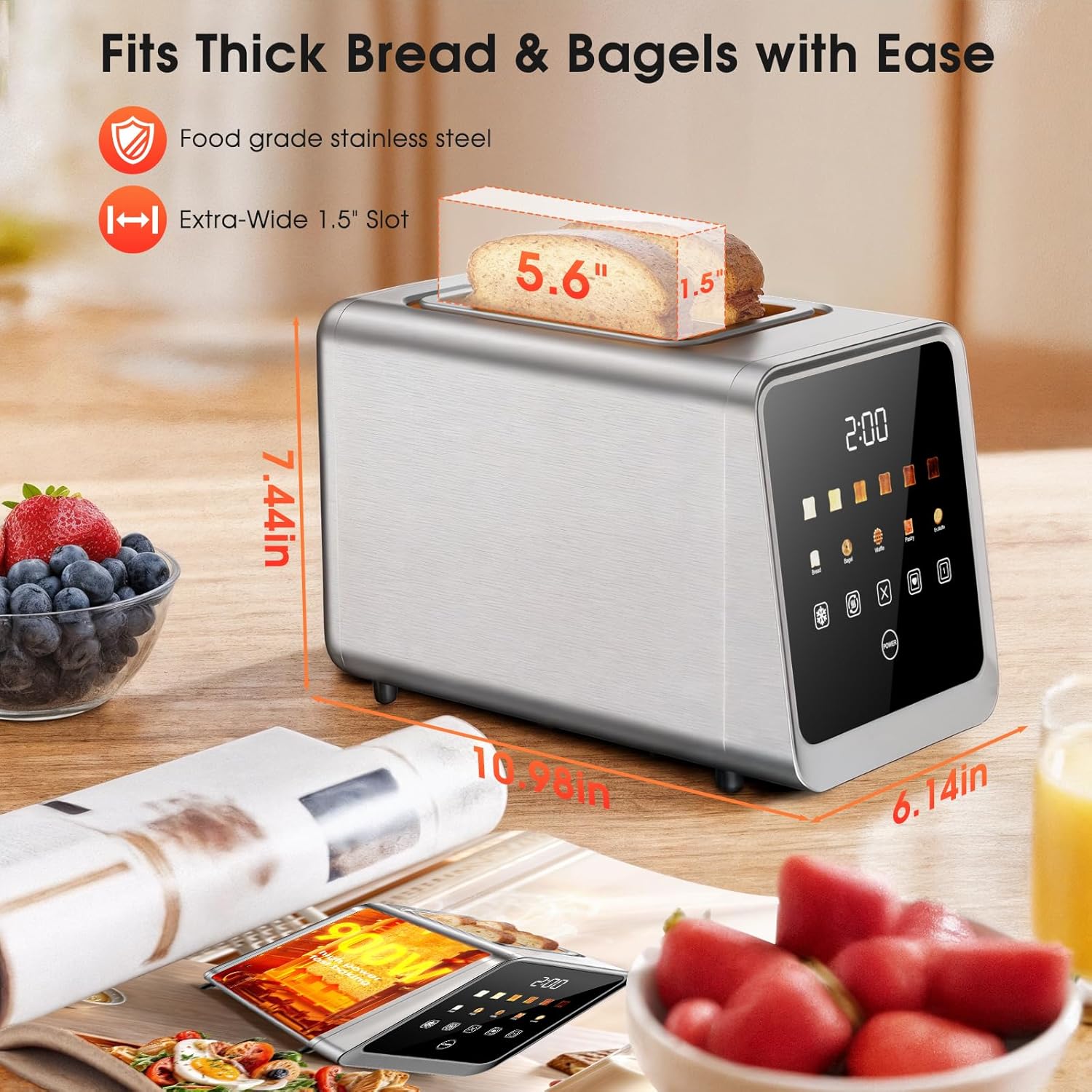
Image: Detailed view of the toaster's design, highlighting the removable crumb tray for easy cleanup and the wire storage slot on the back for organization.
7. Troubleshooting
If you encounter issues with your toaster, refer to the following common problems and solutions:
| Problem | Possible Cause | Solution |
|---|---|---|
| Toaster does not turn on. | Not plugged in; power outlet issue; circuit breaker tripped. | Ensure the toaster is securely plugged into a working outlet. Check your home's circuit breaker. |
| Lever does not stay down. | Toaster is not plugged in; crumb tray is not fully inserted; internal mechanism issue. | Ensure the toaster is plugged in. Verify the crumb tray is fully pushed in. If the problem persists, contact customer support. |
| Toast is unevenly browned. | Inconsistent bread thickness; crumb buildup; heating element issue. | Ensure bread slices are of uniform thickness. Clean the crumb tray regularly. If unevenness persists, contact support. |
| Smoke or burning smell during operation. | Food lodged in slots; crumb buildup; first use burn-off. | Unplug immediately. Remove any lodged food carefully after cooling. Clean crumb tray. If it's the first use, this is normal. If persistent, contact support. |
| Touchscreen is unresponsive. | Temporary software glitch; power cycle needed. | Unplug the toaster for 1-2 minutes, then plug it back in. If the issue continues, contact customer support. |
8. Specifications
| Feature | Detail |
|---|---|
| Brand | Foyoconven |
| Model Number | TA1428E-UL |
| Material | Stainless Steel |
| Product Dimensions (D x W x H) | 6.14" x 7.44" x 10.98" |
| Wattage | 900 watts |
| Voltage | 120 Volts |
| Slot Count | 2 |
| Number of Shade Settings | 6 |
| Number of Programs | 3 (Defrost, Reheat, Single-Slice) |
| Special Features | Built-In Timer, Cancel Function, Defrost Mode, LED Indicator, Touchscreen, Memory Recall |
| Item Weight | 3.03 Pounds |
9. Warranty and Support
Foyoconven products are designed and manufactured to the highest quality standards. For information regarding warranty coverage, please refer to the warranty card included with your purchase or visit the official Foyoconven website.
For technical support, troubleshooting assistance, or to inquire about replacement parts, please contact Foyoconven customer service through the contact information provided on our website or in your product packaging.
