
Introduction
This manual provides essential information for setting up, operating, maintaining, and troubleshooting your REDMI Note 15 Pro+ 5G smartphone. Please read this guide thoroughly to ensure optimal performance and longevity of your device.
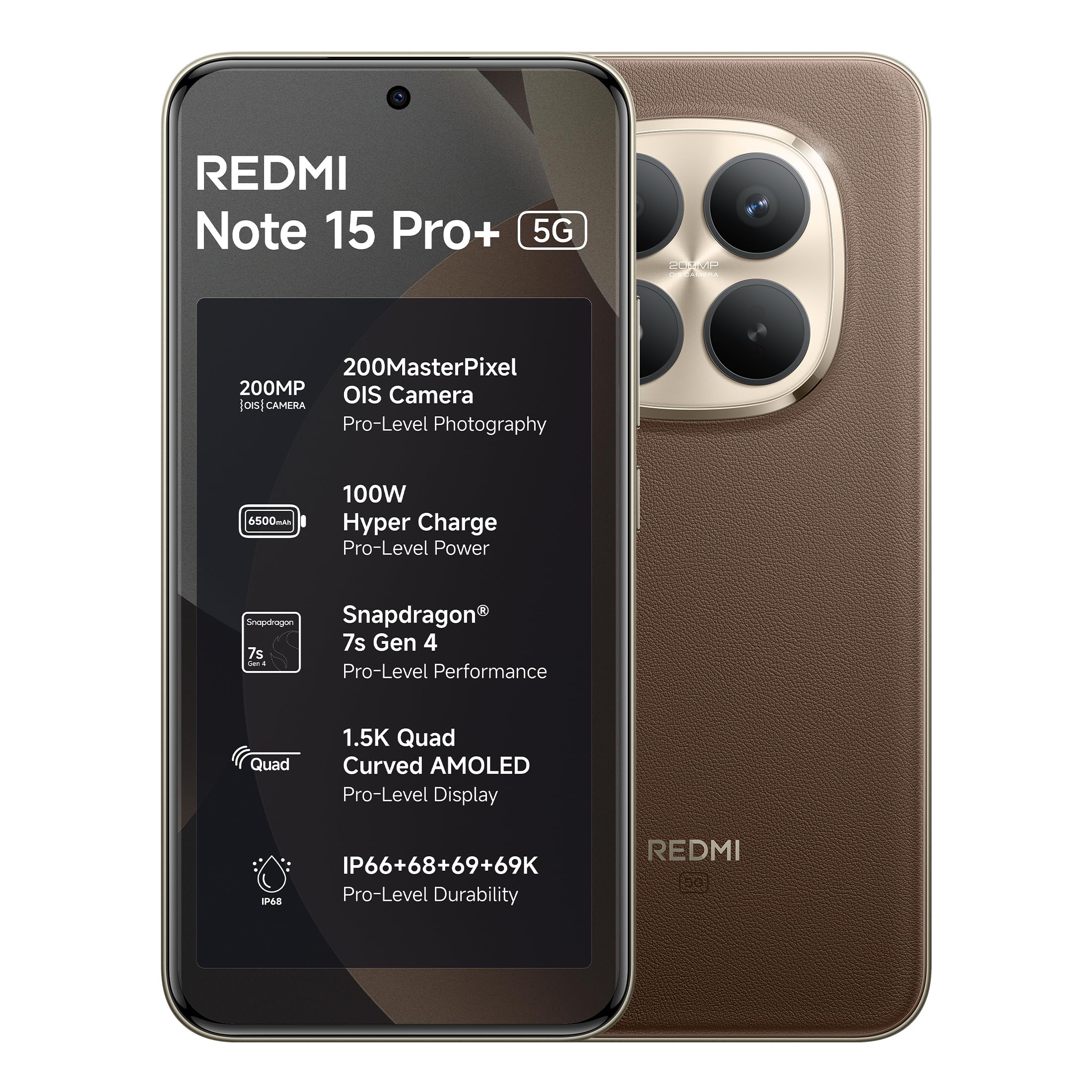
Figure 1: REDMI Note 15 Pro+ 5G (Coffee Mocha)
1. Setup
1.1 Box Contents
Verify that all items are present in the product packaging:
- REDMI Note 15 Pro+ 5G Smartphone
- Charger
- USB Type-C Cable
- SIM Eject Tool
- User Guide (this document)
- Warranty Card
- Protective Case
1.2 Inserting the SIM Card
- Locate the SIM card tray on the side of the device.
- Insert the SIM eject tool into the small hole next to the tray and press gently until the tray pops out.
- Place your Nano-SIM card(s) into the tray with the gold contacts facing down. Ensure proper orientation.
- Carefully push the tray back into the slot until it is flush with the device.
1.3 Initial Power On and Configuration
- Press and hold the Power button until the REDMI logo appears.
- Follow the on-screen instructions to select your language, region, and connect to a Wi-Fi network.
- Sign in with your Google account or create a new one.
- Complete the setup process, including setting up security features like fingerprint or face unlock.
2. Operating Your Device
2.1 Display and Navigation
The device features a 6.83-inch Quad curved 1.5K Ultra QHD AMOLED display with up to 3200 nits peak brightness. It supports a 120Hz adaptive refresh rate for smooth scrolling and interaction. Eye Protect 2.0 with Triple TÜV Certifications helps reduce eye strain.

Figure 2: Immersive AMOLED Display
2.2 Camera System
Your REDMI Note 15 Pro+ 5G is equipped with an advanced 200MP ultimate clarity camera system featuring OIS (Optical Image Stabilization) and an HPE 1/1.4" sensor. This camera is designed for capturing detailed photos and 4K videos with natural depth and steady motion.
- Capture Ultra-Sharp Details: Utilize the 200MP mode for maximum resolution.
- Steady Videos: OIS ensures stable video recording, even when moving.
- Portraits: Use portrait mode for natural depth-of-field effects.

Figure 3: 200MasterPixel Camera System
2.3 Performance and Gaming
Powered by the Snapdragon 7s Gen 4 processor, the device offers smooth performance for daily tasks and gaming. IceLoop cooling technology helps maintain optimal temperatures during intensive use.

Figure 4: Snapdragon 7s Gen 4 Processor
2.4 Battery and Charging
The 6500mAh Silicon-Carbon battery supports 100W HyperCharge, allowing for rapid charging. It also features 22.5W reverse charging. The battery is designed for advanced 1600 lifecycles, ensuring long-term reliability.

Figure 5: 6500mAh Silicon-Carbon Battery
2.5 Audio Features
Experience enhanced audio with symmetric stereo speakers and Dolby Atmos® support. The speakers deliver clear sound, suitable for music and calls.

Figure 6: Ultra-Loud, Ultra-Clear Sound
2.6 Xiaomi HyperOS and AI Features
The device runs on Android 15 with Xiaomi HyperOS, offering intelligent AI features and seamless cross-device connectivity. Key features include:
- Offline Communication: Enables device-to-device calling even without cellular or Wi-Fi network coverage, ideal for travel or areas with poor signal.
- AI Tools: Integrated AI features like Circle to Search and Gemini Assistance enhance user interaction and productivity.

Figure 7: Powered by Xiaomi HyperOS

Figure 8: Smarter Help with AI Tools

Figure 9: Xiaomi Offline Communication
3. Maintenance
3.1 Cleaning Your Device
To clean your device, use a soft, lint-free cloth. Avoid using abrasive cleaners, solvents, or aerosol sprays directly on the phone. For stubborn marks, slightly dampen the cloth with water or a screen cleaner designed for electronics.
3.2 Battery Care
The 6500mAh Silicon-Carbon battery is designed for extended longevity with 1600 lifecycles. To maximize battery life:
- Avoid extreme temperatures.
- Use the provided 100W HyperCharge charger and cable for optimal charging.
- Avoid fully discharging the battery frequently.
3.3 Software Updates
Your device will receive regular software updates, including OS updates for up to 4 years and security patches for up to 6 years. Ensure your device is connected to Wi-Fi and has sufficient battery before initiating updates.
4. Durability and Protection
The REDMI Note 15 Pro+ 5G features a fiberglass back panel and Corning Gorilla Glass Victus 2 for enhanced durability. It boasts an IP69K rating, providing high-level protection against dust and water ingress, including high-pressure water jets and steam cleaning. AI Wet Touch 2.0 ensures screen responsiveness even when wet.

Figure 10: Built-in Protection Features
5. Troubleshooting
If you encounter issues with your device, try the following basic troubleshooting steps:
- Device Unresponsive: Press and hold the Power button for about 10 seconds to force a restart.
- Network Issues: Check if your SIM card is properly inserted. Try toggling Airplane Mode on and off.
- App Malfunction: Close and reopen the app. If the issue persists, clear the app's cache or reinstall it.
- Charging Problems: Ensure the charger and cable are securely connected and undamaged. Try a different power outlet.
- Software Glitches: Ensure your device's software is up to date.
For more complex issues, refer to the support section or contact customer service.
6. Specifications
| Feature | Detail |
|---|---|
| Brand | Redmi |
| Model | Note 15 Pro+ 5G |
| Operating System | Android 15, Xiaomi HyperOS |
| RAM Memory Installed Size | 12 GB |
| Memory Storage Capacity | 256 GB |
| Screen Size | 6.83 Inches (17.35 cm) |
| Display Type | AMOLED |
| Colour | Coffee Mocha |
| Connector Type | USB Type C |
| Water Resistance Level | Waterproof (IP69K) |
| Rear Facing Camera Photo Sensor Resolution | 200 MP |
| Battery Capacity | 6500 Milliamp Hours |
| Item Weight | 208 Grams |
| Item Dimensions (L x W x H) | 16.3 x 7.8 x 0.8 Centimeters |
| Wireless Provider | Unlocked for All Carriers |
| Cellular Technology | 5G |
| Box Contents | Charger, cable, SIM eject tool, Warranty card, User guide, Protective case |
7. Warranty Information
Your REDMI Note 15 Pro+ 5G comes with a 1-year manufacturer warranty for the device from the date of purchase. In-box accessories, including batteries, are covered by a 6-month manufacturer warranty from the date of purchase.
Please retain your proof of purchase for warranty claims.
8. Support and Service
For technical assistance, service, or warranty claims, please contact Redmi customer support. You can find contact information on the official Redmi website or through the provided warranty card.
Manufacturer Information:
DBG Technology (India) Pvt Ltd
PLOT NO-2, BAWAL, SECTOR-8, Rewari, Haryana, 123501.
Importer Information:
Xiaomi Technology India Private Limited
Building Orchid. Block E, Embassy Tech Village, Marathahalli Outer Ring Road, Devarabisanahalli, Bengaluru 560103
Redmi aims for efficient service, with many issues resolved quickly. For more details on repair services, refer to the official Redmi support channels.

Figure 11: Support and Repair Services
For information on potential benefits and subscriptions, please scan the QR code provided in your product packaging or visit the official Redmi website for details. Scan for benefits


