
Introduction
This manual provides essential information for setting up, operating, and maintaining your REDMI Note 15 Pro+ 5G smartphone. Please read this guide thoroughly to ensure optimal performance and longevity of your device. Keep this manual for future reference.
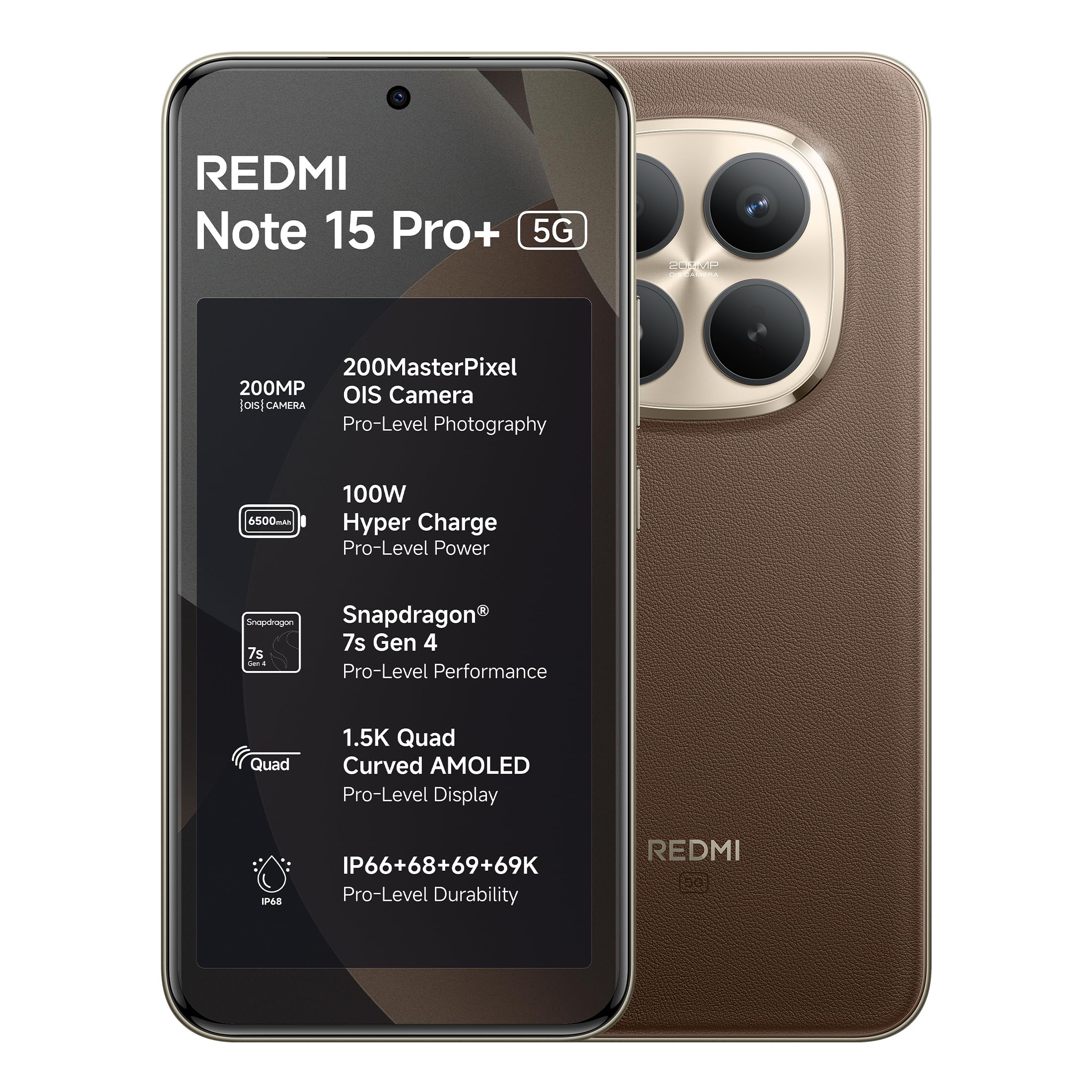
Figure 1: REDMI Note 15 Pro+ 5G (Coffee Mocha)
Setup
1. What's in the Box
- REDMI Note 15 Pro+ 5G Smartphone
- Charger
- USB Type-C Cable
- SIM Eject Tool
- Warranty Card
- User Guide
- Protective Case
2. Device Overview

Figure 2: Front View of the Device

Figure 3: Back View of the Device
3. Inserting the SIM Card
- Locate the SIM card tray on the side of your device.
- Insert the SIM eject tool into the small hole next to the tray and press firmly until the tray pops out.
- Place your Nano-SIM card(s) into the tray with the gold contacts facing down. Ensure proper orientation.
- Carefully push the tray back into the device until it clicks into place.
4. Initial Power-On and Charging
- Press and hold the Power button until the Redmi logo appears.
- Follow the on-screen instructions to complete the initial setup, including language selection, Wi-Fi connection, and Google account setup.
- To charge the device, connect the USB Type-C cable to the phone's charging port and the other end to the provided charger. Plug the charger into a power outlet.
- The device supports 100W HyperCharge for rapid charging.
Operating Instructions
Basic Navigation
- Power On/Off/Restart: Press and hold the Power button. Select 'Power off' or 'Restart' from the menu.
- Volume Control: Use the Volume Up and Volume Down buttons on the side of the device.
- Lock/Unlock Screen: Press the Power button briefly to lock or unlock the screen. Use your set PIN, pattern, or fingerprint for security.
- Home Screen: Swipe up from the bottom of the screen (if using gestures) or tap the Home button (if using navigation buttons) to return to the home screen.
- Recent Apps: Swipe up and hold from the bottom of the screen (gestures) or tap the Recent Apps button to view and switch between open applications.
Making Calls and Sending Messages
- Calls: Open the 'Phone' app, enter the number, and tap the call icon.
- Messages: Open the 'Messages' app, tap the new message icon, enter the recipient's number or select from contacts, and type your message.
Connecting to Networks
- Wi-Fi: Go to Settings > Wi-Fi, turn on Wi-Fi, and select your desired network. Enter the password if required.
- Mobile Data: Go to Settings > Mobile network, and enable 'Mobile data'. Ensure your SIM card is active and has a data plan.
Camera Features
The REDMI Note 15 Pro+ 5G features an advanced 200MP OIS camera system designed for high-resolution photography and stable video recording.

Figure 4: 200MasterPixel Camera System
- 200MP Main Camera: Capture ultra-sharp details with the 1/1.4" sensor and Optical Image Stabilization (OIS).
- 4K Recording: Record high-quality videos with enhanced clarity.
- Portrait Mode: Create professional-looking photos with natural depth and bokeh effects.
- AI Camera: Utilize artificial intelligence for scene recognition and optimized photo settings.
Performance and Battery
Experience smooth performance and long-lasting power with the REDMI Note 15 Pro+ 5G.

Figure 5: Snapdragon 7s Gen 4 Processor
- Snapdragon 7s Gen 4: An advanced performance platform ensuring smooth multitasking and gaming.
- IceLoop Cooling Technology: Helps maintain optimal device temperature during intensive use.
- 6500mAh Silicon-Carbon Battery: Provides extended usage time.
- 100W HyperCharge: Rapidly charges your device.
- 22.5W Wired Reverse Charging: Allows you to charge other devices using your phone.
- 1600 Lifecycles: Advanced battery technology for long-term durability.

Figure 6: Battery and Charging Features
Display and Durability
The device features a high-quality display and robust construction for everyday use.

Figure 7: CrystalRes AMOLED Display
- 6.83" Quad Curved 1.5K Ultra QHD AMOLED Display: Offers immersive visuals with a 120Hz adaptive refresh rate.
- 3200 Nits Peak Brightness: Ensures excellent visibility even in bright outdoor conditions.
- Eye Protect 2.0 with Triple TÜV Certifications: Reduces eye strain during extended viewing.
- Corning Gorilla Glass Victus 2: Provides enhanced screen protection against drops and scratches.
- IP69/69K Rating: Offers high-level protection against dust and water ingress.
- Fiberglass Back Panel: Contributes to the device's overall durability.
- AI Wet Touch 2.0: Improves touch responsiveness even when the screen is wet.

Figure 8: Durability Features
Software and AI Features
The REDMI Note 15 Pro+ 5G runs on Android 15 with Xiaomi HyperOS, offering a range of intelligent features.

Figure 9: Xiaomi HyperOS
- Xiaomi HyperOS: Provides a seamless and intelligent cross-device connectivity experience.
- Circle to Search: A feature for quick information retrieval by circling objects on your screen.
- Gemini Assistance: An AI assistant for various tasks.
- Xiaomi HyperAI Tools: Integrated AI functionalities to enhance user experience.
- Xiaomi Offline Communication: Enables device-to-device calling even without cellular or Wi-Fi network coverage, useful in no-signal zones or crowded areas.

Figure 10: Audio Features
- Symmetric Stereo Speakers: Deliver up to 400% louder sound.
- Dolby Atmos: Provides immersive audio depth and clear dialogue.
Maintenance
Cleaning Your Device
- Use a soft, lint-free cloth to clean the screen and back panel.
- Avoid using harsh chemicals, abrasive materials, or aerosol sprays.
- For stubborn smudges, slightly dampen the cloth with water or a screen cleaner designed for electronics.
Software Updates
- Regularly check for and install software updates to ensure your device has the latest features, security patches, and performance improvements.
- Go to Settings > About phone > MIUI version (or HyperOS version) to check for updates.
Battery Care
- Avoid exposing the device to extreme temperatures.
- Do not let the battery completely drain frequently. Charge it before it reaches very low levels.
- Use only the provided charger and cable for optimal charging and battery health.
Storage Management
- Regularly clear unnecessary files, cache, and unused apps to free up storage space and maintain device performance.
- Go to Settings > Storage to manage your device's storage.
Troubleshooting
Common Issues and Solutions
- Device Not Turning On:
- Ensure the battery is charged. Connect the charger and wait a few minutes before attempting to power on.
- Press and hold the Power button for at least 10-15 seconds to force a restart. - Charging Issues:
- Check if the charger and cable are securely connected to both the device and the power outlet.
- Try using a different compatible charger and cable.
- Ensure the charging port is clean and free of debris. - Network Connectivity Problems (Wi-Fi/Mobile Data):
- Restart your device.
- Toggle Wi-Fi or Mobile Data off and on in Settings.
- For Wi-Fi, forget the network and reconnect. For mobile data, ensure your SIM card is properly inserted and active.
- If issues persist, contact your network provider. - Apps Crashing or Freezing:
- Close the problematic app from recent apps and reopen it.
- Clear the app's cache and data (Settings > Apps > [App Name] > Storage > Clear cache/Clear data).
- Update the app to its latest version from the Google Play Store.
- If the issue continues, uninstall and reinstall the app. - Slow Performance:
- Close unused background apps.
- Clear cache and temporary files.
- Ensure sufficient storage space is available.
- Restart your device regularly.
Factory Reset (Last Resort)
If you encounter persistent software issues that cannot be resolved by other troubleshooting steps, a factory reset may be necessary. Warning: A factory reset will erase all data on your device. Back up important data before proceeding.
- Go to Settings > About phone > Factory reset.
- Follow the on-screen instructions to confirm the reset.
Specifications
| Feature | Detail |
|---|---|
| Brand | Redmi |
| Model | Note 15 Pro+ 5G |
| Operating System | Android 15, Xiaomi HyperOS |
| RAM Memory | 8 GB |
| Internal Storage | 256 GB |
| Screen Size | 6.83 Inches |
| Display Type | AMOLED, 1.5K Ultra QHD, 3200 nits peak brightness |
| Rear Camera Resolution | 200 MP (with OIS) |
| Battery Capacity | 6500 mAh |
| Charging | 100W HyperCharge, 22.5W Wired Reverse Charging |
| Processor | Snapdragon 7s Gen 4 |
| SIM Card Slot Count | Dual SIM |
| SIM Card Size | Nano |
| Connector Type | USB Type C |
| Water Resistance Level | IP69/69K (Waterproof) |
| Dimensions (L x W x H) | 16.3 x 7.8 x 0.8 Centimeters |
| Item Weight | 208 Grams |
| Cellular Technology | 5G |
Warranty Information
Your REDMI Note 15 Pro+ 5G comes with the following warranty:
- Device Warranty: 1 year manufacturer warranty from the date of purchase.
- In-Box Accessories Warranty: 6 months manufacturer warranty for in-box accessories, including batteries, from the date of purchase.
Please retain your proof of purchase for warranty claims.
Support and Contact Information
For technical support, service, or further inquiries, please contact:
- Manufacturer: DBG Technology (India) Pvt Ltd, PLOT NO-2, BAWAL, SECTOR-8, Rewari, Haryana, 123501.
- Importer: Xiaomi Technology India Private Limited, Building Orchid. Block E, Embassy Tech Village, Marathahalli Outer Ring Road, Devarabisanahalli, Bengaluru 560103.
You can also visit the official Redmi website for support resources and FAQs.


