
1. Safety Information
WARNING: This product requires assembly. Use appropriate tools and follow the provided instructions carefully to avoid injury. Always keep the work area clear and ensure stability when lifting heavy parts.
- Keep all small parts and packaging materials away from children.
- Ensure all connections are secure before use.
- Do not overload drawers or shelves.
- Place the desk on a level surface to prevent tipping.
2. Package Contents
Verify that all components are present before beginning assembly. Refer to the detailed parts list included in your product packaging.
- Desktop Panel
- Side Panels (Left and Right)
- Drawer Fronts, Sides, and Backs
- Drawer Slides and Hardware
- Cabinet Door and Hinges
- Adjustable Shelf and Supports
- Power Outlet Unit (2 AC, 2 USB)
- Drawer Pulls and Knobs
- Lockable File Drawer Mechanism and Keys
- Assembly Hardware (screws, dowels, cam locks, etc.)
- Instruction Manual
3. Assembly Instructions
Detailed assembly instructions are provided in the package. Please follow them step-by-step. It is recommended to have a second person assist with assembly, especially for lifting and aligning larger components.
General Assembly Tips:
- Clear a spacious area for assembly.
- Identify all parts and hardware using the provided labels.
- Do not overtighten screws to avoid damaging the wood.
- Use a soft cloth or cardboard to protect surfaces during assembly.

Image: Overview of desk components during assembly.
Assembly Video Reference:
Video: Assembly process for the Executive Computer Desk, demonstrating key steps and features like the lockable file drawer.
4. Features
The Vipbear HOD02 Executive Desk is designed for functionality and style, offering ample workspace and storage solutions.
- Spacious Desktop: A 59-inch wide desktop provides generous space for multiple monitors, laptops, and other office essentials, supporting up to 200 lbs.
- Integrated Power Outlet: Equipped with 2 AC outlets and 2 USB charging ports for convenient power access for your devices.
- Multiple Drawers: Features 5 smooth-gliding drawers for organized storage of office supplies and personal items.
- Lockable File Cabinet: A dedicated file drawer accommodates A4, letter, and legal-size documents, featuring a locking mechanism for security.
- Adjustable Storage Cabinet: A side cabinet with an adjustable shelf provides flexible storage for larger items or a CPU tower.
- Durable Construction: Crafted from high-quality engineered wood, offering scratch-resistant, waterproof, and easy-to-clean surfaces.
- Farmhouse Design: A vintage-inspired farmhouse style with a rustic wood top and distressed white finish complements various decor styles.
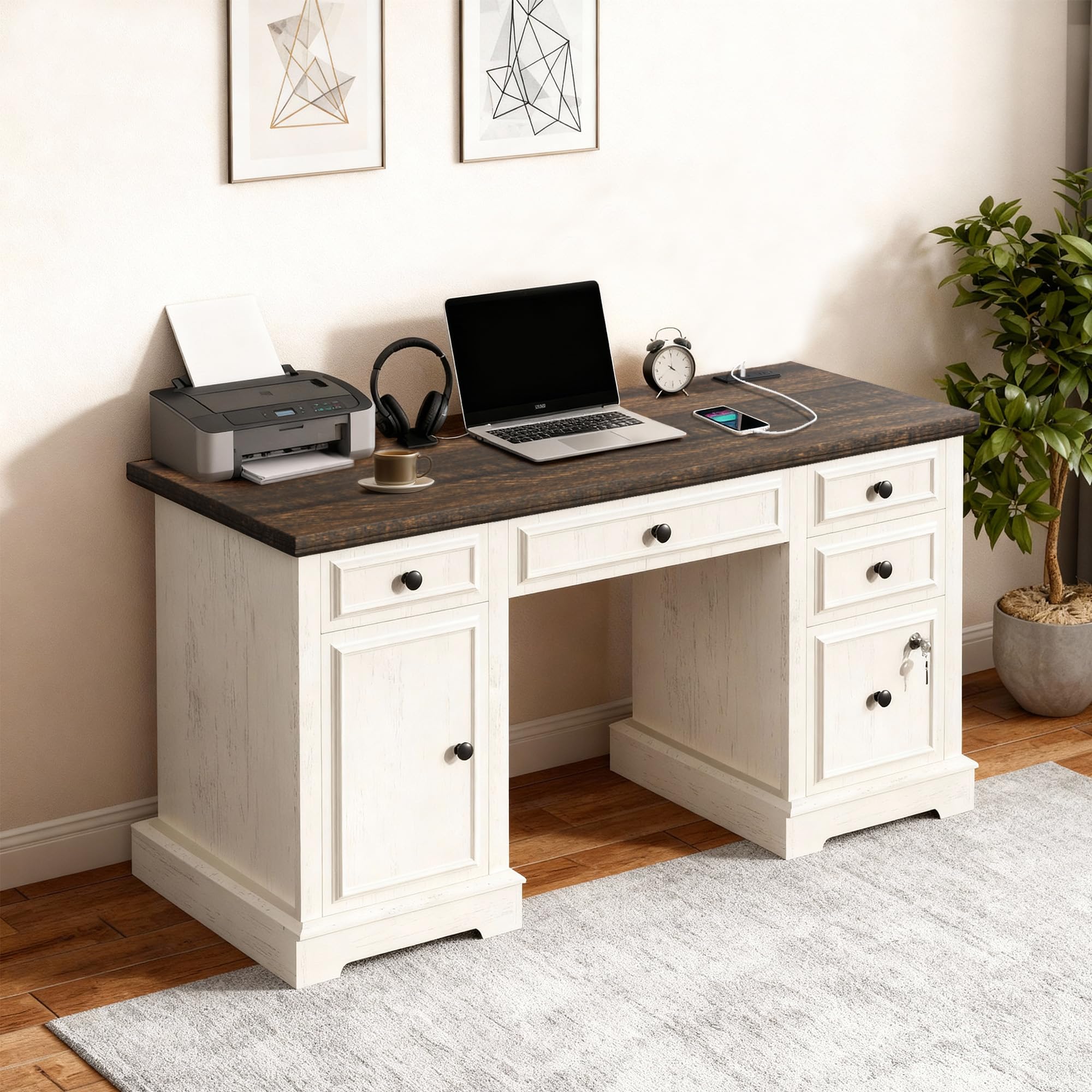
Image: The Vipbear 59-inch Farmhouse Executive Desk, showcasing its overall design and features.

Image: Close-up of the built-in charging station on the desk surface, featuring 2 AC outlets and 2 USB-A ports.

Image: The lockable file drawer, demonstrating its capacity for various document sizes and the security lock.
5. Operation
Drawers:
All drawers are equipped with smooth-gliding slides for easy opening and closing. To open, gently pull the knob. To close, push until the drawer is fully seated.
Lockable File Drawer:
Insert the provided key into the lock on the file drawer. Turn the key to lock or unlock the drawer. Ensure the drawer is fully closed before attempting to lock it.
Storage Cabinet:
The cabinet door opens to reveal an interior with an adjustable shelf. To adjust the shelf height, remove the shelf and reposition the shelf pins to the desired level.

Image: The adjustable and removable shelf within the storage cabinet, showing height options.
Power Outlet:
Plug the desk's main power cord into a standard wall outlet. Use the 2 AC outlets and 2 USB ports on the desktop to power and charge your electronic devices. Ensure devices are compatible with the provided voltage and current.
Operation Video Reference:
Video: Demonstration of the Executive Computer Desk's features, including the lockable file drawer and power outlet functionality.
6. Maintenance
- Cleaning: Wipe surfaces with a soft, damp cloth. Avoid harsh chemicals or abrasive cleaners that may damage the finish.
- Spills: Immediately wipe up any spills to prevent staining or water damage.
- Heat Protection: Use coasters or protective pads under hot items to prevent damage to the desktop surface.
- Drawer Slides: Periodically check drawer slides for smooth operation. If they become stiff, a small amount of silicone lubricant can be applied.
- Hardware: Periodically check and tighten any loose screws or hardware to maintain stability.
7. Troubleshooting
- Drawers sticking: Check that the drawer slides are properly aligned and free of obstructions. Ensure all assembly hardware for the slides is securely tightened.
- Desk wobbles: Verify that the desk is placed on a level surface. Check all leg and frame connections and tighten any loose hardware.
- Power outlets not working: Ensure the desk's main power cord is securely plugged into a functional wall outlet. Check for any tripped circuit breakers in your home.
- Lockable drawer not locking: Ensure the drawer is fully closed before attempting to lock it. Check that the key is fully inserted and turned correctly.
8. Specifications
| Feature | Detail |
|---|---|
| Brand | Vipbear |
| Model Number | HOD02 |
| Product Dimensions (D x W x H) | 21.6"D x 58.6"W x 29"H (55cm x 149cm x 74cm) |
| Item Weight | 122 Pounds (55.3 kg) |
| Maximum Weight Recommendation (Desktop) | 200 Pounds (90.7 kg) |
| Material Type | Engineered Wood |
| Number of Drawers | 5 |
| File Cabinet Type | Lockable, fits A4/Letter/Legal-size |
| Power Outlets | 2 AC Outlets, 2 USB Ports |
| Assembly Required | Yes |

Image: Detailed diagram showing the dimensions of the desk and its various compartments.
9. Warranty and Support
Vipbear is committed to providing quality products. For any issues, questions, or to inquire about warranty information, please contact Vipbear customer support. Refer to your purchase documentation for specific warranty terms and contact details.
Typically, support can be reached via the retailer's customer service portal or directly through the manufacturer's website.