
1. Introduction
Thank you for choosing the Tosima W5 Pro Robotic Window Cleaner. This manual provides essential information for the safe and efficient operation, maintenance, and troubleshooting of your device. Please read it thoroughly before first use and keep it for future reference.
2. Safety Instructions
To ensure safe operation and prevent damage, observe the following safety guidelines:
- Always attach the safety rope to a secure anchor point before operating the robot, especially on high windows.
- Ensure the power cord is securely connected and the robot is powered by the provided adapter.
- The robot is equipped with a 30-minute power outage protection battery. In case of power loss, the robot will remain attached for approximately 30 minutes, emitting an alarm. Retrieve the robot promptly.
- Do not use the robot on cracked, damaged, or uneven glass surfaces.
- Keep children and pets away from the operating robot.
- Use only the recommended cleaning solution or distilled water in the water tank.
- Do not operate the robot in direct sunlight or extreme temperatures.
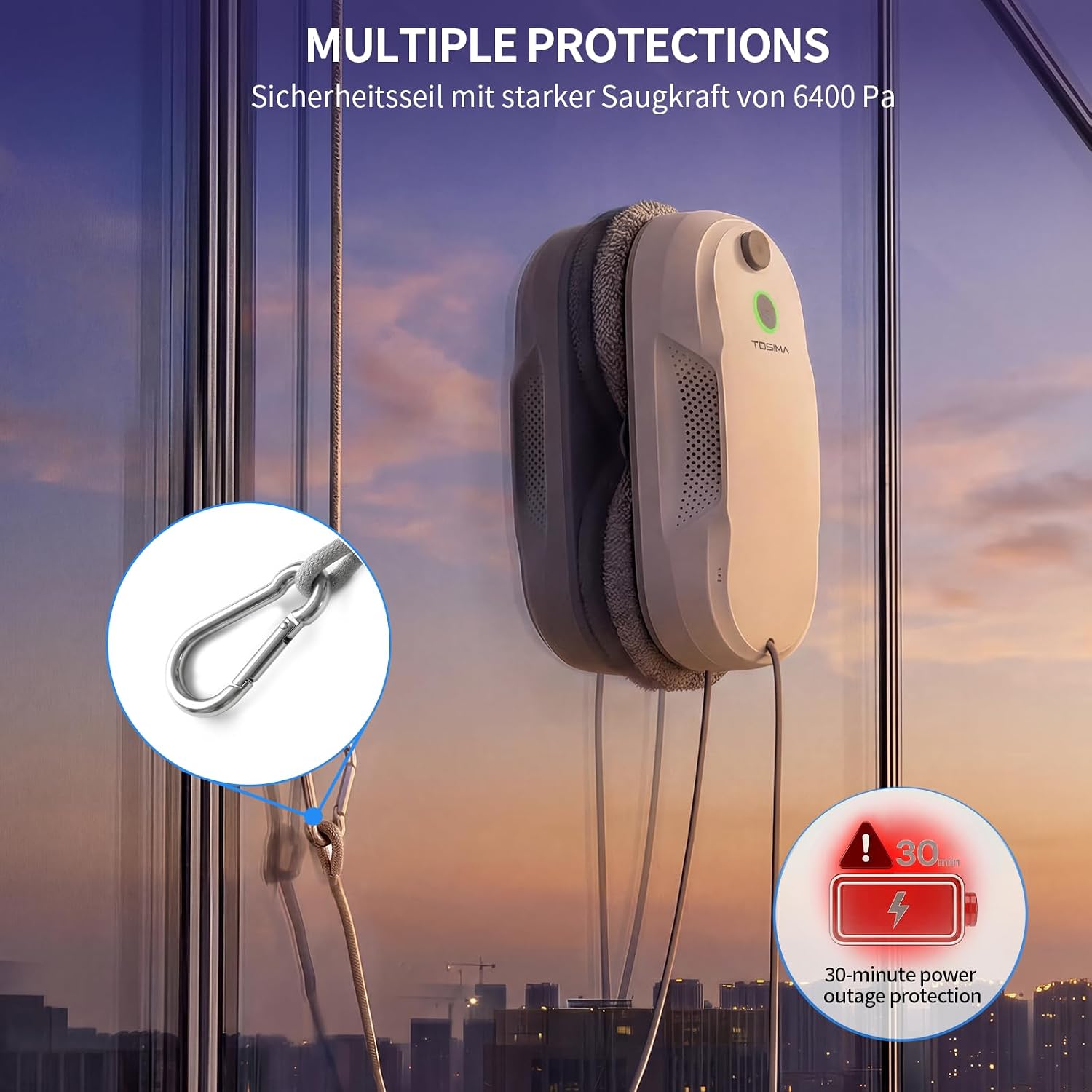
Image: The Tosima W5 Pro demonstrating its safety features, including the robust safety rope and the 30-minute power outage protection system.
3. Package Contents
Verify that all items are present in your package:
- Tosima W5 Pro Window Cleaning Robot x1
- Remote Control x1
- Safety Rope x1
- Power Adapter x1
- Extension Cord x1
- Cleaning Cloths x20
- Batteries (for remote control) x2
- Water Tank Plug x1
- Water Filling Bottle x1
- Atomizing Disc x2
- Instruction Manual x1
- Cotton Swab x2

Image: A visual representation of all items included in the Tosima W5 Pro package, along with the robot's dimensions.
4. Product Overview
The Tosima W5 Pro is an automatic window cleaning robot designed for various smooth surfaces. It features 6400 Pa strong suction, ultrasonic double water spray, and AI-assisted path planning for efficient cleaning.
Key Features:
- 6400 Pa Suction: Ensures strong adherence to surfaces.
- Ultrasonic Double Water Spray: Automatically sprays water or cleaning solution for effective stain removal.
- AI Path Planning: Intelligent navigation for comprehensive cleaning coverage (Z-shaped, intensive spot, edge cleaning).
- Dual Rotating Directions: Microfiber pads rotate in two directions for powerful stain removal.
- Multiple Protections: Includes a physical safety rope and a 30-minute power outage backup battery.

Image: An exploded view illustrating the internal components and key technologies of the Tosima W5 Pro, including its dual spray system, powerful suction fan, and AI algorithm.

Image: Illustration of the dual rotating cleaning pads, highlighting their effectiveness in removing stains from surfaces.
5. Setup
Follow these steps to prepare your Tosima W5 Pro for cleaning:
- Install the cleaning cloth: Attach a clean microfiber cloth to each rotating pad on the robot.
- Dampen: Lightly dampen the cleaning cloths with water or spray the window surface with cleaning solution.
- Fill the water tank: Open the water tank plug and fill the tank with clean water or a suitable window cleaning solution using the provided filling bottle. Close the plug securely.
- Attach the safety rope: Securely fasten the safety rope's carabiner to a sturdy object indoors, such as a heavy furniture leg or a window frame anchor.
- Connect the power supply: Connect the power adapter to the robot and then plug it into a power outlet. Ensure the extension cord is used if needed.
- Turn on: Place the robot on the window surface and press the power button on the robot or the remote control to turn it on. The robot will adhere to the glass.
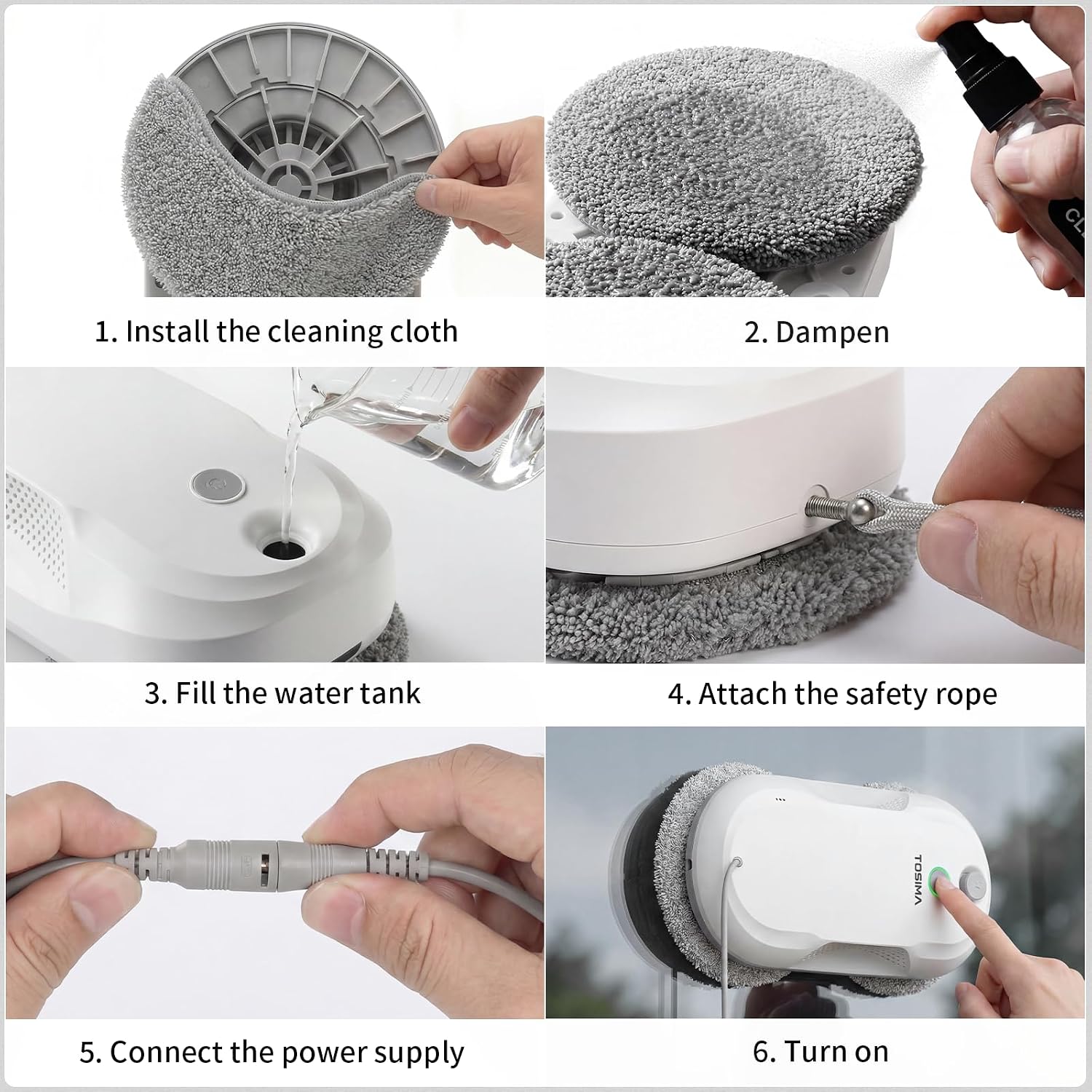
Image: A step-by-step visual guide demonstrating the initial setup process for the Tosima W5 Pro.
6. Operating Instructions
Once set up, you can operate the Tosima W5 Pro using the remote control:
Starting a Cleaning Cycle:
- Place the robot on the desired cleaning surface.
- Press the 'Start' button on the remote control. The robot will automatically detect the window size and begin cleaning in an optimal path (e.g., Z-shaped).
Cleaning Modes:
- Automatic (Z-shaped): Default mode for general cleaning.
- Intensive Spot Cleaning: Use the directional arrows on the remote to guide the robot to specific dirty areas for focused cleaning.
- Edge Cleaning: The robot can detect and clean along the edges of windows.
Stopping the Robot:
- Press the 'Stop' button on the remote control. The robot will stop and remain adhered to the surface.
- Carefully remove the robot from the surface by holding its handle and pressing the release button (if applicable, refer to specific product design).
Applicable Surfaces:
The Tosima W5 Pro is suitable for various smooth, vertical surfaces:
- Floor-to-ceiling windows
- Slanted glass
- Mirrors
- Small windows
- Bathroom glass
- Tiles

Image: The Tosima W5 Pro in action, illustrating its intelligent cleaning paths and remote control operation.
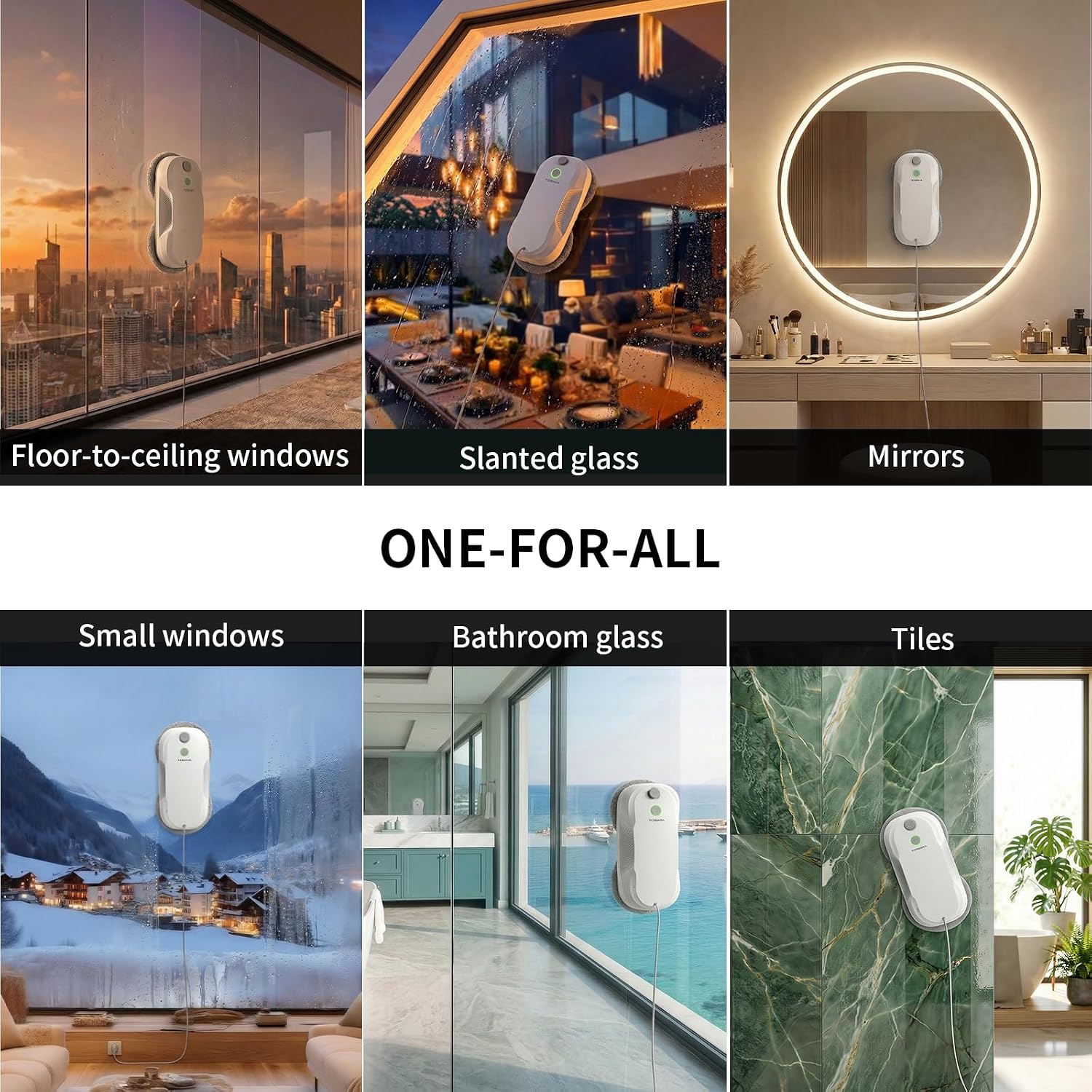
Image: Examples of different surfaces where the Tosima W5 Pro can be effectively used, including various types of windows, mirrors, and tiles.
7. Maintenance
Regular maintenance ensures optimal performance and extends the lifespan of your robot:
- Cleaning Cloths: Remove and wash the microfiber cloths after each use. They are reusable and can be hand or machine washed. Ensure they are completely dry before reattaching.
- Water Tank: Empty any remaining water or solution from the tank after use. Clean the tank periodically to prevent residue buildup.
- Atomizing Discs: Inspect the atomizing discs for blockages. Use the provided cotton swabs to gently clean the spray nozzles if necessary.
- Sensors: Wipe the robot's sensors with a dry, soft cloth to ensure they are free from dust and debris, which can affect navigation.
- Storage: Store the robot in a cool, dry place away from direct sunlight when not in use.
8. Troubleshooting
If you encounter issues with your Tosima W5 Pro, refer to the following common problems and solutions:
| Problem | Possible Cause | Solution |
|---|---|---|
| Robot does not adhere to the glass. | Insufficient suction; dirty surface; power issue. | Ensure power adapter is connected. Clean the glass surface. Check for obstructions on the suction area. |
| Robot leaves streaks or circular marks. | Dirty or overly wet cleaning cloths; incorrect cleaning solution; very dirty window requiring multiple passes. | Replace or wash cleaning cloths. Use less solution or switch to distilled water. For very dirty windows, pre-clean or run multiple cycles with fresh cloths. |
| Robot stops unexpectedly or does not move. | Power interruption; sensor obstruction; low battery (backup). | Check power connection. Clean sensors. If on backup battery, retrieve the robot and ensure continuous power for next use. |
| Water spray is weak or not working. | Empty water tank; clogged nozzles. | Refill water tank. Clean atomizing discs and nozzles with a cotton swab. |
9. Specifications
- Brand: Tosima
- Model Name: W5 Pro
- Color: White
- Components Included: Robotic Window Cleaner, Remote Control, Safety Rope, Power Adapter, Extension Cord, Cleaning Cloths (x20), Batteries (x2), Water Tank Plug, Water Filling Bottle, Atomizing Discs (x2), Instruction Manual, Cotton Swabs (x2)
- Voltage: 12V
- Item Weight: 1500 Grams
- Power Source: AC/DC
- Batteries Included: Yes (for remote control)
- Control Method: Remote Control
- Form Factor: Robotic Window Cleaner
- Recommended Uses: Cleaning windows and glass surfaces
- Portable: Yes
- Model Number: W5
- UPC: 765015971270
- Manufacturer: TOSIMA
10. Warranty and Support
For warranty information, technical support, or service inquiries, please refer to the warranty card included in your package or contact Tosima customer service directly. Contact details can typically be found on the manufacturer's official website or through your retailer.
