
1. Important Safety Instructions
Please read all instructions carefully before operating the dehumidifier. Retain this manual for future reference.
- Always connect the unit to a grounded power outlet.
- Do not operate the dehumidifier with a damaged power cord or plug.
- Ensure the unit is placed on a stable, level surface to prevent water spillage.
- Do not block the air inlet or outlet. Maintain at least 20 cm (8 inches) clearance around the unit.
- Keep children and pets away from the dehumidifier during operation.
- Do not insert objects into the air vents.
- Unplug the unit before cleaning or performing any maintenance.
- Do not use the unit in areas where flammable gases or liquids are stored.
2. Product Overview
The ZAFRO D032-05PtA2/F1-D dehumidifier is designed to efficiently remove excess moisture from your home, basement, or other living spaces, improving air quality and comfort.
Key Features:
- Powerful Dehumidification: Removes up to 21 pints of moisture per day.
- Ultra-Quiet Operation: Operates at a low noise level of 41 dB.
- Adjustable Humidity Control: Set desired humidity levels from 30% to 80%.
- Dual Drainage Options: Manual water tank or continuous drainage with included hose.
- Smart Modes: Sleep Mode, Low Mode, High Mode for various needs.
- 24-Hour Timer: Schedule operation for convenience and energy saving.
- Auto Defrost: Prevents ice buildup on coils in low temperatures.
- Smart Humidity Indicator: Tri-color LED light indicates ambient humidity levels.
- Easy Mobility: Equipped with 360° universal wheels.
Included Components:
- ZAFRO Dehumidifier Unit
- User Manual
- 1-meter Drain Hose
- 4 x 360° Universal Wheels
- 4 x Anti-Slip Pads

Image: ZAFRO Dehumidifier demonstrating its fast and effective dehumidifying capability in a home environment.
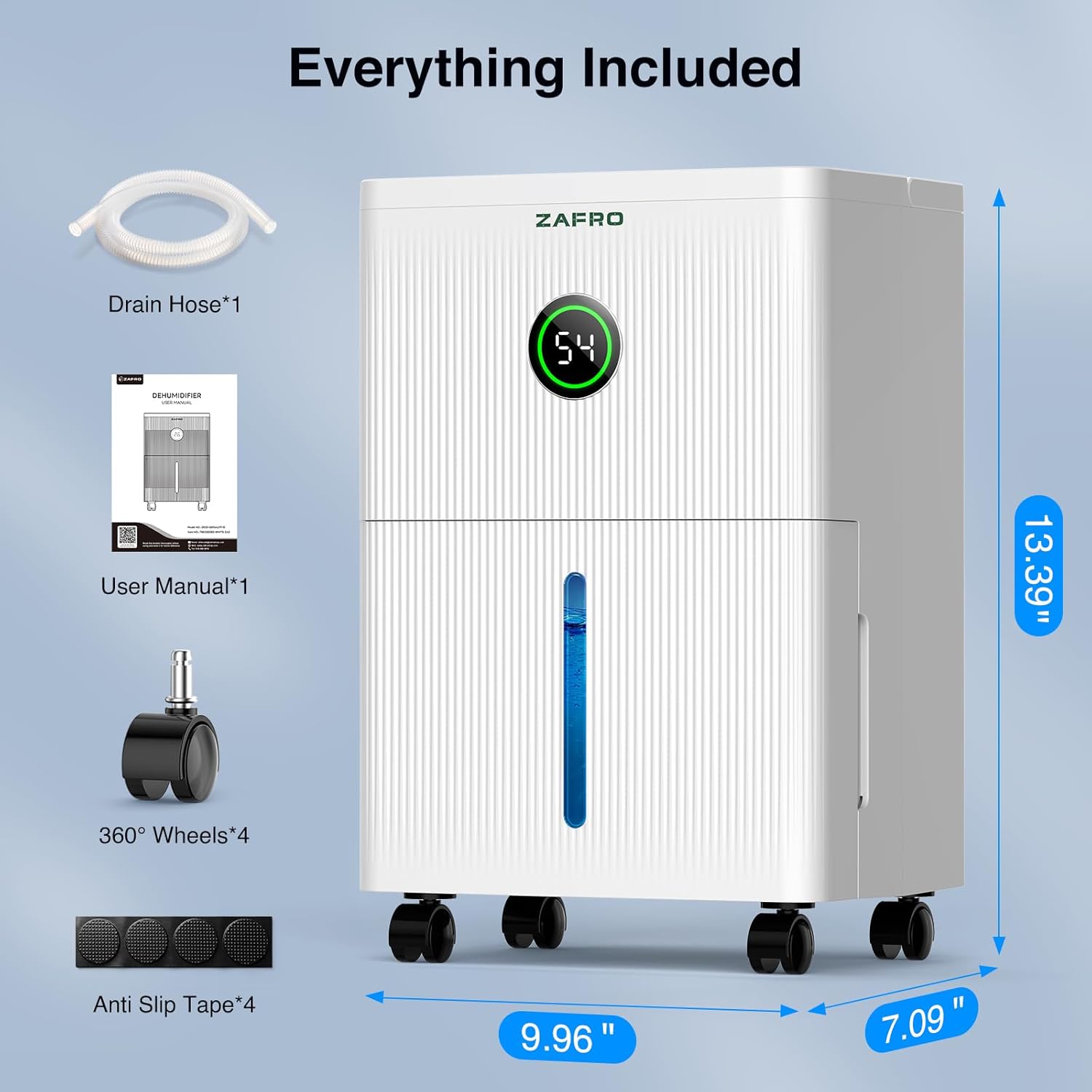
Image: All components included with the ZAFRO Dehumidifier, including the unit, drain hose, user manual, wheels, and anti-slip pads.
3. Setup
Unpacking and Placement:
- Remove all packaging materials from the unit.
- Install the four 360° universal wheels into the designated slots at the bottom of the dehumidifier. Apply the anti-slip pads if desired for added stability.
- Place the dehumidifier on a firm, level surface in the desired location.
- Ensure there is at least 20 cm (8 inches) of space around the unit for proper airflow.
Drainage Options:
Your ZAFRO dehumidifier offers two drainage methods:
- Manual Drainage (Water Tank): The unit will collect moisture in its internal 1.7-liter water tank. When the tank is full, the unit will automatically shut off and indicate that the tank needs to be emptied.
- Continuous Drainage (Drain Hose): For extended operation without manual emptying, attach the included 1-meter drain hose.
To set up continuous drainage:
- Locate the continuous drainage outlet on the back of the unit.
- Remove the rubber stopper from the outlet.
- Connect one end of the drain hose to the outlet, ensuring a secure fit.
- Direct the other end of the hose to a suitable drain (e.g., floor drain, large bucket), ensuring the hose is sloped downwards to allow gravity to drain the water.
- Ensure the hose is not kinked or blocked.
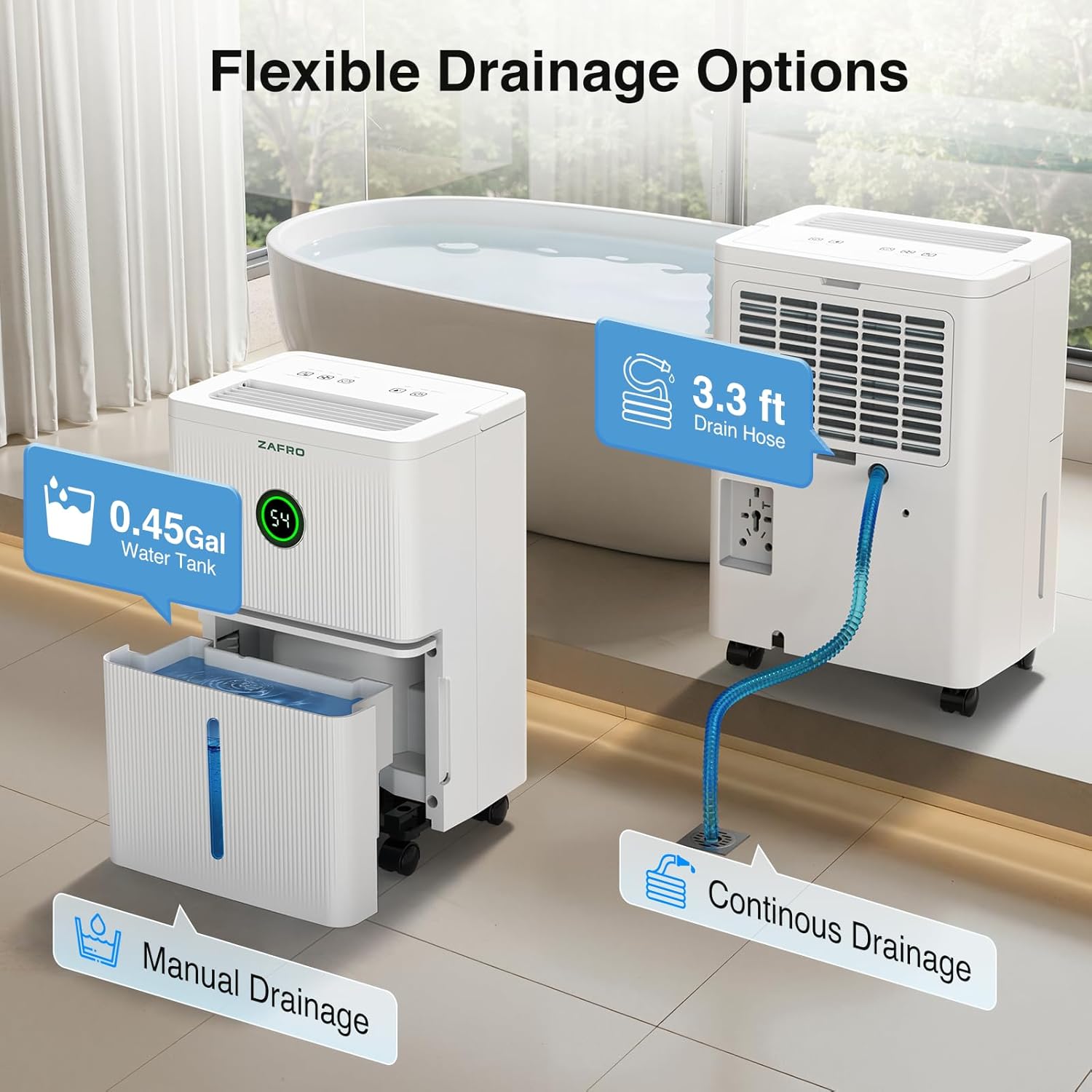
Image: Illustration of the flexible drainage options, including manual water tank emptying and continuous drainage via the provided hose.
4. Operating Instructions
Control Panel Overview:
The dehumidifier features a smart touch control panel and dual digital displays for easy operation and monitoring.

Image: Detailed view of the smart touch control panel, highlighting various functions and indicators.
Functions and Modes:
- Power Button: Press to turn the unit ON or OFF.
- Humidity Setting (HUMI): Press to adjust the desired humidity level from 30% to 80% Relative Humidity (RH) in 5% increments. The unit will operate until the set humidity is reached, then cycle on and off to maintain it.
- Fan Speed (HIGH/LOW): Press to switch between High and Low fan speeds.
- Timer: Press to set the 24-hour timer for automatic ON/OFF operation. Use the humidity adjustment buttons to set the desired hours.
- Sleep Mode: Activates ultra-quiet operation. In this mode, the fan speed automatically switches to low, and all display lights turn off to ensure an undisturbed environment.
- Child Lock (LOCK): Press and hold the 'Sleep' button for 3 seconds to activate or deactivate the child lock, preventing accidental changes to settings.
- Water Full Indicator: An indicator light will illuminate when the water tank is full, and the unit will automatically stop operating.
Smart Humidity Indicator Light:
The front panel features a tri-color LED indicator that provides a quick visual reference of the ambient humidity:
- Blue Light: Humidity is below 45% RH.
- Green Light: Humidity is between 45% and 65% RH.
- Red Light: Humidity is above 65% RH.

Image: Smart indicator lights displaying humidity levels (Blue, Green, Red).
Operating Modes for Different Spaces:
The dehumidifier offers three distinct modes to suit various environments:
- Sleep Mode: Ideal for bedrooms or quiet areas, ensuring minimal noise.
- Low Mode: Suitable for maintaining humidity in moderately damp areas like living rooms.
- High Mode: Best for quickly reducing humidity in very damp areas such as basements or bathrooms.

Image: The dehumidifier's three modes (Sleep, Low, High) are suitable for multiple living spaces.
5. Maintenance
Regular maintenance ensures optimal performance and extends the lifespan of your dehumidifier.
Emptying the Water Tank:
- When the 'Water Full' indicator illuminates, gently pull out the water tank from the front of the unit.
- Carefully carry the tank to a sink or drain.
- Pour out the collected water.
- Rinse the tank with clean water if necessary. Do not use harsh detergents.
- Slide the empty water tank back into the unit until it clicks into place. The unit will resume operation.
Cleaning the Air Filter:
The dehumidifier is equipped with a washable filter. Clean the filter regularly (every 2-4 weeks, depending on usage) to maintain efficiency.
- Unplug the dehumidifier from the power outlet.
- Locate the air filter, typically on the back or side of the unit.
- Gently remove the filter.
- Wash the filter under running water (warm, not hot) or use a vacuum cleaner to remove dust and debris.
- Allow the filter to air dry completely before reinstalling it. Do not expose to direct sunlight or use a dryer.
- Reinsert the dry filter into its slot.
General Cleaning:
- Wipe the exterior of the unit with a soft, damp cloth.
- Do not use abrasive cleaners, waxes, or solvents.
- Ensure no water enters the electrical components.
6. Troubleshooting
If you encounter issues with your dehumidifier, refer to the following common problems and solutions:
| Problem | Possible Cause | Solution |
|---|---|---|
| Dehumidifier does not turn on. | No power supply. Water tank is full or not properly installed. | Check if the unit is plugged in and the power outlet is working. Empty the water tank and ensure it is correctly reinserted. |
| Unit is running but not collecting water. | Ambient humidity is too low. Air filter is clogged. Temperature is too low (Auto Defrost active). | Increase the target humidity setting or check if the room humidity is already below the set point. Clean the air filter. The unit will automatically defrost; wait for it to complete. |
| Unit is noisy. | Unit is not on a level surface. Air filter is clogged. | Ensure the unit is on a flat, stable surface. Clean the air filter. |
| Water leaks from the unit. | Water tank is not properly installed. Continuous drain hose is loose or kinked. | Reinstall the water tank correctly. Check the drain hose connection and ensure it is not kinked and has a proper downward slope. |
| Display shows an error code. | Internal malfunction. | Unplug the unit for 10 minutes, then plug it back in. If the error persists, contact customer support. |
7. Specifications
Technical specifications for the ZAFRO D032-05PtA2/F1-D Dehumidifier:
| Feature | Specification |
|---|---|
| Brand | ZAFRO |
| Model Name | Home Dehumidifier |
| Model Number | D032-05PtA2/F1-D |
| Dehumidification Capacity | 21 Pints per Day (at 95°F, 90% RH) |
| Water Tank Volume | 1.7 Liters (0.45 Gallons) |
| Recommended Floor Area | Up to 1600 Square Feet |
| Noise Level | 41 dB |
| Adjustable Humidity Range | 30% - 80% RH |
| Item Dimensions (D x W x H) | 18D x 25.3W x 34H Centimetres (7.09D x 9.96W x 13.39H Inches) |
| Material Type | Acrylonitrile Butadiene Styrene (ABS) |
| Special Features | 360° Universal Wheels, Adjustable Humidity Control, Digital Display, Smart Humidity Indicator LED Light, Dry Clothes Function, Automatic Defrost, Automatic Shut Off, Continuous Draining, Ultra Quiet Operation, Sleep Mode, Child Lock, Three Modes, Washable Filter |
| Included Components | User Manual, 1m Drain Hose, 4x 360° Wheels, 4x Anti Slip Tape |
8. Warranty and Customer Support
For warranty information or technical assistance, please refer to the warranty card included with your product or contact ZAFRO customer support through the retailer where the product was purchased. Please have your model number (D032-05PtA2/F1-D) and purchase date available when contacting support.


