
1. Product Overview
The ROPVACNIC Robot Vacuum Cleaner S1 is a versatile 2-in-1 device designed for both vacuuming and mopping. It features powerful suction, intelligent navigation, and smart control options to maintain clean floors.
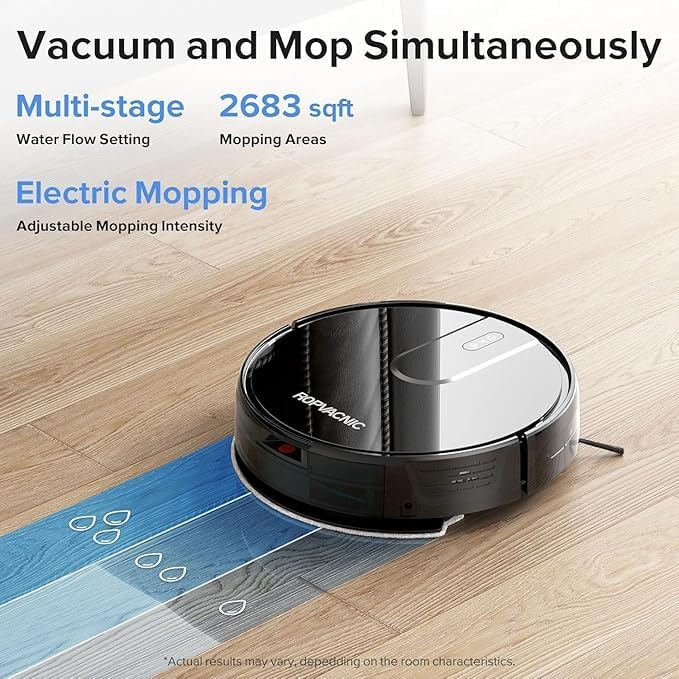
Image: ROPVACNIC Robot Vacuum Cleaner S1. This image shows the top-down view of the robot vacuum cleaner, highlighting its sleek, round design.
2. Package Contents
Before setup, ensure all components are present in the package:
- Robotic Vacuum and Mop Cleaner
- Mop Pad Holder
- Charging Base
- Power Adapter
- Electrically Controlled Water Tank
- Mopping Cloth
- Spare HEPA Filter
- 4 Side Brushes
- Cleaning Brush
- User Manual
- APP Instruction

Image: Contents of the ROPVACNIC S1 package. This image displays all included accessories such as the robot, charging base, remote, brushes, and manuals.
3. Setup Guide
3.1 Charging Base Placement
Place the charging base against a wall in an open area, ensuring there are no obstacles within 1 meter (3 feet) to the sides and 2 meters (6 feet) in front of the base. Connect the power adapter to the charging base and plug it into a power outlet.
3.2 Initial Charge
Place the robot vacuum onto the charging base. Ensure the charging contacts on the robot align with those on the base. The robot will begin charging automatically. For first-time use, fully charge the robot before operation.

Image: Robot vacuum returning to its charging base. This image illustrates the robot automatically docking for recharge.
3.3 App Connection
To utilize smart features, connect your ROPVACNIC S1 to the mobile application:
- Refer to the APP Instruction manual included in the package.
- Download the "ROPVACNIC Smart" app from your device's app market.
- Press and hold the power button on the robot for 5 seconds to turn it on.
- Long press the "" and "" buttons simultaneously for 5 seconds until the green light flashes. This indicates pairing mode.
- Connect your smartphone to a 2.4GHz Wi-Fi network.
- Open the ROPVACNIC Smart app and follow the on-screen instructions to add your S1 robot vacuum.
For direct download, scan the QR code or visit: https://a.smart321.com/ropvacnicsmart

Image: Step-by-step guide for connecting the ROPVACNIC S1 to the mobile application, showing app interface screenshots.
3.4 Voice Control Setup
The ROPVACNIC S1 is compatible with Amazon Alexa and Google Assistant. Follow the instructions in the app to link your robot vacuum with your preferred voice assistant for hands-free control.

Image: A user relaxing on a couch while the robot vacuum cleans, with speech bubbles indicating voice commands for Amazon Alexa and Google Assistant.
4. Operating Instructions
4.1 Starting and Stopping Cleaning
- Manual Start: Press the power button on the robot or the 'Clean' button on the remote control.
- App Control: Use the ROPVACNIC Smart app to start, pause, or stop cleaning.
- Voice Command: Use connected voice assistants (e.g., "Alexa, turn on vacuum cleaner.").
4.2 Cleaning Modes and Settings
The robot offers multiple cleaning modes and personalized settings:
- Multiple Cleaning Modes: Select from various modes like Auto, Spot, Edge, or Scheduled cleaning via the app or remote.
- Adjustable Suction Power: The 5200Pa suction power can be adjusted to different levels (e.g., Gentle, Normal, Strong) to suit various floor types and debris.
- Electric Mopping: The integrated mopping system features a four-stage personalized water adjustment system. Adjust water flow (Low, Medium, High) through the app for different stain levels and floor types.

Image: The ROPVACNIC S1 simultaneously vacuuming and mopping a hard floor, showing water flow patterns and cleaning coverage.

Image: Screenshots of the ROPVACNIC Smart app interface, demonstrating options for cleaning modes, suction power, and water control settings.
4.3 Navigation and Obstacle Avoidance
The S1 robot is equipped with an advanced high-coverage sensing system and multiple algorithmic data points. This enables it to detect obstacles, adjust direction, and navigate efficiently around furniture and other objects. Its slim design (2.99 inches high) allows it to clean under low-clearance furniture.

Image: Diagram illustrating the robot vacuum's intelligent sensing system, showing blue light beams detecting objects and mapping its environment.

Image: The ROPVACNIC S1 robot vacuum cleaning under a bed, demonstrating its low profile for accessing hard-to-reach areas.
4.4 Automatic Recharging
When the battery is low, the robot will automatically return to its charging base to recharge. Ensure the charging base is accessible and powered on.
Video: This video demonstrates the ROPVACNIC S1 robot vacuum's automatic self-charging feature, showing it navigating back to its charging dock.
5. Maintenance
Regular maintenance ensures optimal performance and extends the lifespan of your robot vacuum.
5.1 Emptying Dustbin and Water Tank
After each cleaning cycle, or when indicated by the app, empty the dustbin and clean the water tank. The wet/dry tanks are designed for easy removal and cleaning.
5.2 Cleaning Brushes
- Side Brushes: Regularly check and clean the side brushes for tangled hair or debris. Replace them if they are worn or damaged (4 spare brushes are included).
- Main Brush (if applicable): While the S1 features a no-entanglement design for pet hair, periodically check the main brush area for any accumulated debris and clean as needed.
5.3 Cleaning Filters
The S1 uses a multi-layer optimized high-efficiency filtration system. Clean the HEPA filter regularly by tapping out dust or using the cleaning brush. Replace the HEPA filter every 3-6 months, or as needed (a spare HEPA filter is included).
5.4 Mopping Cloth Maintenance
Remove the mopping cloth after each use and wash it thoroughly. Allow it to air dry completely before reattaching. Replace the mopping cloth when it shows signs of wear or reduced effectiveness.

Image: An exploded view of the robot vacuum's cleaning module, highlighting the electrically controlled water tank, mop pad, and filtration system components.
6. Troubleshooting
If you encounter issues with your ROPVACNIC S1, refer to the following common solutions:
| Problem | Possible Cause | Solution |
|---|---|---|
| Robot does not turn on | Low battery; Power button not pressed correctly | Ensure robot is fully charged. Press and hold the power button for 3-5 seconds. |
| Robot not charging | Charging contacts dirty; Charging base not powered; Robot not properly docked | Clean charging contacts on both robot and base. Ensure base is plugged in. Re-dock the robot, ensuring proper alignment. |
| Robot gets stuck frequently | Too many obstacles; Loose cables or rugs | Clear the cleaning area of small objects, cables, and thick rugs. Use virtual boundaries if available in the app. |
| Poor cleaning performance | Dustbin full; Brushes tangled; Filter clogged; Suction power too low | Empty dustbin. Clean side brushes and main brush. Clean or replace HEPA filter. Increase suction power via app. |
| Mopping not effective | Water tank empty; Mopping cloth dirty/dry; Water flow setting too low | Fill water tank. Clean or wet the mopping cloth. Increase water flow setting in the app. |
| App connection issues | Incorrect Wi-Fi band; Robot not in pairing mode; App outdated | Ensure 2.4GHz Wi-Fi. Re-enter pairing mode (long press "" and "" for 5s). Update app. Restart router and robot. |
7. Specifications
Key technical specifications for the ROPVACNIC Robot Vacuum Cleaner S1:
- Model Name: S1
- Brand: ROPVACNIC
- Product Dimensions: 12"L x 12"W x 2.99"H
- Item Weight: 7.26 pounds
- Suction Power: 5200Pa
- Battery Life: Up to 120 minutes
- Power Source: Battery Powered
- Control Method: App, Remote, Voice (Amazon Echo, Google Home)
- Filter Type: Multi-layer Optimized High-Efficiency Filtration
- Water Tank Capacity: 250 mL (Electrically Controlled)
- Surface Recommendation: Hardwood Floors, Low Pile Carpets
- Special Features: Adjustable Electric Mopping, Intelligent Auto Docking, Advanced Obstacle Avoidance, Personalized Intensity Settings, Multiple Cleaning Modes, Designed for Pet Hair

Image: Graphic displaying the 5200 mAh battery capacity and the ability to clean up to 2683 sqft on a single charge.
8. Warranty and Support
8.1 Warranty Information
For detailed warranty information, please refer to the warranty card included in your product packaging or visit the official ROPVACNIC website. Keep your purchase receipt as proof of purchase for warranty claims.
8.2 Customer Support
If you have any questions, require technical assistance, or need to report an issue, please contact ROPVACNIC customer support through the official website or the contact information provided in your product's user manual.


