
Introduction
This manual provides detailed instructions for the setup, operation, and maintenance of your Ayybboo Digital Football Alarm Clock Model 536. This alarm clock features a digital display, dual alarm settings, a night light with multiple colors, adjustable ringtones and volume, and a snooze function. Please read this manual thoroughly to ensure proper use and to maximize the product's features.
Safety Information
- Keep the device away from water and high humidity.
- Do not expose the device to direct sunlight or extreme temperatures.
- Use only the provided USB charging cable.
- Do not attempt to disassemble or repair the device yourself. Contact customer support if issues arise.
- This product is not a toy. Adult supervision is recommended for young children.
Package Contents
- 1 x Ayybboo Digital Football Alarm Clock
- 1 x USB Charging Cable
- 1 x User Manual (this document)

Image: The alarm clock, USB cable, and user manual are included in the package. The image also shows the product dimensions.
Product Overview
The Ayybboo Digital Football Alarm Clock features a clear digital display and intuitive buttons for easy operation. Familiarize yourself with the main components:

Image: Front view of the digital football alarm clock, highlighting features such as dual alarm, snooze, night light, 6 ringtones, 12/24 hour display, adjustable volume, adjustable brightness, countdown, USB charging, and vibration to illuminate the screen.
- Display Screen: Shows time, date, alarm status, and other indicators.
- Control Buttons: Located on the back or bottom for setting time, alarms, and other functions.
- Snooze/Light Button: Typically on top for snooze and night light activation.
- USB Charging Port: For power input.
Setup
1. Initial Power On and Charging
- Connect the provided USB charging cable to the alarm clock's charging port.
- Plug the other end of the USB cable into a compatible USB power adapter (not included) or a computer USB port.
- The display will illuminate, indicating the device is charging. A red low battery indicator will appear when the power is at 5%. The device has automatic power-off protection when fully charged to prevent overheating.
2. Setting Time and Date
- Locate the "SET" or "TIME" button (refer to product for exact button labels). Press and hold it to enter time setting mode.
- Use the "+" and "-" buttons to adjust the hour, minute, year, month, and day.
- Press the "SET" or "TIME" button again to confirm each setting and move to the next.
- Select between 12-hour and 24-hour format using the appropriate button (often the "+" or "-" button during time setting, or a dedicated "12/24H" button).
Operating Instructions
1. Setting Alarms (Dual Alarm)
The alarm clock supports two independent alarm times.
- Press the "ALARM 1" or "ALARM 2" button (or a general "ALARM" button repeatedly) to select the desired alarm.
- Press and hold the selected "ALARM" button to enter alarm setting mode.
- Use the "+" and "-" buttons to set the desired alarm hour and minute.
- Press the "ALARM" button again to confirm.
- Next, select the alarm frequency:
- Mon-Fri: Alarm sounds on weekdays.
- Mon-Sat: Alarm sounds Monday through Saturday.
- Mon-Sun: Alarm sounds every day.
- To enable or disable an alarm, press the corresponding "ALARM" button once. An alarm icon will appear/disappear on the display.
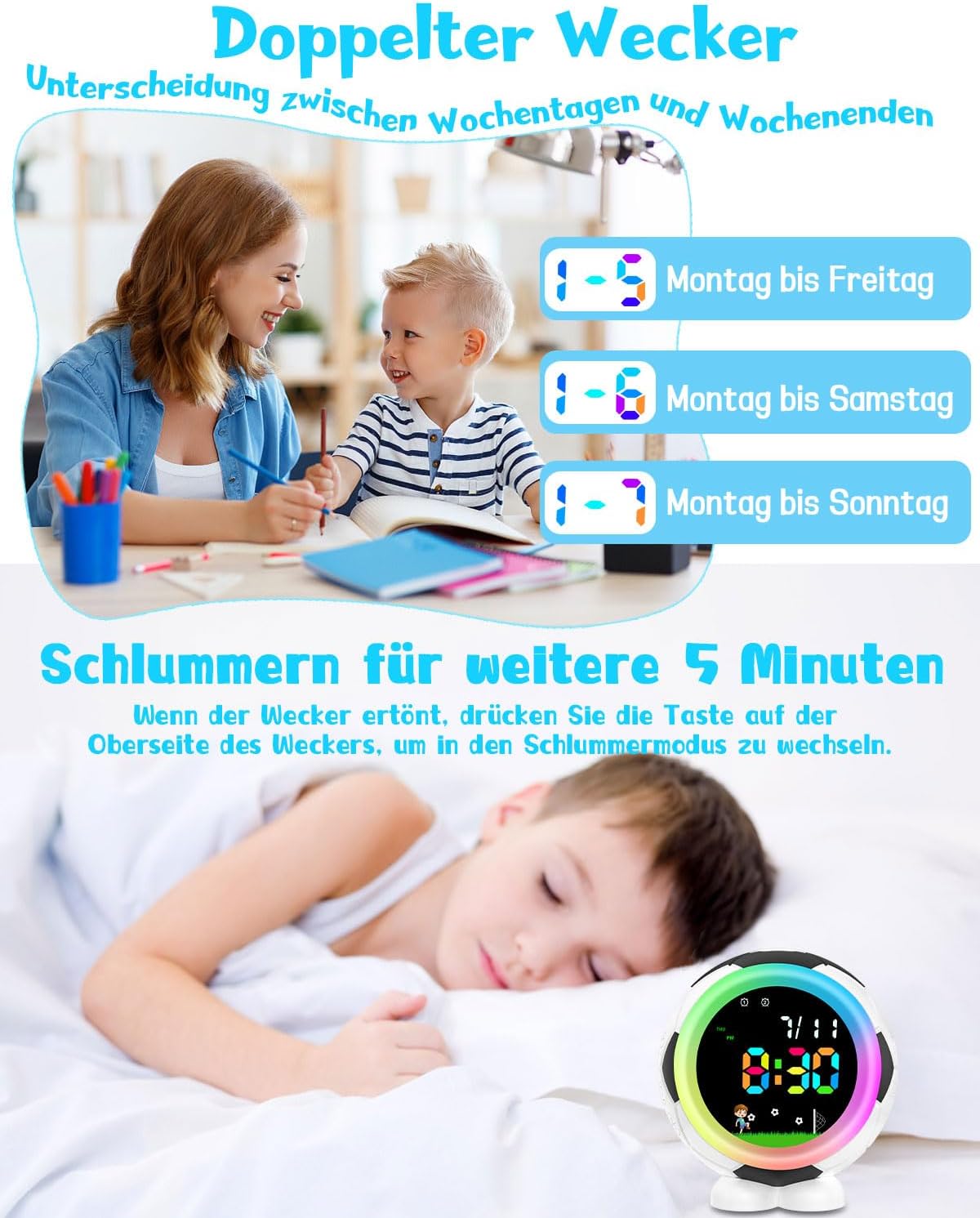
Image: Illustrates the dual alarm feature, showing options for setting alarms for Monday-Friday, Monday-Saturday, or Monday-Sunday.
2. Snooze Function
When the alarm sounds, press the large button on the top of the alarm clock to activate the snooze function. The alarm will pause for 5 minutes and then sound again.
3. Night Light Function
The alarm clock features 8 selectable soft light colors.
- To turn on the night light, press the "LIGHT" or top button.
- Press the button repeatedly to cycle through the 8 available colors.
- The light will automatically shut off after 15 seconds if not connected to external power.

Image: Shows the alarm clock with different colored night lights, indicating the seven-color light switching capability and adjustable light/font colors.
4. Timed Night Light (Requires External Power)
To use the timed night light function, the alarm clock must be connected to an external power source via the USB cable.
- Ensure the alarm clock is connected to external power.
- Press and hold the top button until the display shows "L0:15" (indicating 15 minutes).
- Use the "+" and "-" buttons to adjust the timer length from 0 to 120 minutes.
- The night light will stay on for the set duration and then automatically turn off.
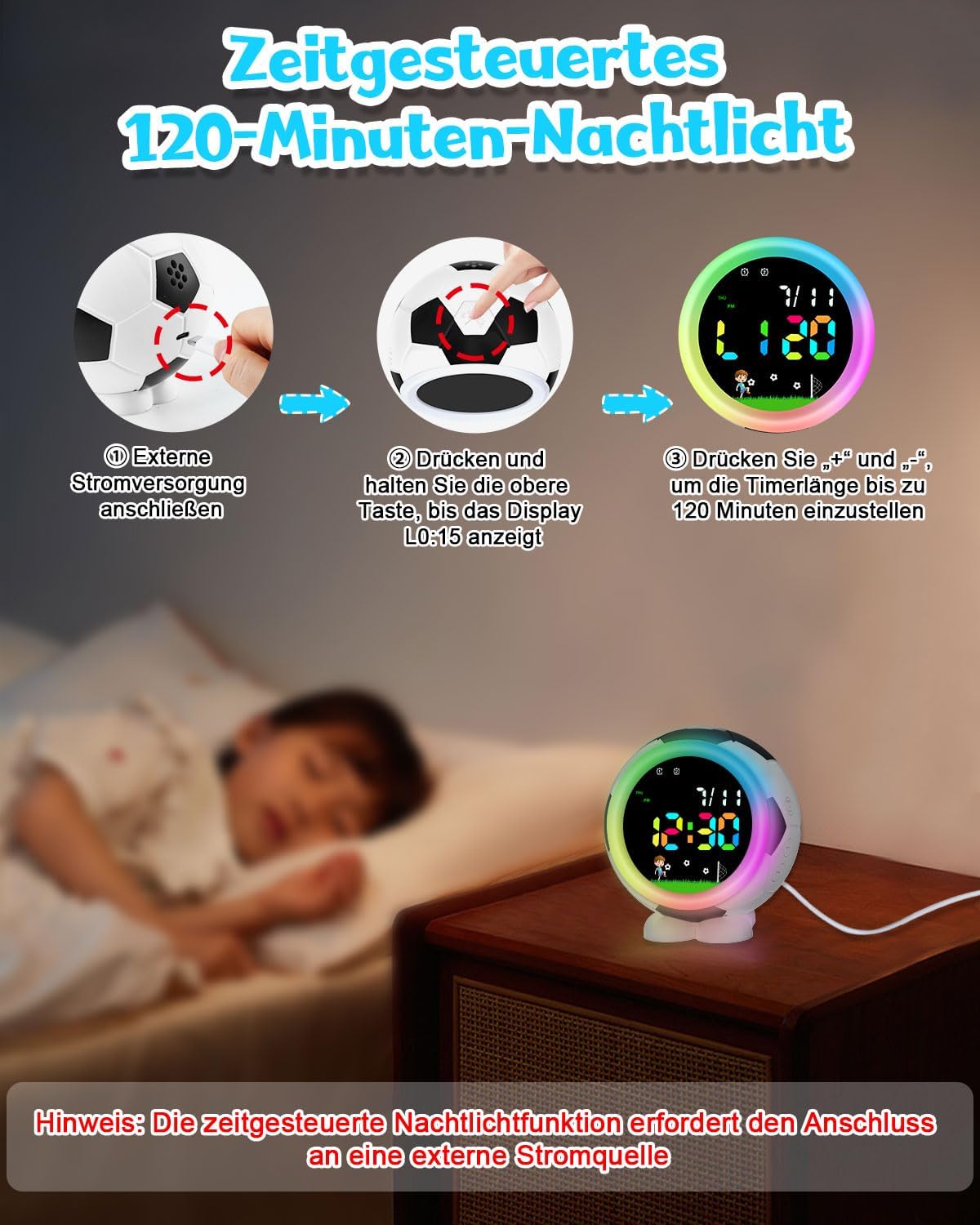
Image: Step-by-step guide on how to set the 120-minute timed night light, emphasizing the need for external power connection.
5. Ringtone Selection and Volume Adjustment
The alarm clock offers 6 crescendo ringtones and 9 adjustable volume levels.
- In normal time display mode, press the "RINGTONE" or "SOUND" button (or a multi-function button) to cycle through the 6 available ringtones.
- To adjust the volume, press the "VOLUME" button (or a multi-function button) and then use the "+" and "-" buttons to select a volume level from U01 (lowest) to U09 (highest).
- The ringtones are designed to gradually increase in volume for a gentle wake-up.

Image: Displays the various ringtone options (Bird, Christmas, Beep, Soft, Excitement, Happy) and a visual representation of the 9 volume levels (U01-U09).
Maintenance
- Cleaning: Wipe the alarm clock with a soft, dry cloth. Do not use abrasive cleaners or solvents.
- Battery Care: The built-in rechargeable battery has automatic power-off protection when fully charged. Avoid prolonged exposure to extreme temperatures to extend battery life.
- Storage: If storing for an extended period, ensure the battery is partially charged and store in a cool, dry place.
Troubleshooting
| Problem | Possible Cause | Solution |
|---|---|---|
| Alarm does not sound. | Alarm is not enabled or volume is too low. | Ensure the alarm is activated (alarm icon visible) and the volume is set to an audible level (U01-U09). |
| Display is blank or dim. | Low battery or device is off. | Connect the alarm clock to a power source using the USB cable to charge. |
| Night light does not stay on. | Not connected to external power for timed function. | For timed night light, ensure the device is connected to external USB power. Otherwise, it will turn off after 15 seconds. |
| Cannot set time/alarm. | Incorrect mode or buttons not pressed correctly. | Refer to the "Setup" and "Operating Instructions" sections. Press and hold the relevant button to enter setting mode. |
Specifications
| Feature | Detail |
|---|---|
| Brand | Ayybboo |
| Model Number | 536 |
| Display Type | Digital |
| Power Source | Battery Powered (Rechargeable Lithium Ion) |
| Product Dimensions (W x H) | 10.4 cm x 11.5 cm (4.1 in x 4.5 in) |
| Weight | 217 grams |
| Material | Acrylonitrile Butadiene Styrene (ABS) |
| Special Features | Adjustable Volume, Colorful Night Lights, Dual Alarm, Musical Ringtones, Timer, Snooze Function |
| Ringtones | 6 crescendo ringtones |
| Volume Levels | 9 adjustable levels |
| Night Light Colors | 8 selectable colors |
| Night Light Timer | 0-120 minutes (requires external power) |
Warranty and Support
Manufacturer's Warranty: This product comes with a 24-month manufacturer's warranty from the date of purchase.
Customer Support: If you have any questions, encounter problems, or require assistance with your Ayybboo Digital Football Alarm Clock, please contact our friendly customer service. Refer to your purchase documentation for contact details or visit the Ayybboo official website.