
1. Introduction
Thank you for choosing the toocki 80W GaN 6-Port Charging Station. This device is designed to provide a versatile and efficient charging solution for multiple electronic devices simultaneously. Featuring GaN technology, a retractable cable, and multiple charging ports, it offers a compact and powerful charging experience. Please read this manual carefully before use to ensure proper operation and safety.
2. Product Overview
The toocki 80W GaN 6-Port Charging Station combines multiple charging functionalities into a single, compact unit. It features both wired and wireless charging options, making it suitable for a wide range of devices.
Key Features:
- 80W Total Output: Delivers up to 80W of power for efficient charging.
- GaN Technology: Utilizes Gallium Nitride (GaN) for improved charging efficiency, compact size, and optimized heat dissipation.
- 6-in-1 Charging Solution: Includes 3 wireless charging points (Mag-Safe compatible for iPhone, Apple Watch, AirPods), 1 USB-C port (65W max), 1 USB-A port (18W max), and 1 retractable USB-C cable (60W max).
- Retractable USB-C Cable: A built-in 65cm retractable cable provides convenience and reduces clutter.
- Magnetic Phone Stand: The magnetic charging plate can be tilted up to 65° and rotates 360°, serving as a phone stand during charging.
- Comprehensive Safety Protections: Equipped with Thermal Guard system and multiple protections against over-current, over-voltage, short-circuit, over-power, over-charge, temperature, flame retardant, and foreign object detection.
- Portable and Foldable Design: Compact and easy to carry, ideal for travel and desktop use.

Figure 2.1: The toocki 80W GaN 6-Port Charging Station, showcasing its compact design and multiple charging interfaces.

Figure 2.2: Diagram illustrating the 6-in-1 charging capabilities, including wireless pads, USB-C, USB-A, and retractable cable.
3. Setup Instructions
- Unpack the Device: Carefully remove the charging station and any included accessories from the packaging.
- Connect to Power: Plug the charging station's power cable into a standard wall outlet (120V input).
- Power Indicator: A power indicator light will illuminate, confirming the device is ready for use.
- Positioning: Place the charging station on a stable, flat surface. Ensure adequate ventilation around the device.

Figure 3.1: Close-up view of the charging station's details, including the power indicator light and non-slip base.
4. Operating Instructions
4.1 Wireless Charging
- For Smartphones (Mag-Safe compatible): Place your Mag-Safe compatible iPhone onto the magnetic charging plate. The phone will snap into place and begin charging at up to 15W. The plate can be adjusted for viewing angles (up to 65° tilt, 360° rotation).
- For Apple Watch: Extend the dedicated Apple Watch charging module by gently pushing it out from the side of the station. Place your Apple Watch onto the module. It will charge at up to 2.5W.
- For AirPods: Open the top cover of the charging station and place your AirPods (with wireless charging case) into the designated slot. It will charge at up to 5W.
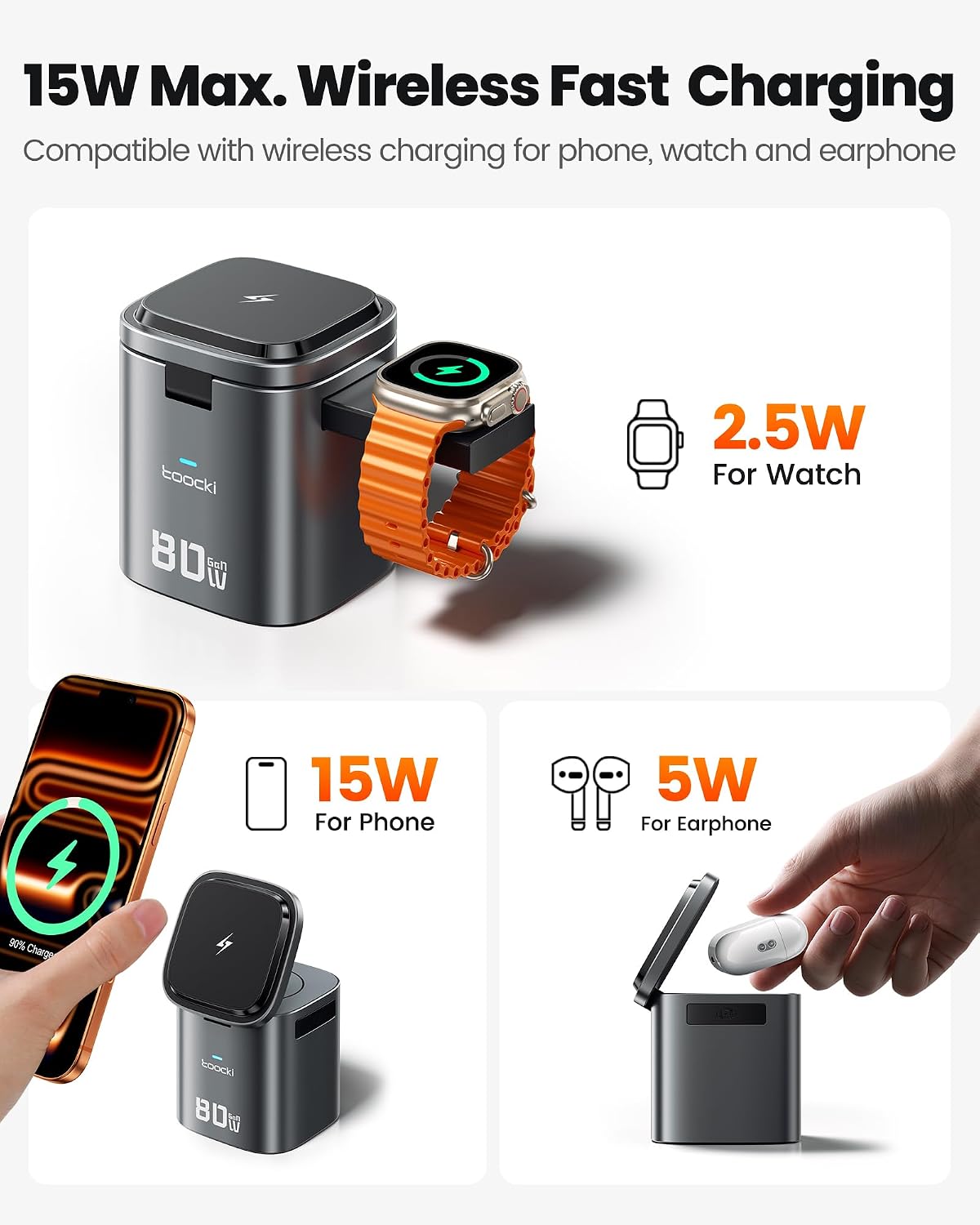
Figure 4.1: Demonstrates wireless charging for a smartphone (15W), Apple Watch (2.5W), and AirPods (5W).

Figure 4.2: The magnetic charging plate offers adjustable angles and 360-degree rotation for optimal viewing.
4.2 Wired Charging
- USB-C Port (65W Max): Connect your USB-C compatible device (e.g., laptop, tablet, smartphone) to the USB-C output port using a suitable cable. This port supports Power Delivery (PD) for fast charging.
- USB-A Port (18W Max): Connect your USB-A compatible device to the USB-A output port. This port supports Quick Charge (QC) for fast charging.
- Retractable USB-C Cable (60W Max): Pull out the integrated USB-C cable to the desired length (up to 65cm). Connect it to your USB-C device. The cable retracts automatically when not in use, keeping your desk tidy.

Figure 4.3: The charging station powering a laptop, smartphone, and AirPods simultaneously.

Figure 4.4: The retractable USB-C cable extended, showing its maximum length of 65cm.
4.3 Simultaneous Charging
The charging station is designed to charge multiple devices concurrently. For optimal fast charging of two devices, use the combination of the retractable USB-C cable and the dedicated USB-C port. The total power output is dynamically distributed among connected devices.

Figure 4.5: A user utilizing the charging station to power a laptop, tablet, and smartphone simultaneously in an office environment.
5. Maintenance
- Cleaning: Disconnect the power before cleaning. Use a soft, dry cloth to wipe the surface of the charging station. Do not use liquid cleaners or aerosols.
- Storage: When not in use, store the charging station in a cool, dry place away from direct sunlight and extreme temperatures. Ensure the retractable cable is fully retracted.
- Avoid Obstructions: Do not block the ventilation openings of the device.
6. Safety Information
To ensure safe operation and prevent damage to the device or connected electronics, please observe the following safety guidelines:
- Do not expose the device to water, moisture, or extreme temperatures.
- Avoid dropping or subjecting the device to strong impacts.
- Do not attempt to disassemble, repair, or modify the charging station. This will void the warranty and may cause safety hazards.
- Use only the provided power cable.
- Keep the device out of reach of children.
- Ensure proper ventilation to prevent overheating.
- The device incorporates multiple safety features, including over-current, over-voltage, short-circuit, over-power, over-charge, temperature, flame retardant, and foreign object detection.

Figure 6.1: Visual representation of the various safety protections integrated into the GaN technology of the charging station.
7. Troubleshooting
| Problem | Possible Cause | Solution |
|---|---|---|
| Device not charging |
|
|
| Slow charging |
|
|
| Wireless charging intermittent |
|
|
8. Specifications
| Feature | Detail |
|---|---|
| Brand | toocki |
| Model Number | MX-CD15S |
| Manufacturer | Shenzhen Toocki Network Technology Co., Ltd. |
| Total Power Output | 80 Watts |
| Input Voltage | 120 Volts |
| Output Voltage | 5 Volts |
| Amperage | 3.25 A |
| Total Charging Points | 6 (3 Wireless, 1 USB-C, 1 USB-A, 1 Retractable USB-C) |
| Wired Connector Types | USB Type A, USB Type C |
| Wireless Charging (Phone) | 15W (Mag-Safe compatible) |
| Wireless Charging (Watch) | 2.5W |
| Wireless Charging (Earphones) | 5W |
| Retractable Cable Output | 60W Max |
| Retractable Cable Length | 65 cm |
| USB-C Port Output | 65W Max |
| USB-A Port Output | 18W Max |
| Special Features | Retractable cable, Fast charging, Wireless charging, Travel-friendly, Magnetic phone stand |
| Compatible Devices | Laptops (MacBook, HP), Smartphones (iPhone 8-17, Galaxy, Pixel, Huawei, Xiaomi, OnePlus, Motorola), Smartwatches (Apple Watch SE/Ultra/11/10/9/8/7/6/5/4/3/2), Tablets, AirPods, Steam Deck, Switch, etc. |
| Color | Black |
| Internal Material | Aluminum |
| Form Factor | Multiport Station |
| Power Source | Electrical Cable |
| Country of Origin | China |
| Included Components | Cable, User Manual |
9. Warranty and Support
For warranty information, technical support, or customer service inquiries, please refer to the official toocki website or contact your retailer. Keep your purchase receipt for warranty claims.
Note: Information regarding spare parts availability and software updates is not provided by the manufacturer at this time.
