
1. Introduction
The VENTION Wireless HDMI Extender Kit provides a reliable solution for transmitting HDMI signals wirelessly over long distances. This kit includes one transmitter (TX) and two receivers (RX), designed for plug-and-play operation with an upgraded LED display for real-time status monitoring. It supports 4K decoding with 1080p@60fps output, making it suitable for various applications from home entertainment to professional presentations.
The system features advanced heat control for stable performance and supports multi-display expansion, allowing a single transmitter to connect with up to six receivers (additional receivers sold separately). Its wide compatibility ensures seamless connection with most HDMI-enabled devices.
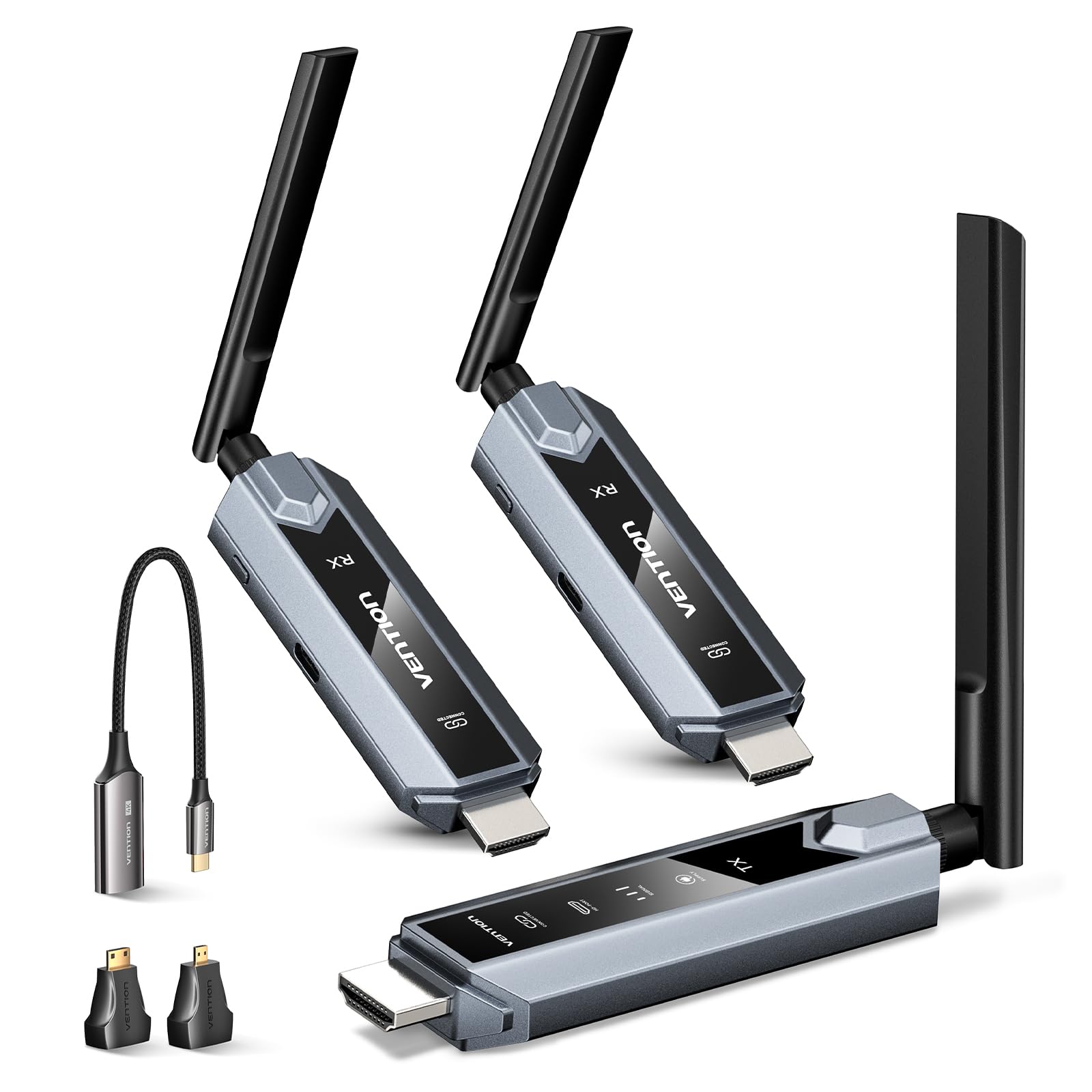
Image 1.1: Overview of the VENTION Wireless HDMI Extender Kit (1TX+2RX).
2. Package Contents
Please verify that all items are present in your package:
- 1 x Wireless HDMI Transmitter (TX)
- 2 x Wireless HDMI Receiver (RX)
- 2 x HDMI Extension Cable (0.2m)
- 3 x USB-C Power Cord (1m)
- 1 x USB-C to HDMI Adapter
- 1 x Micro HDMI to HDMI Adapter
- 1 x Mini HDMI to HDMI Adapter
- 1 x User Manual (this document)

Image 2.1: Visual representation of all items included in the VENTION Wireless HDMI Extender Kit.
3. Product Features
- Wireless Transmission: Extends HDMI signals up to 656 feet (200 meters) in an open area, or up to 393 feet (120 meters) with one transmitter and two receivers. Transmission distance may be affected by obstacles like walls.
- Multi-Display Support: One transmitter can connect to up to six receivers simultaneously for multi-screen viewing (additional receivers sold separately).
- 4K Decoding, 1080P Output: Supports 4K video decoding and outputs at 1080p@60fps for clear, high-definition visuals.
- LED Display: Real-time LED indicators show connection status, signal strength, output status, and power, simplifying setup and troubleshooting.
- Heat Control: Advanced thermal design with smart temperature control and strategic heat vents ensures cool operation during extended use.
- Plug & Play: No drivers or software installation required for immediate use.
- Wide Compatibility: Compatible with 99.99% of HDMI devices, including laptops, PCs, TV boxes, projectors, monitors, cameras, and more. Includes USB-C, Micro HDMI, and Mini HDMI adapters.
- ZeroDrop Technology: Designed for lag-free operation and stable streaming.
- MIMO & LDS Technology: Enhances signal reception for superior performance.

Image 3.1: The LED display provides real-time status for connection, signal, output, and power.

Image 3.2: Illustration of the ultra-long distance transmission range of the wireless HDMI extender.

Image 3.3: Diagram showing transmission distances with multiple receivers (1TX to 1RX, 2RX, 3RX, 4RX).
4. Setup Instructions
Follow these steps to set up your VENTION Wireless HDMI Extender Kit:
- Power the Units: Connect the USB-C power cords to both the transmitter (TX) and receiver (RX) units. Plug the other end of the USB-C power cords into a 5V/2A power adapter (not included) or a USB port that provides sufficient power. The power indicator light on each unit will illuminate.
- Connect Receiver (RX): Connect the receiver unit to your display device (monitor, TV, projector) using an HDMI cable. If needed, use the provided HDMI extension cable.
- Connect Transmitter (TX): Connect the transmitter unit to your source device (laptop, PC, TV box, camera) via its HDMI output. Use the appropriate adapter (USB-C to HDMI, Micro HDMI to HDMI, Mini HDMI to HDMI) if your source device requires it.
- Automatic Connection: Wait approximately 5 seconds. The transmitter and receiver should automatically pair. The indicator light on both units will turn on, confirming a successful connection.
Important Note: Both the transmitter and receiver must be connected to a power source using cables. Ensure a stable power supply that meets the minimum requirement of 5V/2A for each unit. If the power indicator is red, it indicates insufficient power; please use a stronger 5V/2A power adapter.

Image 4.1: Visual guide for connecting the transmitter and receiver units.
4.1 Re-pairing Steps
If the connection does not complete automatically or is lost, you may need to re-pair the units:
- Receiver Pairing Mode: Hold the receiver's function key for more than 5 seconds. The receiver will enter pairing mode, indicated by an interface prompt "Pairing Timeout: 80s".
- Transmitter Pairing: Hold the transmitter's function key for more than 5 seconds. The transmitter will automatically pair with the receiver. A device connection confirmation will be displayed.
Image 4.2: Instructions for re-pairing the transmitter and receiver units.
5. Operating Instructions
5.1 Basic Operation
Once the transmitter and receiver are successfully paired and connected, the video and audio from your source device will be wirelessly transmitted to your display. No further configuration is typically required for basic mirroring.
5.2 Multi-Display Expansion
To use multiple receivers with a single transmitter (up to 6 receivers supported), simply connect each additional receiver to its respective display and power it on. The transmitter will automatically detect and connect to available paired receivers. This allows for simultaneous streaming to multiple screens.

Image 5.1: Example of multi-screen streaming with one transmitter and multiple receivers.
5.3 Mirror and Extend Modes
The VENTION Wireless HDMI Extender supports both mirror and extend modes, depending on your source device's capabilities and operating system settings. You can configure these modes through your computer's display settings.
- Mirror Mode: Duplicates your source device's screen onto the connected display(s).
- Extend Mode: Extends your desktop across the connected display(s), providing more screen real estate.
Note: Ensure your computer supports extended mode if you wish to use this feature.

Image 5.2: Illustration of mirror mode and extend mode functionality.
5.4 Compatibility
The kit is designed for broad compatibility with various devices and operating systems. It includes adapters for different HDMI interfaces to ensure connectivity with a wide range of equipment.

Image 5.3: Diagram showing compatible transmitter and receiver devices.

Image 5.4: Examples of different HDMI interfaces and adapters for connectivity.
5.5 Usage Scenarios
This wireless HDMI extender is suitable for a variety of environments:
- Business Meetings and Presentations
- Home Entertainment (e.g., streaming movies, sports)
- Educational Settings (e.g., teaching presentations)
- Gaming Entertainment
- Live Streaming setups

Image 5.5: Visual examples of the wireless HDMI extender in various settings.
6. Troubleshooting
If you encounter issues with your VENTION Wireless HDMI Extender Kit, please refer to the following common problems and solutions:
- No Signal/Connection Issues:
- Ensure both the transmitter (TX) and receiver (RX) are properly powered with a 5V/2A power source. Check if the power indicator is red, indicating insufficient power.
- Verify that all HDMI cables are securely connected to both the source and display devices.
- Perform the re-pairing steps as described in Section 4.1.
- Reduce the distance between the TX and RX units, or remove any large obstacles (thick walls, metal objects) that may interfere with the wireless signal.
- Image Quality Issues (Lag, Stuttering):
- Ensure the TX and RX units are within the recommended transmission range.
- Minimize wireless interference from other 5GHz devices.
- Check the source device's output resolution and refresh rate. While the system decodes 4K, the output is 1080p@60Hz.
- No Audio:
- Verify audio settings on both your source device and display device.
- Ensure the HDMI cable supports audio transmission.
- Smartphone/Tablet Compatibility:
- When using with smartphones or tablets, confirm that the device supports HDMI output (e.g., via USB-C Alt Mode). Normal functionality cannot be guaranteed if the device does not support HDMI output.
If issues persist after following these steps, please contact VENTION customer support for further assistance.
7. Specifications
| Feature | Description |
|---|---|
| Brand | VENTION |
| Model Name | TZ-ADP |
| Connectivity Technology | HDMI |
| Connector Type | HDMI |
| Resolution | 4K (decoding), 1080p@60Hz (output) |
| Transmission Range | Up to 656ft/200m (open area), 393ft/120m (1TX to 2RX) |
| Power Supply | 5V/2A (via USB-C) |
| Special Features | Real-Time LED Indicators, MIMO & LDS Tech, Multi-Screens (Up to 6 RXs), Heat-Control, ZeroDrop, No Delay |
| Compatible Devices | Cable boxes, Blu-ray players, DVD, laptops, PCs, MacBooks, streaming devices, DSLR cameras, camcorders, set-top boxes, soundbars, TVs, projectors, monitors |
8. Maintenance
To ensure the longevity and optimal performance of your VENTION Wireless HDMI Extender Kit, follow these maintenance guidelines:
- Cleaning: Use a soft, dry cloth to clean the units. Avoid using liquid cleaners or aerosols.
- Storage: Store the devices in a cool, dry place away from direct sunlight and extreme temperatures.
- Handling: Handle the units with care. Avoid dropping them or subjecting them to strong impacts.
- Power Supply: Always use a stable 5V/2A power supply for each unit to prevent damage and ensure proper operation.
9. Warranty and Support
The VENTION Wireless HDMI Extender Kit comes with a 1-Year Manufacturer Warranty. VENTION also provides a 24-month replacement warranty for complete peace of mind.
For technical support, warranty claims, or any questions regarding your product, please contact VENTION Official Store customer service through your purchase platform.
10. Important Notes and Safety Information
- Both the transmitter and receiver must be connected to a power source using cables.
- When used with smartphones or tablets, please verify that the device supports HDMI output; otherwise, normal functionality cannot be guaranteed.
- Transmission distance and speed may be affected when signals pass through walls or other obstacles. For optimal performance, minimize obstructions between the transmitter and receiver.
- Ensure a stable power supply that meets the minimum requirement of 5V/2A for each unit.
- Do not disassemble or attempt to repair the device yourself. This will void the warranty.
- Keep the device away from water, fire, and high temperatures.
11. Product Video
Watch the official product video for an overview of the VENTION Wireless HDMI Transmitter and Receivers:
Video 11.1: Official product video demonstrating the VENTION Wireless HDMI Transmitter and Receivers.


