
1. Introduction
The ELECROW AI Starter Kit for Jetson Orin Nano is a comprehensive development platform designed for artificial intelligence and embedded systems learning and application. This kit integrates a variety of sensors, an 8MP gimbal camera, and an 11.6-inch IPS screen, providing a no-soldering, plug-and-play experience. It is intended for users to explore AI edge computing, robotics, and visual recognition through practical Python tutorials.
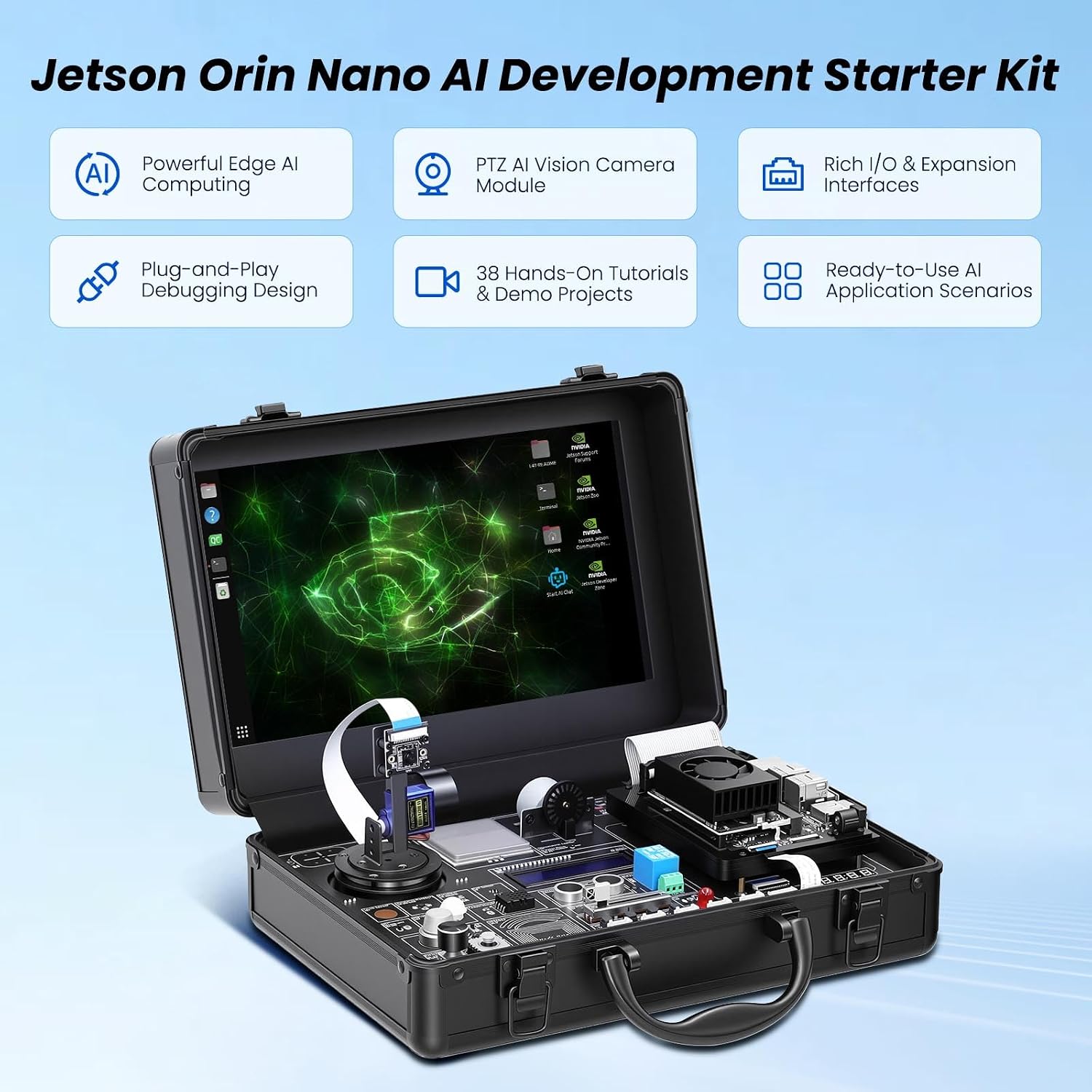
Image 1.1: Overview of the ELECROW AI Starter Kit for Jetson Orin Nano, showcasing its portable design with an integrated screen and various components.
2. Setup
This section outlines the steps to set up your ELECROW AI Starter Kit. The kit is designed for a plug-and-play experience, minimizing the need for complex wiring or soldering.
2.1 Unpacking and Component Identification
Carefully unpack all components from the custom carrying case. Verify that all items listed in the packing list are present.
- 1x AI Starter Kit for Jetson Nano (main unit with integrated screen and sensor board)
- 1x IR Remote Control
- 1x NFC Card
- 1x 128G SD Card (pre-installed or to be installed)
- 1x 40-pin GPIO Cable
- 2x 22-pin FPC Cable
- 2x 24-pin FPC Cable
- 1x Jetson DP&USB Adapter Board
- 4x Acrylic Mounting Plates
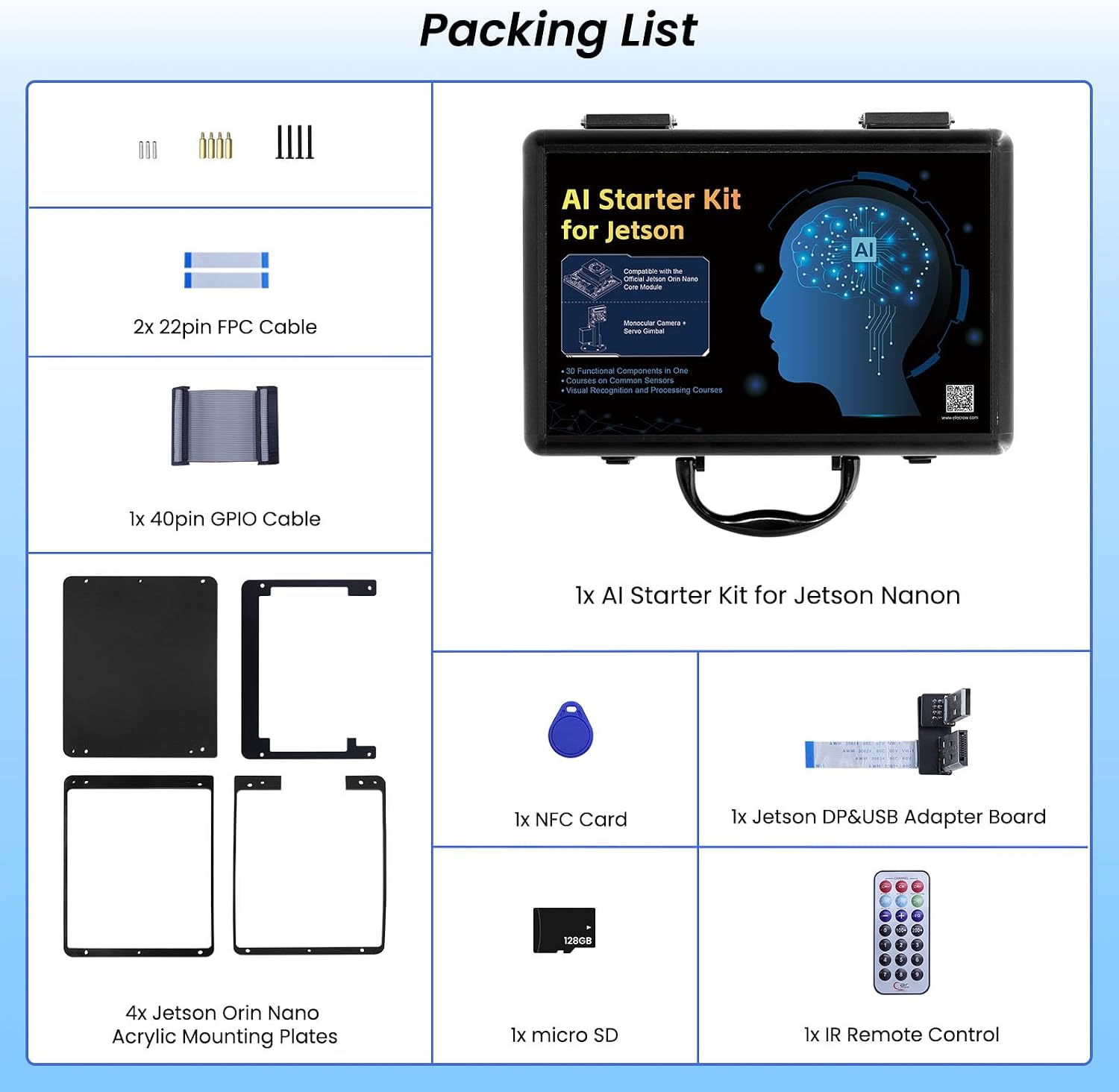
Image 2.1: Detailed view of the kit's packing list, illustrating each included accessory.
2.2 Installing the Jetson Orin Nano Board (if not pre-installed)
The kit is designed to accommodate a Jetson Orin Nano board (not included). Follow these steps to install it:
- Open the main unit case.
- Locate the designated slot for the Jetson Orin Nano board.
- Carefully insert the Jetson Orin Nano board into its connector.
- Secure the board using the provided screws or fasteners.
- Connect any necessary FPC cables or GPIO cables as indicated in the specific Jetson Orin Nano documentation.
Video 2.2: A short video demonstrating the process of fixing the core board top plate, which is part of the Jetson Orin Nano installation.
2.3 Initial Power-Up
Connect the power adapter to the kit and a power outlet. The integrated 11.6-inch IPS screen should power on, displaying the operating system interface.
3. Operation
This section details the primary operational features of the ELECROW AI Starter Kit.
3.1 30-in-1 No-Solder Sensor Board
The kit features an integrated sensor board with 30 functional sensors. These include temperature and humidity, ultrasonic ranging, gas, and motion sensors. The design allows for direct use without soldering or complex wiring. Refer to the provided Python tutorials for examples on how to interact with each sensor.

Image 3.1: An illustration of the 30-in-1 sensor board, highlighting the various integrated sensors and components.
3.2 8MP Gimbal Camera and Dual Servos
The kit includes an IMX219 8MP monocular camera mounted on a dual-servo gimbal. This setup supports advanced AI vision applications such as face recognition and intelligent object tracking. The gimbal allows for precise camera movement and positioning.

Image 3.2: A detailed view of the 8MP HD camera with servo control, demonstrating its capability for face recognition and intelligent object tracking.
3.3 11.6-inch IPS HD Screen
The integrated 1366x768 resolution IPS screen provides a direct visual interface for your projects, eliminating the need for an external monitor. This enables a self-contained development and experimentation environment.

Image 3.3: The integrated 11.6-inch IPS screen in operation, showing its display capabilities.
3.4 AI Voice Interaction System
An exclusive AI voice interaction system is built into the kit, allowing for intelligent Q&A and voice command control. This feature facilitates natural human-computer dialogue and interaction with your AI projects.
3.5 Python Tutorials and Project Development
The kit includes 38 step-by-step Python tutorials, ranging from basic programming concepts to advanced vision practice. These tutorials cover sensor control, embedded development, and AI visual recognition, guiding users through practical applications.

Image 3.4: An example of the Python course content and vision practice tutorials included with the kit.
Video 3.5: An official product video demonstrating the ELECROW AI Starter Kit for Jetson Orin Nano with its 11.6-inch IPS screen and various functionalities.
4. Maintenance
Proper maintenance ensures the longevity and optimal performance of your AI Starter Kit.
- Cleaning: Use a soft, dry cloth to clean the screen and exterior surfaces. Avoid abrasive cleaners or solvents. For sensitive electronic components, use compressed air to remove dust.
- Storage: When not in use, store the kit in its original carrying case in a cool, dry environment to protect it from dust, moisture, and physical damage.
- Software Updates: Regularly check for and install operating system and software updates for the Jetson Orin Nano board to ensure security and access to the latest features and bug fixes.
- Component Handling: Handle all electronic components, especially the camera and sensor board, with care to prevent damage. Avoid applying excessive force to connectors or cables.
5. Troubleshooting
This section provides solutions to common issues you might encounter with your ELECROW AI Starter Kit.
5.1 Power Issues
- Kit does not power on:
- Ensure the power adapter is securely connected to both the kit and a working power outlet.
- Verify that the power outlet is functional by testing it with another device.
- Check the power adapter for any visible damage.
5.2 Display Issues
- Screen remains blank:
- Confirm the Jetson Orin Nano board is correctly installed and powered.
- Check the FPC cables connecting the screen to the main board for secure connections.
- Restart the kit.
5.3 Sensor or Camera Malfunction
- Sensor not responding or camera not detected:
- Ensure all cables (FPC, GPIO) are properly connected to the sensor board and camera module.
- Verify that the correct software drivers and libraries are installed and configured for the specific sensor or camera in your operating system.
- Consult the Python tutorials for specific code examples and troubleshooting steps related to individual sensors.
- Restart the Jetson Orin Nano board.
5.4 Software and Tutorial Issues
- Python tutorials not running or errors encountered:
- Ensure your Python environment is correctly set up with all required libraries (e.g., OpenCV, NumPy, Jetson.GPIO).
- Check for syntax errors in your code.
- Refer to the official ELECROW documentation or community forums for updated information and support.
6. Specifications
| Feature | Detail |
|---|---|
| Brand | ELECROW |
| Memory Storage Capacity | 128 GB (SD Card) |
| CPU Model | Tegra (for Jetson Orin Nano) |
| Connectivity Technology | Bluetooth, Infrared, Wi-Fi |
| Operating System | Linux |
| Processor Brand | NVIDIA |
| Compatible Devices | Jetson Orin Nano |
| RAM Memory Technology | LPDDR4X |
| Processor Count | 1 |
| Total USB Ports | 3 |
| Item Dimensions (L x W x H) | 11.81"L x 7.87"W x 3.94"H |
| Item Weight | 3.5 pounds |
7. Warranty & Support
7.1 Warranty Information
The ELECROW AI Starter Kit for Jetson Orin Nano comes with a 1 Year Manufacturer Warranty. This warranty covers defects in materials and workmanship under normal use. Please retain your proof of purchase for warranty claims.
7.2 Technical Support
For technical assistance, detailed documentation, or further inquiries, please visit the official ELECROW website or contact their customer support. Online resources, including forums and FAQs, may also be available to assist with common questions and project development.
Note: The Jetson Orin Nano board itself is not included in this kit and its warranty and support are provided by NVIDIA or its respective manufacturer.


