1. Introduction
This manual provides instructions for the safe and efficient operation, maintenance, and troubleshooting of your oneisall PP02 Pet Air Purifier. This device is designed to improve indoor air quality by capturing pet hair, dander, and odors, utilizing a multi-layer filtration system.
2. Important Safety Instructions
Please read and save these safety instructions before operating the air purifier to reduce the risk of fire, electric shock, or injury.
- Always unplug the air purifier before moving, cleaning, or performing any maintenance.
- Do not operate the unit if the power cord or plug is damaged.
- Keep the air purifier away from water or wet areas.
- Do not insert fingers or foreign objects into the air inlets or outlets.
- Ensure the air inlets and outlets are not blocked.
- Use only genuine oneisall replacement filters.
- This appliance is not intended for use by persons (including children) with reduced physical, sensory, or mental capabilities, or lack of experience and knowledge, unless they have been given supervision or instruction concerning use of the appliance by a person responsible for their safety.
3. Package Contents
Verify that all items are present in the package:
- oneisall PP02 Pet Air Purifier
- HEPA Filter (Pre-installed)
- Cleaning Brush
- User Manual
4. Product Overview
The oneisall PP02 Pet Air Purifier features dual-sided air intakes and a multi-stage filtration system to effectively capture pet hair, dander, and odors.

Figure 4.1: Exploded view of the oneisall PP02 Pet Air Purifier, illustrating the dual-side air inlets and the internal multi-layer filtration system. This design allows for efficient capture of pet fur and airborne particles.
Key Components:
- Control Panel: Located on the top, with a digital display for air quality and fan speed.
- Dual Air Inlets: Located on the sides, designed to maximize pet hair capture.
- Air Outlet: Located on the top for purified air release.
- Pre-filter: Captures large particles like pet hair and dust.
- HEPA Filter: Captures fine particles such as dander and allergens.
- Activated Carbon Filter: Absorbs odors from pets, cooking, and other sources.
5. Setup and Placement
- Unpack: Carefully remove the air purifier from its packaging.
- Filter Installation: The HEPA filter is typically pre-installed. Open the filter compartment (refer to Figure 4.1 for location) and ensure all packaging materials are removed from the filter before use. Close the compartment securely.
- Placement: Place the air purifier on a firm, level surface. Ensure there is at least 15 cm (6 inches) of space around all sides for optimal airflow. Avoid placing it directly against walls or furniture.
- Power Connection: Plug the power cord into a standard electrical outlet.

Figure 5.1: The oneisall PP02 Pet Air Purifier positioned in a living room, demonstrating its ability to purify air in open-plan spaces. The unit is designed for efficient air circulation.
6. Operating Instructions
The oneisall PP02 features intelligent controls for ease of use.
- Power On/Off: Press the Power button on the control panel to turn the unit on or off.
- Fan Speed Adjustment: Cycle through available fan speeds (e.g., Low, Medium, High) by pressing the Fan Speed button.
- Auto Mode: Activate Auto Mode by pressing the Auto button. In this mode, smart sensors monitor air quality in real-time and automatically adjust the fan speed based on detected pollutants (pets, odors, cooking fumes). When air quality improves, the unit shifts to a quieter mode.
- Sleep Mode: Select Sleep Mode for quiet operation during rest periods. The display lights may dim or turn off.
- Timer Function: Use the Timer button to set the operating duration (e.g., 2H, 4H, 8H). The unit will automatically turn off after the set time.

Figure 6.1: The control panel of the oneisall PP02 Pet Air Purifier, showing the real-time air quality indicator (PM2.5) and current fan speed. The display changes color to indicate air quality status (Good, Fair, Poor).

Figure 6.2: The oneisall PP02 Pet Air Purifier operating in a bedroom, highlighting its quiet operation (25dB) for undisturbed rest.
7. Maintenance
Regular maintenance ensures optimal performance and extends the lifespan of your air purifier.
7.1 Pre-filter Cleaning
The pre-filter is designed to capture large particles like pet hair and dust. It can be easily cleaned to maintain efficiency.
- Power Off: Unplug the air purifier from the power outlet.
- Open Cover: Open the filter compartment cover.
- Remove Pre-filter: Carefully remove the pre-filter.
- Clean: Use the provided cleaning brush to brush away accumulated hair and dust from the pre-filter. The pre-filter is also washable; rinse it under running water if necessary. Ensure it is completely dry before reinstallation.
- Reinstall: Place the clean pre-filter back into the compartment and close the cover securely.
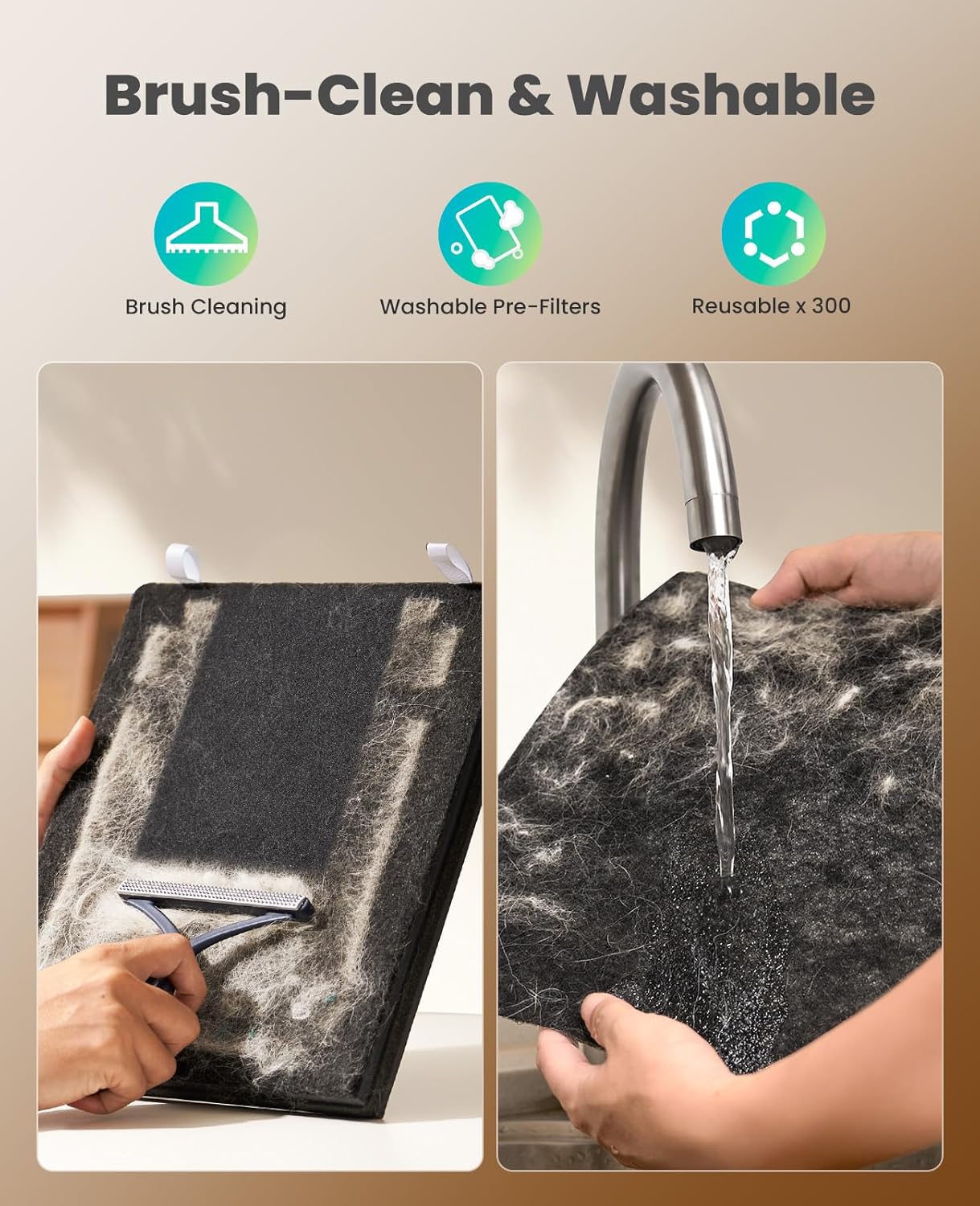
Figure 7.1: Illustration of the pre-filter cleaning process. The image on the left shows using a brush to remove pet hair and dust, while the image on the right demonstrates rinsing the washable pre-filter under water. Ensure the filter is dry before reinstallation.
7.2 HEPA and Activated Carbon Filter Replacement
The HEPA and Activated Carbon filters are not washable and must be replaced periodically. The filter life indicator on the control panel will alert you when replacement is needed. Filter replacement frequency depends on usage and air quality.
- Power Off: Unplug the air purifier.
- Open Cover: Open the filter compartment.
- Remove Old Filter: Carefully remove the used HEPA and Activated Carbon filter assembly.
- Install New Filter: Insert a new oneisall replacement filter, ensuring it is correctly oriented.
- Close Cover: Close the filter compartment securely.
- Reset Filter Life Indicator: After replacing the filter, press and hold the Filter Reset button (if available, or refer to the control panel diagram) for 3-5 seconds to reset the filter life indicator.

Figure 7.2: A visual comparison between a used oneisall filter (left) and a new filter (right), demonstrating the significant amount of pet fur and particles captured by the filtration system over time. This highlights the need for regular filter maintenance and replacement.

Figure 7.3: The oneisall PP02 Pet Air Purifier positioned near a cat and its litter box, illustrating its effectiveness in removing pet odors. The unit features a double activated carbon filter for enhanced odor absorption.
8. Troubleshooting
| Problem | Possible Cause | Solution |
|---|---|---|
| Unit does not turn on. | No power supply. Power cord not securely plugged in. | Check if the power outlet is working. Ensure the power cord is firmly plugged into the unit and the outlet. |
| Airflow is weak or noisy. | Filters are dirty or clogged. Air inlets/outlets are blocked. | Clean the pre-filter. Replace the HEPA and Activated Carbon filter if necessary. Ensure nothing is obstructing the air inlets or outlets. |
| Odor is still present. | Activated Carbon filter is saturated. Unit is too small for the room size. | Replace the HEPA and Activated Carbon filter. Ensure the unit is placed optimally and consider its coverage area. |
| Air quality indicator is always "Poor". | High levels of pollutants in the environment. Sensor is dirty. | Allow the unit to run longer on a higher fan speed. Gently clean the air quality sensor (refer to product diagram for location) with a dry cotton swab. |
9. Specifications
| Model Number | PP02 |
| Brand | oneisall |
| CADR (Clean Air Delivery Rate) | 320 m³/h (188 CFM) |
| Coverage Area | Up to 470 sq ft (20 minutes) / 1410 sq ft (60 minutes) |
| Filtration System | Pre-filter, HEPA Filter, High-Density Activated Carbon Filter |
| Power Consumption | 36W |
| Noise Level | As low as 25dB (in quiet mode) |
| ASIN | B0GDFTQPX2 |
10. Warranty and Support
For warranty information or technical support, please contact oneisall customer service. Refer to the product packaging or the official oneisall website for contact details.
Website: oneisall Official Store


