
Introduction
This manual provides comprehensive instructions for the LocoLee LED lighting kit, RC Version, designed to enhance your LEGO 11372 Autumn Cottage Garden model. Please note that this product includes only the lighting kit; the LEGO model itself is not included and must be purchased separately or already owned. This lighting kit is crafted from high-quality copper lines and ABS plastic, ensuring durability and seamless integration with your LEGO bricks. The RC version allows for remote control of lighting effects, including on/off, brightness, and frequency across different zones of your model.
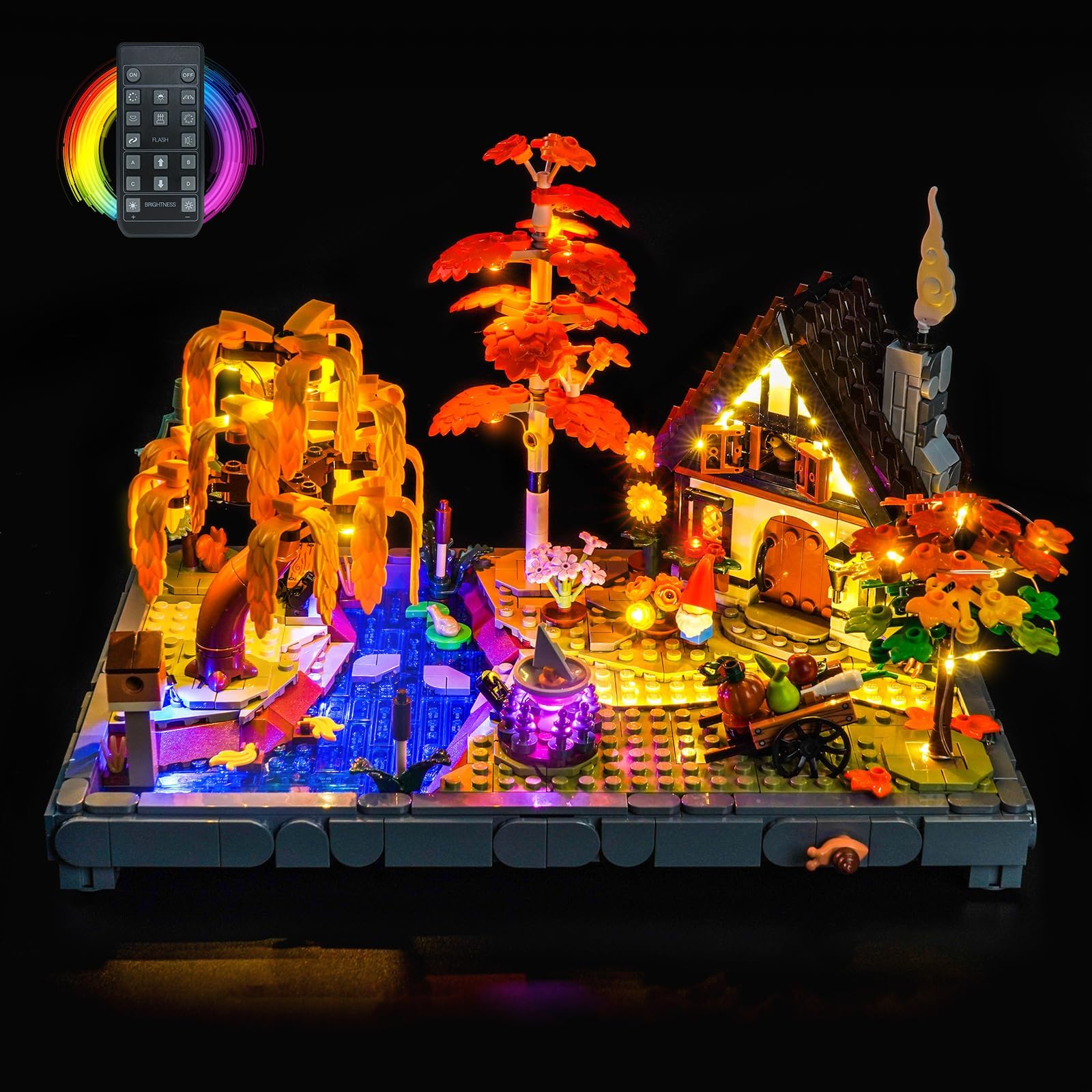
Image: The LocoLee Light Kit illuminating the LEGO 11372 Autumn Cottage Garden model, demonstrating the vibrant lighting effects and the included remote control.
Safety Information
To prevent accidental ingestion, keep all small parts of the lighting kit out of reach of young children. Ensure the power supply voltage is less than 5V when connecting the USB cable. Do not pull wires too hard during installation to avoid damage. Always test each light component before final assembly.
Package Contents
Please verify that all components listed below are present in your package. If any parts are missing or damaged, please contact customer support.
- LED Light Strips (various sizes and colors)
- Connecting Cables (5CM, 15CM)
- Expansion Boards (1x 4-port, 1x 6-port)
- Power Supply (USB compatible, battery not included)
- Remote Control
- Instruction Manual (online video/PDF)

Image: An overview of the components included in the LocoLee Light Kit, illustrating the different types of light strips, cables, and control units.
Setup and Installation
Installation of the LocoLee Light Kit requires careful attention to detail. We recommend following the detailed video or PDF installation instructions available online. These step-by-step guides are numbered and designed to simplify the process. You may need to disassemble a few bricks from your LEGO model to properly integrate the light fixtures.
- Prepare Your Model: Carefully identify the areas where lights will be installed. Refer to the online instructions for specific brick removal guidance.
- Test Components: Before integrating, connect each light part to the power supply to ensure it functions correctly.
- Route Wires: Gently route the thin copper wires between LEGO bricks. Avoid sharp bends or excessive pulling to prevent damage.
- Connect Lights: Attach the LED light strips and individual lights to the expansion boards.
- Secure Components: Once lights are in place, reassemble the LEGO bricks around them, ensuring wires are not pinched.
- Connect Power: Plug the power supply into a USB source (less than 5V).
For visual guidance, please refer to the official installation video:
Video: An official demonstration of the LocoLee Light Kit installed on the LEGO 11372 Autumn Cottage Garden, showcasing various lighting effects and features.

Image: A detailed view of the LEGO Autumn Cottage Garden with the LocoLee lights installed, showing the warm glow from inside the cottage and ambient lighting around the pond.
Detailed Light Placement Examples

Image: Two flower-shaped LED lights providing a warm, inviting glow within the garden scene.

Image: A purple illuminated feature, possibly a magical element, adding a unique color accent to the model.

Image: An interior view of the cottage, showing a warm white LED light illuminating the space, visible through the window.
Operating Instructions
The LocoLee Light Kit (RC Version) offers convenient control over your illuminated LEGO model.
- Power On: Ensure the USB power cable is securely connected to a power source (e.g., USB wall adapter, power bank) with a voltage less than 5V. The lights will automatically turn on or can be controlled via the remote.
- Remote Control Functions: Use the provided remote control to manage the lighting effects. The remote allows you to:
- Turn lights on or off.
- Adjust brightness levels.
- Change lighting frequency or patterns across different zones.
- Battery for Remote: The remote control requires batteries (not included). Please refer to the remote's compartment for the correct battery type and installation.
Maintenance
To ensure the longevity and optimal performance of your LocoLee Light Kit, follow these maintenance guidelines:
- Gentle Handling: The wires and small LED components are delicate. Avoid excessive force or sharp bending, especially when moving or cleaning the model.
- Cleaning: Use a soft, dry cloth to gently dust the lights and wires. Do not use liquid cleaners directly on the electrical components.
- Storage: If storing the model for an extended period, disconnect the power supply. Store in a cool, dry place away from direct sunlight.
Troubleshooting
If you encounter any issues with your LocoLee Light Kit, please refer to the following common solutions:
| Problem | Possible Cause | Solution |
|---|---|---|
| Lights do not turn on. | No power, loose connection, faulty component. | Check USB power source. Ensure all cables are securely connected to expansion boards and lights. Test individual lights if possible. |
| Lights are dim or flickering. | Insufficient power, loose connection, damaged wire. | Ensure power source provides adequate current. Check all connections. Inspect wires for any visible damage. |
| Remote control not working. | Dead batteries, remote out of range, signal obstruction. | Replace remote control batteries. Ensure remote is pointed towards the receiver and within range. Remove any obstructions. |
If these steps do not resolve the issue, please contact LocoLee customer support for further assistance.
Specifications
- Brand: LocoLee
- Model Number: 11372 (Compatible with LEGO 11372 Autumn Cottage Garden)
- Style: RC Version
- Material: Plastic (ABS) and Copper Wire
- Power Input: USB (Voltage less than 5V)
- Included Components: LED lights, connecting cables, expansion boards, power supply module, remote control.
Warranty and Support
LocoLee stands by the quality of its products. Our lighting sets are made with high-quality materials and undergo thorough quality checks to ensure compatibility and performance.
- Quality Guarantee: We ensure our lighting sets are made of high-quality copper lines and ABS plastic, designed to be perfectly hidden and compatible with LEGO blocks.
- Customer Support: If you have any questions or concerns regarding the product, please do not hesitate to contact us at any time.
- Replacement Parts: Replacement parts are available for aftercare services.
For more information and to explore other LocoLee products, visit the official LocoLee Store: LocoLee Store on Amazon.