
Introduction
Thank you for choosing the Halitaa 3-Drawer Tall File Cabinet with Wheels. This cabinet is designed to provide efficient storage for your home office, accommodating both Letter and A4 size documents. Its versatile design also allows it to function as a printer stand. This manual provides detailed instructions for assembly, operation, and maintenance to ensure safe and optimal use of your new furniture.
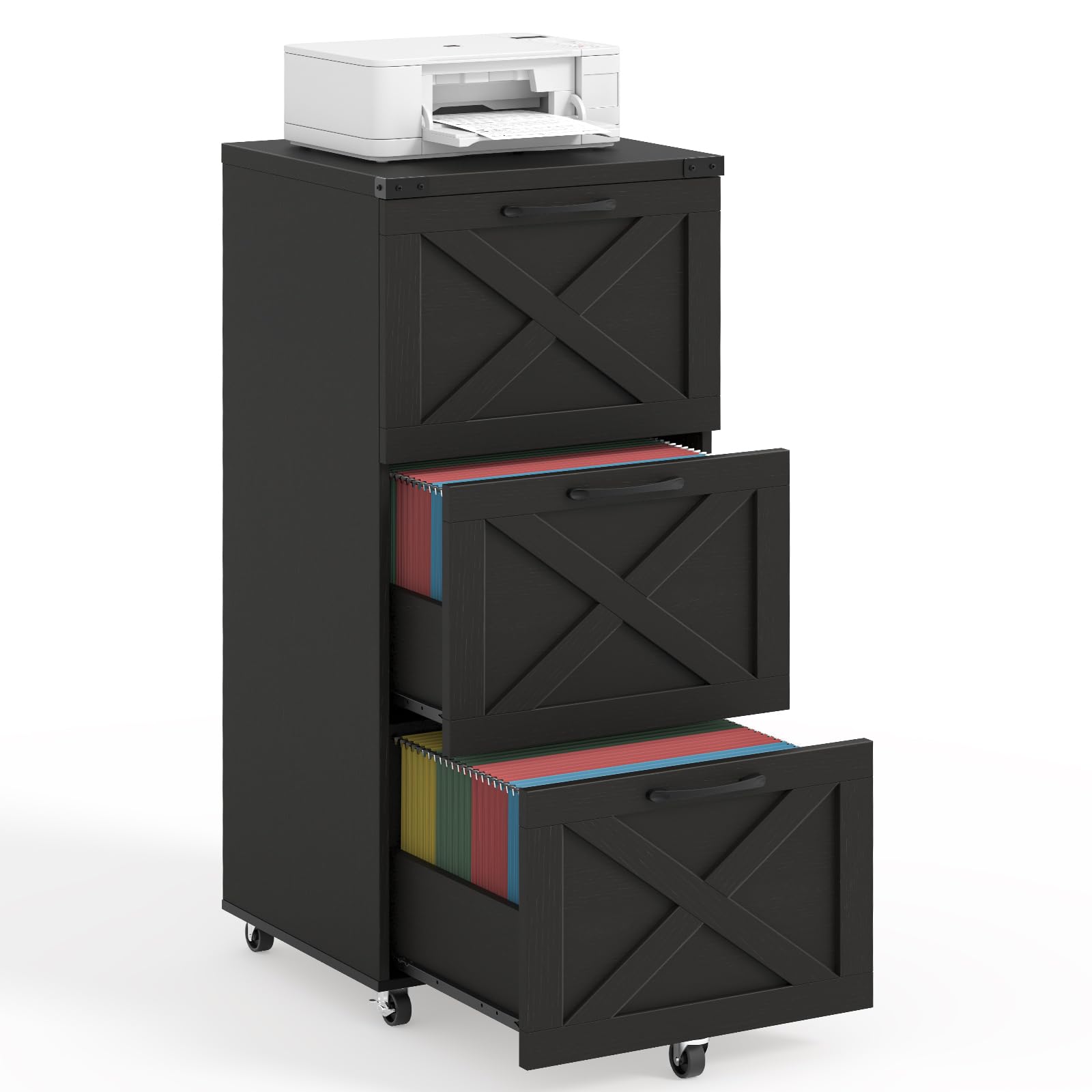
Image: The Halitaa 3-Drawer Tall File Cabinet in black, featuring three drawers with decorative cross-panel fronts and wheels for mobility.
Safety Information
- Read all instructions carefully before assembly and use.
- Keep all small parts and packaging materials away from children and pets to prevent choking hazards.
- Assemble the unit on a soft, clean surface to prevent scratches.
- Ensure all screws and fasteners are securely tightened before use. Periodically check and re-tighten as needed.
- Do not overload drawers. Distribute weight evenly to maintain stability.
- Always use the anti-tipping device provided to secure the cabinet to a wall, especially if children are present.
- Do not stand or climb on the cabinet.
- Use caution when moving the cabinet, especially on uneven surfaces. Ensure drawers are closed and locked (if applicable) before moving.
Package Contents
Please verify that all components are present before beginning assembly. If any parts are missing or damaged, please contact customer support.
- File Cabinet Panels (top, bottom, sides, back, drawer fronts, drawer sides)
- 3 Drawer Assemblies
- 5 Swivel Casters (2 with brakes)
- Adjustable Hanging Rods for file folders
- Handles
- Anti-Tipping Device
- All necessary assembly hardware (screws, dowels, cam locks, etc.)
- Assembly Instructions Manual (separate document, typically included in packaging)
Setup and Assembly
Assembly of the Halitaa file cabinet is designed to be straightforward with detailed, step-by-step instructions provided in the separate assembly manual. Please follow those instructions carefully. The general steps involve:
- Prepare the Area: Clear a spacious, clean, and soft area for assembly to prevent damage to components.
- Identify Parts: Lay out all parts and hardware, matching them with the labels in the assembly manual.
- Assemble the Frame: Connect the side panels, top, and bottom panels using the provided hardware.
- Install Drawer Slides: Attach the drawer slides to the cabinet frame according to the instructions.
- Assemble Drawers: Construct each of the three drawers, ensuring the drawer slides are correctly attached.
- Install Casters: Attach the five swivel casters to the bottom of the cabinet. Ensure the two casters with brakes are positioned at the front for easy access.
- Insert Drawers: Carefully slide the assembled drawers into the cabinet.
- Attach Anti-Tipping Device: Secure the anti-tipping device to the back of the cabinet and to a wall stud using appropriate hardware. This is a critical safety step.

Image: Detail of the cabinet's casters, showing two casters with locking mechanisms and the 360-degree swivel feature for easy movement.

Image: Illustrates the maximum load capacity of 110 lbs for the cabinet top and a close-up of the anti-tipping device for wall attachment.
Operating Instructions
Drawer Usage and File Organization:
Each of the three drawers is equipped with adjustable hanging rods to accommodate both Letter size and A4 size file folders. To adjust, select the appropriate holes on the drawer sides for your desired file size and insert the hanging rods.

Image: A drawer of the file cabinet open, showing hanging file folders and an inset illustrating the adjustable holes for Letter and A4 size documents.
Mobility and Stability:
The cabinet features five industrial-grade swivel casters for easy movement. Two of these casters include brakes. To move the cabinet, ensure the brakes are disengaged. To secure the cabinet in place, engage the brakes on the front casters. The fifth wheel located under the bottom drawer provides additional stability when the drawer is extended.
Locking Mechanism:
The cabinet is designed with a central locking system. When the top drawer is locked, all three drawers will be secured simultaneously. Insert the key into the lock on the top drawer and turn to engage or disengage the lock.
Printer Stand Functionality:
The sturdy top surface of the cabinet is suitable for holding a printer or other office equipment, with a maximum load capacity of 110 lbs (50 kg).

Image: The Halitaa file cabinet in use, storing files, supporting a printer, and organizing stationery and other items.
Maintenance
- Cleaning: Wipe the cabinet surfaces with a soft, damp cloth. Avoid using harsh chemicals or abrasive cleaners, which can damage the finish.
- Hardware Check: Periodically inspect all screws and fasteners to ensure they remain tight. Re-tighten as necessary to maintain structural integrity.
- Caster Care: Keep casters free of debris (hair, dust, etc.) to ensure smooth rolling. Lubricate if necessary.
- Drawer Slides: If drawers become stiff or noisy, apply a small amount of silicone lubricant to the drawer slides.
Troubleshooting
| Problem | Possible Cause | Solution |
|---|---|---|
| Drawers are difficult to open/close or rub against the frame. |
|
|
| Cabinet is unstable or wobbles. |
|
|
| Casters do not roll smoothly or lock properly. |
|
|
Specifications
- Brand: Halitaa
- Model: B0GDCZ8CPC
- Color: Black
- Material: Engineered Wood
- Product Dimensions (D x W x H): 15.75"D x 15.75"W x 38.43"H
- Number of Drawers: 3
- Item Weight: 20.53 Kilograms (approx. 45.26 lbs)
- Maximum Load Capacity (Top Surface): 110 lbs
- Mounting Type: Floor Mount (with optional wall anchor for anti-tipping)
- Features: 5 Swivel Casters (2 lockable), Adjustable Hanging Rods for Letter/A4 files, Anti-Tipping Device, Locking Mechanism.
Warranty and Support
For warranty information or customer support, please refer to the documentation included with your purchase or contact Halitaa customer service directly through their official website or the retailer where the product was purchased. Please have your model number (B0GDCZ8CPC) and purchase date available when contacting support.
Halitaa Store Link: Visit the Halitaa Store on Amazon