
Introduction
This manual provides comprehensive instructions for the Comfort Direct SW-T0001-01 Ceiling Fan Remote Control. This remote is designed to replace the factory remote for specific Hampton Bay Chelia 56-inch indoor ceiling fan models, including SW22008GD, SW-T0001-01, 28865-SWT0001, and 2A767-SWT0001. It offers convenient control over your fan's speed and light functions.
Package Contents
- SW-T0001-01 Handheld Remote Control
- 2 x AAA Batteries (pre-installed)
- Wall Mount Bracket
- Installation Hardware (screws)
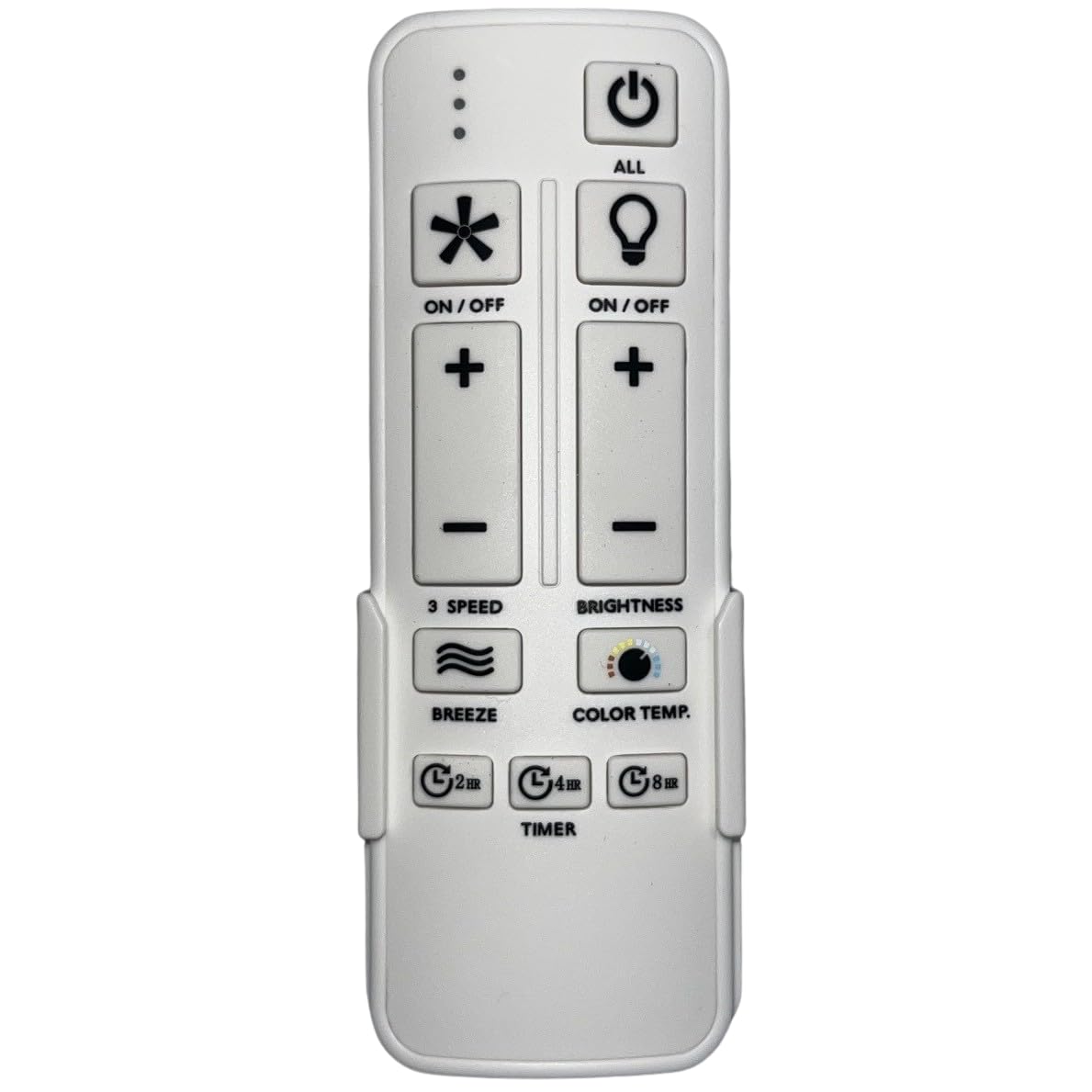
Image: The Comfort Direct SW-T0001-01 remote control, showing its buttons and the included wall mount bracket.
Setup and Pairing Instructions
Follow these steps to set up and pair your new remote control with your Hampton Bay Chelia 56" ceiling fan:
- Power Off the Fan: Ensure the ceiling fan is completely powered off at the wall switch or circuit breaker. This is a critical safety step.
- Power On the Fan: Restore power to the ceiling fan. The fan should now be receiving power.
- Access Learn Button: Locate the battery compartment on the back of your SW-T0001-01 remote control. Open the compartment.
- Press Learn Button: Within 30 seconds of restoring power to the fan, press and hold the "Learn" button located inside the remote's battery compartment for approximately 3 seconds. The fan light (if applicable) may blink or the fan may briefly turn on to indicate successful pairing.
- Test Operation: Close the battery compartment. Test the remote control by pressing the fan speed and light buttons to ensure proper functionality.
If the remote does not pair successfully, repeat the steps, ensuring the fan is powered off and on again before pressing the learn button.
Operating the Remote Control
The SW-T0001-01 remote control provides intuitive button-based operation for your ceiling fan. It operates using Radio Frequency (RF) technology, offering a maximum range of approximately 30 feet.
- Fan Speed Control: Use the dedicated fan speed buttons to adjust the fan's rotation speed (e.g., Low, Medium, High).
- Light Control: Use the light button to turn the fan's light on or off. Some models may support dimming by holding the light button.
- Power On/Off: A main power button typically controls both fan and light, or separate buttons may be present for each function.
Refer to the button labels on your specific remote for exact functions.
Maintenance
Battery Replacement
The remote control requires two AAA batteries. When the remote's performance degrades or it stops responding, it is time to replace the batteries.
- Open the battery compartment cover on the back of the remote.
- Remove the old AAA batteries.
- Insert two new AAA batteries, ensuring correct polarity (+ and -).
- Close the battery compartment cover securely.
Note: Dispose of used batteries responsibly according to local regulations.
Cleaning
To clean the remote control, use a soft, dry cloth. Do not use liquid cleaners, abrasive cleaners, or spray directly onto the remote, as this may damage the electronics.
Troubleshooting
| Problem | Possible Cause | Solution |
|---|---|---|
| Remote not responding. | Dead or low batteries. | Replace batteries with new AAA batteries. |
| Remote not responding. | Remote is not paired with the fan. | Repeat the "Setup and Pairing Instructions" carefully. |
| Limited range or intermittent control. | Interference from other RF devices or distance. | Ensure you are within the 30-foot operating range. Minimize interference from other electronic devices. |
| Fan light or speed not changing. | Incorrect fan model compatibility. | Verify your fan model number matches the compatible models listed in this manual. |
Specifications
| Brand | Comfort Direct |
| Model Number | SW-T0001-01 (CDSW-T0001-01) |
| Compatible Fan Models | Hampton Bay Chelia 56" (SW22008GD, SW-T0001-01, 28865-SWT0001, 2A767-SWT0001) |
| Connectivity Technology | Radio Frequency (RF) |
| Controller Type | Button Control |
| Maximum Range | 30 Feet |
| Batteries Required | 2 x AAA (included) |
| Item Dimensions (L x W x H) | 2.76"L x 1.8"W x 4.57"H |
| Item Weight | 6 Ounces |
Warranty and Support
Limited Warranty
The Comfort Direct SW-T0001-01 Ceiling Fan Remote Control is backed by a 1-Year Limited Warranty from the manufacturer. This warranty covers defects in materials and workmanship under normal use. Please retain your proof of purchase for warranty claims.
Customer Support
For technical assistance, troubleshooting beyond this manual, or warranty inquiries, please contact Comfort Direct customer support. Refer to the product packaging or the Comfort Direct website for the most current contact information.
