
Introduction
Thank you for choosing the Stealth Cam QS24 Trail Camera. This manual provides essential information for setting up, operating, and maintaining your camera to ensure optimal performance. The QS24 is designed for reliable outdoor monitoring, capturing high-resolution images and video with its advanced features.
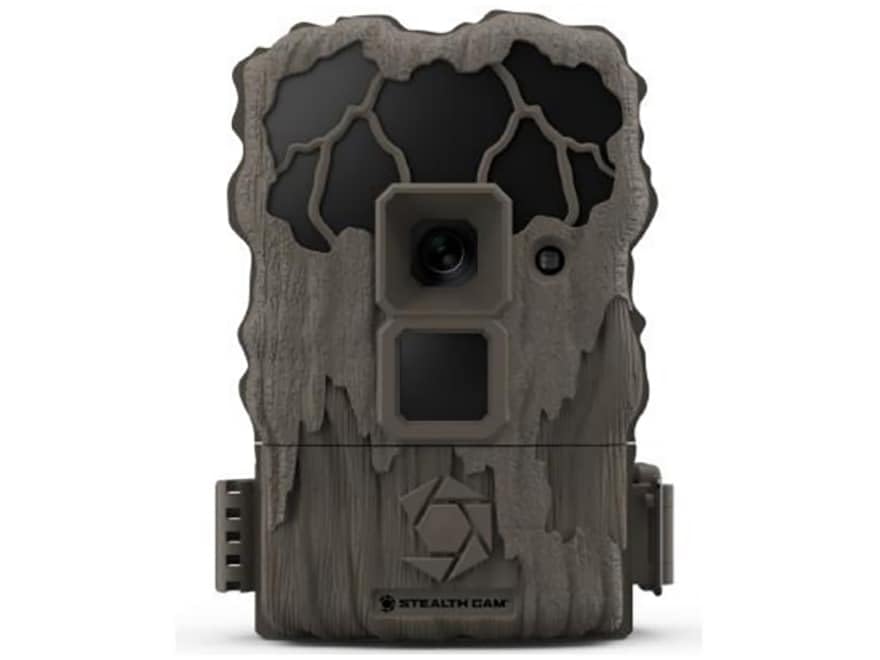
This image shows the compact design of the Stealth Cam QS24 trail camera, suitable for discreet outdoor placement.
Setup
1. Battery Installation
- Open the battery compartment latch, typically located on the side or bottom of the camera.
- Insert the required number of AA batteries (not included), ensuring correct polarity (+/-) as indicated inside the compartment.
- Close the battery compartment securely to maintain the camera's weather resistance.
2. SD Card Installation
- Locate the SD card slot, usually near the battery compartment or on the side.
- Insert a formatted SD card (up to 32GB, not included) with the metal contacts facing the camera. Push until it clicks into place.
- To remove, push the card in again until it springs out.
3. Mounting the Camera
The QS24 is designed for tree mounting. Use the included strap or a compatible mounting accessory.
- Select a sturdy tree or post at the desired height, typically 3-6 feet off the ground.
- Thread the mounting strap through the designated slots on the back of the camera.
- Securely fasten the camera to the tree, ensuring it is stable and pointed towards the desired detection area.
- Adjust the camera angle as needed to optimize the field of view.
Operating Instructions
1. Powering On/Off
- To power on, slide the power switch to the 'ON' position. The camera will perform a self-check.
- To power off, slide the power switch to the 'OFF' position.
2. Setting Up Basic Functions
Access the camera's menu via the internal display and control buttons to configure settings.
- Mode Selection: Choose between Photo (24MP), Video (720p at 30 FPS), or Photo+Video modes.
- Trigger Delay: Set the delay between detections. The QS24 features an ultra-fast 0.8-second trigger speed.
- Detection Range: The camera has an 80-foot LoGlo infrared detection range. Adjust sensitivity if available in settings.
- Date & Time: Set the current date and time for accurate stamping on images and videos.
- Moon Phase: The camera automatically records moon phase data with each capture.
3. Retrieving Images and Videos
- Power off the camera.
- Remove the SD card from its slot.
- Insert the SD card into a compatible card reader connected to a computer or other viewing device.
- Access the files on the SD card to view or transfer your captured media.
An official video from Stealth Cam showcasing the features and applications of their trail cameras, including the QS24 model.
Maintenance
1. Cleaning
- Gently wipe the camera lens and IR array with a soft, lint-free cloth to remove dirt, dust, or moisture.
- Clean the camera body with a damp cloth. Avoid harsh chemicals or abrasive materials.
- Ensure all seals and gaskets are free of debris to maintain weather resistance.
2. Battery Care
- Check battery levels regularly, especially before long deployments.
- Replace all batteries at the same time with new, high-quality batteries. Do not mix old and new batteries or different battery types.
- Remove batteries if the camera will be stored for an extended period to prevent leakage.
3. Storage
- Store the camera in a cool, dry place away from direct sunlight and extreme temperatures.
- Ensure the camera is clean and dry before storage.
Troubleshooting
- Camera Not Powering On:
- Check battery installation and ensure correct polarity.
- Replace with fresh batteries.
- Ensure the power switch is firmly in the 'ON' position. - No Images/Videos Captured:
- Verify the SD card is properly inserted and formatted.
- Check if the SD card is full; delete or replace if necessary.
- Ensure the camera is in an active mode (Photo, Video, or Photo+Video).
- Adjust camera placement to ensure subjects pass within the detection zone. - Poor Image/Video Quality:
- Clean the camera lens and IR array.
- Ensure there are no obstructions in front of the lens or IR sensors.
- Check battery levels; low batteries can affect performance. - False Triggers:
- Reduce the camera's sensitivity setting if available.
- Avoid placing the camera where moving branches or tall grass might trigger it.
- Ensure the camera is not facing direct sunlight or heat sources that could cause false detections.
Specifications
| Model Number | STC-QS24 |
| Image Resolution | 24 Megapixels |
| Video Resolution | 720p HD at 30 FPS |
| Trigger Speed | 0.8 Seconds |
| Detection Range | 80 ft (LoGlo Infrared) |
| IR Range | 80 ft |
| Power Source | Battery Powered (AA batteries, not included) |
| Connectivity | Wireless, Bluetooth |
| Indoor/Outdoor Usage | Outdoor |
| Mount Type | Tree Mount |
| Item Dimensions | 13 x 2.6 x 6 inches |
| Color | Tan |
| UPC | 198954003410 |
Warranty & Support
For detailed warranty information, please refer to the documentation included with your product or visit the official Stealth Cam website. Warranty terms typically cover manufacturing defects for a specified period from the date of purchase.
For technical support, troubleshooting assistance, or to inquire about replacement parts, please contact Stealth Cam customer service directly. Contact information can usually be found on the manufacturer's website or in the product packaging.


