
1. Introduction
Thank you for choosing the TOPTRO TP3 4K Google TV Portable Projector. This manual provides essential information for setting up, operating, and maintaining your projector. Please read it thoroughly before use to ensure optimal performance and safety.
The TOPTRO TP3 is designed to deliver a versatile and immersive viewing experience, featuring integrated Google TV, AI-powered image adjustments, and comprehensive connectivity options. Enjoy your content at home, outdoors, or on the go.
2. Product Overview
2.1 Key Features
- Integrated Google TV: Access over 10,000 official streaming applications, including Netflix, Prime Video, and YouTube, without additional devices.
- Google Voice Control: Use the remote control's voice assistant button to search for content, adjust settings, and control playback hands-free.
- AI-Powered Image Adjustment: Features automatic focus, automatic keystone correction, obstacle avoidance, and automatic screen adjustment for a perfectly aligned and clear image within seconds.
- Native 1080P Resolution with 4K Decoding: Delivers sharp, detailed images and natural colors, supporting 4K video decoding.
- Short Throw Ratio (0.8:1): Projects a 60-inch image from just one meter distance, ideal for small spaces.
- 90-Degree Rotating Stand: Allows for flexible projection angles, including ceiling projection.
- Advanced Connectivity: Equipped with dual-band WiFi 6, Bluetooth 5.3, HDMI ARC, USB, and a 3.5mm audio jack for wide device compatibility.
- Portable Design: Weighing only 1.2 kg (2.6 lbs) with a hidden carry handle, making it easy to transport.
2.2 Package Contents
Ensure all items are present in the package:
- TOPTRO TP3 Projector
- Remote Control
- HDMI Cable
- Power Adapter
- User Manual
3. Setup
3.1 Initial Placement
Place the projector on a stable, flat surface. The 90-degree rotating stand allows for various projection angles, including wall, ceiling, or tabletop. For optimal image quality, ensure the projection surface is smooth and light-colored.

Image: The TOPTRO TP3 projector can be used in diverse environments, from living rooms to outdoor camping, showcasing its adaptability.
3.2 Power Connection
- Connect the power adapter to the projector's power input.
- Plug the power adapter into a suitable electrical outlet (220V).
- Press the power button on the projector or remote control to turn it on.
3.3 Network Connection
Upon first startup, follow the on-screen prompts to connect to your Wi-Fi network. The projector supports dual-band WiFi 6 for a fast and stable connection.
3.4 Google TV Setup
After connecting to Wi-Fi, sign in with your Google account to access Google TV and download applications from the Google Play Store. This step is crucial for utilizing the integrated streaming services.

Image: The projector's interface showing integrated Google TV with direct access to popular streaming applications.
4. Operating Instructions
4.1 Basic Operation
- Power On/Off: Press the power button on the remote or projector.
- Navigation: Use the directional buttons on the remote to navigate menus.
- Selection: Press the 'OK' button to confirm selections.
- Volume Control: Use the volume buttons on the remote.
4.2 Image Adjustment
The TOPTRO TP3 features AI-powered automatic image adjustments:
- Auto Focus: The projector automatically adjusts the image clarity.
- Auto Keystone Correction: Automatically corrects distorted images to a rectangular shape.
- Obstacle Avoidance: Detects and adjusts the image to avoid objects on the projection surface.
- Auto Screen Adjustment: Optimizes the image to fit the screen area.
These adjustments occur automatically within seconds of powering on or repositioning the projector. Manual digital zoom (80-100%) is also available for fine-tuning image size.

Image: Visual representation of the projector's AI-powered automatic image adjustment features, ensuring a clear and aligned picture.
4.3 Google Voice Control
Press the dedicated voice assistant button on your remote control and speak your command. For example, say "Open YouTube" or "Play music." The projector will respond to your voice commands for quick access to functions and content.
4.4 Screen Mirroring (Google Cast)
Utilize Google Cast technology to wirelessly mirror content from your smartphone or tablet to the projector. For iPhone users, download the "AirScreen" application from the Google Play Store on the projector for wireless screen mirroring.
4.5 Rotating Stand Usage
The integrated 90-degree rotating stand allows you to easily adjust the projection angle. Simply pivot the projector to direct the image onto a wall, screen, or ceiling. This feature is particularly useful for bedroom viewing or creative setups.
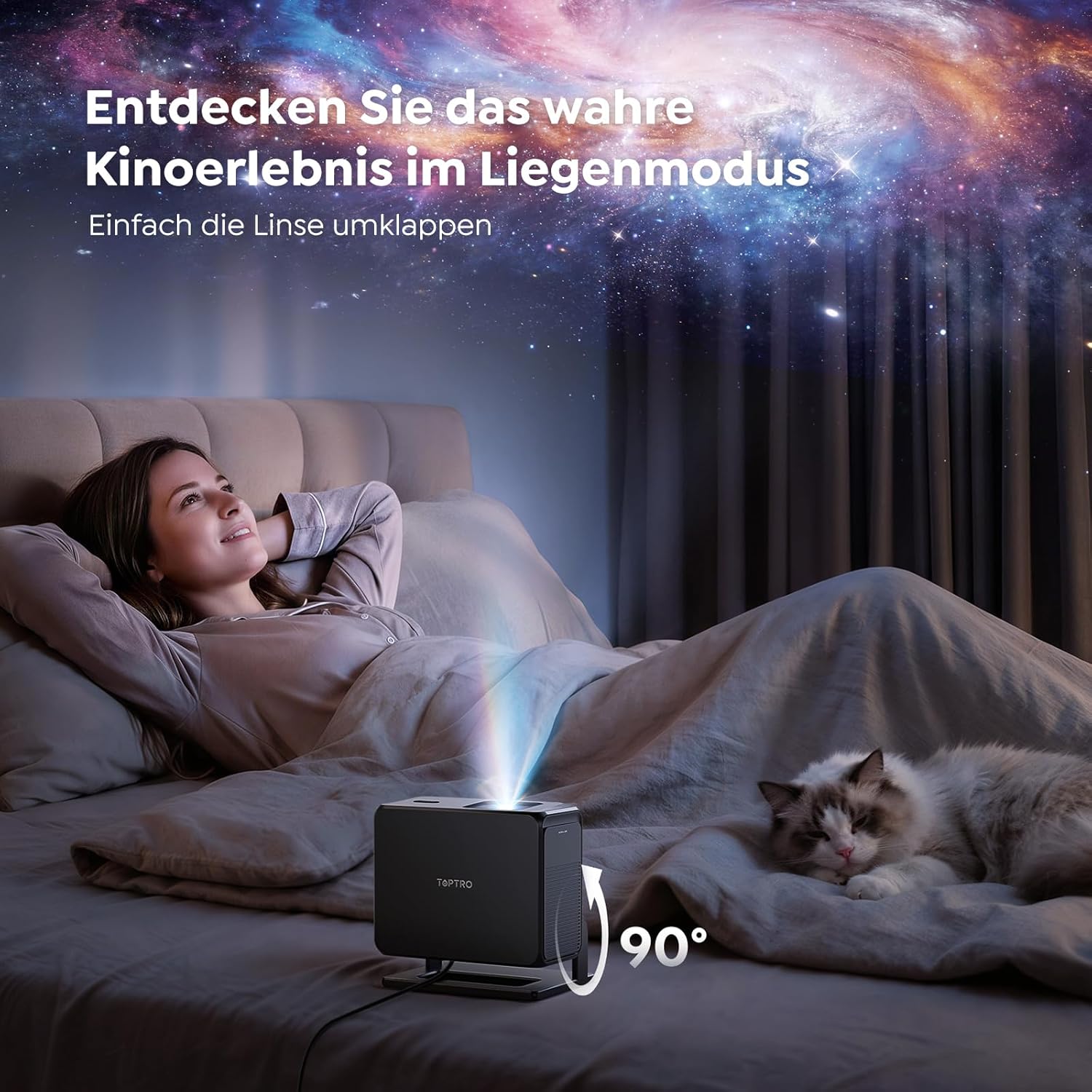
Image: The TOPTRO TP3 projector rotated 90 degrees to project content onto a bedroom ceiling, offering a unique viewing experience.
5. Connectivity
5.1 Wired Connections
- HDMI ARC/CEC: Connect external devices like laptops, gaming consoles (Xbox/PlayStation 5), or Blu-ray players. The ARC feature allows audio to be sent back to a compatible sound system.
- USB: Connect USB drives for media playback.
- 3.5mm Audio Jack: Connect external wired speakers or headphones.
5.2 Wireless Connections
- Wi-Fi 6: Provides faster and more stable wireless connectivity for streaming and online content.
- Bluetooth 5.3: Connect Bluetooth headphones or speakers for an enhanced audio experience.
6. Maintenance
6.1 Cleaning the Lens
Gently clean the projector lens with a soft, lint-free cloth designed for optical surfaces. Avoid using abrasive cleaners or excessive force, as this can scratch the lens.
6.2 General Cleaning
Wipe the exterior of the projector with a soft, dry cloth. Do not use liquid cleaners directly on the device.
6.3 Storage
When not in use, store the projector in a cool, dry place, away from direct sunlight and extreme temperatures. Use the original packaging or a protective case to prevent dust accumulation and damage.
7. Troubleshooting
7.1 No Image Displayed
- Ensure the projector is powered on and connected to a power source.
- Check all cable connections (HDMI, USB) to external devices.
- Verify the input source selected on the projector matches the connected device.
- Confirm the lens cap is removed.
7.2 Blurry Image
- Allow the auto-focus function to complete its adjustment.
- Ensure the projection surface is flat and the projector is stable.
- Clean the projector lens if smudges or dust are visible.
7.3 No Sound
- Check the volume level on both the projector and the connected source device.
- Ensure external speakers or headphones are properly connected (wired or Bluetooth).
- If using HDMI ARC, verify your sound system is compatible and correctly configured.
7.4 Remote Control Not Working
- Replace the batteries in the remote control.
- Ensure there are no obstructions between the remote and the projector's IR receiver.
For further assistance, refer to the detailed troubleshooting section in the full user manual or contact customer support.
8. Specifications
| Feature | Specification |
|---|---|
| Brand | TOPTRO |
| Model Name | TP3 |
| Native Resolution | 1920 x 1080 (1080P) |
| Video Decoding Support | 4K |
| Display Type | LED |
| Special Features | Auto Focus, Auto Keystone Correction, Obstacle Avoidance, Auto Screen Adjustment, Google TV, Google Voice Control |
| Connectivity Technology | HDMI, USB, Bluetooth 5.3, Wi-Fi 6 |
| Hardware Interface | HDMI ARC/CEC, USB, 3.5mm Audio |
| Product Dimensions (LxWxH) | 19.4 x 15.8 x 14.1 cm |
| Item Weight | 1.2 kg |
| Form Factor | Portable |
| Mounting Type | Ceiling Mount, Tabletop, Wall |
| Minimum Image Size | 40 inches |
| Maximum Image Size | 120 inches |
| Maximum Throw Distance | 2.13 meters |
| Voltage | 220 Volts |
| Included Components | HDMI Cable |
| Color | Black |
| Controller Type | Remote Control |
| Compatible Devices | Xbox/PlayStation 5, Smartphone, Tablet, Laptop, Speaker, Notebook |
| Recommended Uses | Gaming, Business, Home Cinema, Education |
9. Warranty and Support
9.1 Warranty Information
Please refer to the warranty card included with your product for specific warranty terms and conditions. Keep your proof of purchase for warranty claims.
9.2 Customer Support
If you encounter any issues or have questions regarding your TOPTRO TP3 projector, please contact our customer service team. We provide prompt, professional, and effective support to ensure a smooth user experience.
Contact details can typically be found on our official website or on the warranty card.


