
1. Important Safety Information
Please read all instructions carefully before assembly and use. Retain this manual for future reference.
- Assembly: Always assemble the desk according to the provided instructions. Ensure all screws are tightened securely to maintain stability.
- Stability: This desk is heavy and may pose a stability risk if not assembled correctly. Do not overload the desk or drawers.
- Placement: Place the desk on a flat, stable surface. Avoid placing it in areas with excessive moisture or direct sunlight.
- Electrical Safety: The built-in power strip is designed for standard use. Do not exceed the rated electrical load. Keep liquids away from electrical components.
2. Package Contents
Verify that all components are present before beginning assembly. If any parts are missing or damaged, please contact customer support.
- Desk components (engineered wood panels, legs)
- 4 Storage Drawers (including file drawer)
- Full-size Monitor Stand
- LED Light Strip
- Built-in Power Strip (with 4 AC outlets and 2 USB ports)
- Assembly Hardware (screws, dowels, etc.)
- Installation Tool
- Instruction Manual
3. Setup and Assembly Instructions
Assembly is required for this desk. It is recommended to have two people for certain steps to ensure easier and safer assembly.
- Preparation: Clear a spacious area for assembly. Lay out all components and hardware. Refer to the included instruction paper for detailed, step-by-step diagrams.
- Frame Assembly: Begin by assembling the main desk frame and legs. Ensure all connections are secure.
- Drawer Installation: Install the drawer slides and assemble the four drawers. Insert the drawers into their designated compartments.
- Monitor Stand: Attach the full-size monitor stand to the desktop.
- Electrical Components: Secure the LED light strip and the built-in power strip according to the instructions.
- Final Check: Once assembled, gently test the desk's stability and ensure all drawers open and close smoothly.

Figure 3.1: Desk Dimensions. This diagram illustrates the overall dimensions of the desk (59"W x 19.7"D x 31.8"H) and the internal measurements of the drawers.
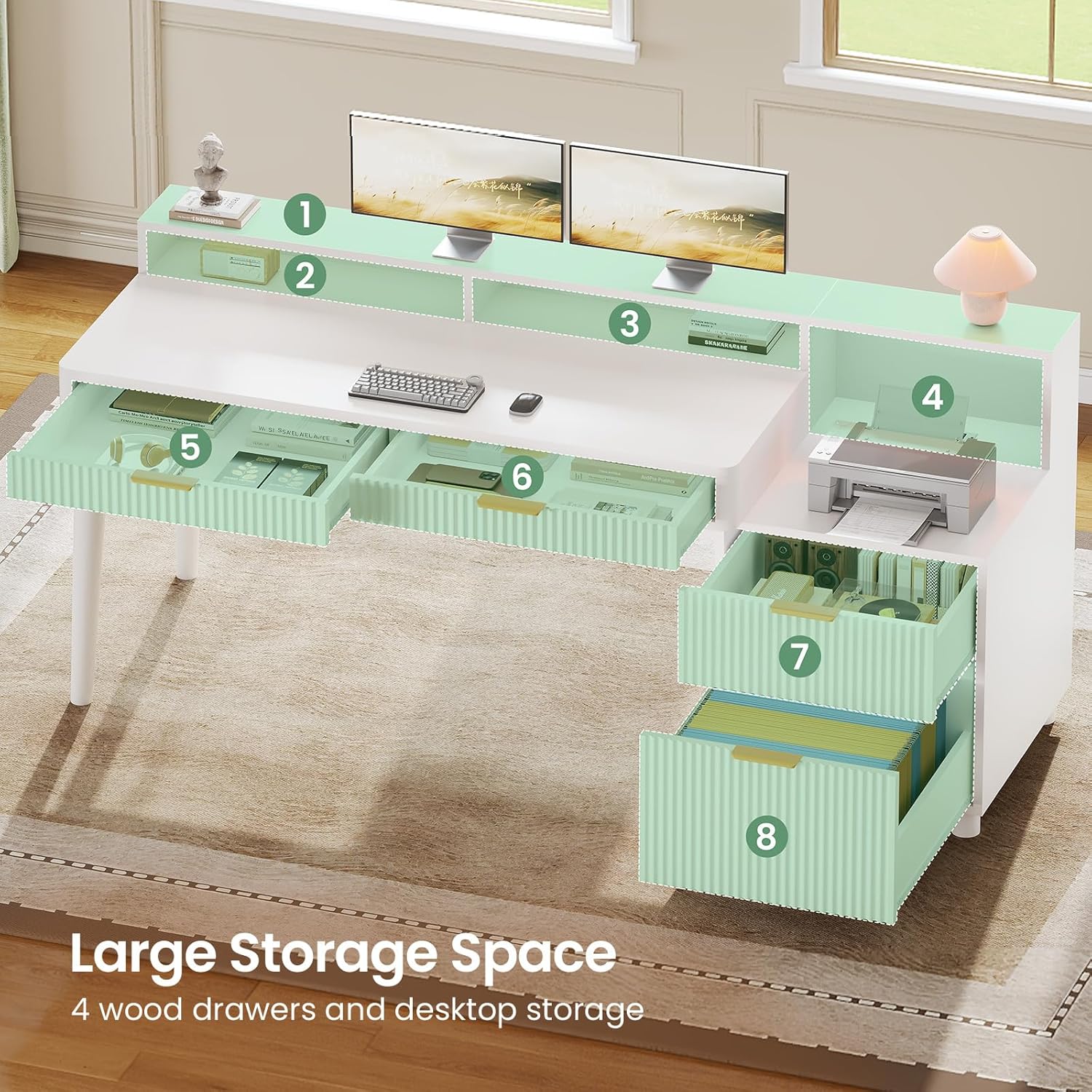
Figure 3.2: Large Storage Space. This image provides an overhead view, detailing the multiple storage areas including the four drawers and desktop compartments.
4. Operating Instructions
4.1 LED Light Strip
The integrated RGB LED light strip offers customizable lighting for your workspace.
- Control: The LED lights are controlled via a dedicated mobile application. Download the app by scanning the QR code in the included instruction manual or searching for the specified app name.
- Color Options: Choose from over 60,000 colors to match your preference or mood.
- Modes: The app provides 29 flashing modes, Mic Mode (lights react to sound), Music Sync (lights synchronize with music), and Timing Mode (schedule light on/off times).

Figure 4.1: LED Light Features. This image illustrates the various control options and modes available for the integrated LED lighting system.
4.2 Built-in Power Strip
The desk includes a recessed power strip for convenient device charging and power access.
- Outlets: Features 4 AC outlets (120V/12A) for standard electronics.
- USB Ports: Includes 2 USB ports (5V/2A) for charging mobile devices.
- Power Switch: A dedicated ON/OFF switch controls power to the strip.
- Power Cord: The power strip is equipped with a 6.5-foot power cord.

Figure 4.2: Recessed Power Strip. This image details the features of the integrated power strip, including its outlets and USB ports.
4.3 Storage Drawers
The desk is equipped with four wood drawers for organized storage.
- File Drawer: One drawer is designed to hold 3 sizes of files: Legal, Letter, and A4.
- Box Drawers: Three additional box drawers provide space for office supplies, gaming accessories, or personal items.
- Smooth Operation: Drawers feature high-quality slide rails for smooth opening and closing.

Figure 4.3: Multifunction Wood File Drawer. This image illustrates the versatility of the drawers for various storage needs, including file organization.
4.4 Full-size Monitor Stand
The integrated monitor stand helps improve posture and provides additional storage.
- Ergonomic Design: Elevates monitors to a comfortable viewing height, reducing neck and back strain.
- Additional Storage: Provides extra space beneath the monitors for books, sticky notes, pens, and other small office items.

Figure 4.4: Full-size Monitor Stand. This image highlights the ergonomic benefits of the monitor stand for maintaining correct posture.
5. Maintenance
Proper care will extend the life and appearance of your SEDETA desk.
- Cleaning: Wipe the desk surfaces with a damp cloth. Avoid harsh chemicals or abrasive cleaners that may damage the finish.
- Spills: Clean up spills immediately to prevent staining or damage to the engineered wood.
- Hardware: Periodically check and tighten all assembly hardware to ensure the desk remains stable.
- LED Lights: If the LED lights malfunction, check the power connection and app settings. Do not attempt to repair electrical components yourself.
6. Troubleshooting
If you encounter issues with your desk, refer to the following common solutions.
| Problem | Possible Cause | Solution |
|---|---|---|
| Desk is wobbly | Loose hardware; uneven floor | Tighten all screws. Adjust leg levelers if present, or place shims under legs on uneven surfaces. |
| Drawers do not slide smoothly | Improper installation; obstruction in slides | Recheck drawer slide installation. Remove any obstructions from the slides. |
| LED lights not working | Power disconnected; app issue | Ensure the LED strip is properly connected to power. Check the mobile app settings and connection. |
| Power strip not providing power | Power switch off; circuit breaker tripped | Ensure the power strip's ON/OFF switch is in the 'ON' position. Check your home's circuit breaker. |
If the problem persists, please contact SEDETA customer support.
7. Specifications
| Feature | Detail |
|---|---|
| Brand | SEDETA |
| Model Number | B0GD66RYG7 |
| Dimensions (D x W x H) | 19.7" x 59" x 31.8" |
| Weight | 84 Pounds |
| Material | Engineered Wood |
| Color | White |
| Number of Drawers | 4 (1 file drawer, 3 box drawers) |
| Special Features | Built-in Power Outlet, LED Lights, Full-size Monitor Stand |
| Power Strip | 4 AC Outlets (120V/12A), 2 USB Ports (5V/2A), 6.5-foot cord |
| LED Lights | RGB, APP Control, 60000+ Colors, Multiple Modes |
| Assembly Required | Yes |
| Care Instructions | Wipe with Damp Cloth |
8. Product Overview Video
Video 8.1: SEDETA Fluted Office Desk with 4 Drawers. This video provides a visual overview of the desk's features, including its design, storage, and functionality.
9. Warranty and Support
SEDETA products are manufactured to high-quality standards. For any questions, missing parts, or concerns regarding your product, please contact SEDETA customer support. Details for contacting support can typically be found on the product packaging or the seller's website.
