
Introduction
Welcome to your new Fastrack StreetStyle 5.0 Quartz Analog Watch, Model 68054PP01W. This watch combines classic analog timekeeping with modern digital functions, designed for daily wear and an active lifestyle. This manual provides detailed instructions for setup, operation, maintenance, and troubleshooting to ensure optimal performance and longevity of your timepiece.
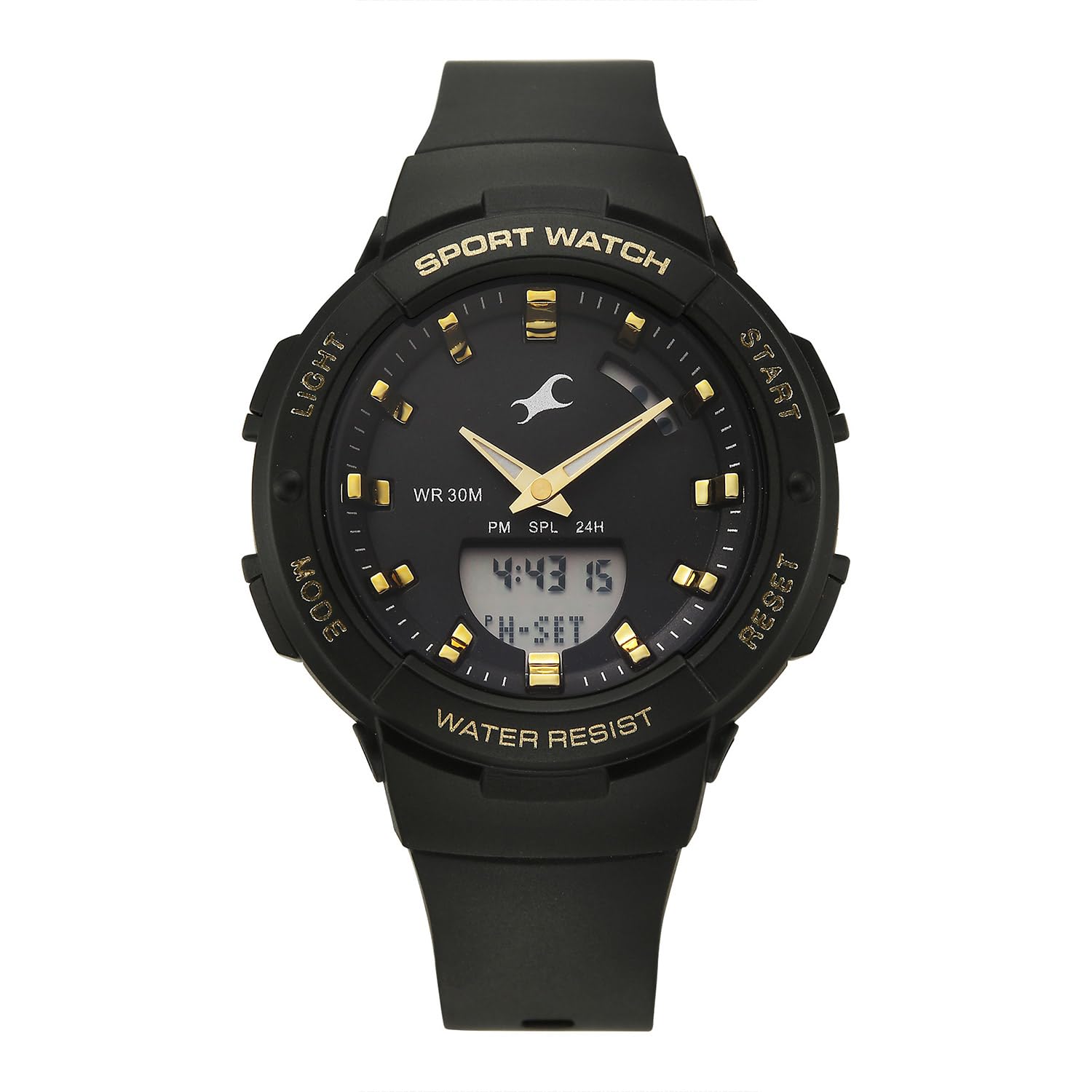
This image displays the front of the Fastrack StreetStyle 5.0 watch, highlighting its black dial, gold-tone hour markers, and both analog and digital time displays. The four control buttons (LIGHT, MODE, START, RESET) are visible on the sides of the case.
Setup
Before using your watch, please familiarize yourself with its basic components and initial settings.
Button Functions:
- LIGHT (Top Left): Activates the EL backlight for visibility in low light conditions.
- MODE (Bottom Left): Cycles through different display modes (Time, Alarm, Stopwatch, Countdown Timer, World Time).
- START (Top Right): Used to start/stop functions like stopwatch, adjust settings.
- RESET (Bottom Right): Used to reset functions, confirm settings, or change selection during setting.
Initial Digital Time and Date Setting:
- In the normal time display mode, press the MODE button repeatedly until the digital display shows the time setting screen (usually indicated by flashing digits).
- Use the START button to select the digit or setting you wish to adjust (e.g., seconds, hour, minute, year, month, day).
- Use the RESET button to increase the selected value. Hold RESET to rapidly advance the value.
- Continue this process until all desired time and date parameters are set.
- Press the MODE button to exit the setting mode and return to the normal time display.
Analog Hand Synchronization:
The analog hands are typically synchronized with the digital time. If they are not aligned, refer to the digital time setting instructions. Some models may require a specific button combination (e.g., holding RESET in time setting mode) to adjust analog hands. Consult the manufacturer's website if further adjustment is needed.
Operating Instructions
Using the EL Backlight:
Press the LIGHT button (Top Left) to illuminate the digital display for a few seconds. This feature is useful in dark environments.
Alarm Function:
Your watch supports multiple alarms (up to 4) with a snooze function and an hourly chime.
- Press the MODE button until the alarm mode is displayed (usually indicated by 'AL' or an alarm icon).
- Press START to select the alarm number (AL1, AL2, etc.) or to toggle between alarm time setting and alarm ON/OFF.
- When setting the alarm time, use START to select hours or minutes, and RESET to adjust the value.
- To activate/deactivate an alarm or the hourly chime, select the respective option and use RESET to toggle ON/OFF.
- Press MODE to exit. When an alarm sounds, press any button to stop it, or LIGHT for snooze (if enabled).
Stopwatch Function:
The stopwatch measures elapsed time.
- Press the MODE button until the stopwatch mode is displayed (usually 'ST' or 'STOP').
- Press START to begin timing.
- Press START again to pause timing.
- Press RESET while paused to reset the stopwatch to zero.
- To record lap times, press RESET while the stopwatch is running. The lap time will display briefly, and the stopwatch will continue running in the background.
Countdown Timer:
The countdown timer allows you to set a specific duration and counts down to zero.
- Press the MODE button until the countdown timer mode is displayed (usually 'TR' or 'TIMER').
- Use START to select hours, minutes, or seconds for setting the countdown duration.
- Use RESET to adjust the selected value.
- Once the desired time is set, press START to begin the countdown.
- Press START again to pause/resume the countdown.
- Press RESET while paused to reset the timer to its initial set time.
World Time Function:
View the current time in various major cities around the world.
- Press the MODE button until the World Time mode is displayed (usually 'WT' or 'WORLD').
- Use the START button to cycle through different city codes/time zones.
- The digital display will show the current time for the selected city.
Maintenance
Cleaning Your Watch:
Regularly wipe your watch with a soft, dry cloth to remove dust and dirt. For more stubborn grime, a slightly damp cloth can be used, followed by a dry one. Avoid using harsh chemicals or abrasive materials, as these can damage the watch's finish or strap.
Water Resistance:
Your Fastrack StreetStyle 5.0 watch has a water resistance depth of 30 meters (3 ATM). This means it is suitable for daily use and can withstand splashes or brief immersion in water. However, it is not recommended for swimming, showering, or diving. Do not operate buttons while the watch is wet or submerged.

A side profile view of the Fastrack StreetStyle 5.0 watch, illustrating the robust case design and the texture of the black Polyurethane (PU) strap with its buckle closure.
Battery Replacement:
The watch is powered by a quartz movement, which requires a battery. When the display dims or the watch stops functioning, it indicates a low battery. Battery replacement should be performed by a qualified watch technician to ensure proper sealing and water resistance integrity.
Troubleshooting
- Watch Not Running: Check if the battery is depleted. If the watch is new, ensure any protective plastic under the crown (if present) has been removed. If issues persist, a battery replacement may be needed.
- Incorrect Time/Date: Refer to the 'Initial Digital Time and Date Setting' section to reset the time and date. Ensure the AM/PM setting is correct.
- Digital Display is Dim or Blank: This usually indicates a low battery. Replace the battery.
- Buttons Not Responding: Ensure the watch is not wet. If the issue persists, there might be an internal malfunction requiring professional service.
- Water Inside Watch: If you notice condensation or water droplets inside the watch, stop using it immediately and take it to a service center. This indicates a breach in water resistance.
Specifications
| Feature | Detail |
|---|---|
| Model Name | StreetStyle 5.0 |
| Model Number | 68054PP01W |
| Display Type | Analog and Digital |
| Movement Type | Quartz |
| Water Resistance Depth | 30 Metres (3 ATM) |
| Clasp Type | Buckle |
| Band Material | Polyurethane (PU) |
| Dial Colour | Black |
| Band Colour | Black |
| Case Material | Acrylonitrile Butadiene Styrene |
| Crystal Material | Mineral Glass |
| Case Diameter | 41 Millimetres |
| Case Thickness | 16.8 Millimetres |
| Item Weight | 200 Grams |
| Country of Origin | India |

An image demonstrating the size of the Fastrack StreetStyle 5.0 watch. The watch case diameter is shown as 41mm, placed next to a standard credit card for visual scale.
Warranty
Your Fastrack StreetStyle 5.0 watch is covered by a manufacturer's warranty. Please refer to the warranty card included with your purchase for specific terms, conditions, and duration. The warranty typically covers manufacturing defects under normal use. Damage resulting from improper use, accidents, unauthorized repairs, or normal wear and tear may not be covered.

This image shows the rear of the Fastrack StreetStyle 5.0 watch, featuring the stainless steel case back with engraved model information and water resistance details. The black PU strap and its metal buckle are also visible.
Support
For further assistance, service, or warranty claims, please contact Fastrack customer support or visit an authorized service center. Keep your purchase receipt and warranty card handy for any service requests.
Manufacturer Contact Information: Titan Company Limited, #3, Sipcot Industrial Complex, Hosur, Tamil Nadu - 635126, India.
You can also visit the official Fastrack website for more information and support resources.