
Introduction
Thank you for choosing the Fastrack StreetStyle 5.0 Quartz Analog Watch. This manual provides detailed instructions for setting up, operating, and maintaining your watch to ensure optimal performance and longevity. This watch combines a classic analog display with a modern digital interface, offering precise timekeeping and a range of useful functions for your daily activities.
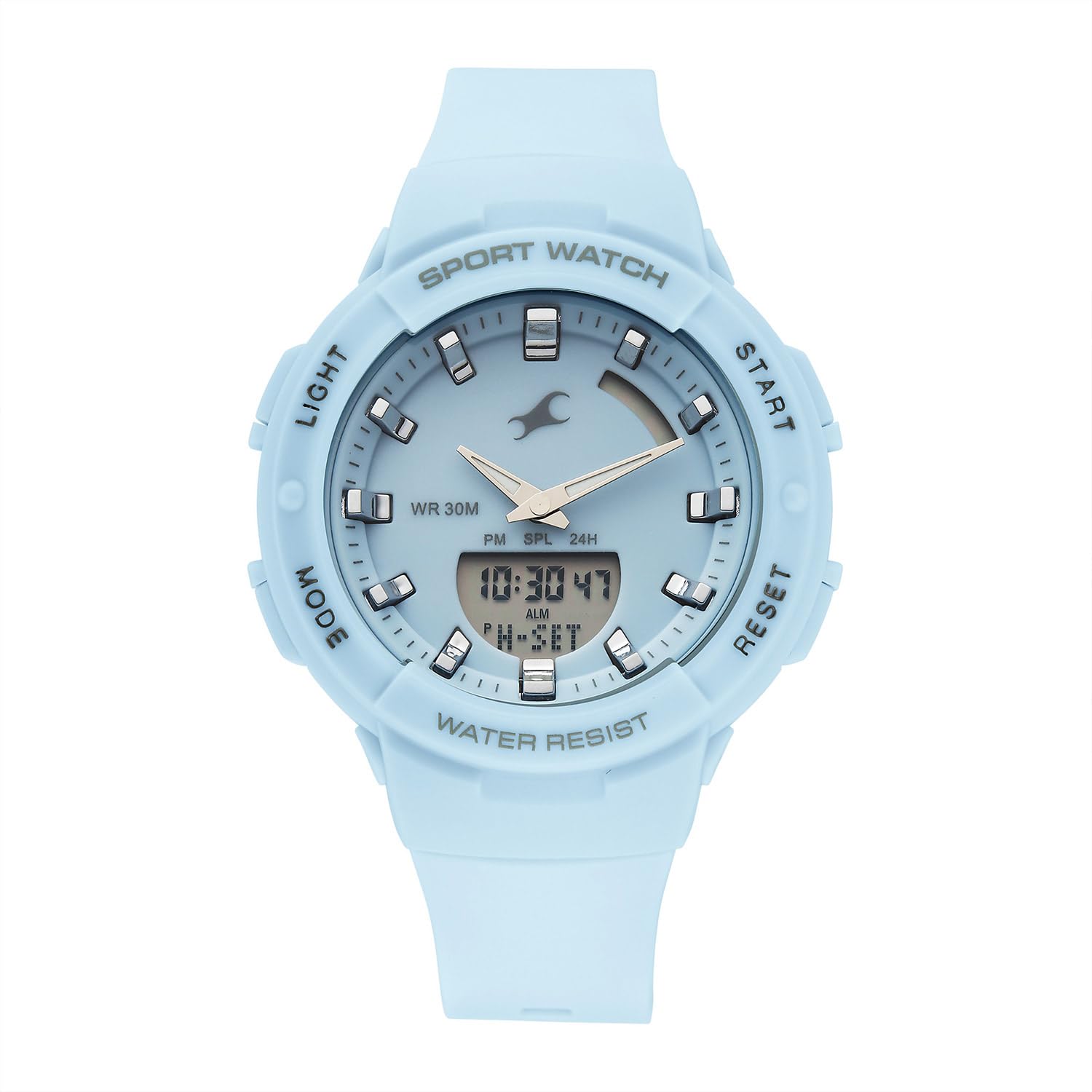
Front view of the Fastrack StreetStyle 5.0 watch, showcasing the blue dial, analog hands, and digital display. The four control buttons (LIGHT, MODE, START, RESET) are visible on the sides of the case.
Setup
Your Fastrack StreetStyle 5.0 watch comes with a pre-installed battery. Before first use, ensure any protective films are removed from the watch face and back case.
Initial Time Setting
- Identify Buttons: Your watch features four buttons: LIGHT (top left), MODE (bottom left), START (top right), and RESET (bottom right).
- Enter Time Setting Mode: Press the MODE button repeatedly until the digital time display starts flashing, indicating you are in setting mode.
- Adjust Time: Use the START button to increase the flashing value (hours, minutes, seconds). Use the RESET button to cycle through the different values (hours, minutes, 12/24-hour format).
- Set Date and Day: Continue pressing the RESET button to move to date, month, and day settings. Adjust these values using the START button.
- Exit Setting Mode: Once all settings are correct, press the MODE button to exit the setting mode. The digital display will stop flashing, and the analog hands will automatically synchronize with the set digital time.
Operating Instructions
Using the EL Backlight
To illuminate the digital display in low-light conditions, press the LIGHT button (top left). The backlight will remain active for a few seconds.
Alarm Function
- Access Alarm Mode: Press the MODE button repeatedly until 'ALM' or the alarm time is displayed.
- Set Alarm Time: While in Alarm Mode, press the RESET button to select the hour or minute digit you wish to adjust. Use the START button to change the value.
- Activate/Deactivate Alarm: Press the START button while in Alarm Mode to toggle the alarm ON/OFF. An alarm icon will appear when activated.
- Hourly Chime: Some models allow setting an hourly chime. Refer to the display for an 'SIG' or chime icon and use the START button to toggle it.
- Exit Alarm Mode: Press the MODE button to return to the regular time display.
Stopwatch Function
- Access Stopwatch Mode: Press the MODE button repeatedly until 'STW' or '00:00:00' is displayed.
- Start/Stop: Press the START button to begin timing. Press START again to pause.
- Lap/Split Time: While the stopwatch is running, press the RESET button to record a lap or split time. The stopwatch will continue running in the background.
- Reset: While the stopwatch is paused, press the RESET button to clear the stopwatch to '00:00:00'.
- Exit Stopwatch Mode: Press the MODE button to return to the regular time display.
World Time Function
Your watch includes a World Time function for tracking time in different global cities.
- Access World Time Mode: Press the MODE button repeatedly until 'WT' or a different city code is displayed.
- Select City: Use the START button to cycle through available city codes/time zones.
- Exit World Time Mode: Press the MODE button to return to the regular time display.
Maintenance
Cleaning Your Watch
To maintain the appearance of your watch, wipe it regularly with a soft, dry cloth. For stubborn dirt, a slightly damp cloth can be used, followed by a dry cloth. Avoid using chemical cleaners, solvents, or abrasive materials, as these can damage the watch's finish and seals.
Water Resistance
This watch is rated for WR 30M (3 ATM) water resistance. This means it is suitable for everyday use and can withstand splashes or brief immersion in water. It is not suitable for swimming, showering, or diving. Avoid operating buttons when the watch is wet to prevent water ingress.

Rear view of the Fastrack StreetStyle 5.0 watch, showing the stainless steel back case with engraved brand logo, model number (68054PP02), and water resistance rating (WR 30M).
Battery Replacement
The watch is powered by a button-cell battery. When the display dims or the watch stops functioning, it's time for a battery replacement. It is recommended to have the battery replaced by an authorized service center to ensure proper sealing and maintain water resistance.
Storage
When not in use, store your watch in a cool, dry place away from direct sunlight, extreme temperatures, and strong magnetic fields. Keeping it in its original packaging or a watch box can help protect it from dust and scratches.
Troubleshooting
- Watch Not Functioning: Check if the battery needs replacement. Ensure no buttons are stuck.
- Incorrect Time Display: Re-enter the time setting mode and adjust the time as per the 'Initial Time Setting' instructions.
- Analog Hands Not Synchronized: If analog hands do not match the digital time after setting, try resetting the watch (if a reset function is available, otherwise consult service).
- Digital Display Dim or Blank: This usually indicates a low battery. Replace the battery.
- Water Inside Watch: If you notice condensation or water droplets inside the watch, stop using it immediately and take it to an authorized service center.
For issues not covered here, please contact Fastrack customer support.
Specifications

Diagram illustrating the case size of the Fastrack StreetStyle 5.0 watch, indicating a 41 mm case diameter for reference.
| Feature | Detail |
|---|---|
| Brand | Fastrack |
| Model Name | StreetStyle 5.0 |
| Model Number | 68054PP02W |
| Display Type | Analog-Digital |
| Movement | Quartz |
| Water Resistance | 30 Meters (3 ATM) |
| Case Dimensions (LxWxH) | 50 x 41 x 17 Millimeters |
| Item Weight | 200 g |
| Batteries Included | Yes |
| Country of Origin | India |
Warranty and Support
Your Fastrack StreetStyle 5.0 watch is covered by a manufacturer's warranty against manufacturing defects. Please refer to the warranty card included with your purchase for specific terms, conditions, and duration. Keep your purchase receipt as proof of purchase for warranty claims.
For technical assistance, service, or warranty claims, please contact Fastrack customer support or visit an authorized Fastrack service center. You can find contact information and service center locations on the official Fastrack website: www.fastrack.in