
Introduction
Thank you for choosing the HAUSBELL Flat EDC Flashlight Model 5452. This compact and versatile flashlight is designed for everyday carry, offering multiple lighting modes and features for various situations. Its durable stainless steel body, stepless dimming, and integrated magnetic base make it a reliable tool for outdoor activities, work, and emergency use.
What's in the Box
- 1 x HAUSBELL Flat EDC Flashlight Model 5452
- 1 x USB-C Charging Cable
- 1 x User Manual
Product Features
The HAUSBELL Flat EDC Flashlight is engineered with a range of features to enhance functionality and user experience:
- Ultra-Flat Stainless Steel Body: Designed for comfortable pocket carry and enhanced durability.
- Stepless Dimming (1800 to 300 Lumens): Precision fidget dial allows smooth adjustment of main light brightness.
- Multi-functional Lighting: Includes cool white, warm white, mixed white, UV blacklight, red light, and an arrow-shaped RGB beacon.
- Magnetic Base: Allows hands-free attachment to metal surfaces for convenient work lighting.
- USB-C Rechargeable: Fast charging with a clear battery indicator.
- IPX6 Water Resistance: Provides protection against strong water jets.
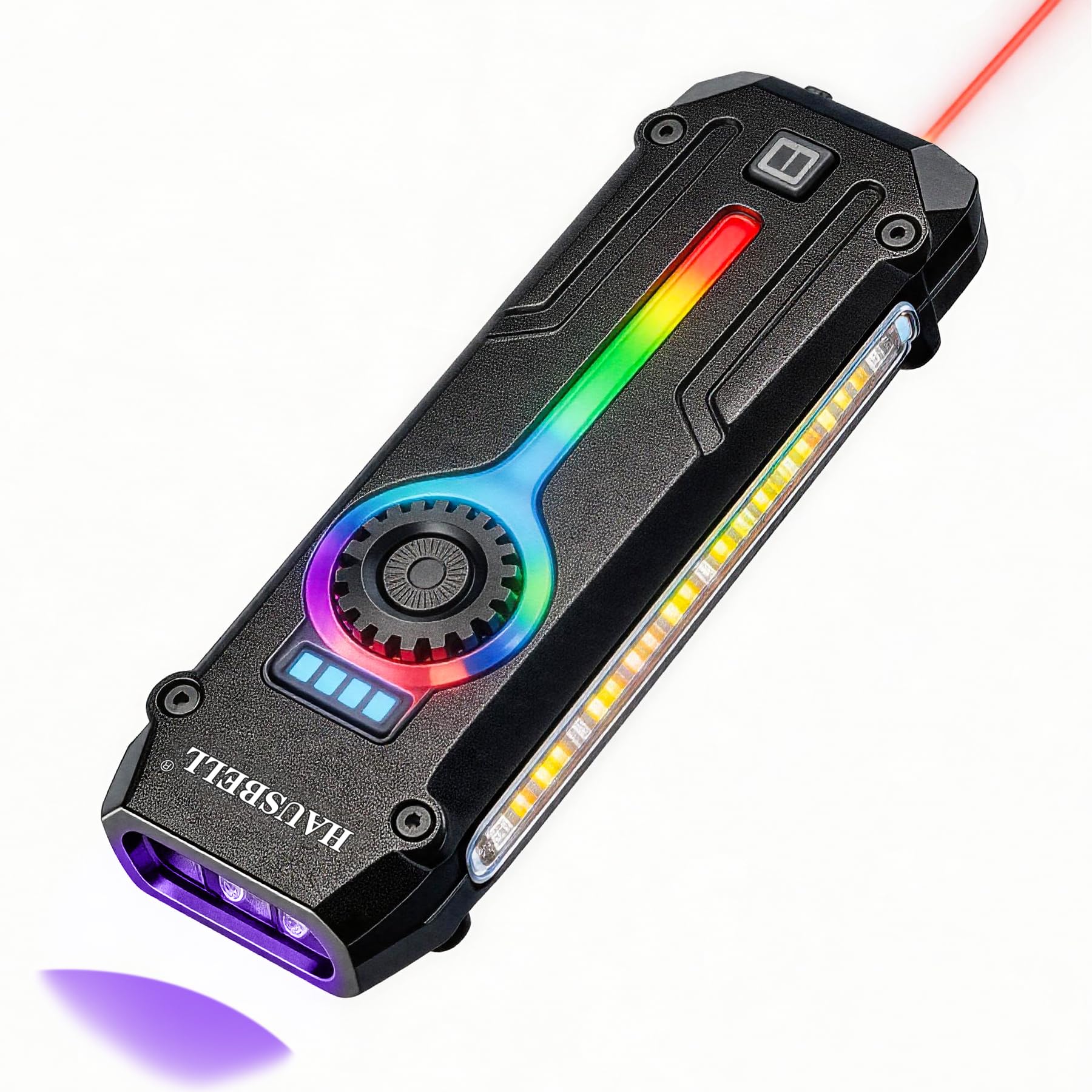
Figure 1: HAUSBELL Flat EDC Flashlight Model 5452.

Figure 2: Overview of the HAUSBELL Flat EDC Flashlight's compact design and features.
Setup
Initial Charging
Before first use, fully charge your HAUSBELL Flat EDC Flashlight.
- Locate the USB-C charging port on the tail of the flashlight. It is protected by a dust cover.
- Open the dust cover.
- Connect the included USB-C cable to the flashlight and to a 5V/2A USB power adapter or computer USB port.
- The battery indicator lights will show red during charging and turn green when fully charged.
- After charging, securely close the dust cover to maintain water resistance.

Figure 3: The flashlight features USB-C charging for convenience.
Operating Instructions
The HAUSBELL Flat EDC Flashlight features a main switch/knob and an auxiliary button for controlling various lighting modes.

Figure 4: Visual guide to the main switch/knob and auxiliary button functions.
Main Light Control (Front LEDs)
Use the Main Switch/Knob to control the front LEDs:
- Single-Click: Press the main switch/knob once to turn on the main light. Each subsequent single click cycles through the following modes:
- Cool White Light
- Warm White Light
- Cool/Warm Mixed Light
- Strobe Mode
- OFF
- Stepless Dimming: While the main light is ON, rotate the main switch/knob clockwise to increase brightness or counter-clockwise to decrease brightness. The brightness can be adjusted from 300 to 1800 lumens.
- Memory Function: If the main light is left on a particular setting for approximately 10 seconds before turning off, it will memorize that setting and return to it when turned on again.
- Double-Click: From OFF, double-click the main switch/knob to directly activate the UV Blacklight mode. Single-click again to turn off.

Figure 5: The main light offers Cool White, Warm White, and Mixed White modes.

Figure 6: Stepless dimming allows precise brightness control, and the UV mode helps detect hidden stains.
Side Light Control (COB Work Light)
Use the Auxiliary Button for the side COB work light:
- Long-Press: Press and hold the auxiliary button for about 3 seconds to turn the side light ON.
- Single-Click: After the side light is ON, single-click the auxiliary button to cycle through the following light modes:
- Cool White Side Light
- Warm White Side Light
- Cool/Warm Mixed Side Light
- OFF
- Stepless Dimming: While the side light is ON, rotate the main switch/knob to adjust its brightness.
Auxiliary Light Control (Red Laser & RGB Beacon)
The auxiliary button also controls the red laser and RGB mood lights:
- Single-Click: Press the auxiliary button once to activate the Red Laser Mode. Single-click again to turn off.
- Double-Click: Double-click the auxiliary button to turn on the Red Flashing Mood Light (arrow-shaped beacon).
- Long-Press: Press and hold the auxiliary button to cycle through the Color-Chasing Flow Light and Multi-Color Flashing Mood Light modes.

Figure 7: The flashlight includes UV light for detection and a red laser for various uses, including pet play.

Figure 8: The arrow-shaped RGB beacon enhances visibility and can be used for signaling.
Video 1: Official HAUSBELL video demonstrating the various lighting modes and features of the Flat EDC Flashlight.
Maintenance
- Cleaning: Wipe the flashlight with a soft, damp cloth. Do not use abrasive cleaners or solvents.
- Water Resistance: The flashlight is IPX6 water-resistant. Ensure the USB-C port dust cover is securely closed to maintain water resistance. Avoid submerging the flashlight in water.
- Storage: Store the flashlight in a cool, dry place when not in use for extended periods. Charge the battery every 3-6 months to prolong its lifespan.
Troubleshooting
| Problem | Possible Cause | Solution |
|---|---|---|
| Flashlight does not turn on. | Low battery. | Charge the flashlight using the provided USB-C cable. |
| Light output is dim. | Low battery or dimming setting. | Charge the flashlight. Rotate the main switch/knob clockwise to increase brightness. |
| UV light or Red Laser not working. | Incorrect mode selection. | Double-click main switch for UV. Single-click auxiliary button for Red Laser. |
| Water ingress. | USB-C port dust cover not closed. | Ensure the dust cover is securely closed after charging. |
Specifications
| Feature | Detail |
|---|---|
| Brand | HAUSBELL |
| Model Number | 5452 (SD-5452-01) |
| Max Lumens | 1800 High Lumens (Main Light) |
| Dimming | Stepless Dimming (300-1800 lumens) |
| Light Source Type | LED |
| Special Features | Side COB Work Light, Red Light (Pet/Cat Toy), UV Black Light (Detection), RGB Ambient Arrow Light, Magnetic Base & Clip, Hands-Free, Rugged Stainless Steel Body, USB-C Rechargeable, Power Indicator |
| Material | Polycarbonate, Stainless Steel |
| Water Resistance Level | IPX6 (Waterproof) |
| Battery Type | Lithium Ion (1 included) |
| Battery Life | Up to 48 Hours |
| Item Weight | 4.16 ounces |
| Item Dimensions (L x W x H) | 4.2" x 1.3" x 0.6" |
Warranty and Support
This product is covered by an 18-month limited warranty. The warranty covers defects in materials or workmanship. Damage caused by misuse, disassembly, or improper handling is not covered. For assistance, please contact Customer Support at: Hausbell.U@outlook.com.
Environmental Note: Please dispose of used batteries and electronic devices according to local regulations.
Enjoy Your Adventures!