
1. Important Safety Instructions
Please read all instructions carefully before using this appliance. Failure to follow these instructions may result in electric shock, fire, or serious injury.
- This appliance is for household use only. Do not use outdoors or on wet surfaces.
- Do not allow children to operate the vacuum cleaner. Close supervision is necessary when used near children.
- Do not pick up flammable or combustible liquids, such as gasoline, or use in areas where they may be present.
- Do not pick up anything that is burning or smoking, such as cigarettes, matches, or hot ashes.
- Do not use without the dust cup and filter in place.
- Turn off the appliance before connecting or disconnecting the battery pack, or before performing any maintenance.
- Use only the charger supplied by the manufacturer to recharge.
- Store the vacuum cleaner indoors in a cool, dry place.
2. Product Overview
Familiarize yourself with the components of your MONSGA M100 Cordless Vacuum.
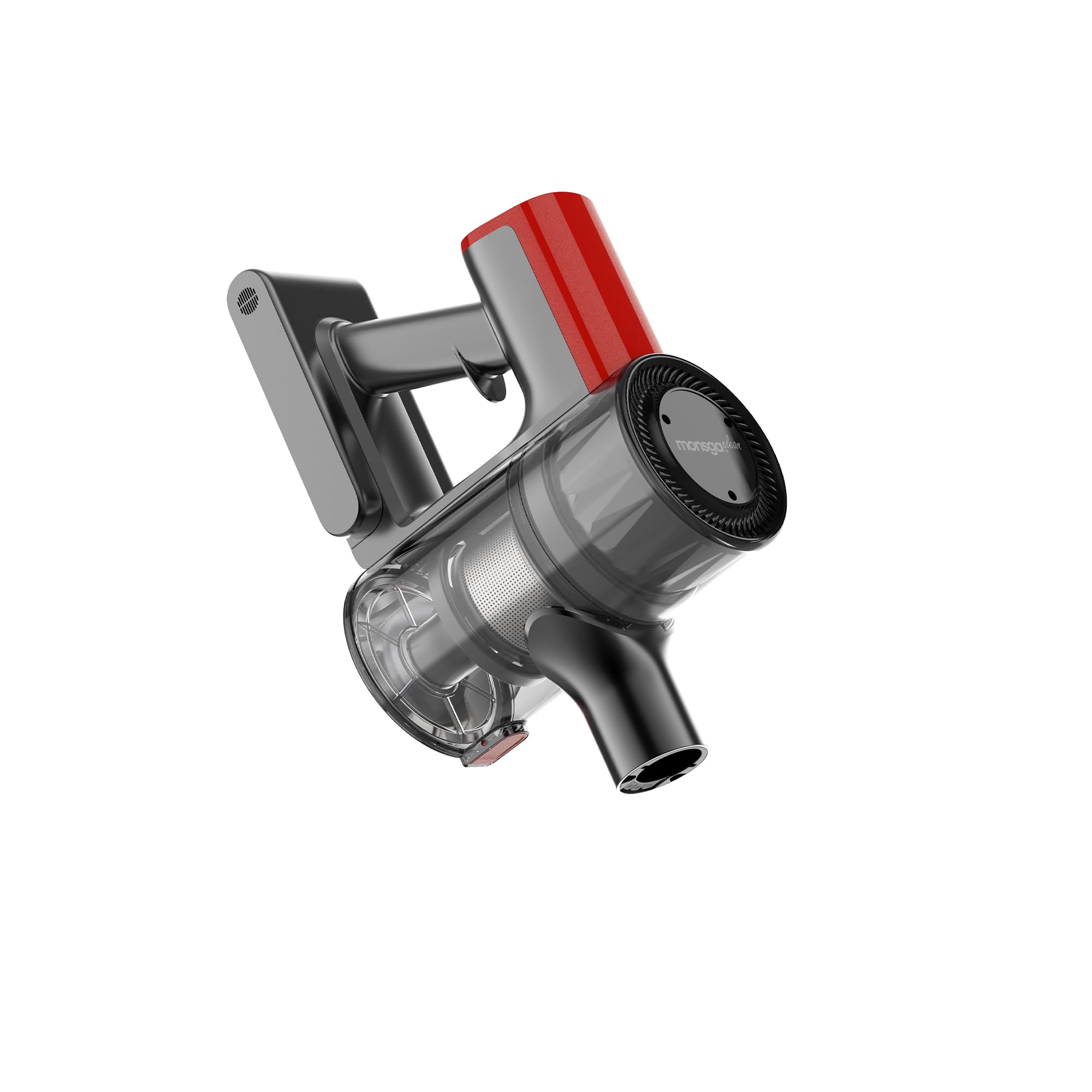
Image 1: Main unit of the MONSGA M100 Cordless Vacuum. This shows the handle, motor housing, and dustbin assembly.
Components:
- Main Body: Contains the motor, battery, and control panel.
- Dust Cup: Collects dust and debris. Features a 0.5-liter capacity.
- HEPA Filter: Traps fine dust particles for cleaner exhaust air.
- Extension Wand: Connects the main body to the floor brush or accessories.
- Motorized Floor Brush: For cleaning various floor types.
- Accessory Kit: Includes various nozzles and brushes for specialized cleaning (e.g., crevice tool, dusting brush).
- Charging Adapter: For recharging the vacuum's battery.
3. Setup and Initial Use
3.1 Assembly
- Unpack: Carefully remove all components from the packaging.
- Attach Dust Cup: Ensure the dust cup is securely attached to the main body.
- Connect Extension Wand: Insert the extension wand into the main body until it clicks into place.
- Attach Floor Brush: Connect the motorized floor brush to the other end of the extension wand until it clicks. For handheld use, attach accessories directly to the main body.
3.2 Charging the Battery
The MONSGA M100 is battery-powered. Fully charge the battery before first use.
- Connect the charging adapter to the charging port on the main body.
- Plug the adapter into a standard wall outlet.
- The charging indicator light will illuminate, typically showing red during charging and turning green when fully charged.
- Allow approximately 4-5 hours for a full charge.
4. Operating Instructions
4.1 Power On/Off
- Press the power button located on the handle to turn the vacuum on.
- Press the power button again to turn the vacuum off.
4.2 Suction Modes
The MONSGA M100 typically features multiple suction modes for different cleaning needs.
- Standard Mode: Suitable for everyday cleaning on hard floors and low-pile carpets.
- Max Mode: Provides stronger suction for deep cleaning carpets or heavily soiled areas. Press the mode button to switch between modes.
4.3 Using Accessories
Detach the extension wand and floor brush to use the vacuum in handheld mode with various accessories:
- Crevice Tool: Ideal for narrow gaps, corners, and edges.
- Dusting Brush: For delicate surfaces, upholstery, and curtains.
5. Maintenance and Care
Regular maintenance ensures optimal performance and extends the lifespan of your vacuum.
5.1 Emptying the Dust Cup
- Ensure the vacuum is turned off.
- Press the dust cup release button to detach the dust cup from the main body.
- Hold the dust cup over a trash bin and press the bottom release latch to empty contents.
- Reattach the dust cup securely.
5.2 Cleaning the HEPA Filter
Clean the HEPA filter regularly (every 2-4 weeks, depending on usage) to maintain suction power.
- Remove the dust cup and then carefully remove the HEPA filter.
- Tap the filter gently over a trash bin to remove loose dust.
- If heavily soiled, rinse the filter under cold running water. Do not use detergent.
- Allow the filter to air dry completely for at least 24 hours before reinserting. Do not use the vacuum with a wet filter.
5.3 Cleaning the Motorized Floor Brush
Periodically check the brush roll for tangled hair or debris.
- Turn off the vacuum and detach the floor brush.
- Use scissors or a brush to remove any hair or fibers wrapped around the brush roll.
- Ensure the brush roll spins freely before reattaching.
6. Troubleshooting
Refer to this section for common issues and their solutions.
| Problem | Possible Cause | Solution |
|---|---|---|
| Vacuum does not turn on. | Battery is not charged. | Charge the battery fully. |
| Battery not properly inserted. | Ensure battery is securely clicked into place. | |
| Low suction power. | Dust cup is full. | Empty the dust cup. |
| Filter is clogged. | Clean or replace the HEPA filter. | |
| Hose or nozzle is blocked. | Check for and remove any blockages in the extension wand or floor brush. | |
| Brush roll not spinning. | Hair or debris tangled in brush roll. | Clean the brush roll as described in Section 5.3. |
7. Specifications
- Brand: MONSGA
- Model Name: M100
- Special Feature: Cordless
- Filter Type: HEPA Filter
- Included Components: Accessory Kit
- Capacity: 0.5 Liters
- Form Factor: Handheld
- Color: Silver
- Product Dimensions: 10"L x 10"W x 10"H
- Item Weight: 2 pounds
- Surface Recommendation: All floors
- Power Source: Battery Powered
8. Warranty and Support
MONSGA products are designed for reliability and performance. This product comes with a standard manufacturer's warranty against defects in materials and workmanship.
For warranty claims, technical support, or to purchase replacement parts, please contact MONSGA customer service through the official MONSGA website or your retailer's support channels. Please have your model number (M100) and purchase information ready.
Online Support: Visit the official MONSGA website for FAQs and support resources. MONSGA Official Store