
1. Introduction
This manual provides essential information for the safe and efficient operation of your Jecod MDP-2500 Sine Wave Water Return Pump. The MDP-2500 is designed for use in marine and freshwater aquarium systems, offering precise flow control and quiet operation.

Figure 1: Jecod MDP-2500 Sine Wave Water Return Pump with Controller.
Key Features:
- Sine Wave Technology: Ensures quiet and smooth operation.
- Wireless Control: Integrated WiFi for remote control via a mobile application.
- Digital Controller: Provides direct flow adjustment and power display.
- Safety Features: Includes IC electronic detection for dry run and locked rotor protection, with automatic power-off.
- Durable Construction: Features a wear-resistant ceramic shaft and no copper components, suitable for both marine and freshwater environments.
- Memory Function: Recalls previous settings after power interruption.
2. Safety Instructions
Read all safety warnings and instructions carefully before installation and operation. Failure to follow these instructions may result in electric shock, fire, or serious injury.
- Always disconnect the power supply before performing any maintenance or installation.
- Ensure the pump is fully submerged when operating to prevent dry running, which can damage the motor.
- Do not operate the pump if the power cord or plug is damaged.
- This pump is designed for water circulation only. Do not use with flammable or corrosive liquids.
- Keep the controller and power adapter away from water to prevent electrical hazards.
- Ensure all electrical connections are secure and protected from moisture.
3. Package Contents
Verify that all components are present and undamaged upon opening the package. If any items are missing or damaged, contact your retailer.

Figure 2: Typical package contents for the Jecod MDP-2500.
- Jecod MDP-2500 Sine Wave Water Return Pump
- Digital Controller
- Power Adapter
- Inlet/Outlet Fittings
- User Manual (this document)
4. Setup Instructions
Follow these steps for proper installation of your MDP-2500 pump.
4.1 Pump Placement
- Position the pump in your sump or desired location, ensuring it is fully submerged in water.
- Ensure there is adequate space around the pump for water flow and heat dissipation.
4.2 Connecting Fittings
- Attach the appropriate inlet and outlet fittings to the pump. The MDP-2500 supports various pipe sizes (20/25 mm).
- Securely connect your aquarium plumbing to the pump's inlet and outlet.
4.3 Electrical Connections
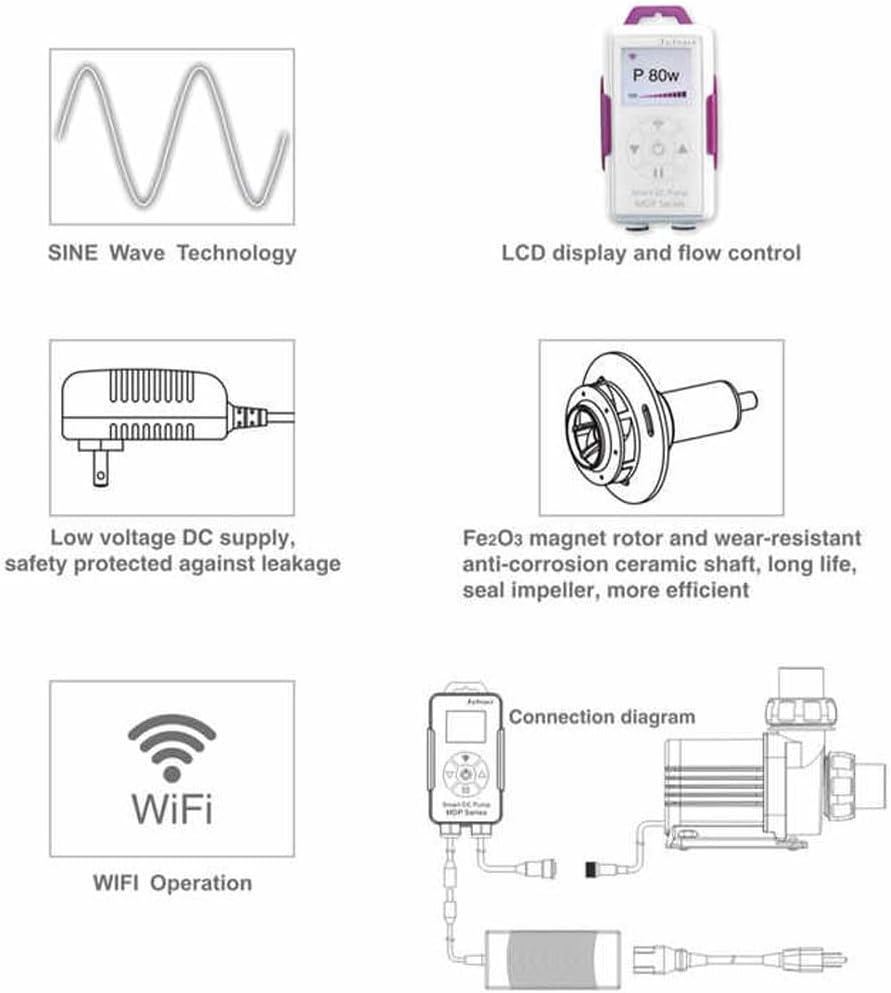
Figure 3: Connection diagram for the Jecod MDP-2500.
- Connect the pump cable to the digital controller.
- Connect the power adapter to the digital controller.
- Plug the power adapter into a grounded electrical outlet.
4.4 WiFi Setup (Optional)

Figure 4: Jecod MDP-2500 with WiFi control capability.
- Download the official Jecod/Jebao app from the Apple App Store or Google Play Store.
- Follow the in-app instructions to connect your pump to your home WiFi network. The pump supports Smart AP mode, which does not require a router for initial setup.
- Once connected, you can control pump settings remotely via the app.
5. Operating Instructions
The MDP-2500 pump can be operated via its digital controller or the mobile application.
5.1 Power On/Off
- Once connected to power, the pump will automatically turn on and resume its last saved setting due to the memory function.
- To manually turn off the pump, press the power button on the controller. Press again to turn it back on.
5.2 Adjusting Flow Rate
- Using the Controller: Use the '+' and '-' buttons on the digital controller to increase or decrease the flow rate. The current power consumption (e.g., P 23w) and flow level will be displayed on the LCD screen.
- Using the Mobile App: Open the Jecod/Jebao app and select your pump. Adjust the flow rate using the controls provided within the application interface.
6. Maintenance
Regular maintenance ensures optimal performance and extends the lifespan of your pump.
6.1 Cleaning the Impeller and Pump Housing
- Frequency: Clean the pump every 1-3 months, or more frequently if water flow decreases significantly.
- Procedure:
- Disconnect the pump from the power supply.
- Remove the pump from the water and disconnect any attached plumbing.
- Carefully disassemble the pump housing to access the impeller. Refer to the pump's design for specific disassembly steps.
- Clean the impeller, ceramic shaft, and inside of the pump housing using a soft brush and clean water. Remove any debris, algae, or mineral deposits.
- Rinse all components thoroughly.
- Reassemble the pump, ensuring all parts are correctly seated and sealed.
6.2 General Cleaning
- Wipe down the exterior of the pump and controller with a damp cloth. Do not use harsh chemicals or abrasive cleaners.
- Ensure the controller and power adapter remain dry.
7. Troubleshooting
If you encounter issues with your MDP-2500 pump, refer to the following common problems and solutions.
| Problem | Possible Cause | Solution |
|---|---|---|
| Pump does not turn on | No power supply; Loose connection; Faulty controller/adapter | Check power outlet; Ensure all cables are securely connected; Test with another power source if possible. |
| Low water flow | Clogged impeller/intake; Air in pump; Incorrect flow setting | Clean impeller and intake screen; Ensure pump is fully submerged and free of air bubbles; Increase flow setting on controller/app. |
| Pump is noisy | Debris in impeller; Air in pump; Improper seating | Clean impeller; Remove air from pump by gently tilting; Ensure pump is securely placed and not vibrating against surfaces. |
| WiFi connection issues | Incorrect WiFi password; Router too far; App issues | Verify WiFi password; Move pump closer to router or use AP mode; Restart app and pump. |
8. Specifications
Detailed technical specifications for the Jecod MDP-2500 pump.
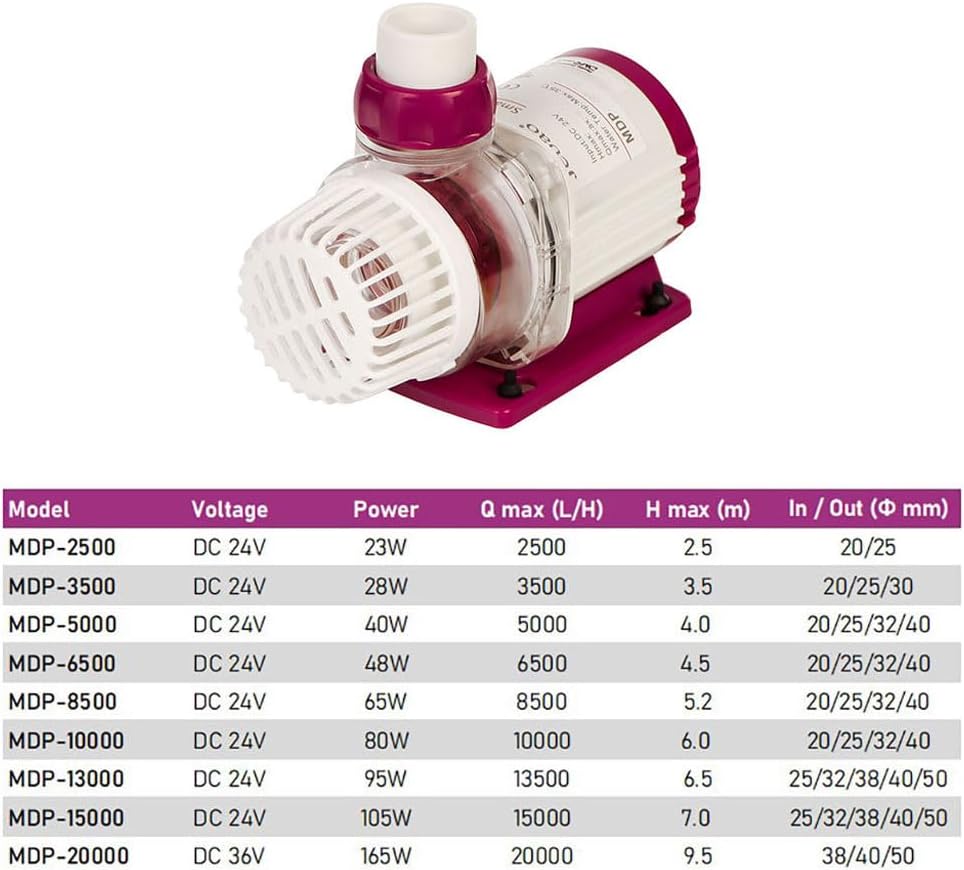
Figure 5: Jecod MDP Series Pump Specifications.
| Specification | Value (MDP-2500) |
|---|---|
| Model | MDP-2500 |
| Voltage | DC 24V |
| Power | 23 Watts |
| Max Flow (Q max) | 2500 L/H (660 GPH) |
| Max Head (H max) | 2.5 meters (8.2 feet) |
| Inlet/Outlet Diameter | 20/25 mm |
| Dimensions (L x W x H) | 6" x 3" x 4" (approx.) |
| Material | Plastic (No Copper Components) |
| Power Source | AC/DC Adapter (110-120V 60Hz input) |
| Features | Sine Wave Technology, WiFi Control, Memory Function, Dry Run Protection, Locked Rotor Protection |
9. Warranty and Support
This product comes with a standard manufacturer's warranty. Please refer to the warranty card included with your purchase or contact your retailer for specific warranty terms and conditions.
For technical support or further assistance, please contact the retailer where you purchased the product or visit the official Jecod/Jebao website for contact information.


