
1. Introduction
The Jecod MOW-22 Sine Wavemaker Pump is designed to create natural wave patterns and optimal water circulation in aquariums up to 60 inches. This device features a unique Wi-Fi control system, allowing for multiple wave styles and functions to meet diverse aquatic environment needs. The MOW series incorporates improved motor technology for enhanced performance and reliability.
Key features include:
- 100V 60Hz US plug, 50W, providing 5822 GPH flow.
- Unique Wi-Fi control system for diverse wave patterns.
- Night sensor to automatically reduce pump speed when tank lights are off.
- 180-degree adjustable outlet flow direction.
- Wireless control for synchronizing multiple wavemakers.
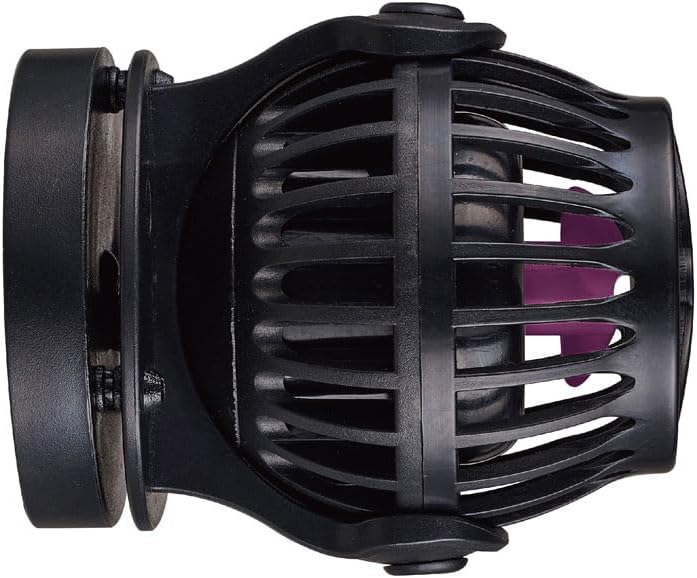
Figure 1: Side view of the Jecod MOW-22 Sine Wavemaker Pump, showing the main body and mounting mechanism.
2. Safety Instructions
Please read and understand all safety instructions before operating this device. Failure to follow these instructions may result in electric shock, fire, or serious injury.
- Always disconnect power before performing any maintenance or installation.
- This device is designed for indoor aquarium use only. Do not use it for other purposes.
- Ensure the power cord is not damaged. Do not operate with a damaged cord or plug.
- Do not immerse the controller or power adapter in water.
- Keep out of reach of children.
- Ensure a drip loop is formed with the power cord to prevent water from traveling along the cord and reaching the electrical outlet.
- Only use the provided power adapter with the pump.
3. Package Contents
Verify that all items are present and undamaged upon opening the package:
- Jecod MOW-22 Sine Wavemaker Pump
- Wi-Fi Controller
- Power Adapter
- Mounting Magnet
- Instruction Manual (this document)
4. Setup
- Mounting the Pump:
Position the wavemaker inside the aquarium at the desired location. Place the external magnet on the outside of the aquarium glass, directly opposite the internal magnet of the pump. Ensure the pump is securely attached to the glass. The pump's outlet flow direction can be adjusted 180 degrees to optimize water movement.

Figure 2: Perspective view of the Jecod MOW-22 Sine Wavemaker Pump, highlighting the impeller and magnetic mount.
- Connecting the Controller:
Connect the pump cable to the Wi-Fi controller. Then, connect the power adapter to the Wi-Fi controller and plug the adapter into a standard 100V 60Hz US electrical outlet. Ensure a drip loop is present.
- Wi-Fi Configuration:
Refer to the separate Wi-Fi Controller manual or the manufacturer's website for detailed instructions on connecting the controller to your home Wi-Fi network and configuring wave patterns. This system allows for advanced customization and synchronization of multiple wavemakers.
5. Operating Instructions
Once the pump is installed and connected to power, and the Wi-Fi controller is configured, you can begin operating the wavemaker.
- Wave Modes: Use the Wi-Fi application to select from various pre-programmed wave modes or customize your own. Adjust flow intensity and frequency to simulate natural ocean currents.
- Night Sensor: The integrated night sensor automatically detects low light conditions. When the aquarium lights dim or turn off, the pump will reduce its speed to a gentler flow, mimicking natural nighttime conditions and reducing stress on aquatic life.
- Synchronization: If you have multiple Jecod MOW wavemakers, use the Wi-Fi controller to synchronize their operation, creating complex and dynamic water movements across the entire aquarium.
- Feed Mode: Activate feed mode via the controller to temporarily pause the pump, allowing fish to feed without food being immediately swept away. The pump will resume normal operation after a set period.
6. Maintenance
Regular maintenance ensures optimal performance and extends the lifespan of your wavemaker pump.
- Weekly Check: Visually inspect the pump for any debris or algae buildup on the impeller or protective cage.
- Monthly Cleaning:
- Disconnect the pump from power.
- Remove the pump from the aquarium.
- Carefully disassemble the protective cage and remove the impeller.
- Clean all components with a soft brush and warm water. For stubborn algae or mineral deposits, a diluted vinegar solution can be used, followed by thorough rinsing.
- Inspect the impeller for any signs of wear or damage. Replace if necessary.
- Reassemble the pump, ensuring all parts are correctly seated.
- Power Cord: Periodically check the power cord for any nicks, cuts, or damage. Replace the unit if the cord is compromised.
7. Troubleshooting
| Problem | Possible Cause | Solution |
|---|---|---|
| Pump not running | No power; Impeller jammed; Controller issue | Check power connection; Clean impeller; Reset controller |
| Weak or inconsistent flow | Debris in impeller; Algae buildup; Incorrect mode setting | Clean pump and impeller; Adjust mode via Wi-Fi controller |
| Pump making unusual noise | Debris in impeller; Worn impeller; Improper mounting | Clean impeller; Replace impeller; Re-secure mounting magnet |
| Wi-Fi connectivity issues | Router distance; Incorrect password; Network interference | Move controller closer to router; Re-enter Wi-Fi password; Check router settings |
If troubleshooting steps do not resolve the issue, please contact customer support.
8. Specifications
- Model: MOW-22
- Part Number: PET-MOW22-1
- Power Input: 100V, 60Hz
- Power Consumption: 50W
- Maximum Flow Rate: 5822 GPH (Gallons Per Hour)
- Recommended Tank Size: Up to 60 inches
- Product Dimensions: 3.7 x 4.72 x 3.7 inches
- Material: Plastic
- Style: Submersible
- Control: Wi-Fi Controller
- Manufacturer: JEBAO INC
9. Warranty and Support
Jecod products are manufactured to high-quality standards. This product comes with a standard manufacturer's warranty against defects in materials and workmanship. Please refer to the warranty card included in your package or visit the official Jecod website for specific warranty terms and conditions.
For technical support, troubleshooting assistance, or warranty claims, please contact your retailer or Jecod customer service. Contact information can typically be found on the product packaging or the official Jecod website.
Please retain your proof of purchase for warranty purposes.