
Introduction
The blafili BiCast is a professional Bluetooth 5.2 audio transmitter designed for use with mixers, PA systems, and other professional stage equipment. It features both XLR and USB-C connectivity, enabling wireless audio streaming with support for aptX HD and aptX Adaptive codecs. This device allows for dual-device streaming and offers up to 16 hours of battery life, providing a reliable solution for wireless audio transmission.
Product Overview
Key Features
- Professional Bluetooth Transmitter: Integrates XLR and USB-C connectivity for mixers, PA systems, and professional stage gear with Bluetooth 5.2 streaming.
- Dual Device Streaming: Capable of streaming audio to two Bluetooth speakers or two Bluetooth headphones simultaneously.
- Premium Audio Codecs: Supports aptX HD and aptX Adaptive technologies for high-quality wireless sound.
- Extended Battery Life: Built-in rechargeable battery provides up to 16 hours of continuous wireless streaming.
- Compact Design: Lightweight tabletop mount with a durable ABS body and aluminum-alloy parts, featuring simple on-device controls.
Package Contents
- 1 x blafili BiCast Bluetooth Audio Transmitter
- 1 x User Manual

Image: blafili BiCast transmitter, USB-C cable, and user manual.
Device Layout

Image: Labeled diagram of the blafili BiCast device.
- USB-C Charging Port/Audio Input: Used for charging the device and for USB-C audio input from compatible devices like computers.
- POWER LED: Indicates power status.
- POWER ON/OFF, Play/Pause & Switch Bluetooth Codec Button: Press and hold to power on/off. Short press to play/pause audio. Double press to switch between supported Bluetooth codecs.
- PAIR LED: Indicates Bluetooth pairing status.
- PAIR Button: Press to initiate Bluetooth pairing mode.
- Battery Status LED: Indicates the current battery charge level.
- XLR Input: Standard XLR male connector for connecting to mixers, PA systems, and other audio equipment.
Setup
Initial Charge
Before first use, fully charge the blafili BiCast using the provided USB-C cable and a standard 5V USB power adapter (not included). The Battery Status LED will indicate charging progress and completion.
Connecting to a Mixer or PA System (XLR)
- Ensure the blafili BiCast is powered off.
- Connect the XLR male connector of the BiCast directly into an available XLR female output on your mixer, audio interface, or PA system.
- Power on the BiCast by pressing and holding the POWER button.
Connecting to a Computer (USB-C Audio Input)
- Connect the USB-C port of the BiCast to a USB-C port on your computer using a compatible USB-C cable.
- The BiCast will function as a USB-C DAC (Digital-to-Analog Converter) for high-quality audio playback from your computer.
- Select the blafili BiCast as the audio output device in your computer's sound settings.
Operating Instructions
Power On/Off
- To Power On: Press and hold the POWER button until the POWER LED illuminates.
- To Power Off: Press and hold the POWER button until the POWER LED turns off.
Bluetooth Pairing
- Ensure the blafili BiCast is powered on.
- Press the PAIR button. The PAIR LED will flash, indicating the device is in pairing mode.
- On your Bluetooth receiving device (e.g., Bluetooth speaker, headphones), enable Bluetooth and search for available devices.
- Select "blafili BiCast" from the list of found devices.
- Once connected, the PAIR LED on the BiCast will stop flashing and remain solid.
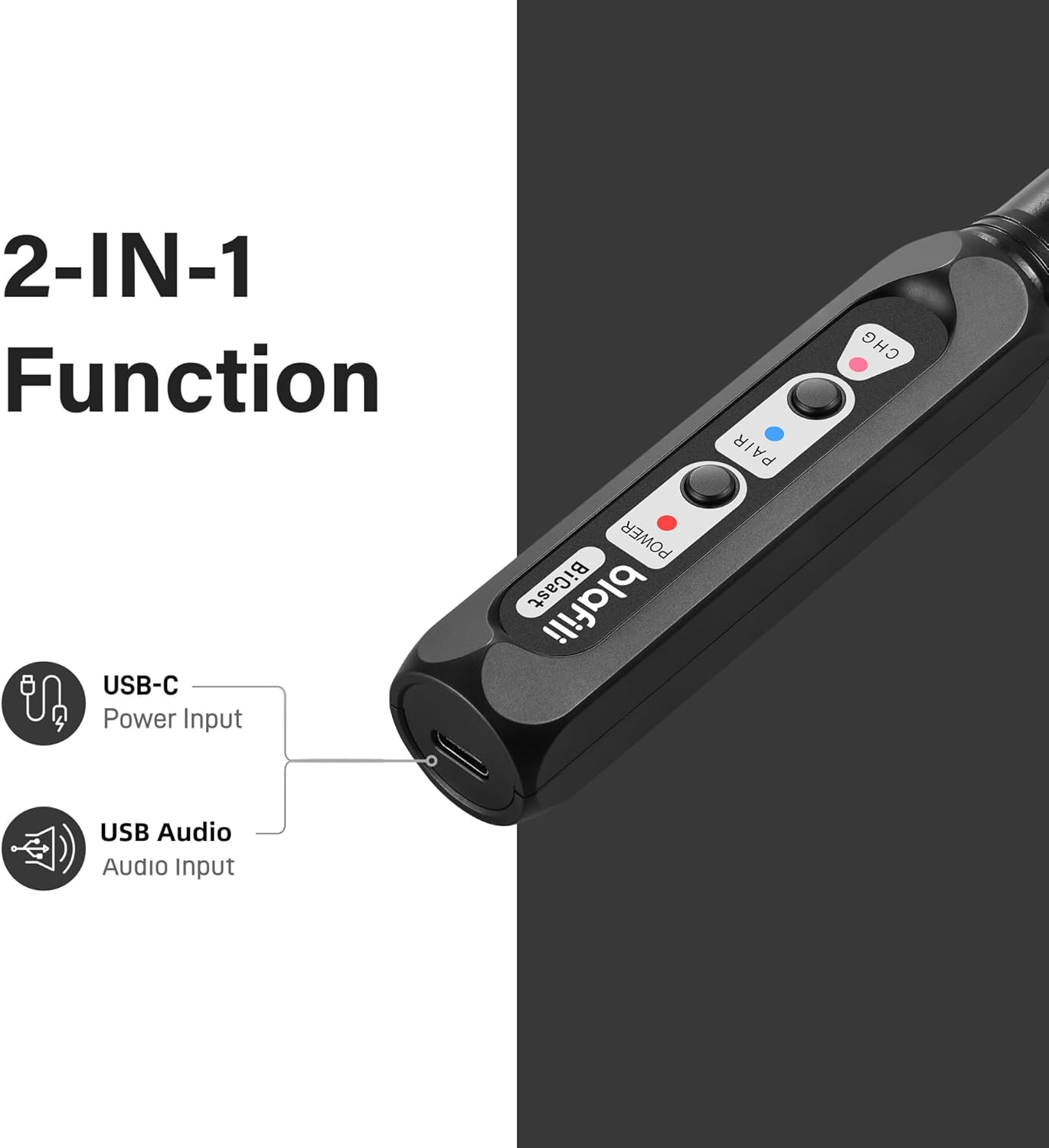
Image: blafili BiCast demonstrating Bluetooth connections to speakers and integration with a mixer and loudspeaker.
Dual Device Streaming
The blafili BiCast supports streaming to two Bluetooth receiving devices simultaneously. After pairing with the first device, put the BiCast back into pairing mode and connect to a second device. Both devices will receive the same audio signal.
Audio Codec Selection
The BiCast supports various audio codecs, including aptX HD and aptX Adaptive, for optimal sound quality. To switch between available codecs, double-press the POWER button during audio playback. The device will automatically select the best available codec supported by the connected receiving device.

Image: Supported audio codecs for blafili BiCast.
Charging and Battery Life
The blafili BiCast is equipped with a rechargeable 320mAh battery, providing up to 16 hours of continuous wireless streaming on a full charge. To charge the device, connect a USB-C cable to the USB-C port on the BiCast and to a 5V USB power source. The Battery Status LED will indicate charging status.

Image: blafili BiCast charging via USB-C, illustrating its long battery life.
Troubleshooting
- Q: Difficulty syncing with a TV?
- A: Turn off Bluetooth on other devices first. The blafili BiCast connects to one device at a time for pairing. If streaming to two devices, ensure both are paired after the initial connection.
- Q: Doesn't connect sometimes when used with a wireless mic system?
- A: Turn off the wireless microphone system first when you intend to use the blafili BiCast to avoid interference during pairing.
- Q: Cannot get anything to pair with it?
- A: The blafili BiCast is a Bluetooth transmitter, not a receiver. It transmits audio from an XLR or USB-C source to Bluetooth headphones or speakers. It cannot pair with Bluetooth headsets, Bluetooth speakers, or other Bluetooth receivers as a source device itself.
- Q: Does it produce any tones when pairing/unpairing?
- A: No, blafili products, including the BiCast, do not produce any audible tones during pairing or unpairing actions.
- Q: Is it compatible with USB-C audio output?
- A: The blafili BiCast is compatible with USB-C audio input, not output. It features a USB-C DAC for connecting to computers for high-quality audio playback from the computer to the BiCast, which then transmits wirelessly.
Specifications
| Model Name | blafili BiCast |
| Bluetooth Version | 5.2 |
| Wireless Communication Technology | Bluetooth, aptX Adaptive, aptX HD |
| Connectivity Technology | Bluetooth |
| Audio Output Mode | Stereo |
| Power Source | Battery Powered (1 Nonstandard Battery included) |
| Battery Life | Up to 16 hours |
| Input Voltage | 5 Volts |
| Maximum Range | 100 Feet (Bluetooth Range) |
| Audio Latency | 20 Milliseconds |
| Signal-to-Noise Ratio | 100 dB |
| Material | Acrylonitrile Butadiene Styrene (ABS) body, Aluminum-alloy parts |
| Mounting Type | Tabletop Mount |
| Product Dimensions | 1"D x 1"W x 1"H (Approximate) |
| Item Weight | 2.89 ounces |
| Specific Uses For Product | Audio Streaming, Live Sound Mixing, Professional Audio |
Maintenance
To ensure the longevity and optimal performance of your blafili BiCast, follow these maintenance guidelines:
- Cleaning: Use a soft, dry cloth to clean the exterior of the device. Avoid using harsh chemicals, solvents, or abrasive cleaners.
- Storage: Store the device in a cool, dry place away from direct sunlight and extreme temperatures.
- Handling: Handle the device with care to prevent physical damage. Avoid dropping or subjecting it to strong impacts.
- Moisture: The device is not waterproof. Keep it away from liquids and high humidity.
Warranty and Support
The blafili BiCast comes with a Lifetime Warranty, ensuring long-term reliability and support for manufacturing defects.
For technical support, warranty claims, or further assistance, please visit the official blafili store or contact customer service through the provided channels.
Official blafili Store: https://www.amazon.com/stores/blafili/page/ABA91840-0885-4F80-8A9F-72A658425026


