
Introduction
Thank you for choosing the JAZAVA 72 Inch Smart Ceiling Fan with Light. This manual provides detailed instructions for the safe installation, operation, and maintenance of your new ceiling fan. Please read all instructions carefully before beginning installation and retain this manual for future reference.
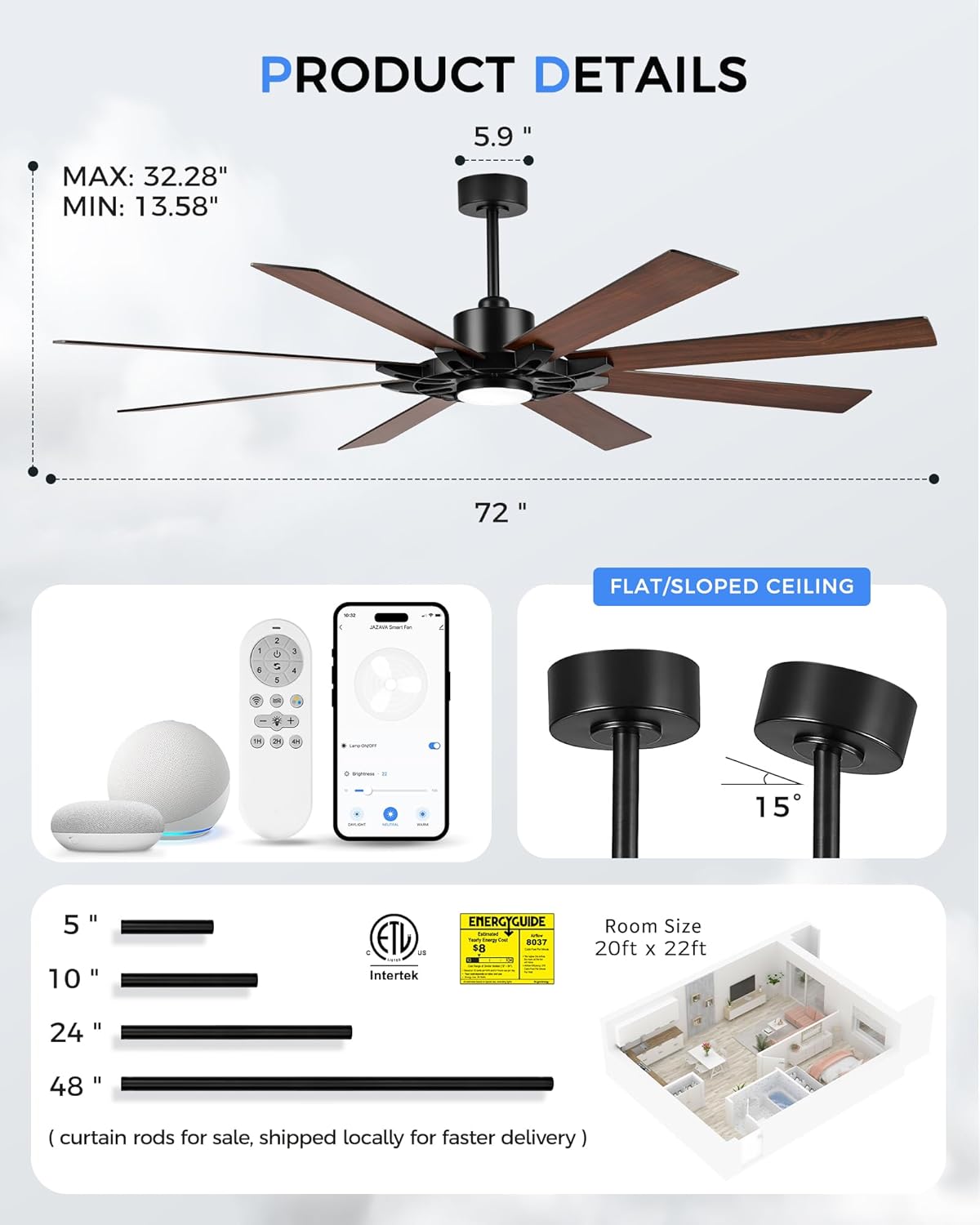
This 72-inch ceiling fan is designed for large indoor and outdoor spaces, featuring smart control capabilities via Alexa voice commands, a dedicated mobile app (2.4GHz WiFi), and an included remote control. It incorporates a quiet, energy-efficient DC motor and a dimmable LED light kit.
Safety Information
WARNING: To reduce the risk of fire, electric shock, or personal injury, always follow these basic precautions:
- Read all instructions and safety information before installing your fan and save these instructions.
- All wiring must be in accordance with national and local electrical codes. Installation should be performed by a qualified licensed electrician.
- The fan must be mounted with a minimum of 7 feet (2.1 meters) clearance from the trailing edge of the blades to the floor.
- Ensure the mounting location can support the fan's weight (approximately 21.94 lbs).
- Always disconnect power at the main circuit breaker before installation or servicing.
- Do not operate the fan with damaged power cords or plugs.
- Avoid placing objects in the path of the fan blades.
Package Contents
Verify that all components are present before beginning installation:
- Fan Motor Assembly
- 8 Fan Blades (Dual-finish: Black & Walnut)
- Mounting Bracket
- Downrods (5", 10", 24" included; 48" available separately)
- Canopy and Decorative Cover
- LED Light Kit
- Remote Control
- Receiver/Controller
- Hardware Pack (screws, wire nuts, etc.)
- Instruction Manual
Setup and Installation
Professional installation is recommended. Ensure power is disconnected at the circuit breaker before proceeding.
1. Install Mounting Bracket
Secure the mounting bracket to the ceiling outlet box. For added safety, install the J-hook through the center of the outlet box into a wooden joist and hang the safety cable onto it.
2. Select and Install Downrod
Choose the appropriate downrod length based on your ceiling height to ensure optimal airflow and safety clearance. The fan comes with 5", 10", and 24" downrods. A 48" downrod is available for purchase separately.
- 8-9 ft ceilings: Use 5" downrod (standard ceiling installation).
- 9-10 ft ceilings: Use 10" downrod (medium-height ceilings).
- 10-12 ft ceilings: Use 24" downrod (high or vaulted ceilings).

3. Wiring Connections
Connect the fan's electrical wires to your household wiring according to the provided wiring diagram. Ensure all connections are secure using wire nuts. The fan includes a safety cable that should be attached to the J-hook in the outlet box to prevent accidental detachment.

4. Attach Fan Blades
Attach the 8 fan blades to the motor assembly. The blades feature a dual-finish (Black & Walnut) allowing you to choose your preferred aesthetic. Ensure all screws are tightened securely.

5. Pair Remote and Receiver
After installation and restoring power, pair the remote control with the fan's receiver. This typically involves turning the power off and on, then pressing a pairing button on the remote within a specific timeframe (usually 30 seconds).

Operating Instructions
Your JAZAVA smart ceiling fan offers multiple control options for convenience.
Remote Control Operation
The included remote control allows you to adjust fan speed, light settings, and other features:
- Fan Speed: Select from 6 speeds (Mild Comfort, Sturdy Gust, Turbo Force).
- Light Control: Turn the LED light on/off, adjust brightness (10%-100%), and change color temperature (3000K Warm Light, 4000K Neutral Light, 5000K Cool Light).
- Reverse Function: Switch between summer (counter-clockwise) and winter (clockwise) modes.
- Timer: Set the fan to turn off after 1, 2, or 4 hours.
- Nature/Fresh Mode: Simulates natural breeze by varying fan speed.


Smart App Control
Download the JAZAVA Smart Fan app (compatible with 2.4GHz WiFi) to control your fan from your smartphone or tablet. The app provides all remote control functionalities and additional scheduling options.
Alexa Voice Control
Integrate your JAZAVA smart fan with Alexa for convenient voice control. Once connected via the app, you can use commands such as:
- "Alexa, turn on/off [device name] fan."
- "Alexa, brighten/dim the [device name] light."
- "Alexa, set [device name] fan speed to [1-6]."
Maintenance
Regular maintenance ensures optimal performance and longevity of your ceiling fan.
- Cleaning: Use a soft, damp cloth to clean the fan blades and motor housing. Do not use abrasive cleaners or solvents.
- Blade Inspection: Periodically check that all blade screws are tight. Loose blades can cause wobbling and noise.
- Light Kit: The LED light kit is integrated and designed for long life. If replacement is needed, contact customer support.
- Dusting: Dust the fan regularly to prevent buildup, which can affect performance and appearance.
Troubleshooting
If you encounter issues with your JAZAVA ceiling fan, refer to the following common problems and solutions:
| Problem | Possible Cause | Solution |
|---|---|---|
| Fan does not start | No power, loose wiring, remote not paired. | Check circuit breaker. Ensure all wires are securely connected. Re-pair remote (see Setup section). |
| Fan wobbles | Loose blades, uneven blade weight, improper mounting. | Tighten all blade screws. Check mounting bracket for secure installation. |
| Light does not work | Loose wiring, LED driver issue. | Check light kit wiring connections. Contact support if LED driver is suspected. |
| Remote/App not responding | Remote battery low, pairing lost, WiFi issue (for app). | Replace remote battery. Re-pair remote/app. Ensure 2.4GHz WiFi is active and stable. |
| Noise during operation | Loose screws, internal component issue. | Check all screws on blades and housing. Ensure no wires are rubbing. If noise persists, contact support. |
Troubleshooting Pairing Issues

Specifications
| Brand | JAZAVA |
| Model Name | ZCCF05BK-72 |
| Color | Black & Walnut |
| Size | 72 Inch |
| Number of Blades | 8 |
| Motor Type | DC Motor |
| Number of Speeds | 6 |
| Air Flow Capacity | 4270–12450 CFM |
| Noise Level | 35 Decibels |
| Light Kit | Dimmable 22W LED |
| Color Temperature | 3000K-5000K (Adjustable) |
| Control Type | App Control, Remote Control, Voice Control (Alexa) |
| Indoor/Outdoor Usage | Indoor, Outdoor |
| Product Dimensions | 72"D x 72"W x 32.28"H (with 24" downrod) |
| Item Weight | 21.94 Pounds |
| Certifications | FCC, DOE, ETL Certified |
Warranty and Support
JAZAVA provides responsive, professional after-sales service. Our support team is available to assist with any questions or issues you may encounter.
- Support Hours: Monday–Friday, 8:30 a.m.–5:00 p.m. (PT)
- Phone: +1 (6**)-***-1518
- Email: service@******.com
Please refer to your purchase documentation for specific warranty details. As a U.S.-based company, JAZAVA aims for faster issue resolution with local engineers and support.


