
1. Introduction
Thank you for choosing the KNKA APH4000 Air Purifier. This manual provides essential information for the safe and efficient operation of your new air purifier. Please read it thoroughly before use and keep it for future reference.
The KNKA APH4000 Air Purifier is designed for large rooms, offering high CADR values for smoke, dust, PM2.5, and pollen. It features an efficient airflow design with dual front-and-back air intakes and dual side outlets, providing 4.8 air changes per hour in 350 ft² rooms. The unit includes dual 3-stage filtration systems, multiple operating modes (PET, ECO, Sleep, Auto), real-time AQI display, and a filter replacement indicator.
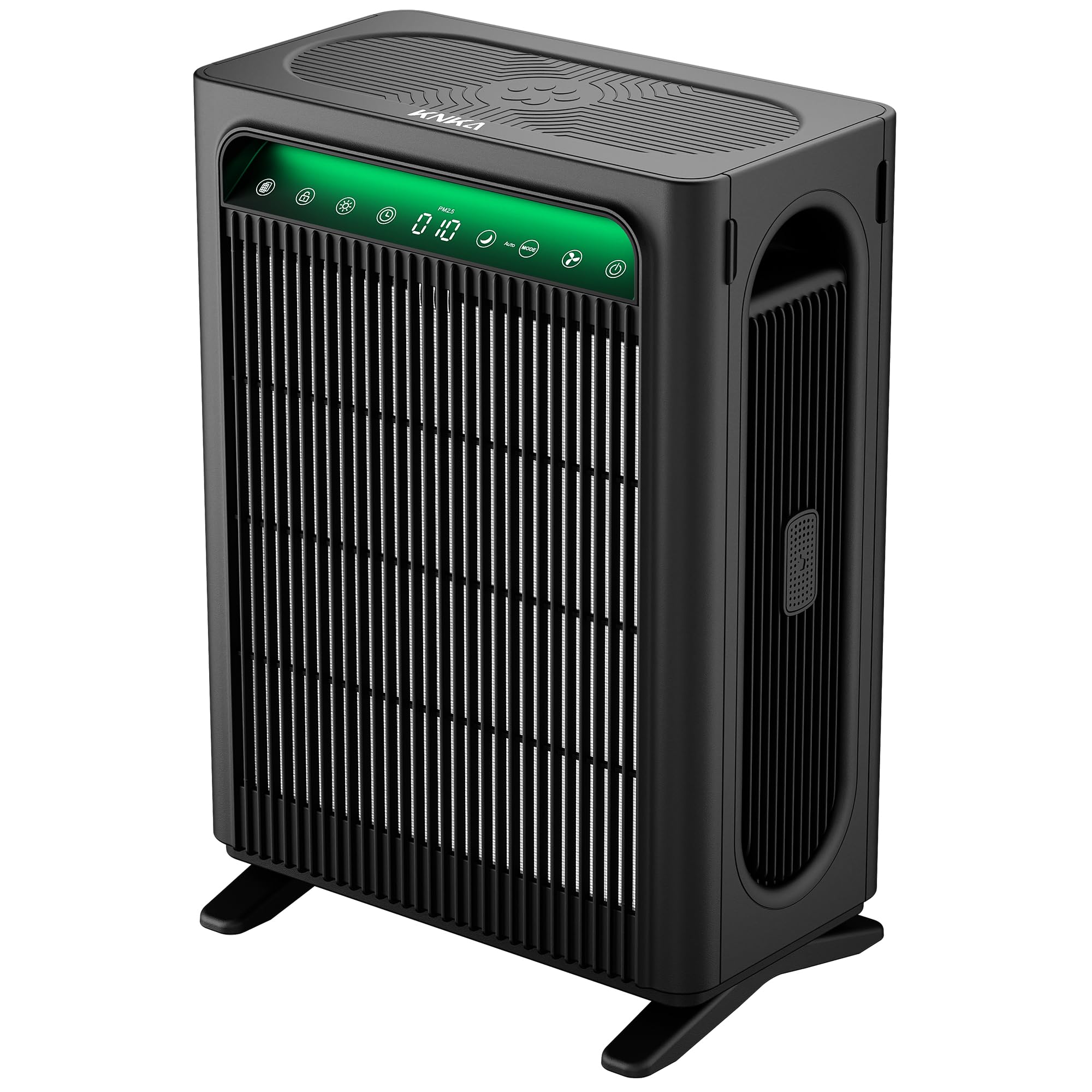
Figure 1: KNKA APH4000 Air Purifier in a typical home environment.
Video 1: Overview of the KNKA APH4000 Air Purifier's features and benefits, including its powerful air circulation and filtration capabilities.
2. Package Contents
Please check the package for the following items:
- 1 x KNKA APH4000 Air Purifier
- 2 x 3-Stage Original Filters (Pre-Installed)
- 1 x User Manual
- 1 x AC Power Adapter
- 2 x Brackets (Support Feet)
- 1 x Aroma Pad
Video 2: Unboxing the KNKA Air Purifier, showing all included accessories and initial setup steps.
3. Setup
- Unpack the Unit: Carefully remove the air purifier and all accessories from the packaging. Remove any protective plastic bags from the unit.
- Attach Support Feet: Locate the two support feet (brackets). Align them with the slots on the bottom of the air purifier and firmly press them into place until they click securely.
- Prepare Filters: The air purifier comes with two 3-stage filters pre-installed. Before first use, open the filter covers (front and back) and remove the protective plastic packaging from both filters. Reinsert the filters and close the covers.
- Install Aroma Pad (Optional): Locate the aroma box on the side of the unit. Press to pop it out, insert the provided aroma pad, and if desired, add a few drops of your favorite essential oil for a refreshing scent. Close the aroma box.
- Connect Power: Plug the AC power adapter into the power port at the bottom of the unit. The hidden plug design helps keep the setup neat and secure. Then, plug the adapter into a standard electrical outlet.

Figure 2: The dual-sided 3-stage filtration system, highlighting the washable pre-filter, True HEPA filter, and activated carbon filter.
4. Operating Instructions
The control panel is located on the top of the air purifier. It features touch-sensitive buttons and a digital display.
- Power On/Off: Touch the power button (
 ) to turn the unit on or off.
 - Fan Speed Adjustment: Touch the fan speed button () to cycle through four fan speeds: Speed 1 (low), Speed 2 (medium), Speed 3 (high), and Speed 4 (turbo).
- Smart Modes: Touch the 'Mode' button to switch between different smart modes:
- ECO Mode: Saves energy by entering standby when air quality is excellent and restarting automatically when purification is needed.
- Auto Mode: Automatically adjusts fan speed based on real-time air quality.
- PET Mode: Increases airflow to effectively tackle pet hair, dander, and odors.
- Sleep Mode: Operates at the lowest fan speed (22-24 dB) with dimmed lights for quiet operation during rest. Touch any button to exit Sleep Mode.
- Timer Function: Touch the timer button () to set an automatic shut-off timer from 1 to 12 hours.
- Light Control: Touch the light button () once to turn off the ambient light. Touch it again to turn off both the ambient and screen lights.
- Child Lock: Press and hold the child lock button () for 3 seconds to activate or deactivate the child lock, preventing accidental changes to settings.
- Filter Life Display: Touch the filter button () to display the remaining filter life as a percentage. The PM2.5 reading will reappear after 3 seconds.
- Real-Time AQI Display: The built-in sensor monitors indoor air quality and displays the AQI (Air Quality Index) in real-time on the screen. Color-coded lights provide an instant visual indication of air quality:
- Green: Excellent (0-12 µg/m³)
- Blue: Good (13-35 µg/m³)
- Yellow: Poor (36-55 µg/m³)
- Red: Severe (56+ µg/m³)
Video 3: A quick start guide demonstrating the basic operation of the KNKA Air Purifier, including power, fan speed, and mode selection.

Figure 3: Real-time AQI display with corresponding color indicators for air quality levels.

Figure 4: The air purifier operating in Sleep Mode, designed for quiet nights with noise levels as low as 22-24 dB.
5. Maintenance
Regular maintenance ensures optimal performance and extends the lifespan of your air purifier.
- Filter Replacement: The filter replacement indicator will notify you when it's time for a change. For optimal performance, replace the filters every 3–6 months, depending on usage and air quality. Use genuine KNKA filters (search B0FQNYGVZF on Amazon).
- Washable Pre-Filter: The pre-filter is washable and designed for easy cleaning. Regularly clean the pre-filter to remove larger particles like pet hair and dust.
- PM2.5 Sensor Cleaning: Use a coin to gently open the PM2.5 sensor cover located on the side of the unit. Clean the sensor regularly to maintain accurate air quality readings.
- Aroma Box Cleaning: Periodically clean the aroma box and replace the aroma pad as needed.

Figure 5: Instructions for cleaning the washable pre-filter, demonstrating both rinsing and vacuuming methods.

Figure 6: Different filter options for the KNKA APH4000 Air Purifier, including Original, Smoke, and Pet Care filters.
6. Specifications
| Feature | Specification |
|---|---|
| Product Dimensions | 8.15 x 12.36 x 17.09 inches |
| Item Weight | 9.68 Pounds |
| Item Model Number | APH4000 |
| Power Source | AC/DC |
| Control Method | Touch |
| Filter Type | 3-Stage Filter (True HEPA and Activated Carbon) |
| Floor Area Coverage | 350 Square Feet |
| Noise Level | 22 Decibels (Sleep Mode) |
| Particle Retention Size | 0.3 Micron |
| Wattage | 45 watts |
| Contaminant Filtration Capability | Dust, Odors, Pet Dander, Pet Hair, Pollen |
| Special Features | AQI Display, Dual 3-Stage Filters, PET & ECO & AUTO & SLEEP Mode, Washable Pre-Filter |
| Certifications | AHAM Certified, CARB Certified, DOE Certified, ETL Certified, FCC Certified |
| Color | Black |
7. Warranty and Support
The KNKA APH4000 Air Purifier comes with a 2-Year Warranty. For warranty claims or technical support, please refer to the contact information provided in your product packaging or visit the official KNKA website.


