
Introduction
Thank you for choosing the Acekool 18000 BTU Split Air Conditioner with Heater. This manual provides essential information for the safe and efficient operation, installation, and maintenance of your unit. Please read it thoroughly before installation and use, and retain it for future reference.
Important Safety Information
- Always disconnect power before performing any maintenance or cleaning.
- Ensure the unit is installed by a qualified HVAC technician to prevent electrical shock, fire, or injury.
- Do not block air inlets or outlets of the indoor or outdoor units.
- Keep children and pets away from the unit during operation.
- Use only the specified refrigerant (R32) and follow all local regulations for handling.

Image: Overview of the Acekool 18000 BTU Split Air Conditioner with Heater, showing both indoor and outdoor units, remote control, and various installation components.
Setup and Installation
Proper installation is crucial for the performance and longevity of your Acekool split air conditioner. It is strongly recommended that installation be performed by a licensed HVAC technician.
Package Contents
Your Acekool 18000 BTU Split Air Conditioner system ships in two boxes. Please ensure both boxes have arrived before beginning installation. The package includes:
- Indoor Unit
- Outdoor Unit
- 13-ft Copper Connection Pipe (Air Pipe)
- 13-ft Copper Connection Pipe (Liquid Pipe)
- 8-ft Power Line
- 15-ft Communication Wire
- 6.5-ft Drain Pipe
- Remote Control + Batteries
- User Manual
- Tape
- Luting (Putty)

Image: Detailed illustration of the package contents, showing the indoor unit, outdoor unit, and all included installation accessories.
Pre-Installation Notes
- Keep the unit upright for at least 24 hours before installation to allow the refrigerant to settle.
- Ensure the installation area has adequate space for airflow and maintenance.
- Verify the power supply meets the unit's requirements (208V~230V/60Hz).
Operating Instructions
Your Acekool split air conditioner offers various modes and smart features for optimal comfort and energy efficiency.
Remote Control Functions
The multifunctional remote control allows you to manage all aspects of your unit's operation.

Image: The all-in-one multifunctional remote control, highlighting buttons for Cooling, Heating, Dry, Fan, Sleep, ECO, Self-Cleaning, Timer, and 4D Auto Swing.
Operating Modes:
- Cool Mode: Provides rapid cooling (approx. 30 seconds to start). Adjust temperature and fan speed for desired comfort.
- Heat Mode: Provides rapid heating (approx. 60 seconds to start). Ideal for colder conditions.
- Dry Mode: Reduces indoor humidity effectively.
- Fan Mode: Circulates air without cooling or heating. Features four adjustable fan speeds (Low, Mid, High, Turbo) and 4D auto-sweep airflow for even distribution up to 50 feet.
Smart Features and Functions:
- WiFi/Alexa Voice Control: Connect the unit to your home WiFi network to control it via the mobile app or Alexa voice commands for hands-free operation and real-time adjustments.
- Eco Mode: Reduces power consumption during periods of low demand, optimizing energy efficiency.
- Sleep Mode: Adjusts temperature and fan speed automatically for quiet operation and comfortable sleep conditions.
- 24H Timer: Program the unit to turn on or off at specific times within a 24-hour cycle.
- Self-Cleaning: Activates an automatic cleaning cycle for the indoor unit.
- Display On/Off: Toggles the unit's display lights.
- °C/°F Selection: Switch between Celsius and Fahrenheit temperature displays.
Quiet Operation
The unit is engineered with double-layer soundproofing and low-vibration design, ensuring whisper-quiet operation, ideal for bedrooms, living rooms, and offices.

Image: An Acekool indoor unit operating quietly in a bedroom, illustrating its ultra-silence feature for better sleep with icons for 24H Timer, Sleep Mode, and Display On/Off.
Maintenance
Regular maintenance ensures optimal performance and extends the lifespan of your Acekool air conditioner.
Filter Cleaning
The unit features a reusable filter that requires seasonal cleaning. To clean the filter:
- Turn off the unit and disconnect power.
- Open the front panel of the indoor unit.
- Remove the air filters.
- Clean the filters with a vacuum cleaner or wash them with lukewarm water and a mild detergent.
- Rinse thoroughly and allow to air dry completely before reinstalling.
- Close the front panel and restore power.
Self-Cleaning Function
Utilize the self-cleaning function periodically to maintain the cleanliness of the indoor coil and prevent mold growth. Refer to your remote control section for how to activate this feature.
General Cleaning
Wipe the exterior of both indoor and outdoor units with a soft, damp cloth. Do not use harsh chemicals or abrasive cleaners.
Troubleshooting
Before contacting customer support, please refer to the following common issues and solutions.
| Problem | Possible Cause | Solution |
|---|---|---|
| Unit does not power on | No power supply; circuit breaker tripped; remote control batteries low | Check power connection; reset circuit breaker; replace remote control batteries. |
| Insufficient cooling/heating | Dirty air filter; blocked air inlets/outlets; incorrect mode setting; room too large | Clean air filter; ensure clear airflow; select correct mode; verify unit capacity for room size. |
| Unusual noise | Loose parts; foreign object in fan; unit not level | Inspect for loose components; remove any obstructions; ensure unit is level. If noise persists, contact technician. |
| Water leakage from indoor unit | Clogged drain hose; improper installation; frozen coil | Check and clear drain hose; ensure proper slope of drain line; allow unit to defrost if coil is frozen. Contact technician if issue persists. |
| Remote control not responding | Batteries low or incorrectly inserted; obstruction between remote and unit | Replace batteries; ensure correct polarity; remove any obstructions. |
| WiFi connectivity issues | Router too far; incorrect password; network interference | Ensure unit is within WiFi range; re-enter password; check router settings or restart router. |
Specifications
Detailed technical specifications for the Acekool 18000 BTU Split Air Conditioner with Heater.
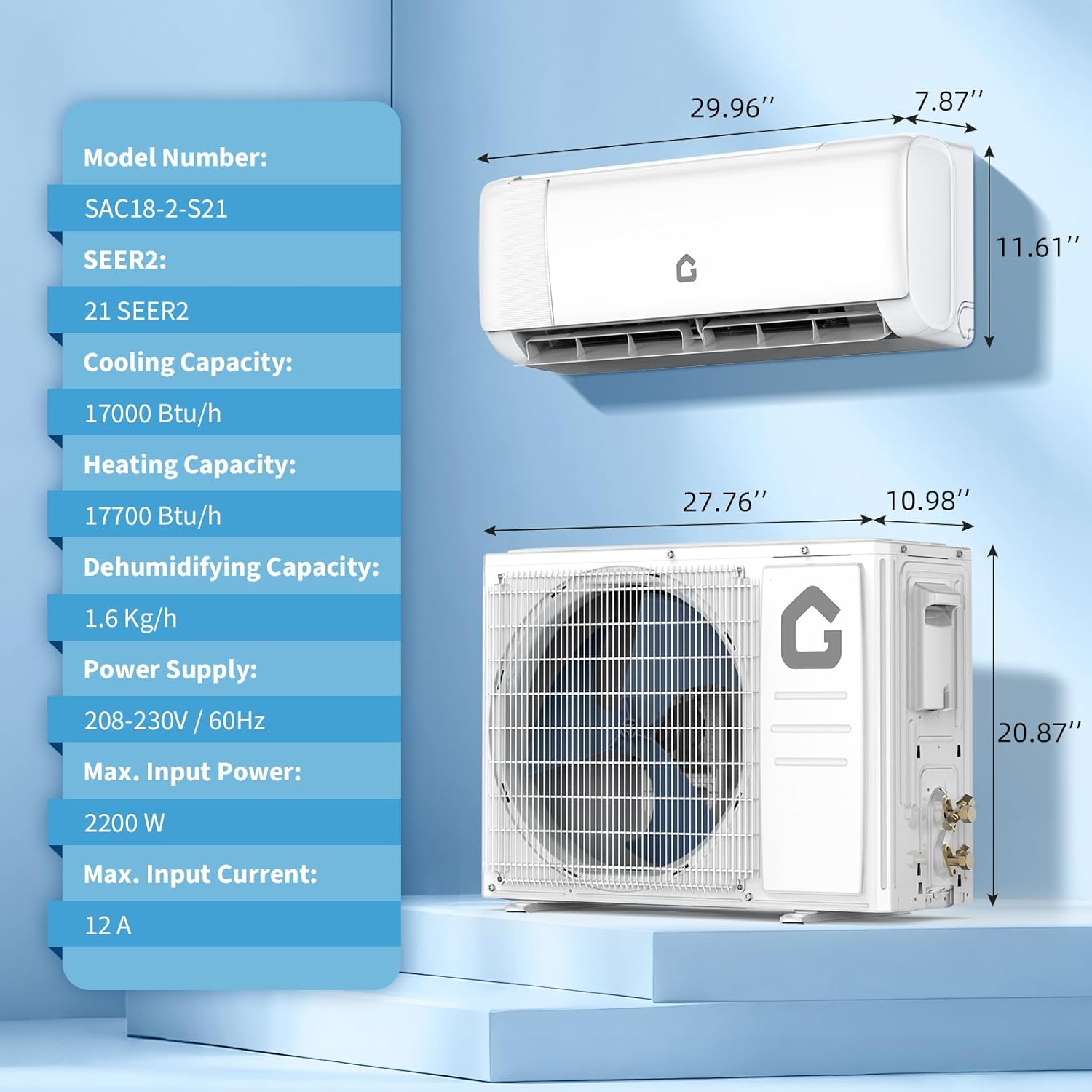
Image: Technical drawing showing the dimensions of both the indoor and outdoor units, along with key specifications like Model Number (SAC18-2-S21), SEER2 (21), Cooling Capacity (17000 Btu/h), Heating Capacity (17700 Btu/h), Dehumidifying Capacity (1.6 Kg/h), Power Supply (208-230V / 60Hz), Max. Input Power (2200 W), and Max. Input Current (12 A).
| Feature | Specification |
|---|---|
| Brand | Acekool |
| Model Number | PHO_163L533R-8133pXFqpdi |
| Cooling Power | 18000 BTU |
| SEER2 Rating | 21 |
| Voltage | 230V |
| Noise Level | 42 dB |
| Refrigerant Type | R32 |
| Annual Energy Consumption | 576 kWh per year |
| Product Dimensions (Overall) | 38"D x 25"W x 31"H |
| Item Weight | 112 pounds |
| Controller Type | App Control, Remote Control |
| Special Feature | Inverter Compressor |
| Operating Temperature Range | -13°F to 140°F |
High Efficiency Inverter Compressor
The unit features an innovative integrated structure multi-stage inverter compressor designed for a service life of up to 20 years, providing precise temperature control and energy savings.

Image: Diagram illustrating the high-efficiency inverter compressor and its 0.1°C precise temperature control capability, showing stable temperature curves.
All-Weather Response
Designed for stable operation across a wide operating temperature range, ensuring high performance even in extreme environments from -13°F to 140°F.

Image: The outdoor unit depicted in both desert (high temperature 140°F) and snowy (low temperature -13°F) environments, emphasizing its stable operation in all weather conditions.
Warranty Information
The Acekool 18000 BTU Split Air Conditioner with Heater comes with a Two-Year Warranty from the date of purchase. This warranty covers defects in materials and workmanship under normal use. Please retain your proof of purchase for warranty claims. For full warranty terms and conditions, refer to the documentation provided with your product or contact customer support.
Customer Support
For technical assistance, troubleshooting not covered in this manual, or warranty inquiries, please contact Acekool customer support.
You can also visit the official Acekool Store for more product information and support resources: Acekool Store
