
Garvee 6RAkRPY_x0uVCUlSZaxxjQG0Z
Garvee TV Stand with RGB LED Lighting and Fireplace Insert
Model: 6RAkRPY_x0uVCUlSZaxxjQG0Z
Introduction
Thank you for choosing the Garvee TV Stand. This manual provides detailed instructions for assembly, operation, maintenance, and troubleshooting to ensure safe and efficient use of your new entertainment center. Please read this manual thoroughly before beginning assembly or operation and retain it for future reference.
Safety Information
Observe the following safety precautions to prevent injury or damage to the product:
- Always assemble the unit on a soft, clean surface to prevent scratches.
- Ensure all parts are securely fastened before use. Do not overtighten screws.
- Keep small parts and packaging materials away from children.
- Do not exceed the maximum weight capacity for the top surface or shelves.
- For the electric fireplace, ensure it is connected to a grounded outlet. Do not cover the air vents.
- If any parts are missing or damaged, do not proceed with assembly. Contact customer support immediately.
Package Contents
Before assembly, please verify that all components listed below are present and undamaged. This product may arrive in multiple packages.
| Component | Quantity |
|---|---|
| Main Panels (Top, Bottom, Sides, Back) | Varies by design |
| Drawer Components (Fronts, Sides, Backs, Bottoms) | 6 sets |
| Adjustable Shelves | 2 |
| Hardware Pack (Screws, Dowels, Cam Locks, Drawer Slides, Handles) | 1 set |
| RGB LED Light Kit | 1 set |
| Electric Fireplace Insert | 1 |
| Instruction Manual | 1 |
Note: Small parts are included in the hardware pack. Please handle with care.
Assembly Instructions
Assembly typically requires 1-2 hours with 1-2 adults. Follow these steps carefully. A Phillips head screwdriver and hammer (not included) may be required.
- Unpack and Identify Parts: Carefully remove all components from the packaging. Lay them out on a clean, soft surface. Refer to the parts list to ensure all pieces are present.
- Assemble the Main Frame: Begin by connecting the side panels to the bottom panel using the provided hardware (dowels and cam locks). Ensure the structure is stable.
- Install Back Panels: Secure the back panels to the main frame using small nails or screws. This adds stability to the unit.
- Assemble Drawers: For each drawer, attach the side panels to the front and back panels. Insert the drawer bottom into the grooves. Secure with screws. Attach the drawer handles to the drawer fronts.
- Install Drawer Slides: Attach the drawer slides to the inside of the TV stand frame and to the sides of each assembled drawer. Ensure they are aligned for smooth operation.
- Insert Adjustable Shelves: Place the shelf pins into the desired holes within the side cabinets. Rest the adjustable shelves on these pins.
- Install Electric Fireplace Insert: Carefully slide the electric fireplace insert into its designated opening in the center of the TV stand. Ensure it fits snugly and is flush with the front surface.
- Attach Top Panel: Place the top panel onto the assembled frame and secure it using the appropriate hardware.
- Install RGB LED Light Kit: Adhere the RGB LED light strips to the designated areas, typically along the open shelves. Connect the power supply and controller as per the separate LED kit instructions.
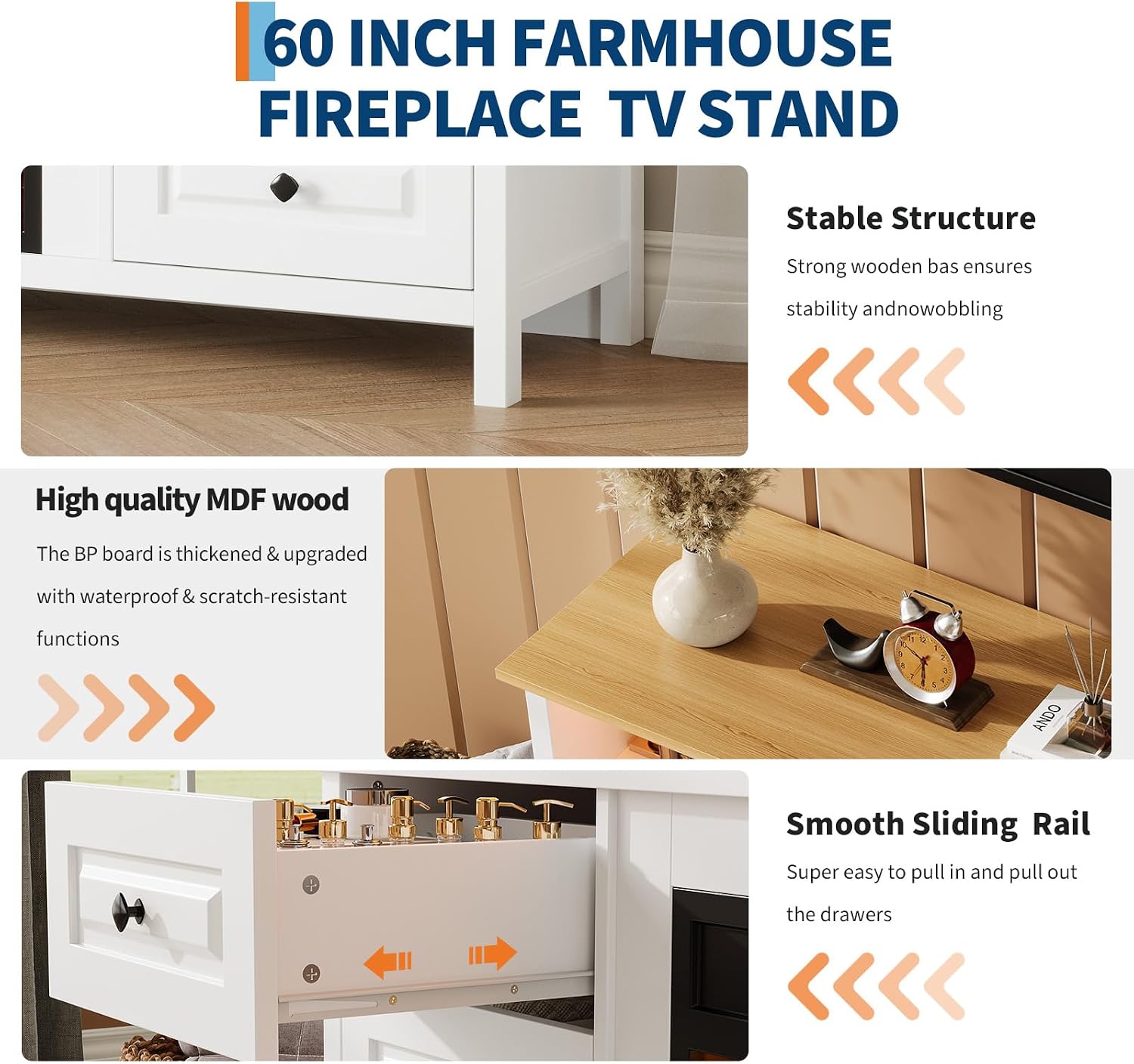
Figure 1: Illustration of stable structure, high-quality MDF wood, and smooth sliding drawer rails, key components for assembly.

Figure 2: Detail showing smooth and silent drawer sliders and the six large double drawers, important for proper drawer installation.
Operating Instructions
RGB LED Lighting
The integrated RGB LED light strips offer over 16 colors and dynamic modes to enhance your viewing experience. Control options include:
- Remote Control: Use the provided remote to change colors, adjust brightness, select dynamic modes (static, flash, fade), and activate music sync.
- Mobile App Control: Download the compatible mobile application (refer to LED kit instructions for app name) to control the lights via your smartphone.
- Voice Control: If supported by the app and integrated with smart home systems, voice commands can be used to manage the lighting.

Figure 3: Visual representation of the 16-color adjustable LED light system in operation.
Electric Fireplace Insert
The 23-inch 3D electric fireplace insert provides ambient warmth and visual appeal. It operates at 1400W, 120V/60Hz.
- Power On/Off: Use the power button on the fireplace unit or the remote control to turn the fireplace on or off.
- Faux Flame: Adjust the brightness settings of the faux flame effect using the controls on the unit or remote.
- Heat Function: Activate the heating element as desired. The unit includes overheat protection for safety.
- Timer: Set a timer for automatic shut-off if available on your model.

Figure 4: Detailed view of the 23-inch 3D fireplace insert, highlighting its controls and power specifications.
Maintenance
Proper care will extend the life and appearance of your TV stand:
- Cleaning: Wipe surfaces with a soft, damp cloth. Avoid harsh chemicals or abrasive cleaners that may damage the finish.
- Dusting: Regularly dust the unit to prevent buildup.
- Hardware Check: Periodically check and tighten all screws and fasteners to ensure stability.
- Fireplace Care: Refer to the separate fireplace insert manual for specific cleaning and maintenance instructions. Ensure the fireplace is unplugged before cleaning.
Troubleshooting
If you encounter issues, refer to the table below for common problems and solutions.
| Problem | Possible Cause | Solution |
|---|---|---|
| Unit is wobbly after assembly | Loose fasteners | Check and tighten all screws and cam locks. Ensure the unit is on a level surface. |
| Drawers do not slide smoothly | Misaligned drawer slides or obstruction | Re-align drawer slides. Ensure no objects are blocking the mechanism. |
| RGB LED lights not working | Power connection issue, remote battery dead | Check power adapter connection. Replace remote control batteries. Ensure LED strips are properly connected to the controller. |
| Fireplace not turning on | Not plugged in, power switch off, circuit breaker tripped | Ensure the fireplace is securely plugged into a working, grounded outlet. Check the main power switch on the unit. Reset the circuit breaker if necessary. |
| Fireplace heat not working | Heat function not activated, vents blocked, overheat protection engaged | Activate the heat function via controls. Ensure air vents are clear. If overheat protection engaged, unplug and allow to cool before restarting. |
Specifications
| Feature | Detail |
|---|---|
| Brand | Garvee |
| Model Number | 6RAkRPY_x0uVCUlSZaxxjQG0Z |
| Color | White + Brown Top Panel |
| Material | Engineered Wood (PB and MDF board) |
| Overall Dimensions (L x W x H) | 152 x 40 x 81.5 cm (59.84 x 15.75 x 32 inches) |
| Item Weight | 64.75 kg |
| Number of Drawers | 6 (faux double drawers) |
| Number of Shelves | 2 (adjustable) |
| Fireplace Insert Size | 23 inches |
| Fireplace Power | 1400W, 120V/60Hz |
| LED Lighting | 16+ colors, dynamic modes, app/voice/remote control |
| Max TV Size Supported | Up to 65 inches |

Figure 5: Product dimensions for the TV stand and individual drawers.
Warranty and Support
Garvee is committed to providing quality products and customer satisfaction. While specific warranty details are not provided in this manual, our customer service team is available 24/7 to assist you with any questions, concerns, or support needs regarding your TV stand.
For assistance, please refer to the contact information provided with your purchase or visit the official Garvee website.
Related documents6RAkRPY_x0uVCUlSZaxxjQG0Z


Ask a question about this manual
Ask about setup, troubleshooting, compatibility, parts, safety, or missing instructions. Manuals+ will review the question and use this page’s manual context to help answer it.