
FURITEK TRX4M
FURITEK Torpedo BRUSHLESS Power System for TRX4M
Instruction Manual
1. Introduction
The FURITEK Torpedo BRUSHLESS Power System is an advanced electronic upgrade designed specifically for the TRX4M 1/18 scale RC crawler. This system integrates the high-performance FURITEK Python Pro Electronic Speed Controller (ESC) with the innovative FURITEK Cedar Brushless Inrunner Motor, providing superior control and power.
The Python Pro ESC features a robust, dust and waterproof enclosing case and a built-in 5A BEC (Battery Eliminator Circuit) capable of operating at multiple voltages up to 8.4V, effectively eliminating brownout issues often associated with large servos. The Cedar motor is a patent-pending design, known for its smooth operation, and is also dust and waterproof, ensuring reliability in various conditions.
This combination delivers exceptional low-speed torque and precise throttle control, significantly enhancing the performance of your TRX4M.
2. Safety Information
- General Safety: Always operate RC vehicles in a safe manner, away from people, pets, and property.
- Battery Handling: Use appropriate LiPo battery safety precautions. Never overcharge or over-discharge batteries.
- Component Heat: Motors and ESCs can become hot during operation. Allow components to cool before handling.
- Children: Keep all components and the RC vehicle away from children under 12 years of age. This product is not a toy.
- Water Exposure: While components are dust and waterproof, avoid prolonged submersion or high-pressure water exposure. Ensure all connections are dry before powering on after exposure to moisture.
3. Package Contents
Verify that all components are present and undamaged upon opening the package:
- FURITEK Python Pro Electronic Speed Controller (ESC)
- FURITEK Cedar Brushless Inrunner Motor with 11T Steel Pinion
- Motor Mount (typically included for specific vehicle fitment)
- Connecting Wires/Cables
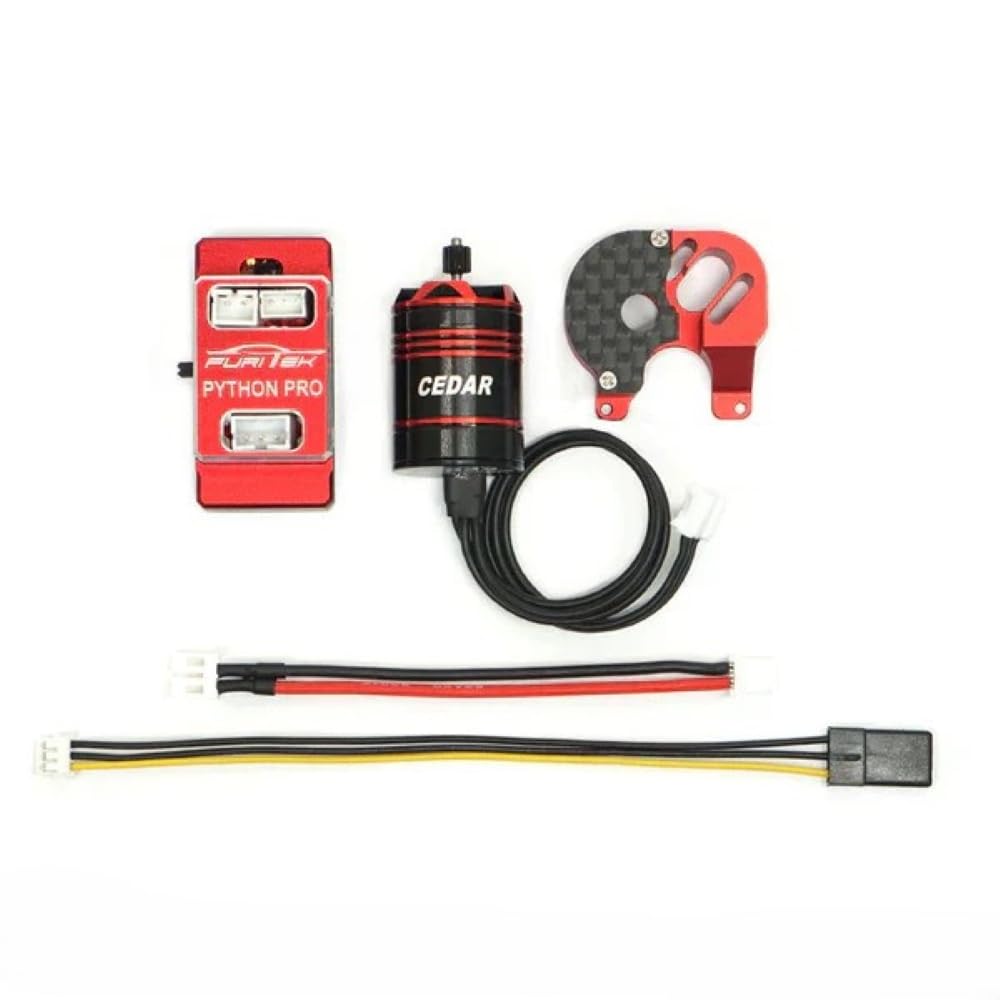
Image 1: Overview of the FURITEK Torpedo BRUSHLESS Power System components.

Image 2: Another view of the FURITEK Torpedo BRUSHLESS Power System components.
4. Setup and Installation
Follow these steps for proper installation into your TRX4M RC crawler:
- Prepare Vehicle: Disconnect the battery from your TRX4M. Remove the stock motor and ESC assembly.
- Install Cedar Motor: Securely mount the FURITEK Cedar motor into the TRX4M chassis using the provided motor mount and hardware. Ensure the 11T steel pinion is correctly aligned with the vehicle's transmission gear.
- Mount Python Pro ESC: Find a suitable location within the TRX4M chassis to mount the Python Pro ESC. Use double-sided tape or other secure methods to prevent movement during operation.
- Wire Connections:
- Connect the three motor wires from the Cedar motor to the corresponding ports on the Python Pro ESC.
- Connect the ESC's receiver cable to the throttle channel (typically channel 2) on your TRX4M's receiver.
- Connect your battery to the Python Pro ESC's power input. Ensure correct polarity.
- Initial Configuration (App): The Python Pro ESC features a Bluetooth interface. Download the official FURITEK app on your smartphone. Power on the ESC and connect via Bluetooth to perform initial setup, calibrate throttle, and adjust basic parameters. Refer to the app's instructions for detailed configuration.
5. Operating Instructions
Once installed and configured, operate your TRX4M with the Torpedo system:
- Power On Sequence: Always turn on your radio transmitter first, then connect the battery to the ESC.
- Driving: Use your transmitter to control the throttle and steering of your TRX4M. The Torpedo system provides precise low-speed control and ample power for crawling.
- App Tuning: For advanced adjustments and fine-tuning of parameters such as throttle curves, drag brake, motor timing, and more, use the FURITEK app while the ESC is powered on and connected via Bluetooth. This allows for customization to suit your driving style and terrain.
- Power Off Sequence: Disconnect the battery from the ESC first, then turn off your radio transmitter.
6. Maintenance
Regular maintenance ensures the longevity and optimal performance of your Torpedo system:
- Cleaning: After each use, especially in dusty or wet conditions, gently clean the ESC and motor. Use a soft brush or compressed air to remove dirt and debris. Wipe with a dry cloth.
- Connection Check: Periodically inspect all wiring and connectors for signs of wear, damage, or looseness. Ensure all connections are secure.
- Motor Inspection: Check the Cedar motor for any obstructions or unusual noises. Ensure the pinion gear is securely fastened and properly meshed with the transmission.
- Storage: When not in use, store the RC vehicle and its electronics in a cool, dry place, away from direct sunlight and extreme temperatures. Disconnect the battery during storage.
7. Troubleshooting
If you encounter issues, refer to the following common troubleshooting steps:
- No Power to System:
- Ensure the battery is fully charged and properly connected to the ESC.
- Check all power connections for looseness or damage.
- Verify the ESC's power switch (if applicable) is in the 'ON' position.
- Motor Not Spinning / Erratic Operation:
- Confirm the motor wires are securely connected to the ESC.
- Ensure the ESC's receiver cable is correctly plugged into the throttle channel of your receiver.
- Recalibrate the ESC's throttle range using the FURITEK app or manual calibration procedure.
- Check for any physical obstructions preventing the motor or drivetrain from turning freely.
- Loss of Control / Brownout:
- The Python Pro ESC's 5A BEC is designed to prevent brownouts. If issues occur, ensure your servo is not drawing excessive current.
- Check for loose connections between the ESC and receiver.
- Ensure your receiver is receiving adequate power.
- Overheating:
- Ensure proper ventilation around the ESC and motor.
- Check motor gearing; an overly aggressive gear ratio can cause overheating.
- Avoid continuous heavy load operation without breaks.
8. Specifications
| Feature | Specification |
|---|---|
| Brand | FURITEK |
| Product Model | Torpedo BRUSHLESS Power System (FUR-2342) |
| Compatible RC Model | TRX4M |
| ESC Model | Python Pro |
| Motor Model | Cedar Brushless Inrunner |
| Motor Pinion | 11T Steel |
| Voltage | Up to 8.4 Volts (for Python Pro BEC) |
| Horsepower | 120 Watts |
| Material | Aluminum (housing/casing) |
| Item Weight | 2.4 ounces (approximate total system weight) |
| Features | Dustproof, Waterproof, Integrated 5A BEC, Bluetooth Connectivity |
9. Warranty Information
Specific warranty details for the FURITEK Torpedo BRUSHLESS Power System are not provided in the available product information. Please refer to the manufacturer's official website or contact their customer support for comprehensive warranty terms and conditions.
10. Support
For technical assistance, troubleshooting beyond this manual, or inquiries regarding your FURITEK Torpedo BRUSHLESS Power System, please visit the official FURITEK website or contact their customer support channels. No specific support contact information was provided in the product details.
11. Official Product Videos
No official product videos from the seller were provided in the available product information.
Related documentsTRX4M

Ask a question about this manual
Ask about setup, troubleshooting, compatibility, parts, safety, or missing instructions. Manuals+ will review the question and use this page’s manual context to help answer it.