
Introduction
This manual provides instructions for the Casfuy PWL-300 Wireless Smart Quiet Stainless Steel Cat Water Fountain. This product is designed to provide fresh, filtered water for your pets, featuring multiple operating modes and a durable stainless steel construction. Please read this manual thoroughly before use to ensure proper operation and maintenance.
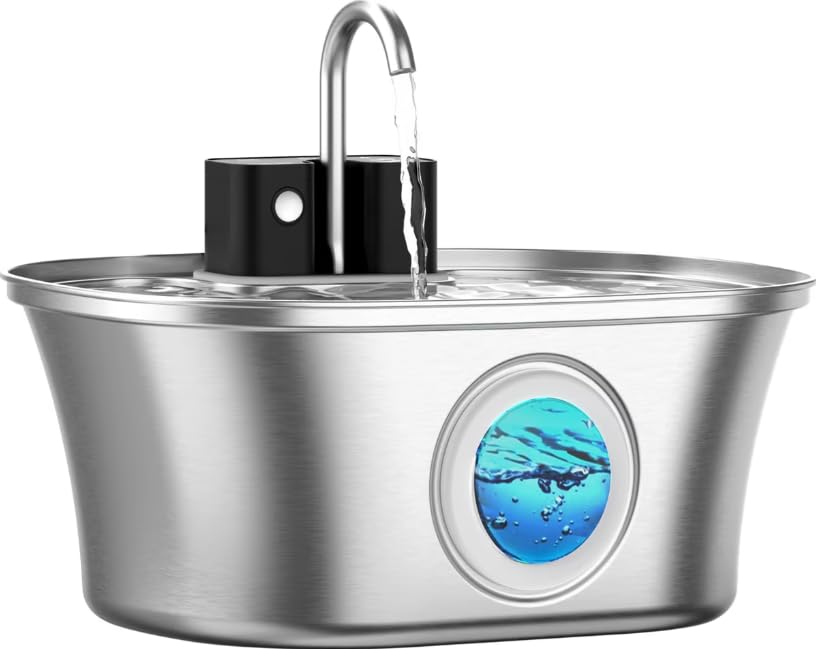
Image: The Casfuy PWL-300 Wireless Smart Quiet Stainless Steel Cat Water Fountain, showcasing its sleek design and water flow.
Safety Instructions
- Ensure the fountain is placed on a stable, level surface to prevent tipping.
- Do not immerse the main unit (containing electrical components) in water.
- Keep the power adapter and cable away from pets to prevent chewing.
- Unplug the fountain before cleaning or performing any maintenance.
- This product is for indoor use only.
- Do not allow children to play with the fountain.
- Use only original Casfuy replacement parts and accessories.
Package Contents
Verify that all components are present in the package:
- Stainless Steel Water Tank
- Stainless Steel Top Cover
- User Manual (this document)
- Bracket
- Filter Sponge
- Carbon Filter
- Water Pump
- Brush
Setup
- Clean Components: Wash the stainless steel tank and top cover thoroughly with water and mild soap. Rinse completely.
- Install Filter: Place the filter sponge into the designated slot in the pump assembly. Insert the carbon filter into the filter tray.
- Assemble Pump: Attach the water pump to the bracket and secure it in the bottom of the stainless steel tank. Ensure the pump cable is routed correctly.
- Fill with Water: Fill the stainless steel tank with clean water up to the maximum fill line. The fountain has a capacity of 108 fluid ounces (3.2 liters).
- Place Top Cover: Carefully place the stainless steel top cover onto the tank, ensuring it is seated properly.
- Initial Charge (for cordless use): If using wirelessly, connect the power adapter to the fountain and a power outlet. Allow the internal battery to fully charge before first cordless use. A full charge takes approximately 5 hours and provides up to 45 days of use in sensor or timer mode.
- Power On: Press the power button to turn on the fountain.

Image: A detailed view of the multi-layer filtration system, showing the filter sponge and carbon filter layers.
Operating Modes
The Casfuy PWL-300 offers three intelligent drinking modes:
- Sensor Mode: Water dispenses for 30 seconds when a pet approaches the fountain. This mode conserves battery life and water.
- Timer Mode: Water is dispensed for 60 seconds every 30 minutes. This provides regular access to fresh water while still being energy efficient.
- Continuous Mode: Water flows continuously. This mode requires the fountain to be plugged into a power source.
To switch between modes, press the mode selection button on the fountain. The LED indicator will change to reflect the selected mode.

Image: A visual representation of the three operating modes: Sensor, Timer, and Continuous, with a cat interacting with the fountain.

Image: An illustration highlighting the fountain's long battery life of up to 45 days and its 4000mAh battery capacity.
Maintenance
Cleaning the Fountain
Regular cleaning is essential to maintain water quality and prolong the life of the fountain. Clean the fountain at least once a week.
- Disconnect Power: Unplug the fountain from the power outlet or ensure it is turned off if operating wirelessly.
- Disassemble: Remove the top cover, filters, and pump assembly.
- Clean Tank and Cover: The stainless steel water tank and top cover are dishwasher safe. For manual cleaning, wash with water and mild soap, then rinse thoroughly. Do not immerse the battery or any plastic parts containing electronic components in water or place them in the dishwasher.
- Clean Pump: Disassemble the pump and clean all parts with the provided brush. Remove any hair or debris that may have accumulated. Rinse thoroughly.
- Reassemble: Reassemble all components and refill the tank with fresh water.

Image: The stainless steel tank and cover placed inside a dishwasher, illustrating their dishwasher-safe feature. Note: Electronic components are not dishwasher safe.
Filter Replacement
Replace the carbon filter every 2-4 weeks, or more frequently if you have multiple pets or notice reduced water flow. Replace the filter sponge every 1-2 months.
- Turn off and unplug the fountain.
- Remove the top cover and the old filters.
- Rinse the new carbon filter under running water to remove any loose carbon dust.
- Place the new filter sponge and carbon filter into their respective slots in the filter tray.
- Reassemble the fountain and refill with fresh water.
Troubleshooting
| Problem | Possible Cause | Solution |
|---|---|---|
| Fountain not dispensing water | Low water level; Pump clogged; Power issue; Battery depleted | Refill water; Clean pump and filters; Check power connection; Recharge battery |
| Water flow is weak | Filter clogged; Pump dirty; Low water level | Replace filter; Clean pump; Refill water |
| Fountain is noisy | Low water level; Pump dirty; Improper assembly | Refill water; Clean pump; Ensure all parts are correctly assembled |
| LED light not working | Power issue; Internal fault | Check power connection; Contact customer support |
Specifications
- Model Number: PWL-300
- Material: Stainless Steel
- Capacity: 108 Fluid Ounces (3.2 Liters)
- Dimensions: 9.37 x 8.11 x 4.72 inches
- Weight: 1.83 Pounds
- Battery: 1 Lithium Ion (included), 4000mAh
- Noise Level: Less than 20 dB (whisper-quiet operation)
- Features: Wireless operation, 3 intelligent drinking modes (Sensor, Timer, Continuous), multi-layer filtration, water-level window, LED light.

Image: A cat drinking from the fountain, emphasizing its large 3.2L (108.2 oz) capacity.

Image: A visual representation of the fountain's ultra-silent operation, indicating a noise level below 25 dB, with a sleeping cat nearby.
Warranty and Support
For warranty information or technical support, please contact Casfuy customer service. Refer to the contact details provided on the product packaging or the official Casfuy website. Please have your model number (PWL-300) and purchase date available when contacting support.