
1. Introduction
The Memorex Retro AM/FM Radio Boombox, model MX-BCD110, combines classic design with modern audio capabilities. This manual provides comprehensive instructions for the safe and efficient setup, operation, and maintenance of your device. Please read this manual thoroughly before use and retain it for future reference.
What's Included:
- Memorex Retro Boombox (MX-BCD110)
- AC Power Cord
- Operation Manual
2. Safety Information
Please observe the following safety precautions to prevent electric shock, fire, or damage to the unit:
- Do not expose this appliance to rain or moisture.
- Do not block any ventilation openings.
- Ensure the power cord is not pinched or walked on.
- Unplug the unit during lightning storms or when unused for long periods.
- Refer all servicing to qualified service personnel.
- Do not open the casing; there are no user-serviceable parts inside.
3. Product Overview
The Memorex MX-BCD110 features a top-loading CD player, AM/FM radio tuner, Bluetooth wireless streaming, and an auxiliary input for connecting external audio devices. It operates on either AC power or batteries for portable use. An LED display provides clear information on selected modes and tracks.
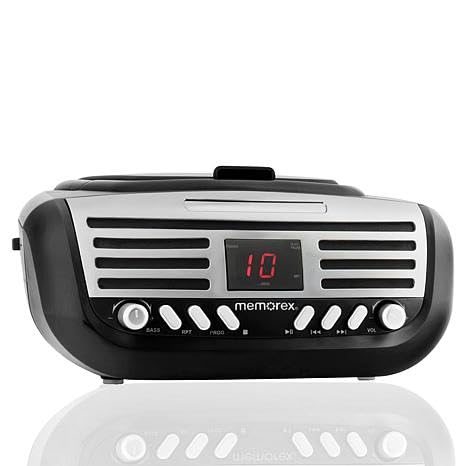
Front view of the Memorex Retro AM/FM Radio Boombox, showing the top-loading CD player, control buttons, and LED display.
Key Features:
- AM/FM Radio Tuner
- Top-Loading CD Player (supports CD, CD-R, CD-RW)
- Bluetooth Wireless Streaming
- Auxiliary Input (3.5mm)
- LED Display
- Programmable CD Playback
- AC or Battery Powered Operation
4. Setup
4.1 Power Connection
The boombox can be powered by either the included AC power cord or batteries.
- AC Power: Insert the AC power cord into the AC IN jack on the back of the unit, then plug the other end into a standard wall outlet (AC 120V ~ 60Hz).
- Battery Power: For portable use, open the battery compartment on the bottom of the unit. Insert 6 'C' size batteries (not included), ensuring correct polarity (+/-). Close the compartment securely.
4.2 Antenna Setup
For optimal FM radio reception, fully extend the telescopic antenna. For AM reception, rotate the unit to find the best signal.
5. Operating Instructions
5.1 Power On/Off
Press the POWER button to turn the unit on or off.
5.2 Mode Selection
Press the MODE button repeatedly to cycle through available functions: CD, FM Radio, AM Radio, Bluetooth, and AUX Input. The selected mode will be indicated on the LED display.
5.3 AM/FM Radio Operation
- Select FM or AM mode using the MODE button.
- Use the TUNING knob or buttons (if present) to scan for desired radio stations.
- Adjust the VOLUME knob to your preferred listening level.
5.4 CD Player Operation
- Select CD mode using the MODE button.
- Open the CD compartment lid.
- Place a CD (label side up) onto the center spindle and gently press down until it clicks into place.
- Close the CD compartment lid.
- Press the PLAY/PAUSE button to start playback.
- Use the SKIP FORWARD or SKIP BACKWARD buttons to navigate between tracks.
- Press STOP to end playback.
- The unit supports programmable CD playback. Refer to the specific controls on your unit for programming instructions.
5.5 Bluetooth Wireless Streaming
- Select Bluetooth mode using the MODE button. The LED display will indicate 'BT' or a similar pairing indicator.
- On your Bluetooth-enabled device (smartphone, tablet, etc.), enable Bluetooth and search for available devices.
- Select "Memorex MX-BCD110" from the list of devices to pair.
- Once paired, you can stream audio from your device to the boombox.
- Adjust volume on both the boombox and your connected device.
5.6 Auxiliary Input (AUX)
- Connect a 3.5mm audio cable (not included) from the headphone jack or line-out of your external audio device to the AUX IN jack on the boombox.
- Select AUX mode using the MODE button.
- Play audio from your external device. All playback controls (play, pause, skip) will be managed directly on the external device.
6. Maintenance
6.1 Cleaning the Unit
Wipe the exterior of the unit with a soft, dry cloth. Do not use abrasive cleaners, waxes, or solvents as they may damage the finish. Avoid spraying liquids directly onto the unit.
6.2 CD Care
Handle CDs by their edges. Keep them clean and free of scratches. If a CD is dirty, wipe it gently with a soft, lint-free cloth from the center outwards.
6.3 Battery Care
If the unit will not be used for an extended period, remove the batteries to prevent leakage and corrosion.
7. Troubleshooting
If you experience issues with your Memorex MX-BCD110, please consult the following common problems and solutions:
- No Power:
Solution: Ensure the AC power cord is securely plugged into both the unit and a working wall outlet. If using batteries, check that they are inserted correctly and are not depleted. - No Sound:
Solution: Check the volume level on the boombox and any connected external device. Ensure the correct mode (CD, FM, AM, BT, AUX) is selected. - CD Not Playing:
Solution: Ensure the CD is inserted correctly with the label side facing up. Check if the CD is clean and free of scratches. Try a different CD. - Poor Radio Reception:
Solution: Fully extend the FM telescopic antenna. For AM, rotate the unit to improve signal reception. Move the unit away from other electronic devices that may cause interference. - Bluetooth Not Connecting:
Solution: Ensure the boombox is in Bluetooth pairing mode. Make sure Bluetooth is enabled on your external device and it is within range (typically 30 feet). Forget the device on your phone and try pairing again.
8. Specifications
| Model Number | MX-BCD110 |
| Product Dimensions (L x W x H) | 10 x 10 x 6 inches |
| Item Weight | 2.88 pounds |
| Power Source | AC 120V ~ 60Hz or 6 x 'C' size batteries (not included) |
| Connectivity Technology | Bluetooth, Aux-in (3.5mm) |
| Speaker Type | Stereo |
| CD Compatibility | CD, CD-R, CD-RW |
| Radio Frequencies | AM, FM |
9. Warranty and Support
Memorex products are designed for reliability and performance. For warranty information, customer service, or technical support, please refer to the documentation included with your purchase or visit the official Memorex website. Please have your model number (MX-BCD110) and purchase date available when contacting support.