
1. Introduction
This manual provides instructions for the proper use and maintenance of your coioc Portable Bluetooth Speaker S18. Please read this manual thoroughly before using the product to ensure optimal performance and longevity.
Package Contents:
- coioc Portable Bluetooth Speaker S18
- Type-C Charging Cable
- Quick Start Guide
2. Safety Information
- Do not expose the speaker to extreme temperatures or direct sunlight for extended periods.
- Avoid dropping or subjecting the speaker to strong impacts.
- Do not attempt to disassemble or modify the speaker. This will void the warranty.
- Keep the speaker away from medical devices.
- Use only the provided Type-C charging cable or a certified equivalent.
- Ensure charging ports are dry before connecting the charging cable.
3. Product Overview
The coioc S18 is a portable Bluetooth speaker designed for various environments, offering robust audio and features.
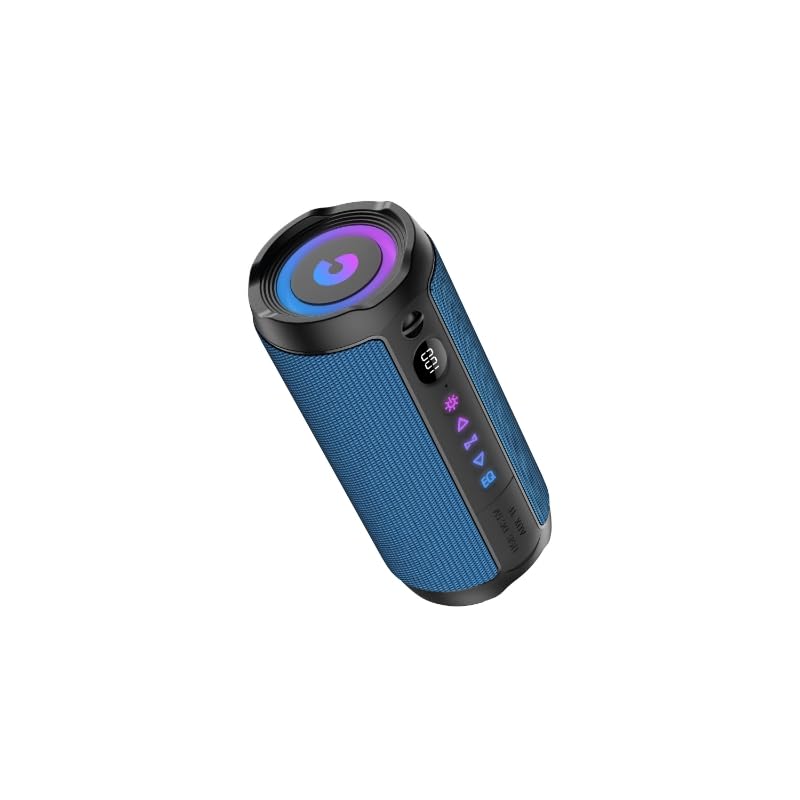
Image 1: coioc Portable Bluetooth Speaker S18 (Blue variant shown)
Key Features:
- High-Fidelity 360° Stereo Sound: Provides immersive audio with balanced and clear surround sound.
- 30W High Power Output: Equipped with two 55mm drivers for rich and balanced sound quality.
- TWS Connectivity: Allows pairing of two S18 speakers for true wireless stereo sound.
- LED Battery Indicator: Displays battery level from 1% to 100%.
- Extended Playtime: Up to 30 hours of playback on a single charge with a 4000mAh battery.
- Bluetooth 5.4: Offers stable wireless connection up to 100 feet.
- RGB Color Light Show: Dynamic lights synchronize with music beats.
- IPX7 Waterproof Rating: Protects against water immersion up to 1 meter for 30 minutes.
- Built-in Microphone: Supports hands-free calling.
4. Controls and Indicators
The speaker features intuitive controls and an LED display for easy operation.
Typical Control Layout:
- Power Button: Press and hold to power on/off. Short press for play/pause.
- Volume Up (+): Short press to increase volume. Long press for next track.
- Volume Down (-): Short press to decrease volume. Long press for previous track.
- Bluetooth Button: Short press to enter Bluetooth pairing mode.
- Light Mode Button: Short press to cycle through RGB light modes.
- LED Display: Shows battery percentage and current mode.
- Type-C Charging Port: For charging the speaker.
Note: Refer to the Quick Start Guide for a detailed diagram of button placement.
5. Setup
5.1 Charging the Speaker
- Connect the Type-C charging cable to the speaker's charging port.
- Connect the other end of the cable to a USB power adapter (not included) or a computer's USB port.
- The LED display will show the charging progress. A full charge typically takes a few hours.
- Disconnect the cable once fully charged.
5.2 Powering On/Off
- To Power On: Press and hold the Power button for approximately 2-3 seconds until you hear an audible prompt and the LED display illuminates.
- To Power Off: Press and hold the Power button for approximately 2-3 seconds until you hear an audible prompt and the LED display turns off.
5.3 Bluetooth Pairing
- Ensure the speaker is powered on and in Bluetooth pairing mode (indicated by a flashing Bluetooth icon or specific LED pattern). If not, short press the Bluetooth button.
- On your device (smartphone, tablet, computer), enable Bluetooth and search for available devices.
- Select "coioc S18" from the list of devices.
- Once paired, the speaker will emit an audible confirmation, and the Bluetooth indicator will become solid.
5.4 True Wireless Stereo (TWS) Pairing
TWS allows you to connect two coioc S18 speakers for a stereo sound experience.
- Ensure both S18 speakers are powered on and not connected to any other Bluetooth device.
- On one speaker (this will be the primary speaker), press and hold the Bluetooth button for approximately 3-5 seconds until you hear a TWS pairing prompt.
- The primary speaker will automatically search for the secondary speaker.
- Once successfully paired, both speakers will emit an audible confirmation, and their Bluetooth indicators will synchronize.
- Now, connect your device to the primary speaker via Bluetooth as described in section 5.3.
6. Operating Instructions
6.1 Music Playback
- Play/Pause: Short press the Power button.
- Next Track: Long press the Volume Up (+) button.
- Previous Track: Long press the Volume Down (-) button.
- Volume Adjustment: Short press the Volume Up (+) or Volume Down (-) buttons.
6.2 Hands-Free Calling
- Answer Call: Short press the Power button when an incoming call is received.
- End Call: Short press the Power button during a call.
- Reject Call: Long press the Power button when an incoming call is received.
6.3 RGB Light Modes
Short press the Light Mode button to cycle through different RGB lighting effects. Press and hold to turn the lights off/on.
7. Maintenance
7.1 Cleaning
- Wipe the speaker with a soft, damp cloth.
- Do not use abrasive cleaners, alcohol, or chemical solvents.
- Ensure the charging port is clean and free of debris.
7.2 Storage
- Store the speaker in a cool, dry place away from direct sunlight.
- If storing for an extended period, charge the battery to approximately 50% every few months to maintain battery health.
7.3 Water Resistance (IPX7)
- The speaker is IPX7 rated, meaning it can be immersed in water up to 1 meter for 30 minutes.
- Ensure the charging port cover is securely closed before exposing the speaker to water.
- Do not expose to saltwater or other chemicals.
- After exposure to water, wipe the speaker dry before charging.
8. Troubleshooting
| Problem | Possible Cause | Solution |
|---|---|---|
| Speaker does not power on. | Low battery. | Charge the speaker fully. |
| Cannot pair via Bluetooth. | Speaker not in pairing mode; device Bluetooth off; too far apart. | Ensure speaker is in pairing mode. Turn device Bluetooth off/on. Move speaker closer to device (within 100 ft). |
| No sound or low volume. | Volume too low on speaker or device; speaker not connected. | Increase volume on both speaker and device. Re-pair Bluetooth connection. |
| TWS pairing fails. | Speakers too far apart; one speaker already paired to a device. | Ensure both speakers are disconnected from other devices. Place speakers close together. Repeat TWS pairing steps. |
| Sound distortion. | Volume too high; low battery; interference. | Reduce volume. Charge speaker. Move away from other electronic devices. |
9. Specifications
| Feature | Detail |
|---|---|
| Brand | coioc |
| Model Number | S18 |
| Speaker Maximum Output Power | 30 Watts |
| Connectivity Technology | Bluetooth |
| Bluetooth Version | 5.4 |
| Audio Output Mode | Stereo |
| Speaker Type | Portable Speaker |
| Additional Features | Bass Boost, Built-In Microphone, Display, Dustproof, LED Light, Lightweight, Portable, Stereo Pairing, USB Port, Waterproof |
| Battery Average Life | 30 Hours |
| Waterproof Rating | IPX7 |
| Control Method | Touch |
| Audio Driver Size | 55mm (2 x 55mm drivers) |
| Item Dimensions (D x W x H) | 5"D x 5"W x 5"H (approximate) |
| Compatible Devices | Laptop, Smartphone, Tablet, Television |
10. Warranty and Support
10.1 Warranty Information
The coioc Portable Bluetooth Speaker S18 comes with a Limited Warranty. Please refer to the Quick Start Guide included in your package for specific warranty terms and conditions. Retain your proof of purchase for warranty claims.
10.2 Customer Support
For technical support or customer service inquiries, please refer to the contact information provided in your Quick Start Guide or visit the official coioc website.