
1. Introduction
Thank you for choosing the SANSCO TW-38 Dual Lens PTZ Solar Camera. This wireless outdoor security camera is designed to provide comprehensive surveillance with its dual lenses, pan-tilt-zoom (PTZ) capabilities, and solar power integration. This manual provides essential information for the proper setup, operation, and maintenance of your camera system.
2. Safety Information
- Read all instructions carefully before installation and use.
- Ensure the camera is installed in a location that provides adequate direct sunlight for the solar panel to function effectively. Avoid shaded areas.
- For optimal longevity, install the camera under an eave or proper shelter to minimize direct exposure to harsh weather conditions, despite its IP66 waterproof rating.
- Fully charge the camera's battery overnight using the provided USB charger cable before initial installation.
- Do not attempt to disassemble or modify the camera. Refer all servicing to qualified personnel.
- Use only the specified 5V 1A power adapter for charging if the battery is depleted. Do not use 2.4A or 3A adapters.
3. Setup
3.1. Package Contents
Verify that all components are present in the package:
- 1x SANSCO TW-38 Camera
- 1x Solar Panel
- 1x Set Guide (Quick Start Guide)
- Mounting Screws and Anchors
3.2. Initial Charging
Before installation, fully charge the camera's internal battery using the provided USB cable and a 5V 1A power adapter. This ensures the camera has sufficient power for initial setup and operation, especially if solar charging is not immediately optimal.
3.3. Solar Panel Placement
The solar panel must be placed in a location that receives plenty of direct sunlight throughout the day. Avoid areas that are covered or shaded by trees, buildings, or other obstructions. Proper solar panel placement is crucial for continuous power supply.
3.4. Mounting the Camera
The SANSCO TW-38 camera can be mounted on a wall or ceiling. Choose a mounting location that provides the desired viewing angle and is within range of your Wi-Fi network. Use the included screws and anchors for secure installation.
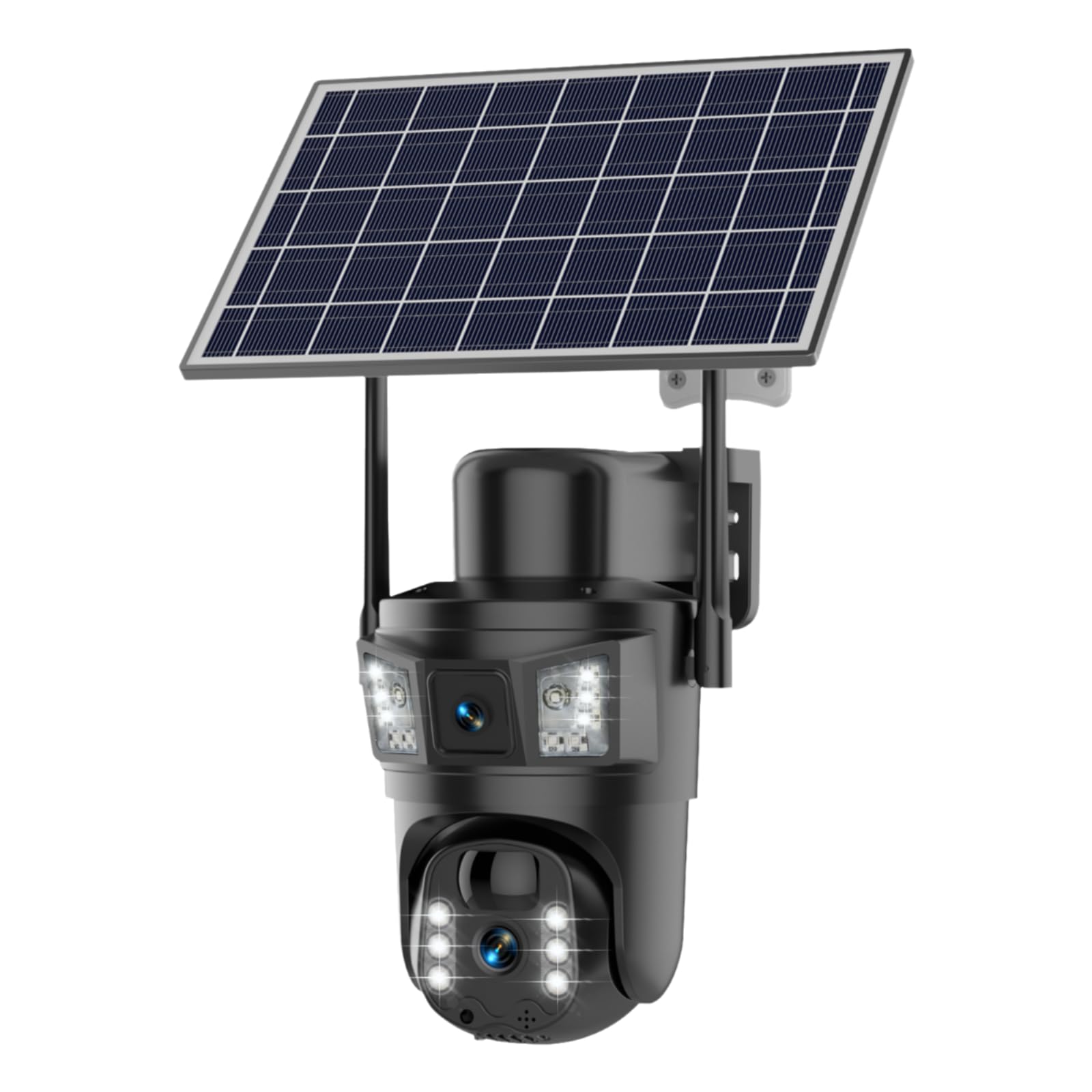
Figure 1: Example of camera and solar panel mounting. Ensure the solar panel receives direct sunlight.
3.5. Wi-Fi Connection and App Setup
- Download the EseeCloud app from your smartphone's app store (available for iOS and Android).
- Create an account or log in if you already have one.
- Follow the in-app instructions to add your SANSCO TW-38 camera. The camera supports both 2.4GHz and 5GHz Wi-Fi networks.
- Ensure your smartphone is connected to the same Wi-Fi network you intend to connect the camera to during the setup process.
4. Operating the Camera
4.1. Dual Lens and PTZ Functionality
The camera features dual lenses: a fixed lens and a rotating PTZ lens. The PTZ lens offers 355° horizontal rotation and 90° vertical rotation, providing a 360° view with minimal blind spots. Use the EseeCloud app to control the PTZ movement and switch between the bullet (fixed) and dome (PTZ) screens for rapid target identification. The camera also supports 10X digital zoom.
4.2. 2K High-Definition Live Video
The camera provides 8MP (4MP + 4MP, 2304*1296P) full HD images and video. Access live view through the EseeCloud app. The camera offers clear visibility during both day and night, with color night vision capabilities.
4.3. PIR Motion Detection and Alerts
The integrated Passive Infrared (PIR) sensor detects human and animal motion. When motion is detected, the camera will trigger intelligent motion alarms, sending real-time alerts to your mobile app. The camera can also activate a siren and flashing white light as a deterrent. Note that vehicles driving down the street may not trigger motion events as the PIR is optimized for person/animal detection.
4.4. Two-Way Audio
Utilize the built-in microphone and speaker for real-time two-way audio communication. This allows you to speak with visitors, deter intruders, or communicate with family members directly through the EseeCloud app.
4.5. Recording Modes
The SANSCO TW-38 is a battery-powered camera and does not support 24/7 continuous recording to conserve battery life. It is designed for live view and motion detection recording. The camera enters a sleeping mode when no motion or human presence is detected to optimize power consumption.
5. Maintenance
5.1. Cleaning
Periodically clean the camera lenses and the solar panel surface with a soft, damp cloth to ensure optimal performance. Dust and debris can obstruct the lenses and reduce the efficiency of the solar panel.
5.2. Battery Care
To prolong battery life, ensure the solar panel is consistently exposed to direct sunlight. Avoid setting the camera to record continuously, as this will quickly deplete the battery. If the battery is completely dead, charge it using a 5V 1A power adapter.
6. Troubleshooting
- Camera not powering on: Ensure the battery is fully charged. Connect the camera to a 5V 1A power adapter for charging.
- No Wi-Fi connection: Verify that the camera is within range of your 2.4GHz or 5GHz Wi-Fi network. Ensure your router is functioning correctly. Re-attempt the Wi-Fi setup process through the EseeCloud app.
- Poor video quality: Check for obstructions on the camera lens. Ensure the camera is securely mounted and not vibrating. Verify your Wi-Fi signal strength.
- Motion detection not working: Adjust the PIR sensitivity settings in the EseeCloud app. Ensure there are no physical obstructions blocking the PIR sensor. Remember that the camera detects persons/animals via PIR, and certain movements like distant cars may not trigger events.
- Battery draining quickly: Ensure the solar panel is receiving adequate direct sunlight. Avoid placing the camera in crowded areas if advanced face recognition technology is enabled, as this can consume more power. Confirm that continuous recording is not enabled (it is not supported for this model).
- Two-way audio issues: Check the microphone and speaker settings in the EseeCloud app. Ensure your phone's volume is up and there are no obstructions to the camera's speaker/microphone.
7. Specifications
| Feature | Detail |
|---|---|
| Model Name | TW-38 |
| Brand | SANSCO |
| Connectivity Technology | Wireless (Wi-Fi 2.4GHz & 5GHz) |
| Power Source | Solar Powered, Battery Powered (1 Lithium Ion battery included) |
| Video Capture Resolution | 2K (8MP: 4MP + 4MP, 2304*1296P) |
| Special Features | 2-Way Audio, HD Resolution, Motion Sensor (PIR), Night Vision (Color), PTZ Technology (355° H, 90° V), Dual Lens, Dual Screen View, 10X Digital Zoom |
| Indoor/Outdoor Usage | Indoor, Outdoor |
| Water Resistance Level | IP66 Waterproof |
| Control Method | App (EseeCloud) |
| Product Dimensions | 10 x 8 x 5.5 inches |
| Item Weight | 3.74 pounds |
8. Warranty and Support
For warranty information, technical support, or any questions not covered in this manual, please contact SANSCO customer service. Refer to the product packaging or the SANSCO official website for contact details.