
1. Introduction
The Mcbazel Digital Light Meter S8811 is a high-precision illuminance meter designed for accurate light measurement across various applications. Featuring a rapid 8X/s sampling rate, a 270° rotatable sensor, and an HD color screen, this device provides reliable data for professionals and enthusiasts alike. It is suitable for optimizing lighting in environments such as LED grow light setups, photography studios, and general lumen testing.
2. Product Features
- Ultra-Wide Range & Fast Sampling: Measures from 0 to 200,000 Lux (20,000 FC) with a rapid 8 times per second sampling rate for instant, real-time data.
- 270° Rotatable Sensor: Allows the sensor to be angled towards the light source while keeping the display visible, preventing body shadows from affecting measurements. (Note: Sensor rotates right-side only).
- HD Color Display: A vibrant, backlit HD color screen ensures clear readability in various lighting conditions.
- Multi-Light Calibration: Features Light Source Correction Coefficients for accurate readings with different light types, including LED (White/Red/Warm) and standard lights.
- Smart Data Functions: Includes Data Hold (freezes current reading), Max/Min/Avg recording, and one-touch Unit Switching (Lux/FC, °C/°F).
- Ambient Temperature Sensor: Provides additional environmental data.
- Energy-Saving Design: Equipped with an intelligent 10-minute Auto-Off function to preserve battery life, which can be manually disabled for continuous monitoring.
- Durable Build: Ergonomic housing designed for resilience in various usage environments.
3. Package Contents
Please verify that all items are present in the package:
- 1 x Mcbazel Digital Light Meter S8811
- 1 x User Manual (English/Chinese)

Image: The Mcbazel Digital Light Meter S8811 shown alongside its included user manual, illustrating the package contents.
4. Getting Started (Setup)
4.1 Battery Installation
- Locate the battery compartment cover on the back of the device.
- Slide or unclip the cover to open the compartment.
- Insert three (3) AAA batteries, ensuring correct polarity (+/-) as indicated inside the compartment. (Batteries are not included)
- Replace the battery compartment cover securely.

Image: A close-up view of the battery compartment on the back of the light meter, showing where to insert the three AAA batteries.
4.2 Powering On/Off
- To power on the device, press the red power button located on the front panel.
- To power off the device, press and hold the red power button for approximately 2 seconds until the screen turns off.
5. Operation
5.1 Basic Light Measurement
- Power on the device.
- Remove the protective cap from the sensor.
- Point the white dome sensor directly towards the light source you wish to measure.
- Read the illuminance value displayed on the HD color screen. The device provides real-time readings.
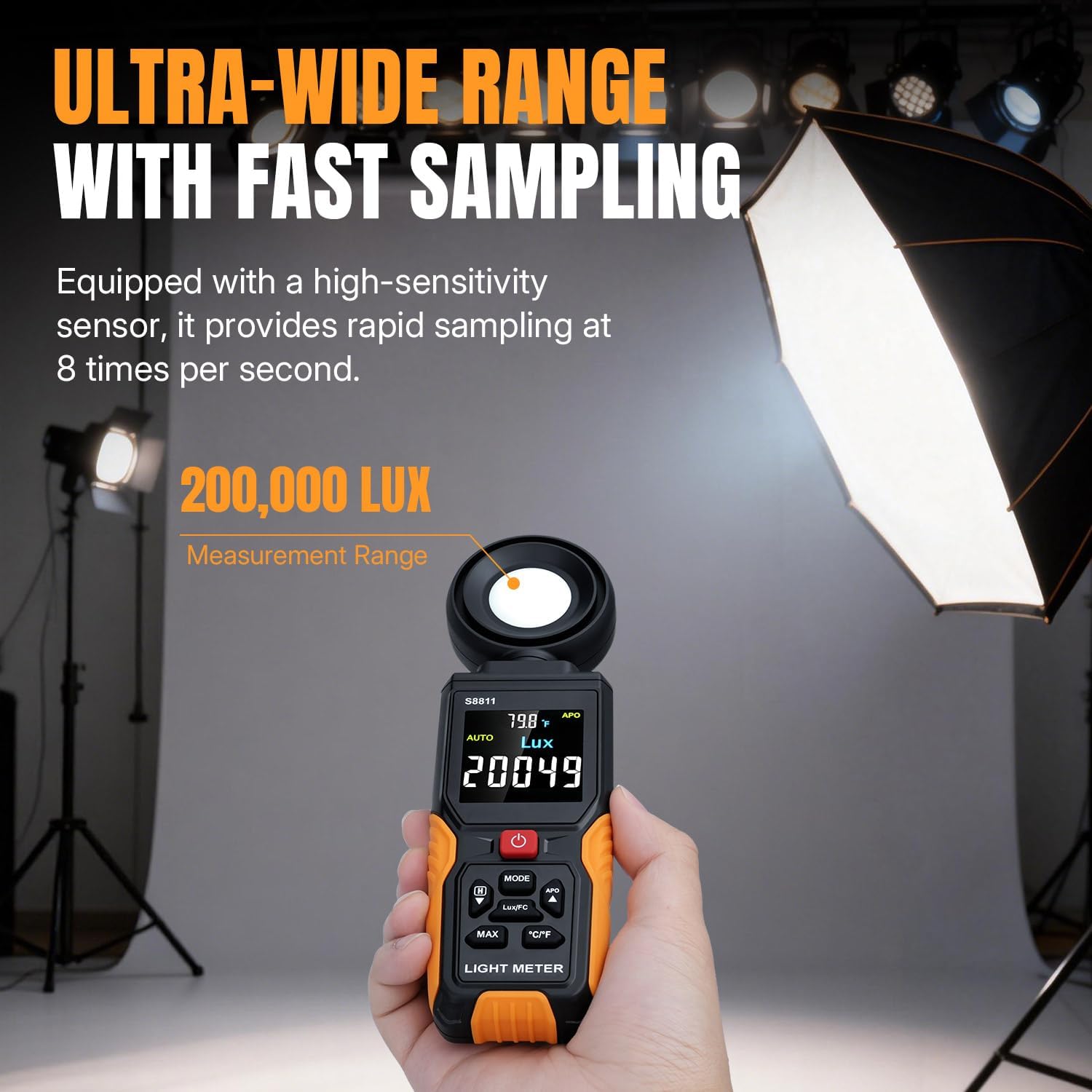
Image: A hand holding the Mcbazel Digital Light Meter S8811, with the screen displaying a light measurement in Lux, demonstrating its fast sampling capability.
5.2 Using the 270° Rotatable Sensor
- The sensor head can be rotated up to 270° to the right. This allows you to position the sensor towards the light source while maintaining a clear view of the display.
- Gently rotate the sensor head clockwise to the desired angle. Avoid rotating it counter-clockwise beyond its limit to prevent damage.

Image: The Mcbazel Digital Light Meter S8811 with its sensor head rotated, illustrating the 270-degree rotation feature for flexible measurement angles.
5.3 Unit Switching (Lux/FC, °C/°F)
- Press the MODE button to switch between Lux and Foot-Candle (FC) units for light measurement.
- Press the °C/°F button to toggle the temperature display between Celsius and Fahrenheit.
5.4 Data Hold Function
- To freeze the current reading on the display, press the HOLD button (often labeled with a 'H' icon or integrated with the 'Down' arrow button). Press it again to release and resume real-time measurement.
5.5 Max/Min/Avg Recording
- Press the MAX button to cycle through Maximum, Minimum, and Average recorded values during a measurement session.
- The display will show 'MAX', 'MIN', or 'AVG' indicators.

Image: The light meter's screen showing different data modes including maximum, minimum, and average light readings, along with temperature.
5.6 Light Source Correction Coefficients
- This meter includes specific calibration settings for various light sources, particularly LEDs (White, Red, Warm). Refer to the on-screen indicators or the detailed user manual (included in the package) for instructions on how to select the appropriate correction coefficient for your light source to ensure optimal accuracy.

Image: A graphic illustrating the multi-light calibration feature of the light meter, showing different light spectrums and the device's ability to switch between Lux and FC units.
5.7 Auto-Off Function
- The device automatically powers off after 10 minutes of inactivity to conserve battery.
- To disable the auto-off function, consult the detailed user manual for specific button combinations, typically involving holding a button during power-on.
6. Maintenance
6.1 Cleaning
- Wipe the device with a soft, dry cloth. Do not use abrasive cleaners or solvents.
- Keep the sensor dome clean and free from dust or smudges to ensure accurate readings. Use a soft brush or lens cloth if necessary.
6.2 Storage
- When not in use for extended periods, remove the batteries to prevent leakage.
- Store the device in a cool, dry place, away from direct sunlight and extreme temperatures.
- Always place the protective cap over the sensor when storing to prevent damage.
7. Troubleshooting
7.1 Device Does Not Power On
- Check if the batteries are inserted correctly with the proper polarity.
- Replace with fresh AAA batteries.
- Ensure the power button is pressed firmly.
7.2 Inaccurate Readings
- Ensure the sensor dome is clean and unobstructed.
- Verify that the sensor is pointed directly at the light source.
- Check if the correct Light Source Correction Coefficient is selected for your specific lighting type.
- Avoid casting shadows on the sensor with your body or other objects during measurement.
7.3 Display Issues
- If the display is dim or flickering, replace the batteries.
- If the display shows an error message, refer to the detailed user manual for specific error codes and solutions.
8. Specifications
| Feature | Detail |
|---|---|
| Model Number | S8811 |
| Measurement Range | 0 to 200,000 Lux / 0 to 20,000 FC |
| Sampling Rate | 8 times per second |
| Sensor Rotation | 270° (Right-side only) |
| Display | HD Color Backlit Screen |
| Units | Lux, FC, °C, °F |
| Power Source | 3 x AAA Batteries (not included) |
| Auto-Off | 10 minutes (can be disabled) |
| Product Dimensions | 2.36 x 1.1 x 8.07 inches |
| Item Weight | 7 ounces |
9. Warranty and Support
Mcbazel products are manufactured to high-quality standards. For warranty information, technical support, or service inquiries, please refer to the contact details provided in the separate warranty card included with your product or visit the official Mcbazel website. Please retain your proof of purchase for warranty claims.