
Introduction
Thank you for choosing the KOMFOTT Side Table with Charging Station. This multi-functional nightstand combines convenience, storage, and modern style, making it a practical addition to any living space. This manual provides essential information for assembly, operation, and maintenance to ensure safe and efficient use of your product.
Safety Information
- Assembly is required. Use caution when handling small parts and tools.
- Ensure all connections for the charging station are secure before use.
- Do not overload the electrical outlets.
- Keep liquids away from the charging station to prevent electrical hazards.
- Do not exceed the maximum weight capacities for the top shelf, open compartment, or drawers.
Package Contents
Please verify that all components are present before beginning assembly. If any parts are missing or damaged, please contact customer support.
- 1 x KOMFOTT Side Table
- 1 x User Guide (this document)
- All necessary assembly hardware (screws, dowels, etc.)

Image: The KOMFOTT Side Table in a bedroom setting, showcasing its design and functionality.
Setup and Assembly
Assembly of the KOMFOTT Side Table is required. Detailed step-by-step instructions and diagrams are provided in the separate user guide included in your package. Please follow these instructions carefully to ensure proper and safe assembly.
General Assembly Tips:
- Identify all parts and hardware before starting.
- Use a clean, flat surface for assembly to prevent scratches.
- Do not overtighten screws to avoid damaging the material.
- Ensure all connections are firm and stable before placing items on the table.

Image: Detailed dimensions of the side table, including the top surface, open compartment, and drawer interiors.
Operating Instructions
Using the Charging Station:
- Connect the 4.9 ft extra-long power cord from the side table to a standard wall outlet.
- The integrated charging station features 2 AC outlets, 1 USB port (5V/2.4A), and 1 Type-C port (5V/3A).
- Plug your devices into the appropriate ports for convenient charging.
- Utilize the built-in cable holes at the back of the table to route charging cords, keeping your space organized and tangle-free.

Image: A close-up view of the integrated charging station with various ports and a device connected.
Storage Features:
- Wide Top Surface: Use the top surface for placing daily essentials such as lamps, alarm clocks, or beverages.
- Open Compartment: The open compartment provides easy access storage for books, magazines, or decorative items.
- Two Drawers: Two smooth-gliding drawers offer concealed storage for personal items, keeping your space tidy. The drawers are equipped with sturdy metal handles for easy operation.
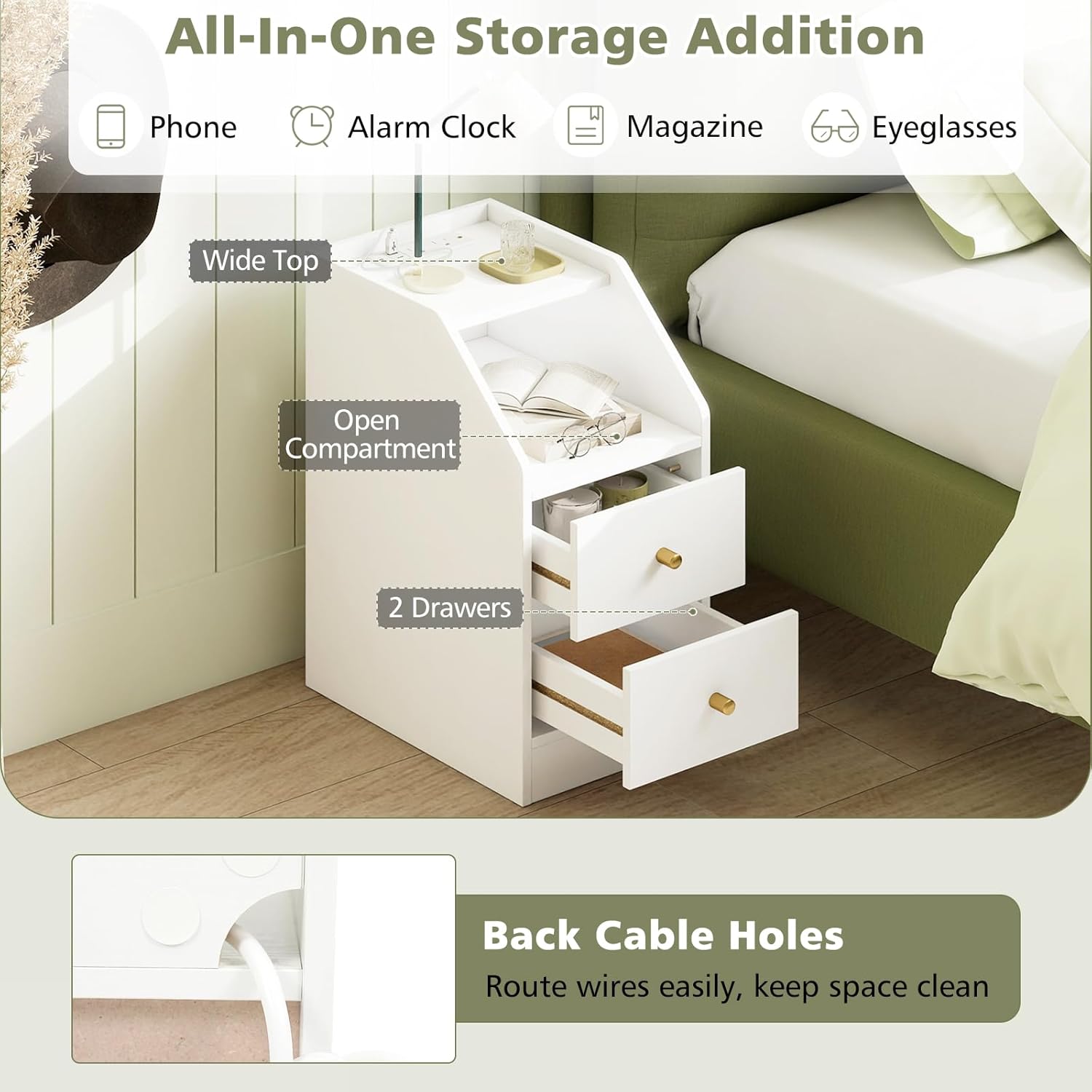
Image: An illustration highlighting the wide top, open compartment, two drawers, and cable management holes.
Maintenance
- Cleaning: Wipe the surface with a soft, damp cloth. Avoid harsh chemicals or abrasive cleaners that may damage the finish.
- Spills: Clean up spills immediately to prevent staining, especially on the engineered wood and MDF surfaces.
- Inspection: Periodically check all screws and connections to ensure they remain tight and secure. Retighten if necessary.
- Placement: Avoid placing the table in direct sunlight or near heat sources to prevent material warping or discoloration.
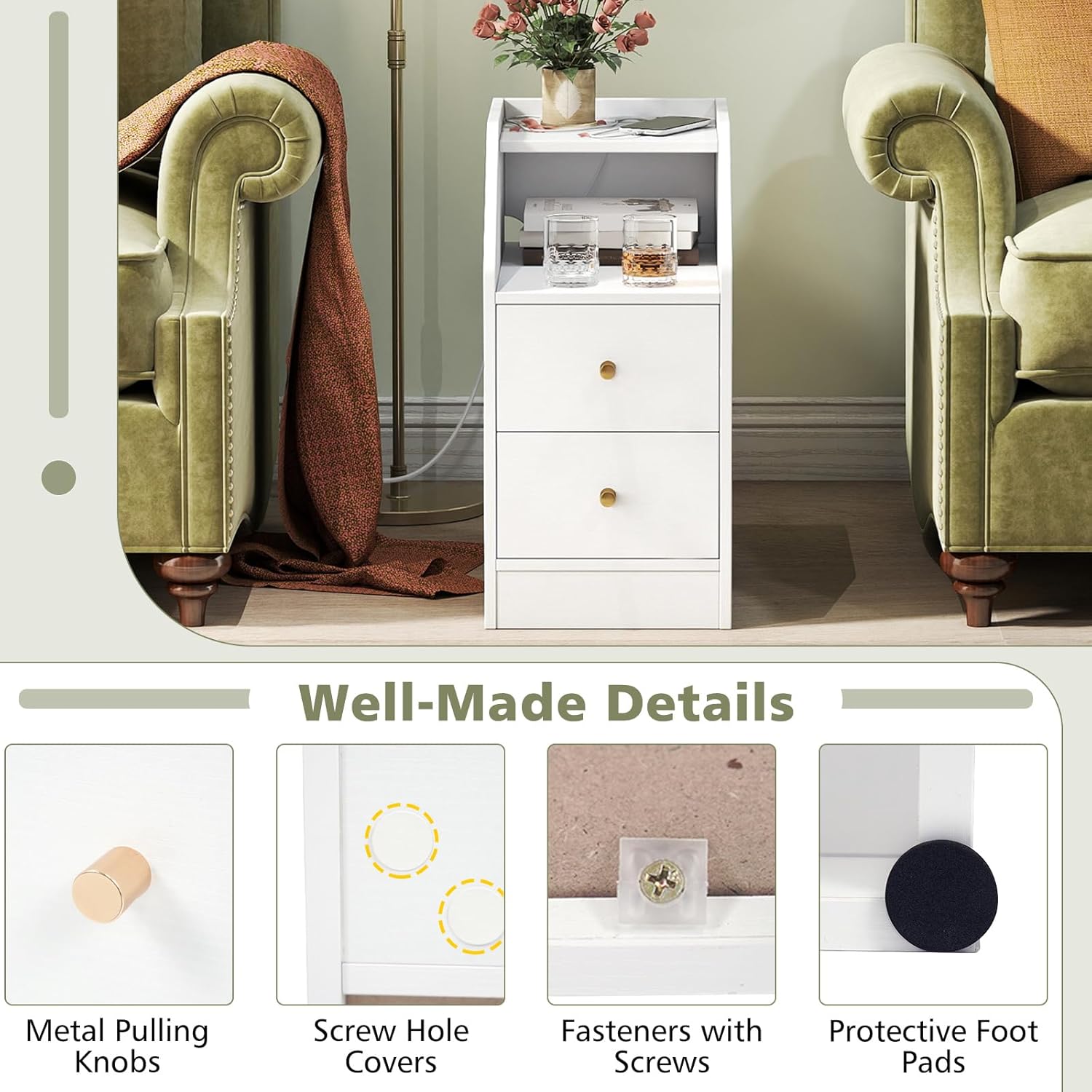
Image: Detailed view of the table's construction elements, including knobs, screw covers, and foot pads.
Troubleshooting
Charging Station Issues:
- No Power: Ensure the power cord is securely plugged into both the table and the wall outlet. Check if the wall outlet is functional by plugging in another device.
- Device Not Charging: Verify that your device's charging cable is properly connected to both the device and the table's port. Try a different port or cable to rule out cable or device issues.
- Overload: If multiple high-power devices are connected, the charging station may temporarily shut off to prevent overload. Unplug some devices and try again.
Structural Issues:
- Wobbly Table: Check all assembly screws and tighten any that are loose. Ensure the table is placed on a flat, even surface.
- Drawers Sticking: Ensure the drawer slides are properly aligned and free of obstructions. Check that the drawer is not overloaded.
Specifications
| Feature | Detail |
|---|---|
| Brand | KOMFOTT |
| Model Number | 11254-HU-KT |
| Overall Dimensions (L x W x H) | 16" x 10" x 20" |
| Material | Engineered Wood, MDF |
| Color | White |
| Item Weight | 19 lbs |
| Load Capacity of Top Shelf | 35 lbs |
| Load Capacity of Open Compartment | 35 lbs |
| Load Capacity of Each Drawer | 25 lbs |
| Power Cord Length | 4.9 ft |
| Charging Ports | 2 AC Outlets (125V/12A), 1 USB Port (5V/2.4A), 1 Type-C Port (5V/3A) |
| Assembly Required | Yes |
Warranty and Support
For warranty information or technical support, please refer to the contact details provided in the original product packaging or visit the official KOMFOTT website. Keep your purchase receipt for warranty claims.