
1. Introduction
Thank you for choosing the ZACHVO Puri Hot and Cold Water Dispenser. This appliance is designed to provide instant hot water and refreshingly cool water for your daily needs. Please read this manual carefully before operating the device to ensure safe and efficient use. Keep this manual for future reference.
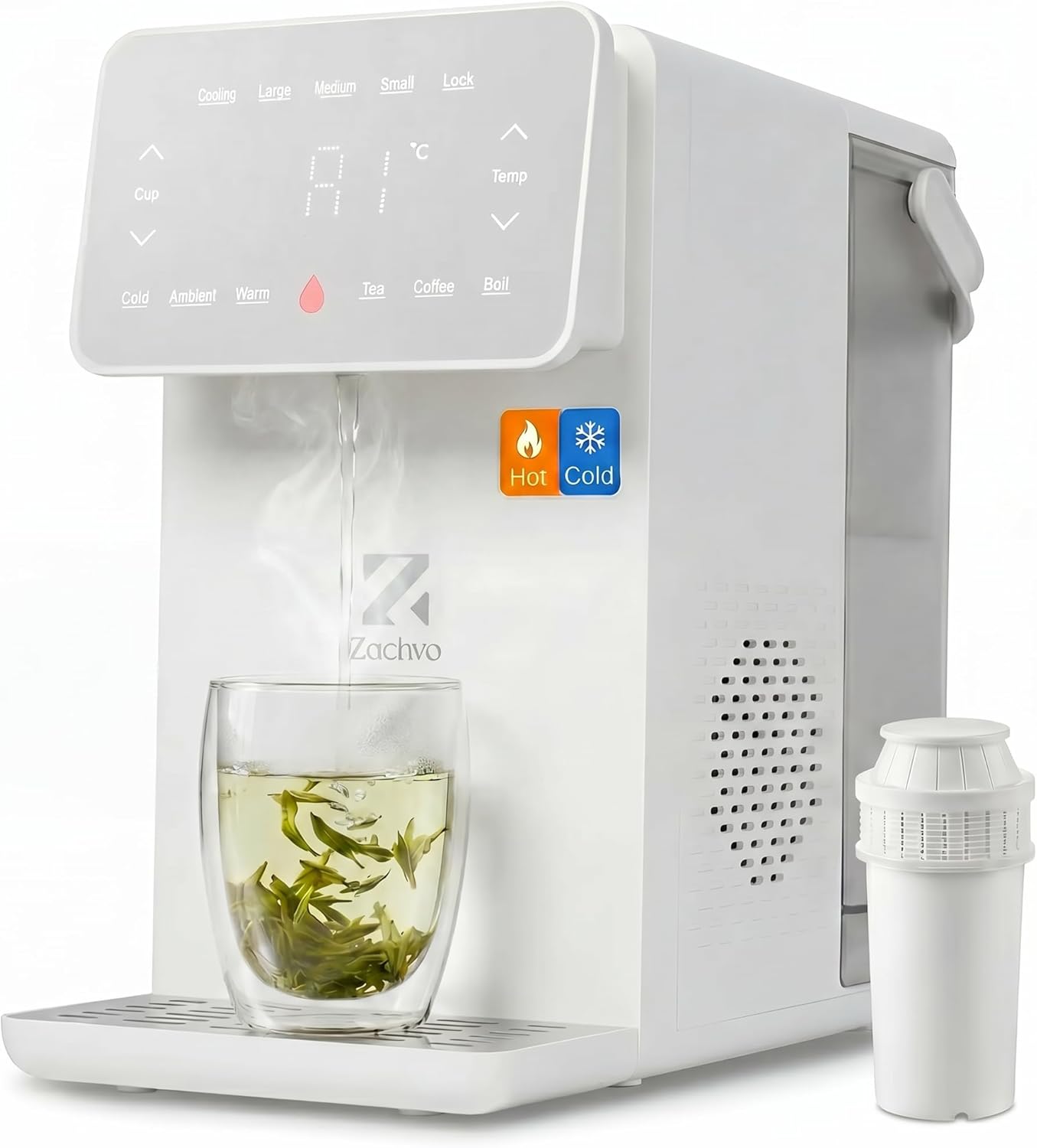
Image 1.1: ZACHVO Puri Hot and Cold Water Dispenser. This image shows the overall design of the dispenser, highlighting its compact form factor and the digital display panel.
2. Safety Instructions
To prevent injury to yourself and others, or damage to the appliance, please observe the following safety precautions:
- Always connect the dispenser to a grounded power outlet with the correct voltage (220 Volts).
- Do not immerse the appliance, power cord, or plug in water or other liquids.
- Keep children away from the hot water dispenser. The appliance features a Child Safety Lock to prevent accidental hot water dispensing.
- Ensure the appliance is placed on a stable, level surface, away from direct sunlight and heat sources.
- Do not operate the dispenser if it has a damaged cord or plug, or if it malfunctions or has been damaged in any manner.
- The dispenser is equipped with Overheat Protection and Dry-Run Protection to ensure safe operation.
- Avoid touching the hot water outlet directly after dispensing hot water.
- The Splash-Free Water Outlet design minimizes splashing during use.

Image 2.1: Child Lock Feature. This image illustrates the child lock activated on the dispenser's control panel, emphasizing family safety.
3. Product Components
Familiarize yourself with the main parts of your ZACHVO Puri water dispenser:
- Main Water Tank (4.5 L): Holds the primary water supply.
- Cold Water Tank (0.5 L): Separate tank for chilled water.
- Control Panel: Digital display and touch buttons for operation.
- Water Outlet: Dispenses hot or cold water.
- Drip Tray: Collects any spills or drips.
- Water Filter: Filters incoming water for improved taste and quality.
- Power Cord: For electrical connection.

Image 3.1: Internal Components. This transparent view highlights the dual heating and cooling modules, demonstrating the advanced technology within the dispenser.
4. Setup
4.1 Unpacking
- Carefully remove the dispenser from its packaging.
- Remove all packing materials, including any protective films or tapes.
- Check for any damage during transit. If damaged, do not use and contact customer support.
4.2 Placement
Place the dispenser on a flat, stable, and heat-resistant surface. Ensure there is adequate space around the unit for ventilation.

Image 4.1: Product Dimensions. This image shows the compact size of the dispenser, with approximate dimensions of 28 cm (width) x 43 cm (height) x 40 cm (depth), making it suitable for various countertop spaces.
4.3 Filter Preparation and Installation
Before first use, the water filter needs to be prepared:
- Remove Carbon Dust: Rinse the filter under running tap water for a few minutes to remove any loose carbon dust.
- Soak: Submerge the filter in a bowl of water for a few minutes. This helps to activate the filter and improve performance.
- Install & Fill: Insert the prepared filter into the designated slot within the water tank. Fill the main water tank with clean tap water.
- Place Tank Back: Ensure the water tank is correctly positioned and securely seated in the dispenser.

Image 4.2: Filter Preparation Steps. This visual guide demonstrates the four essential steps for preparing and installing the water filter before initial use.
4.4 Initial Power-On
Plug the power cord into a suitable electrical outlet. The dispenser will power on, and the display will illuminate. It may perform an initial self-check or priming cycle.
5. Operation
5.1 Control Panel Overview
The digital control panel allows you to select desired water temperatures and volumes.

Image 5.1: Control Panel. This close-up shows the touch-sensitive control panel, indicating options for temperature adjustment (in 5°C steps) and volume adjustment (in 50ml steps).
5.2 Dispensing Cold Water
To dispense cold water (12-15°C):
- Place a cup under the water outlet.
- Press the 'Cold' button on the control panel.
- The dispenser will provide chilled water from the separate 0.5L cold water tank.
5.3 Dispensing Hot Water
The dispenser uses direct heating technology to provide hot water in approximately 3 seconds.
- Place a heat-resistant cup under the water outlet.
- Select your desired temperature (from 45°C to 95°C) using the 'Temp' up/down arrows. Common presets like 'Tea', 'Coffee', 'Boil' may also be available.
- Select your desired volume using the 'Cup' up/down arrows or preset volume buttons (e.g., 'Small', 'Medium', 'Large').
- Press the 'Dispense' or 'Start' button (often indicated by a water droplet icon).
- To stop dispensing before the selected volume is reached, press the dispense button again.

Image 5.2: Hot and Cold Dispensing. This image displays the dispenser providing both hot water (95°C) and cold water (12°C), illustrating its dual functionality for various beverages.
5.4 Child Lock
To activate or deactivate the child lock, press and hold the 'Lock' button for a few seconds until the indicator changes. When activated, hot water dispensing is prevented.
5.5 Night Light
The dispenser features a soft night light for convenient use in low-light conditions. This function activates automatically or can be toggled via the control panel (refer to specific button on your model).

Image 5.3: Quiet Operation and Night Light. This image shows the dispenser in a bedroom setting, highlighting its quiet operation (below 46 dB) and the soft night light feature for nighttime use.
6. Maintenance
Regular cleaning and maintenance will ensure the longevity and optimal performance of your dispenser.
6.1 Cleaning the Exterior
Wipe the exterior of the dispenser with a soft, damp cloth. Do not use abrasive cleaners or solvents.
6.2 Cleaning the Drip Tray
The drip tray should be emptied and cleaned regularly to prevent overflow and bacterial growth. Simply slide it out, empty the water, wash with mild soap, rinse, and dry before reinserting.
6.3 Filter Replacement
The water filter should be replaced regularly, typically after filtering 150 liters of water or every 4-6 weeks, depending on water quality and usage. Refer to the filter preparation steps (Section 4.3) for installation of a new filter.
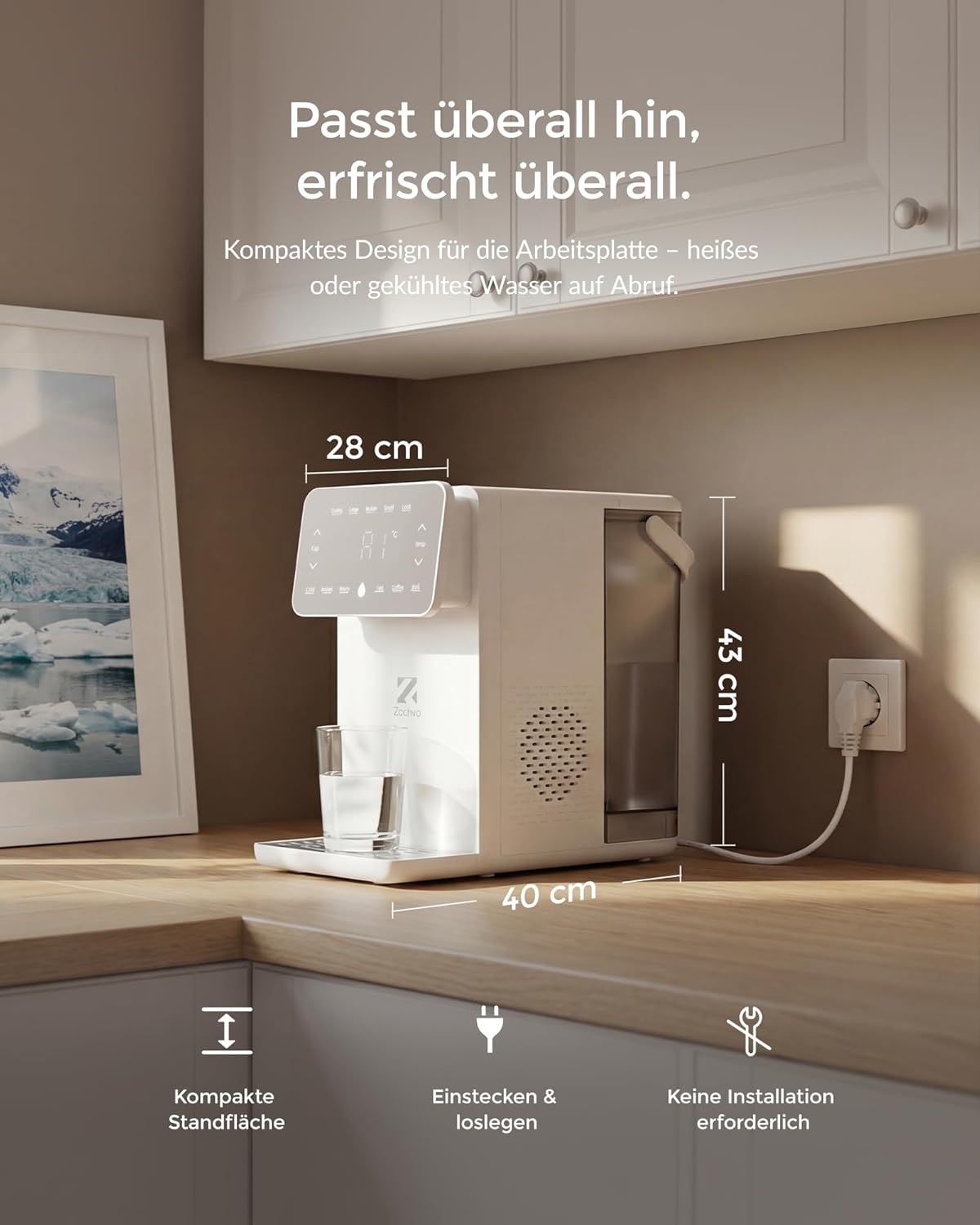
Image 6.1: Water Filter Layers. This diagram illustrates the multi-stage filtration process, including nylon mesh for large particles, PP cotton for finer particles, activated carbon for taste and odor, and ion exchange resin for limescale reduction.

Image 6.2: Filter Effectiveness. This comparison shows the difference between unfiltered tap water and water filtered by the ZACHVO system, demonstrating its ability to reduce limescale buildup and improve taste.
6.4 Descaling
Over time, mineral deposits (limescale) can build up, especially in the hot water system. Descale the appliance every 1-3 months, depending on your water hardness. Use a food-grade descaling solution specifically designed for water dispensers or kettles. Follow the descaling product's instructions carefully.
7. Troubleshooting
If you encounter any issues with your dispenser, please refer to the following common problems and solutions:
| Problem | Possible Cause | Solution |
|---|---|---|
| No water dispensed | Water tank empty; Tank not properly seated; Power issue | Refill water tank; Re-seat tank correctly; Check power connection |
| Hot water not heating | Overheat protection activated; Heating element malfunction; Child lock engaged | Unplug and wait 15 mins, then restart; Deactivate child lock; Contact support if issue persists |
| Cold water not cooling | Cooling system malfunction; Ambient temperature too high | Ensure proper ventilation; Contact support if issue persists |
| Water tastes unusual | New filter not primed; Filter needs replacement; Appliance needs cleaning | Prime new filter (Section 4.3); Replace filter (Section 6.3); Clean appliance (Section 6.1-6.2) |
If the problem persists after trying these solutions, please contact ZACHVO customer support.
8. Specifications
| Feature | Specification |
|---|---|
| Brand | ZACHVO |
| Model Name/Number | C4-WH-DE |
| Capacity (Main Tank) | 4.5 Liters |
| Capacity (Cold Water Tank) | 0.5 Liters |
| Material | Plastic |
| Color | White |
| Voltage | 220 Volts |
| Power | 2100 Watts |
| Item Weight | 3.74 Kilograms |
| Hot Water Temperature Range | 45°C to 95°C |
| Cold Water Temperature Range | 12°C to 15°C |
| Noise Level (Cooling) | < 46 dB |
9. Warranty and Support
Your ZACHVO Puri Hot and Cold Water Dispenser comes with a standard manufacturer's warranty. Please refer to the warranty card included in your product packaging for specific terms and conditions.
For technical support, warranty claims, or any questions regarding your product, please contact ZACHVO customer service through the retailer where you purchased the product or visit the official ZACHVO website for contact information.