
1. Introduction
Thank you for choosing the MOWETOO MT-5000 Rechargeable UV and White Light Flashlight. This manual provides essential information for the safe and efficient operation, maintenance, and troubleshooting of your device. Please read it thoroughly before use and retain it for future reference.
1.1. Included Components
- Blacklight 2N1 Flashlight
- USB-C Charging Cable
- User Manual (this document)
- Wrist Strap
- Spare Battery Compartment (for AAA batteries)

Figure 1: MOWETOO MT-5000 Flashlight and its included accessories, including the USB-C charging cable, wrist strap, and spare battery compartment.
2. Safety Information
To ensure safe operation and prevent damage to the device, please observe the following precautions:
- Eye Safety: Do not look directly into the light beam, especially the UV light, as it can cause eye damage. Avoid shining the light directly into the eyes of people or animals.
- Battery Safety: Use only the specified battery type (Lithium Ion 21700 or compatible 18650/26650, or 3x AAA with adapter). Do not mix old and new batteries, or different types of batteries. Dispose of batteries responsibly.
- Charging: Use only the provided USB-C cable or a certified equivalent. Do not charge unattended.
- Heat: The flashlight may become warm during prolonged use, especially on high settings. This is normal.
- Water Resistance: The flashlight is waterproof, but avoid prolonged submersion or operating underwater. Ensure the charging port cover is securely closed.
- Children: Keep out of reach of children.
3. Product Overview
The MOWETOO MT-5000 is a versatile 2-in-1 flashlight featuring both a high-lumen white light and a 365nm UV blacklight. It includes a digital display for battery status, zoomable focus, and multiple operating modes.

Figure 2: Exploded view illustrating the internal components and features of the MOWETOO MT-5000 Flashlight, including the integrated head structure, high-output LED emitters, tempered glass optical lens, adjustable focus mechanism, smart digital power display, white light control switch, UV mode switch, water-resistant sealing ring, reinforced end cap, and safety wrist lanyard.

Figure 3: High-Performance White LED System details, highlighting efficient heat management, precision optical lens for focused beam, and a high-brightness LED chip for clear visibility.

Figure 4: 365nm Optical System Upgrade details, showing the heat dissipation body, optical filter lens to reduce visible purple light, and a UV LED chip for accurate detection.
4. Setup
4.1. Battery Installation
The flashlight comes with one 21700 Lithium Ion battery pre-installed. If you need to replace or insert a battery:
- Unscrew the tail cap of the flashlight.
- Insert the 21700 battery with the positive (+) end facing towards the head of the flashlight.
- Alternatively, use the provided spare battery compartment to insert three AAA batteries, then insert the compartment into the flashlight with the positive (+) end facing the head.
- Screw the tail cap back on securely.
4.2. Charging the Battery
The flashlight features a USB-C charging port for convenient recharging.
- Locate the USB-C charging port on the side of the flashlight, usually protected by a rubber cover.
- Open the rubber cover.
- Connect the provided USB-C charging cable to the port and the other end to a USB power source (e.g., wall adapter, computer, power bank).
- The LCD display will show the charging progress.
- Once fully charged, disconnect the cable and securely close the rubber cover to maintain water resistance.

Figure 5: The flashlight's USB-C charging port for fast and convenient recharging, and its USB-A output for emergency power to small devices.
5. Operating Instructions
The MOWETOO MT-5000 features two separate buttons for white light and UV light control, along with a zoom function.

Figure 6: The flashlight's control panel with separate buttons for UV and white light, and a digital display showing real-time battery percentage.
5.1. Power On/Off and White Light Modes
- Press the White Light Mode Switch (power button) to turn on the white light. The LCD display will show the current battery percentage.
- Press the White Light Mode Switch repeatedly to cycle through the white light modes: High → Medium → Low → Strobe → SOS → Off.
- To turn off the white light directly from any mode, press and hold the White Light Mode Switch for approximately 2 seconds.
5.2. UV Light Operation
- Press the UV Mode Switch to turn on the 365nm UV blacklight.
- Press the UV Mode Switch again to turn off the UV light.
- Note: The white light and UV light operate independently. Activating one will automatically turn off the other if it was active.

Figure 7: The 365nm UV light effectively reveals hidden pet urine stains on upholstery, which are invisible under normal lighting.
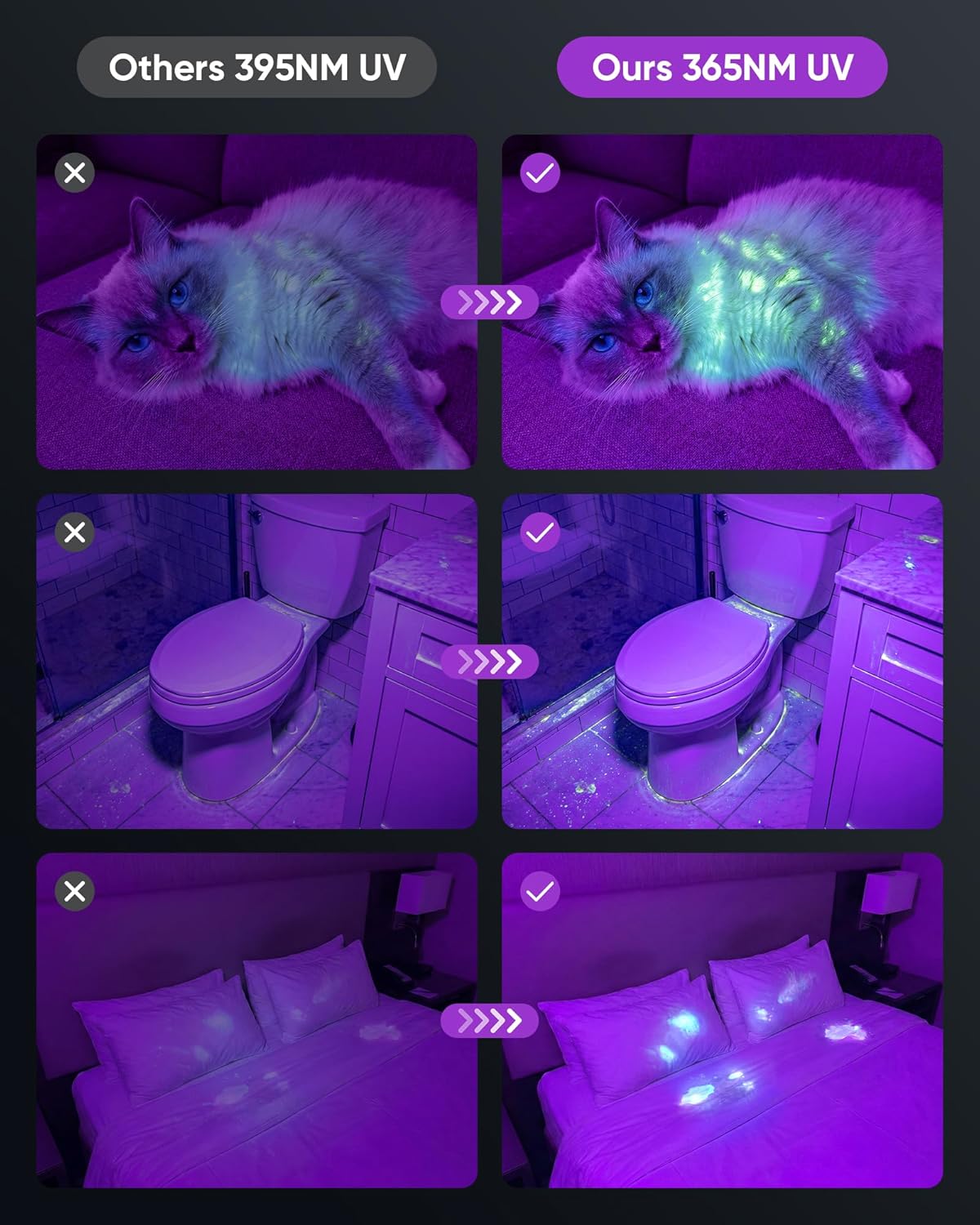
Figure 8: A visual comparison demonstrating the superior clarity and fluorescence detection of 365nm UV light compared to common 395nm UV light for revealing hidden stains and materials.

Figure 9: The 365nm UV light is effective for professional-grade applications such as scorpion detection, making them glow brightly for easy identification.
5.3. Zoom Function
The flashlight features an adjustable focus mechanism to change the beam from a narrow spot to a wide floodlight.
- To adjust the focus, gently push or pull the head of the flashlight forward or backward.
- Pushing the head forward creates a narrow, focused beam for long-distance illumination.
- Pulling the head backward creates a wide, diffused beam for broad area illumination.

Figure 10: The flashlight's zoom control allows adjustment from a focused spot beam to a wide flood beam, suitable for various lighting needs.
5.4. Power Bank Function
The flashlight can also function as a portable power bank to charge small electronic devices.
- Locate the USB-A output port next to the USB-C charging port.
- Connect your device's charging cable to the USB-A output port.
- The flashlight will begin charging your device. The LCD display will indicate power output.

Figure 11: The flashlight is built for outdoor use, can serve as an emergency power bank, and is compact and portable for easy carrying.
6. Maintenance
6.1. Cleaning
- Wipe the flashlight body with a soft, damp cloth.
- For the lens, use a lens cleaning cloth to avoid scratches.
- Do not use harsh chemicals or abrasive cleaners.
6.2. Battery Care and Storage
- If storing the flashlight for an extended period, remove the battery to prevent leakage.
- Store the flashlight and battery in a cool, dry place away from direct sunlight and extreme temperatures.
- Recharge the battery every 3-6 months during storage to maintain its lifespan.

Figure 12: The flashlight's rugged and durable construction, showcasing its waterproof, slip-proof, and fall-proof features for reliable performance in demanding conditions.
7. Troubleshooting
| Problem | Possible Cause | Solution |
|---|---|---|
| Flashlight does not turn on. | Low battery; Incorrect battery installation; Faulty switch. | Charge the battery; Reinstall battery with correct polarity; Contact support if switch is faulty. |
| Light is dim or flickers. | Low battery; Loose connections; Dirty lens. | Charge the battery; Ensure battery and tail cap are secure; Clean the lens. |
| Cannot charge the flashlight. | Faulty charging cable; Damaged charging port; Power source issue. | Try a different USB-C cable; Ensure power source is working; Contact support if port is damaged. |
| Zoom function is stiff. | Dirt or debris in mechanism. | Clean the zoom mechanism carefully; Avoid forcing it. |
8. Specifications
| Feature | Detail |
|---|---|
| Model Number | MT-5000 |
| Brand | MOWETOO |
| Light Source Type | LED + UV 2N1 |
| UV Wavelength | 365nm |
| White Brightness | 9900 Lumens |
| Power Source | Battery Powered |
| Battery Type | Lithium Ion (1 included) |
| Compatible Batteries | 21700, 18650, 26650, or 3x AAA (with adapter) |
| Charging Port | USB-C |
| Power Output | USB-A (for power bank function) |
| Material | Aluminum |
| Water Resistance Level | Waterproof |
| Special Features | Adjustable Focus, Adjustable Light Modes, Lightweight, Long Range, Portable, Digital Display |
| Item Dimensions (L x W x H) | 1.77"L x 1.77"W x 6.89"H |
9. Warranty and Support
MOWETOO products are designed for durability and performance. For warranty information, technical support, or customer service inquiries, please refer to the contact information provided with your purchase or visit the official MOWETOO website. Please retain your proof of purchase for warranty claims.