
1. Introduction
Thank you for choosing the taopodo Smart Watch. This device is designed to enhance your daily life with its health and fitness tracking capabilities, smart notifications, and durable design. This manual provides detailed instructions on how to set up, operate, maintain, and troubleshoot your new smart watch. Please read this manual thoroughly before using the product to ensure proper function and longevity.
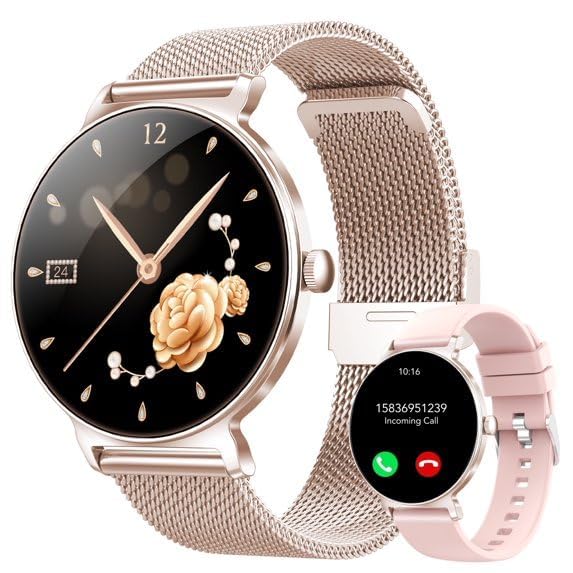
Image 1.1: The taopodo Smart Watch, featuring a sleek gold-colored round display and a comfortable pink silicone band. The screen shows a digital time display.
2. Setup
2.1 What's in the Box
- taopodo Smart Watch (JX523-QSUS1)
- Charging Cable
- User Manual (this document)
2.2 Initial Charging
Before first use, fully charge your smart watch. Connect the provided charging cable to the charging port on the back of the watch and plug the USB end into a standard USB power adapter (not included) or a computer's USB port. The watch display will indicate charging status. A full charge typically takes approximately 2 hours.
2.3 Power On/Off
- To Power On: Press and hold the side button for 3-5 seconds until the screen lights up.
- To Power Off: Press and hold the side button, then select 'Power Off' on the screen.
2.4 App Installation and Pairing
To unlock the full functionality of your taopodo Smart Watch, you need to install the companion app on your smartphone. The watch is compatible with both iOS and Android devices.
- Download the App: Scan the QR code provided in the watch packaging or search for the designated app name (refer to packaging for specific app name) in the Apple App Store (for iOS) or Google Play Store (for Android).
- Create Account: Open the app and follow the on-screen instructions to create an account and set up your profile.
- Pair the Watch: Ensure Bluetooth is enabled on your smartphone. In the app, navigate to the 'Device' or 'Add Device' section. Select your taopodo Smart Watch from the list of available devices. Confirm the pairing request on both your phone and the watch if prompted.
3. Operating Instructions
3.1 Touchscreen Navigation
The taopodo Smart Watch features a 1.27-inch HD touchscreen for intuitive navigation.
- Swipe Up/Down: Scroll through menus and notifications.
- Swipe Left/Right: Access different widgets or quick settings.
- Tap: Select an item or confirm an action.
- Press Side Button: Return to the home screen or wake the display.
3.2 Basic Functions
- Time Display: The watch automatically synchronizes time with your paired smartphone.
- Notifications: Receive call, message, and app notifications directly on your wrist after enabling them in the companion app.
3.3 Health and Fitness Tracking
Your smart watch is equipped with various sensors to monitor your health and activity.
- Activity Tracker: Automatically records steps taken, distance traveled, and calories burned throughout the day. View detailed statistics in the app.
- Heart Rate Monitor: Tap the heart rate icon on the watch or in the app to measure your heart rate. The watch can also be set to monitor heart rate continuously.
- Sleep Tracking: Wear the watch to bed to monitor your sleep patterns, including deep sleep, light sleep, and wake times.
3.4 Water Resistance (IP68)
The taopodo Smart Watch is IP68 waterproof, meaning it is resistant to dust and can withstand immersion in water up to 1 meter for 30 minutes. It is suitable for daily use, such as washing hands or light rain. Do not use it for swimming, diving, or in hot water/steam environments.
4. Maintenance
4.1 Cleaning
To maintain the appearance and functionality of your watch:
- Wipe the watch screen and body with a soft, damp, lint-free cloth.
- For the silicone band, you can wash it with mild soap and water, then rinse thoroughly and dry completely before reattaching.
- Avoid using harsh chemicals, abrasive cleaners, or solvents.
4.2 Storage
When not in use for extended periods, store the watch in a cool, dry place away from direct sunlight and extreme temperatures. Ensure the battery has some charge to prevent deep discharge.
4.3 Battery Care
To prolong the life of your Lithium Ion battery:
- Avoid fully discharging the battery frequently.
- Charge the watch regularly, even if not used daily.
- Do not expose the watch to extreme heat or cold, as this can degrade battery performance.
5. Troubleshooting
If you encounter issues with your taopodo Smart Watch, please refer to the following common solutions:
| Problem | Possible Solution |
|---|---|
| Watch does not power on | Ensure the watch is fully charged. Press and hold the side button for 10-15 seconds to perform a forced restart. |
| Cannot pair with smartphone | Ensure Bluetooth is enabled on your phone. Restart both the watch and your phone. Make sure the watch is within Bluetooth range. Try unpairing and re-pairing through the app. |
| Inaccurate health data | Ensure the watch is worn snugly on your wrist, about one finger's width above your wrist bone. Clean the sensors on the back of the watch. Update the app and watch firmware. |
| Notifications not received | Check app settings to ensure notification permissions are granted. Verify Bluetooth connection is stable. Ensure 'Do Not Disturb' mode is not active on either the watch or phone. |
6. Specifications
| Feature | Detail |
|---|---|
| Model Number | JX523-QSUS1 |
| Brand | taopodo |
| Screen Size | 1.27 Inches |
| Display Type | LED |
| Operating System | Android Wear 1.0 |
| Connectivity Technology | Bluetooth |
| Wireless Communication Standard | Bluetooth |
| Battery Cell Composition | Lithium Ion |
| Water Resistance Level | Waterproof (IP68) |
| Water Resistance Depth | 1 Meter |
| Band Material Type | Silicone |
| Human Interface Input | Touchscreen |
| Supported Application | Fitness Tracker |
| Compatible Devices | Smartphone (iOS and Android) |
| Metrics Measured | Heart Rate Monitor, Step Count, Calories Burned |
| Built-In Media | Charging Cable |
7. Warranty and Support
7.1 Product Warranty
The taopodo Smart Watch (Model JX523-QSUS1) comes with a 1-year standard warranty from the date of purchase. This warranty covers manufacturing defects and malfunctions under normal use. It does not cover damage caused by misuse, accidents, unauthorized modifications, or failure to follow the instructions in this manual.
7.2 Customer Support
For technical support, warranty claims, or any questions regarding your taopodo Smart Watch, please contact our customer service team. Refer to the contact information provided on the product packaging or our official website. Please have your model number (JX523-QSUS1) and proof of purchase ready when contacting support.
