
1. Introduction
This manual provides essential information for the safe and effective use of your FUNMILY Walking Pad Treadmill with Desk Workstation. Please read all instructions carefully before assembly and operation. Retain this manual for future reference.
2. Safety Instructions
- Always place the treadmill on a flat, stable surface.
- Ensure adequate clearance around the treadmill (at least 2 feet on sides and rear).
- Keep children and pets away from the treadmill during operation.
- Wear appropriate athletic footwear.
- Use the safety key at all times. In case of emergency, the safety key will immediately stop the treadmill.
- Do not operate the treadmill if it is damaged or malfunctioning.
- Consult a physician before starting any new exercise program.
- Maximum user weight capacity: 400 pounds.
3. Package Contents
Verify that all components are present before beginning assembly:
- Treadmill Unit
- Desk Tabletop
- Remote Control
- Lubricant
- Safety Key
- User Manual
- Wrench
- Power Cord
4. Setup and Assembly
The FUNMILY Walking Pad Treadmill is designed for straightforward assembly. Follow these steps:
- Unpacking: Carefully remove all components from the packaging.
- Positioning: Place the treadmill unit on a level surface.
- Handlebar Assembly: Extend the handlebars to the upright position. Secure them using the quick-release wrenches at the base. Ensure they are firmly locked to prevent movement during use.
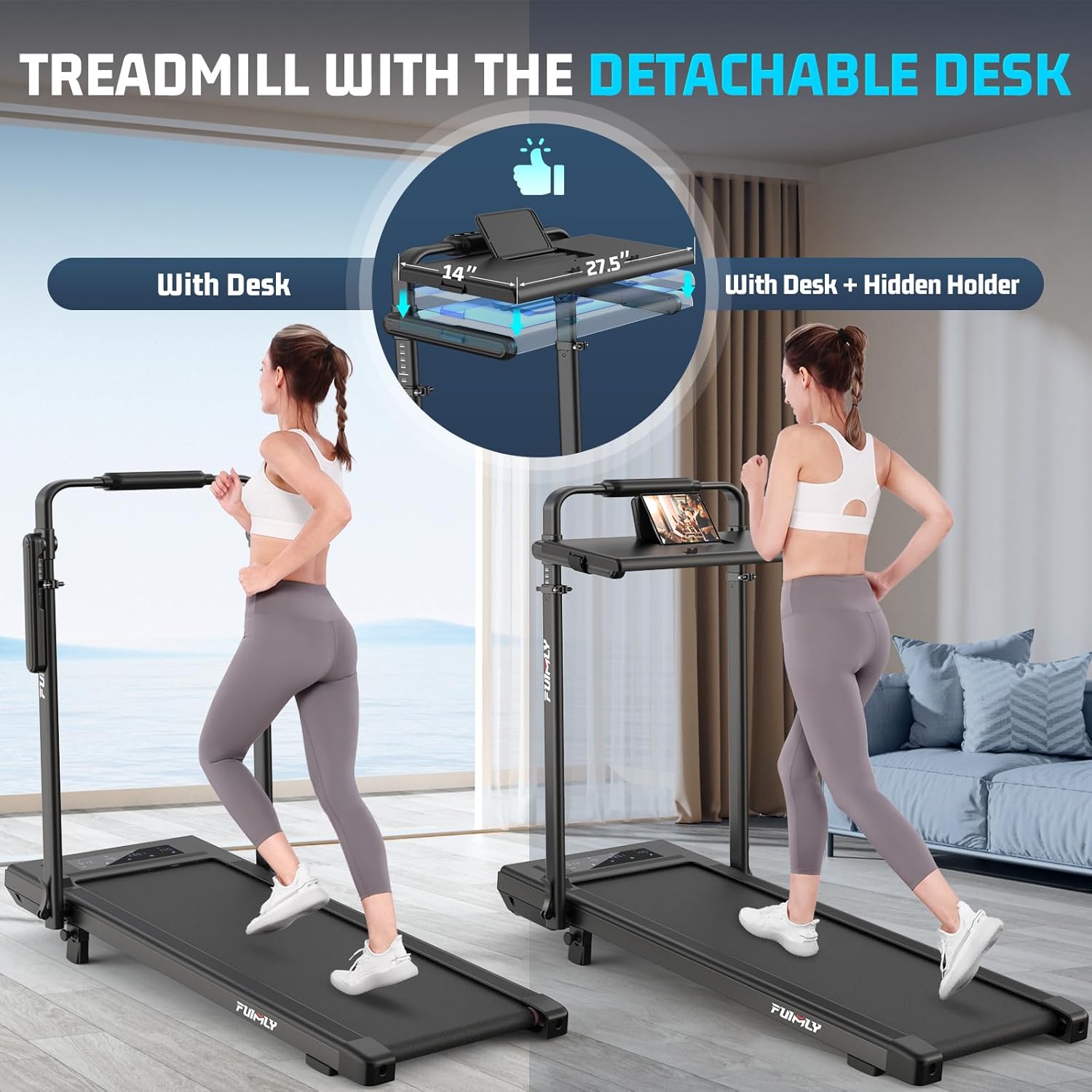
- Desk Tabletop Installation: If using the desk, place it onto the designated slots on the handlebars. Secure it with the provided fasteners or straps. The desk is removable for different workout modes.
- Power Connection: Plug the power cord into a grounded electrical outlet.
- Safety Key: Attach the safety key to the console and clip the other end to your clothing.

5. Operating Instructions
5.1 Control Methods
Your treadmill offers three ways to control your workout:
- Motor Cover Touch Buttons: Robust buttons located on the motor cover for direct access to functions.
- Console Touch Panel: A smooth, modern interface on the main console for adjustments.
- Remote Control: Manage your workout from a distance for added convenience.

5.2 Starting a Workout
- Ensure the safety key is properly attached to the console and your clothing.
- Press the START button on the console or remote. The treadmill will begin at a low speed.
- Adjust the speed using the '+' and '-' buttons. The speed range is 0.6 to 7.5 MPH.
- To stop, press the STOP button or pull the safety key.
5.3 Incline Feature
The treadmill features a 15% incline option to enhance your workout intensity and calorie burn. Adjust the incline manually as desired before starting your exercise.

5.4 Adjustable Handrail
The handrails are adjustable for personalized support and can be folded away for compact storage or to allow for a wider range of arm movement during exercise.

5.5 Workout Modes
The treadmill supports multiple modes of use:
- Treadmill with Desk: Use the desk workstation for walking or jogging while working (Speed: 4 - 7.5 MPH).
- Foldable Treadmill: With handrails extended, use as a traditional treadmill for running or jogging (Speed: 4 - 7.5 MPH).
- Under-Desk Walking Pad: Fold the handrails down for use as a walking pad under a standing desk (Speed: 0.6 - 4 MPH).

5.6 Preset Programs
The treadmill includes 12 preset programs (P1-P12) that automatically adjust speed and incline to provide varied workout routines. Refer to the console display for program details.
5.7 Display Metrics
The LED display shows key workout metrics:
- Distance
- Speed
- Calories Burned
- Time
6. Maintenance
Regular maintenance ensures the longevity and optimal performance of your treadmill.
6.1 Cleaning
- Wipe down the treadmill surfaces with a damp cloth after each use.
- Avoid using abrasive cleaners or solvents.
6.2 Lubrication
The running belt requires periodic lubrication to reduce friction and extend its lifespan. Use the provided lubricant and follow these steps:
- Turn off and unplug the treadmill.
- Lift the edge of the running belt.
- Apply a small amount of lubricant evenly under the center of the belt.
- Plug in the treadmill and run it at a low speed (e.g., 1 MPH) for 2-3 minutes to distribute the lubricant.
- Lubricate every 3-6 months depending on usage.
6.3 Storage
The treadmill features a foldable design for easy storage. Fold the handlebars down and store the unit vertically or horizontally in a dry, cool place.

7. Troubleshooting
If you encounter issues with your treadmill, refer to the following common problems and solutions:
| Problem | Possible Cause | Solution |
|---|---|---|
| Treadmill stops at 3.0 MPH (E05 error) | Motor overload or sensor issue. | Reduce load, ensure proper lubrication, or contact customer support if persistent. |
| Remote control not working | Battery issue, remote not paired, or signal interference. | Check/replace batteries. Ensure line of sight to the treadmill's receiver. Refer to the remote control pairing instructions in the full user manual. |
| Desk attachment vibrates excessively | Loose connections or uneven surface. | Ensure the desk is securely fastened to the handlebars. Verify the treadmill is on a stable, level surface. |
| Handlebars are not sturdy or do not lock securely | Improper assembly or loose quick-release wrenches. | Re-check handlebar assembly. Ensure quick-release wrenches are fully tightened and engaged. If the issue persists, contact customer support. |
| Unusual noise during operation | Lack of lubrication, loose components, or belt misalignment. | Lubricate the running belt. Check for any loose screws or parts. Refer to the full manual for belt adjustment procedures. |
8. Specifications
| Feature | Detail |
|---|---|
| Brand | FUNMILY |
| Model Name | Treadmill |
| Product Dimensions (D x W x H) | 54" x 29" x 5.7" |
| Item Weight | 60 pounds |
| Material | Alloy Steel |
| Maximum Speed | 7.5 miles per hour |
| Minimum Speed | 0.6 miles per hour |
| Maximum Incline Percentage | 15% |
| Maximum Horsepower | 3.5 HP |
| Maximum Weight Recommendation | 400 pounds |
| Display Type | LED |
| Power Source | Corded Electric |
| Metrics Measured | Distance, Speed, Calories Burned |
| Number of Programs | 12 |
| Deck Length | 54 inches |
| Deck Width | 26 inches |
| Folded Size | 54" x 29" x 5.7" |
9. Warranty and Support
9.1 Warranty Information
This FUNMILY treadmill comes with a 1-year warranty from the date of purchase. This warranty covers manufacturing defects and malfunctions under normal use. It does not cover damage caused by misuse, accidents, or unauthorized modifications.
9.2 Customer Support
For technical assistance, warranty claims, or any questions regarding your product, please contact FUNMILY customer support. Refer to the contact information provided in your purchase documentation or on the official FUNMILY website.
