
1. Introduction
This manual provides detailed instructions for the installation, operation, and maintenance of your VIKNAN 17.2 inch Touch Screen Android Car Radio. This unit is designed as an upgrade for Chevrolet Silverado and GMC Sierra models from 2019 to 2024, specifically for vehicles with OEM 7-inch and 8-inch radio versions. It features an Android 14 operating system, an 8-core CPU, 8GB RAM, and 128GB ROM, offering enhanced performance and a large display for navigation and multimedia.
2. Setup and Installation
The VIKNAN 17.2 inch Touch Screen Android Car Radio is designed for a plug-and-play installation. It comes with all necessary cables and accessories. An instruction manual is included, and online technical support is available to assist with the installation process. It is crucial to ensure compatibility with your specific vehicle model and OEM radio version before beginning installation.
2.1 Compatibility and Retained Features
- Compatible with Chevrolet Silverado and GMC Sierra 2019-2024 (OEM 7-inch and 8-inch versions).
- Retains factory amplifier system.
- Supports factory Sirius XM radio.
- Maintains heating and cooling seat control functionality.
- Integrates with the factory original reverse camera.
- Retains original steering wheel controls.
2.2 Installation Overview
The installation process involves removing the existing factory radio and installing the new 17.2-inch unit. While designed for ease of installation, professional installation is recommended if you are unfamiliar with car audio systems. Ensure all connections are secure and properly routed to avoid damage or malfunction.

Image: Comparison of the vehicle dashboard before and after installing the VIKNAN 17.2 inch Android Car Radio. The left side shows the original 7-inch and 8-inch factory units, while the right side displays the new, larger 17.2-inch screen seamlessly integrated into the dashboard.
3. Operating Instructions
Your VIKNAN car radio operates on Android 14, providing a user-friendly interface and access to a wide range of features.
3.1 Basic Operation
- Power On/Off: Press and hold the power button (refer to the unit's physical layout for exact location).
- Touch Screen: The 17.2-inch capacitive touch screen allows for intuitive control.
- LCD Knobs: Long press the LCD knobs for 5 seconds to switch between temperature, fan speed, and volume controls.
- Customization: Customize wallpapers and add frequently used apps directly to the homepage for quick access.
3.2 Navigation and Multimedia
- GPS Navigation: Utilize the built-in GPS for navigation. The unit supports various map types, including North America and Worldwide.
- Split-Screen Function: Use the one-click split-screen feature to simultaneously display navigation and other applications, such as video playback.
- CarPlay & Android Auto: Connect your smartphone for Apple CarPlay or Android Auto functionality. This enables voice control for map navigation, phone calls, messages, and music streaming.
- Connectivity: Connect to the internet via 4G network or Wi-Fi for online navigation, video streaming, and downloading apps from the app store. The unit includes a built-in Cloud SIM (no physical SIM card required).

Image: The VIKNAN 17.2 inch Android Car Radio display showing various features. The screen is split, displaying a map (Google Maps) on the upper section and a music player with live lyrics on the lower left. The lower right shows custom split-screen app options including CarPlay, Console, Maps, Netflix, and Spotify. Multifunctional LCD knobs are visible, along with a gauge summary display for vehicle information like coolant temperature, transmission temperature, and oil pressure.

Image: The VIKNAN 17.2 inch Android Car Radio display showcasing built-in wireless CarPlay and Android Auto. A hand is interacting with the touchscreen, which shows a grid of application icons. Below the main screen, separate icons for Android Auto and Apple CarPlay are highlighted, indicating seamless smartphone integration.
3.3 Vehicle Information and Settings
- Real-time Data Monitoring: The unit reads through the OEM protocol to display real-time vehicle data such as transmission temperature, oil temperature, coolant temperature, and oil pressure directly on the homepage.
- 3D Vehicle Model: Customize the display with multiple vehicle models and colors.
- License Plate Editing: Edit and customize your license plate number and colors on the display.
- Camera Support: Supports OEM cameras and 360-degree cameras for enhanced visibility.
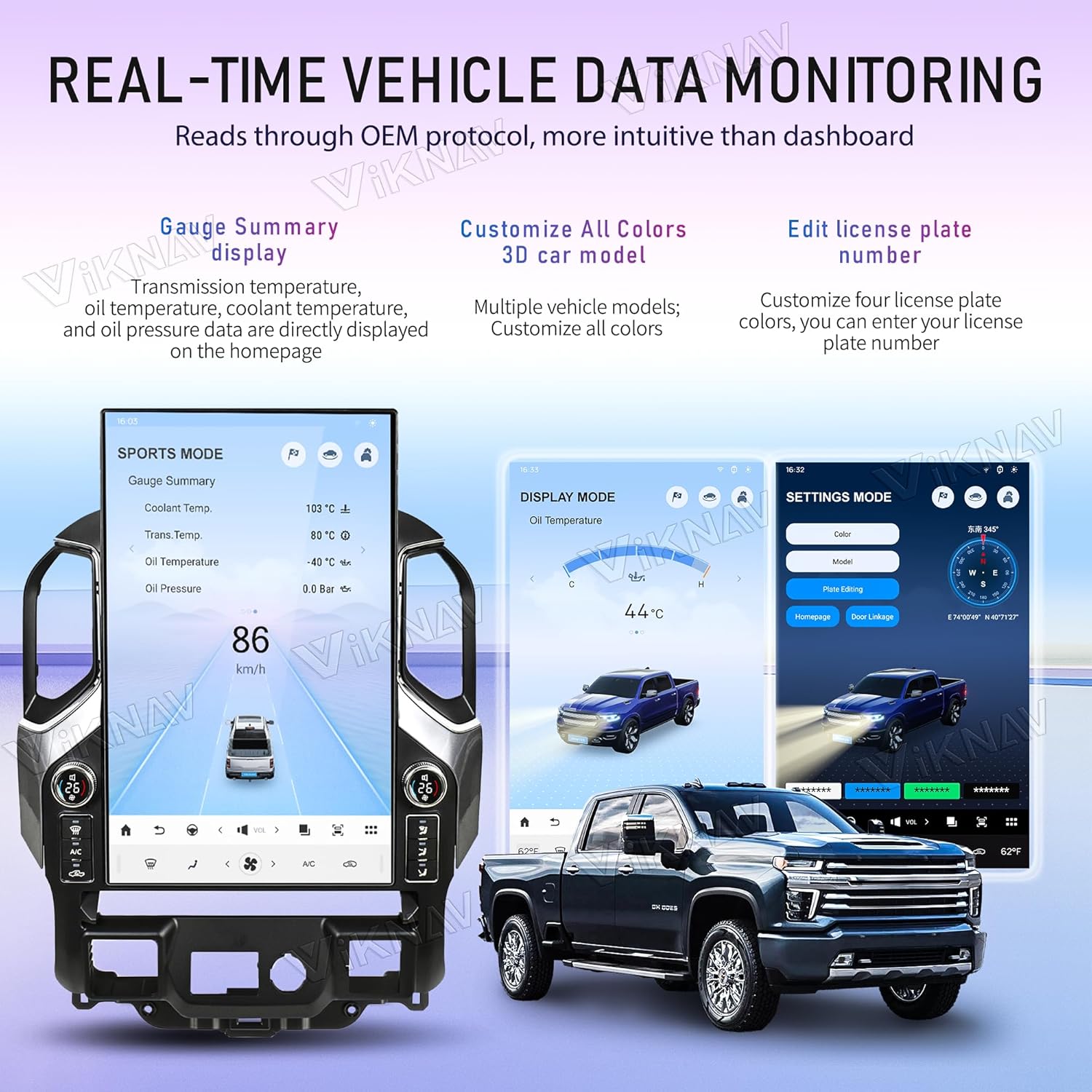
Image: The VIKNAN 17.2 inch Android Car Radio displaying real-time vehicle data monitoring. The screen shows a 'SPORTS MODE' with gauge summaries for coolant temperature, transmission temperature, oil temperature, and oil pressure. Another screen shows 'DISPLAY MODE' with temperature readings, and a 'SETTINGS MODE' allows customization of vehicle color, model, and license plate number, with a 3D vehicle model visible.
3.4 Dual Operation System
The unit supports a dual operation system, allowing you to switch between the Android system and the original vehicle's OEM system as needed.
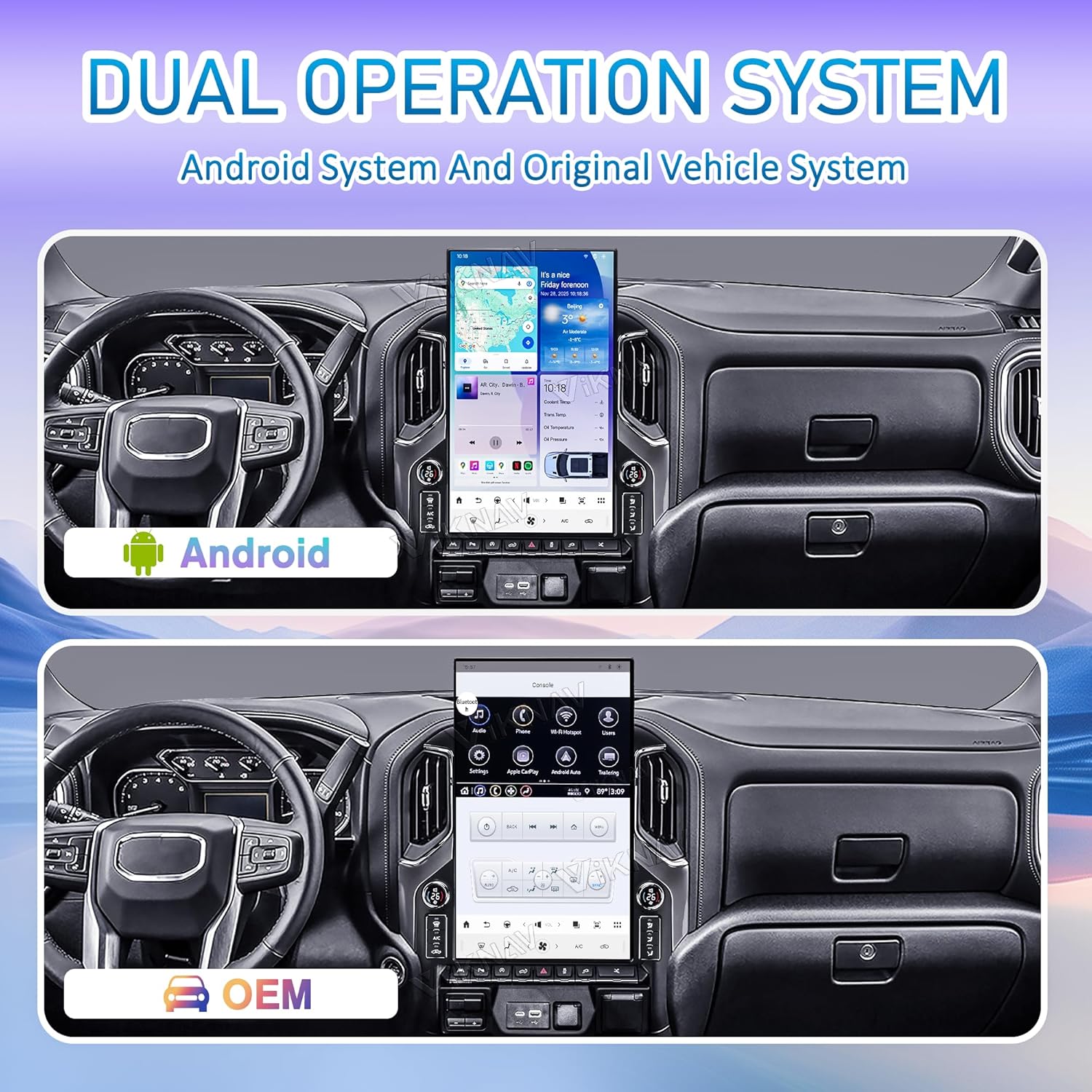
Image: The VIKNAN 17.2 inch Android Car Radio demonstrating its dual operation system. The top panel shows the Android interface with various apps and navigation, while the bottom panel shows the original OEM vehicle system interface, indicating the ability to switch between the two.
4. Maintenance
Proper maintenance ensures the longevity and optimal performance of your VIKNAN car radio.
- Screen Cleaning: Use a soft, lint-free cloth to gently wipe the touchscreen. For stubborn smudges, slightly dampen the cloth with water or a screen-safe cleaner. Avoid abrasive materials or harsh chemicals.
- Software Updates: Periodically check for and install software updates provided by VIKNAN to ensure the system runs efficiently and has the latest features and security patches.
- Environmental Conditions: Avoid exposing the unit to extreme temperatures or direct sunlight for prolonged periods, as this can affect screen performance and component lifespan.
5. Troubleshooting
If you encounter issues with your VIKNAN car radio, refer to the following troubleshooting tips. For complex problems, contact technical support.
| Problem | Possible Cause / Solution |
|---|---|
| Unit does not power on. | Check all power connections. Ensure the vehicle's ignition is on. Verify the fuse. |
| No audio output. | Check speaker connections. Ensure volume is not muted or set to zero. Verify factory amplifier system integration. |
| CarPlay/Android Auto not connecting. | Ensure your smartphone is compatible and its operating system is updated. Check USB cable connection (if wired) or Bluetooth/Wi-Fi settings (if wireless). Restart both the car radio and your phone. |
| Settings are in an unfamiliar language (e.g., Japanese). | Navigate to the system settings menu (usually represented by a gear icon) and locate the language option to switch to English. Refer to the visual guides in the manual or contact support if needed. |
| GPS not acquiring signal or inaccurate. | Ensure the GPS antenna is properly installed and has a clear view of the sky. Update map data if available. |
| Poor reverse camera view. | Check camera connections. Ensure the camera lens is clean. Adjust display settings for brightness/contrast if available. |
| No internet access via 4G/Wi-Fi. | For 4G, ensure the built-in Cloud SIM is activated. For Wi-Fi, verify connection to a stable network and correct password. |
If these steps do not resolve the issue, please contact VIKNAN technical support for further assistance.
6. Specifications
| Feature | Detail |
|---|---|
| Brand | VIKNAN |
| Model Number | B0GC55W37B |
| Screen Size | 17.2 Inches |
| Operating System | Android 14 |
| CPU | 8 Core |
| RAM | 8GB |
| Memory Storage Capacity | 128 GB |
| Display Type | LCD |
| Touch Screen Type | Capacitive |
| Resolution | 1920*1200 (Supports 4K decoding playback) |
| Connectivity Technology | Bluetooth, Wi-Fi, 4G Network |
| Special Features | Bluetooth, Touchscreen, Waterproof (general feature), Wireless CarPlay, Android Auto, GPS Navigation, Real-time Vehicle Data Monitoring, Split-Screen Function, Built-in Cloud SIM |
| Supported Satellite Navigation System | GPS |
| Compatible Vehicle Type | Truck (Chevrolet Silverado, GMC Sierra 2019-2024) |
| Included Components | Screen with cable accessories |
| UPC | 725388584828 |
7. Warranty and Support
Your VIKNAN 17.2 inch Touch Screen Android Car Radio comes with a manufacturer's warranty and dedicated technical support.
- Warranty: The product includes a 1-year manufacturer's warranty. Please retain your proof of purchase for warranty claims.
- Technical Support: Online technical support is available to assist with installation, troubleshooting, and any operational questions you may have. Contact information can typically be found on the product packaging or the seller's official website.
For the most efficient support, please have your product model number (B0GC55W37B) and purchase details ready when contacting customer service.