
1. Introduction
Thank you for choosing the XIEBro ZX5 E8S Robot Vacuum and Mop Combo. This manual provides essential information for the safe operation, maintenance, and troubleshooting of your device. Please read it thoroughly before use and retain it for future reference.
The XIEBro ZX5 E8S is designed to provide efficient cleaning for various floor types, combining vacuuming and mopping functionalities. Its intelligent features ensure a clean home with minimal effort.
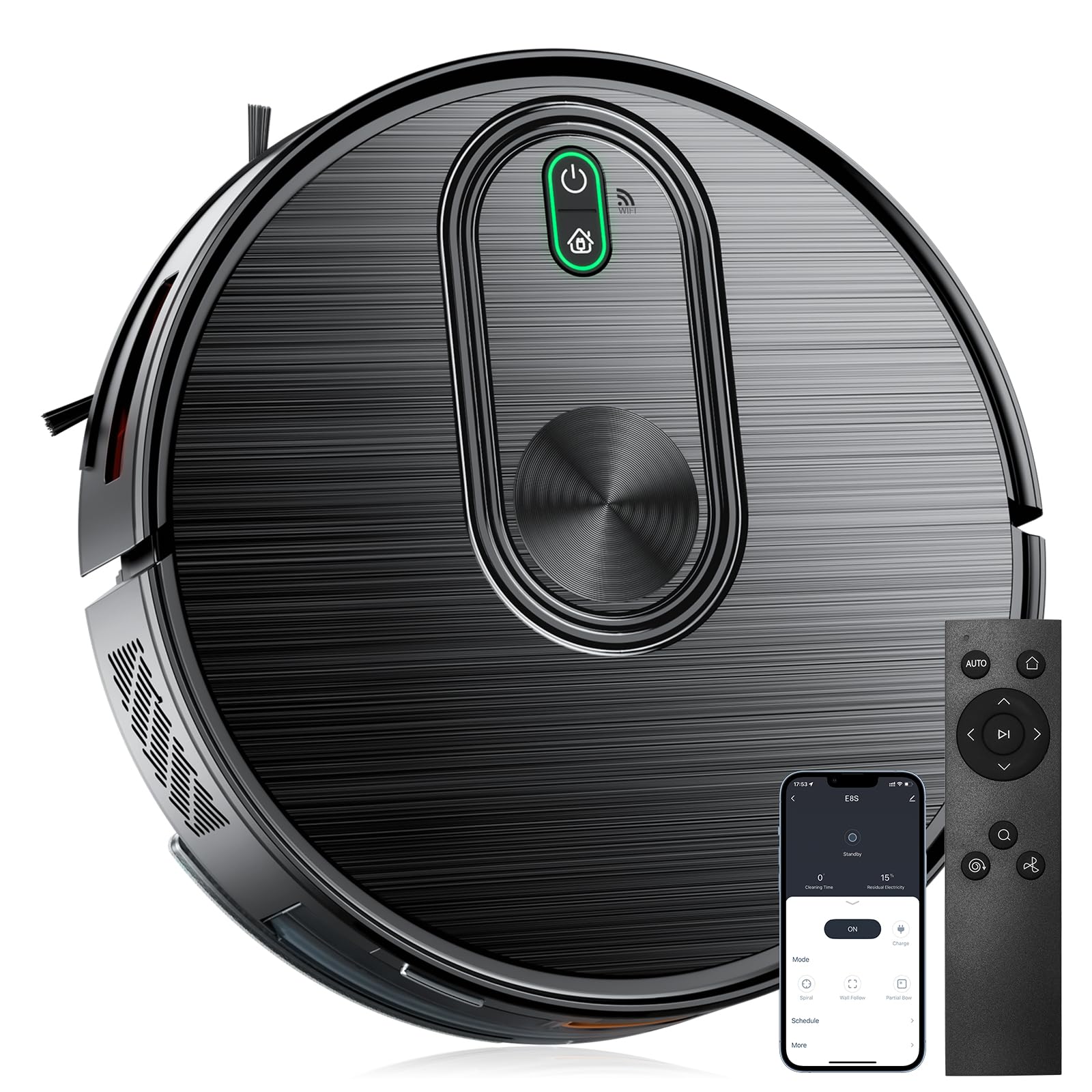
Figure 1.1: XIEBro ZX5 E8S Robot Vacuum and Mop Combo
2. Package Contents
Ensure all items are present and in good condition upon unpacking. If any items are missing or damaged, please contact customer support.
- XIEBro E8S Robotic Vacuum Cleaner
- Charging Dock
- Power Adapter
- Remote Control
- Dustbin/Water Tank Combo
- Mop Pads (multiple)
- Side Brushes (multiple)
- Filters (multiple)
- Charging Base Plate

Figure 2.1: Mop Pads, Side Brushes, and Filters

Figure 2.2: Dustbin/Water Tank

Figure 2.3: Charging Dock

Figure 2.4: Remote Control

Figure 2.5: Power Adapter

Figure 2.6: Charging Base Plate
3. Setup
3.1 Charging the Robot Vacuum
- Place the charging dock against a wall in an open area, ensuring there are no obstacles within 1 meter (3 feet) to either side and 2 meters (6 feet) in front.
- Connect the power adapter to the charging dock and plug the other end into a wall outlet. Ensure the indicator light on the charging dock illuminates.
- Place the robot vacuum onto the charging dock. Ensure the charging contacts on the robot align with those on the dock. The robot will emit a sound and the indicator lights will show charging status.
- Allow the robot to fully charge before its first use (approximately 4-6 hours).

Figure 3.1: Auto Recharge at Low Battery
3.2 App Connection
- Download the 'Tuya Smart' app from your smartphone's app store (iOS or Android).
- Register or log in to your account.
- Ensure your robot vacuum is charged and powered on.
- Open the app, tap '+' to add a device, and select 'Robot Vacuum' or search for 'E8S'.
- Follow the on-screen instructions to connect the robot to your 2.4GHz Wi-Fi network. (Note: 5GHz Wi-Fi is not supported).

Figure 3.2: App Control Interface
4. Operating Instructions
4.1 Power On/Off
- To power on, press and hold the power button on the robot or use the app/remote.
- To power off, press and hold the power button until the indicator lights turn off, or use the app/remote.
4.2 Cleaning Modes
The XIEBro E8S offers multiple cleaning modes to suit your needs:
- Auto Cleaning: The robot intelligently navigates and cleans the entire area.
- Spot Cleaning: Focuses on a specific dirty area, cleaning in a spiral pattern.
- Edge Cleaning: Cleans along walls and furniture edges.

Figure 4.1: Auto Cleaning Path (S-shape)

Figure 4.2: Spot Cleaning Path (Spiral)

Figure 4.3: Edge Cleaning Path
4.3 Control Methods
- App Control: Use the Tuya Smart app to start/stop cleaning, select modes, set schedules, adjust suction power (800Pa, 1600Pa, 3000Pa, 6500Pa), and control water flow for mopping.
- Voice Control: Compatible with Amazon Alexa and Google Assistant. Link your robot vacuum through the respective smart home app to use voice commands (e.g., "Alexa, turn on E8S").
- Remote Control: Use the included remote for basic functions like starting/stopping, returning to charge, and changing cleaning modes.

Figure 4.4: Voice Control Integration

Figure 4.5: Remote Control Operation
4.4 Advanced Features
- 2-in-1 Vacuuming & Mopping: The robot seamlessly switches between sweeping debris and damp mopping, delivering dual-action cleaning in one cycle.
- Adjustable Strong Suction: Powerful suction (up to 6500Pa) effortlessly lifts embedded pet hair, crumbs, and fine dust from carpets and hard floors.
- Electronically Controlled Water Tank: Precisely adjusts water flow during mopping to prevent over-wetting, ensuring safe use on all floor types.
- Anti-Drop Sensors: Precision cliff sensors scan floor edges and stairs, halting movement to avoid accidental falls during operation.
- Obstacle Crossing: Glides over thresholds, cables, and rugs up to 0.59 inches (1.5 cm) tall, minimizing manual intervention.
- Ultra-Slim Design: With a 2.9-inch height, the robot slides easily under furniture (beds, sofas) to clean hidden dust zones most robots can't reach.
- Obstacle Avoidance: Infrared sensors detect obstacles in real-time, preventing collisions with furniture or walls for scratch-free cleaning.

Figure 4.6: 2-in-1 Vacuuming & Mopping

Figure 4.7: Adjustable Strong Suction

Figure 4.8: Electronically Controlled Water Tank

Figure 4.9: Anti-Drop Feature

Figure 4.10: 0.59-Inch Obstacle Crossing

Figure 4.11: Ultra-Slim 2.9-Inch Design

Figure 4.12: Obstacle Avoidance
5. Maintenance
Regular maintenance ensures optimal performance and extends the lifespan of your XIEBro E8S robot vacuum.
5.1 Cleaning the Dustbin and Filters
- Press the release button to remove the dustbin/water tank combo.
- Open the dustbin cover and empty all debris into a trash can.
- Remove the primary filter and HEPA filter. Tap them gently to remove dust. Rinse if necessary (allow to air dry completely before reinstallation).
- Rinse the dustbin with water. Ensure it is completely dry before reinserting.
5.2 Cleaning the Water Tank and Mop Pad
- Remove the mop pad from the water tank.
- Empty any remaining water from the tank.
- Rinse the water tank and mop pad with clean water.
- Allow both to air dry completely before reattaching the mop pad and reinstalling the tank.
5.3 Cleaning Brushes and Sensors
- Side Brushes: Regularly check for tangled hair or debris. Remove and clean them. Replace if worn.
- Main Brush: Remove the main brush cover and the brush. Use the cleaning tool to remove hair and debris.
- Sensors: Wipe the cliff sensors and charging contacts with a clean, dry cloth to ensure proper function.
6. Troubleshooting
If you encounter issues with your robot vacuum, refer to the following common problems and solutions:
| Problem | Possible Cause | Solution |
|---|---|---|
| Robot does not power on | Low battery; Power switch off | Charge the robot; Ensure the main power switch is on. |
| Robot cannot charge | Charging contacts dirty; Charging dock not powered | Clean charging contacts on robot and dock; Ensure power adapter is connected and plugged in. |
| Poor cleaning performance | Dustbin full; Brushes tangled; Filter clogged | Empty dustbin; Clean main and side brushes; Clean or replace filters. |
| Robot gets stuck frequently | Obstacles on floor; Cliff sensors dirty | Clear cables, small objects, and thick rugs; Clean cliff sensors. |
| App connection failed | Incorrect Wi-Fi band; Weak Wi-Fi signal | Ensure 2.4GHz Wi-Fi is used; Move robot closer to router; Restart router and robot. |
7. Specifications
| Feature | Detail |
|---|---|
| Brand | XIEBro |
| Model Name | E8S Robotic Vacuum |
| Surface Recommendation | Hard Floor, Low Pile Carpet, Wood Floor, Tile Floor |
| Special Feature | Automatic Shut-Off |
| Color | Black |
| Controller Type | App Control |
| Filter Type | Sponge |
| Battery Life | Up to 200 minutes (runtime) |
| Battery Type | Lithium Ion |
| Voltage | 220 Volts |
| Capacity (Dustbin) | 560 Milliliters |
| Power Source | Battery Powered |
| Control Method | App, Voice, Remote |
| Compatible Devices | Google Home, Smartphones |
| Form Factor | Robotic |
| Item Dimensions (L x W x H) | 11.81"L x 11.81"W x 2.95"H |
| Noise Level | 60 Decibels |
| Number of Speeds | 2 |
| UPC | 765452450543 |
8. Warranty and Support
The XIEBro ZX5 E8S Robot Vacuum and Mop Combo comes with a standard manufacturer's warranty. Please refer to the warranty card included in your package for specific terms and conditions.
For technical support, troubleshooting assistance, or warranty claims, please contact XIEBro customer service through the contact information provided on the official XIEBro website or your purchase platform.