
1. Introduction
This manual provides essential information for the safe and efficient operation of your LVYUAN 3000 Watt Power Inverter. This device converts 12V DC power from a battery source into 110V/120V AC power, suitable for various household appliances and electronic devices. It is designed for use in RVs, vehicles, trucks, off-grid solar systems, and outdoor camping scenarios. Please read this manual thoroughly before installation and use.

Figure 1: Inverter with Modified Sine Wave Technology and internal components.
2. Safety Information
Always observe the following safety precautions to prevent injury or damage to the inverter and connected devices:
- Ventilation: Ensure the inverter is installed in a well-ventilated area. Do not block the cooling fans or vents.
- Dry Environment: Avoid exposure to water, rain, snow, or spray. The inverter is not waterproof.
- Proper Connections: Connect the inverter only to a 12V DC power source. Ensure correct polarity (+ to + and - to -) to prevent damage. Use appropriate gauge cables.
- Load Limits: Do not exceed the inverter's continuous power rating (3000W) or peak power rating (6000W). Overloading can cause damage and trigger safety protections.
- Flammable Materials: Do not operate the inverter near flammable materials, gases, or liquids.
- Children: Keep the inverter out of reach of children.
- Servicing: Do not attempt to disassemble or modify the inverter. Refer all servicing to qualified personnel.
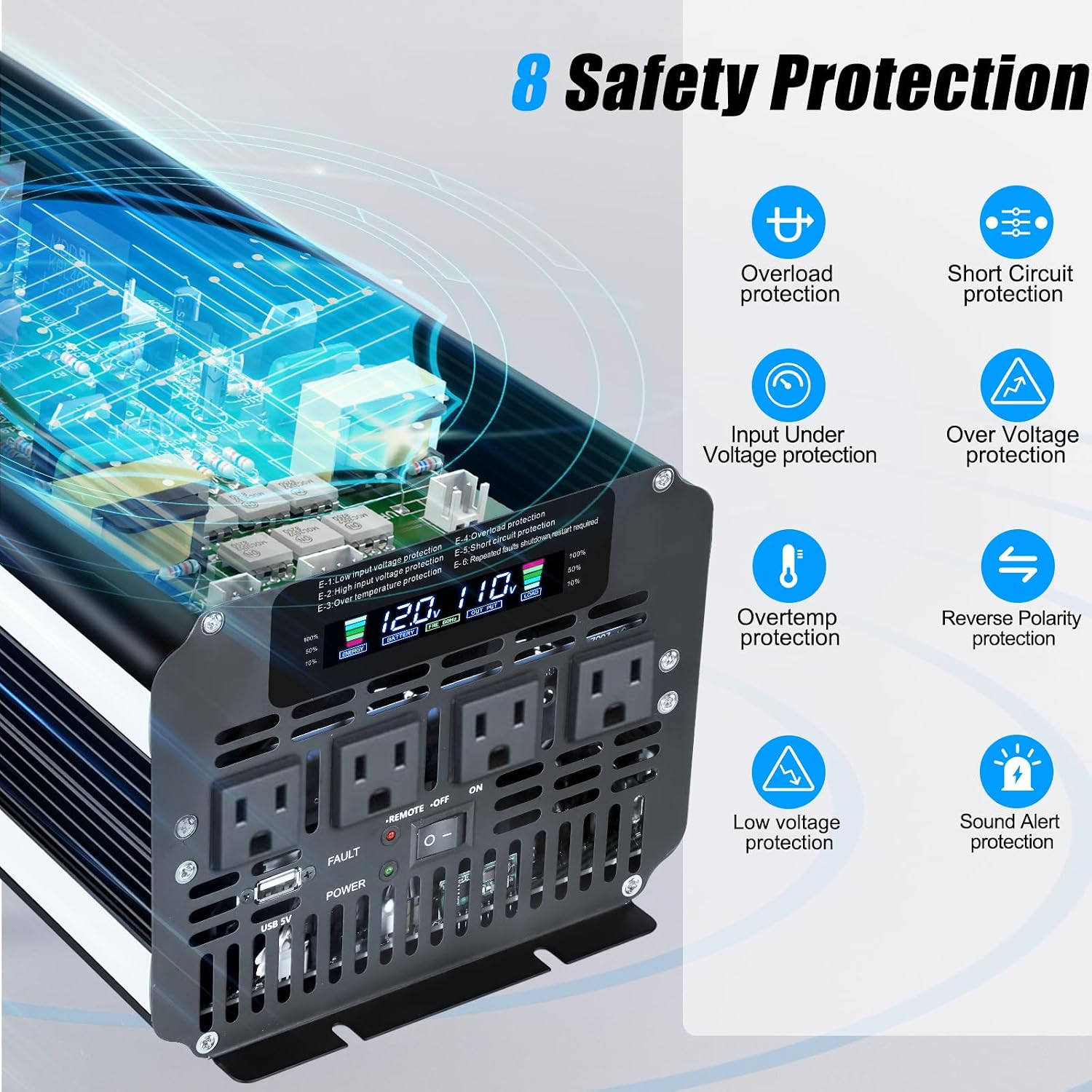
Figure 2: Built-in Safety Protections.
3. Product Overview
Familiarize yourself with the components of your LVYUAN 3000 Watt Power Inverter:

Figure 3: Front and Rear Panel Components.
Front Panel:
- LCD Display: Shows real-time information such as input voltage, output voltage, battery level, output frequency, and load capacity.
- AC Output (x4): Four standard 110V/120V AC outlets for connecting appliances.
- USB Ports: For charging USB-powered devices.
- LED Indicator: Indicates operational status or fault conditions.
- ON/OFF Switch: Powers the inverter on or off.
- Remote Control Port: For connecting the wired remote control.
Rear Panel:
- Positive (+) Terminal: Red terminal for connecting the positive battery cable.
- Negative (-) Terminal: Black terminal for connecting the negative battery cable.
- Cooling Fans (x2): Automatically activate to dissipate heat and maintain optimal operating temperature.
LCD Display Details:

Figure 4: LCD Display Indicators.
- Battery Capacity: Indicates the remaining battery charge.
- Battery Voltage: Displays the input DC voltage from the battery.
- Output Frequency: Shows the AC output frequency (60Hz).
- Output Voltage: Displays the AC output voltage (110V/120V).
- Load Capacity: Indicates the percentage of the inverter's capacity currently being used by connected appliances.
4. Setup
4.1 Unpacking
Carefully remove all components from the packaging. The box should contain:
- LVYUAN 3000 Watt Power Inverter
- Remote controller (Note: Battery 12V 23A not included)
- 2 pairs of battery cables
- Instruction Manual (this document)
4.2 Placement
Choose a suitable location for the inverter:
- Ventilation: Ensure adequate airflow around the inverter. Do not place it in an enclosed compartment without ventilation.
- Temperature: Operate the inverter in a cool, dry environment, away from direct sunlight or heat sources.
- Stability: Mount the inverter securely on a flat, stable surface to prevent movement.
- Distance: Keep the inverter away from water, moisture, and flammable materials.
4.3 Battery Connection
Connecting the inverter to your 12V battery source:
- Ensure the inverter's ON/OFF switch is in the "OFF" position.
- Connect the red battery cable to the positive (+) terminal of the inverter and the positive (+) terminal of your 12V battery.
- Connect the black battery cable to the negative (-) terminal of the inverter and the negative (-) terminal of your 12V battery.
- Ensure all connections are tight and secure to prevent loose contacts and sparking.
Important: Incorrect polarity will damage the inverter and void the warranty. Always double-check connections.
4.4 Remote Control Setup
Insert a 12V 23A battery (not included) into the remote control. Plug the remote control cable into the designated port on the inverter's front panel.
5. Operating Instructions
5.1 Powering On/Off
- After securing all battery connections, flip the ON/OFF switch on the inverter to the "ON" position. The LCD display will illuminate, showing current status.
- To turn off the inverter, flip the ON/OFF switch to the "OFF" position.
5.2 Connecting Appliances
- Ensure the inverter is powered on.
- Plug your AC appliances into the 4 AC outlets on the front panel.
- For USB-powered devices, connect them to the USB ports.
- Monitor the LCD display for load capacity to ensure you do not exceed the inverter's rated power.

Figure 5: Versatile Application Example.
5.3 Using the Remote Control
The wireless remote control allows you to power the inverter on or off from a distance, which is convenient for installations in hard-to-reach locations.
- Ensure the remote control is connected to the inverter via its cable.
- Press the "ON" button on the remote to power on the inverter.
- Press the "OFF" button on the remote to power off the inverter.

Figure 6: Wireless Remote Control in use.
6. Maintenance
Regular maintenance ensures the longevity and optimal performance of your inverter:
- Cleaning: Periodically clean the exterior of the inverter with a dry cloth. Ensure vents and cooling fans are free from dust and debris. Do not use liquid cleaners.
- Connections: Regularly check battery cable connections to ensure they remain tight and free from corrosion.
- Storage: If storing the inverter for an extended period, disconnect it from the battery and store it in a cool, dry place.
7. Troubleshooting
This section addresses common issues you might encounter. The inverter's LCD display and LED indicator provide valuable diagnostic information.
| Problem | Possible Cause | Solution |
|---|---|---|
| No power output / Inverter not turning on | Loose battery connections, low battery voltage, inverter switch off, blown fuse. | Check battery connections, charge battery, ensure switch is ON, check internal fuses (if accessible and safe). |
| Overload alarm / Inverter shuts down | Connected appliance exceeds inverter's continuous or peak power rating. | Reduce the load by disconnecting some appliances. Restart the inverter. |
| Low voltage alarm / Inverter shuts down | Battery voltage is too low. | Recharge or replace the battery. |
| Over-temperature alarm / Inverter shuts down | Inverter is overheating due to poor ventilation or excessive load. | Ensure proper ventilation, clear vents/fans, reduce load. Allow inverter to cool down. |
| Fault indicator on | Internal fault, short circuit, or reverse polarity. | Turn off inverter, disconnect all loads and battery. Check for short circuits in wiring. Reconnect carefully. If fault persists, contact support. |
8. Specifications
Key technical specifications for the LVYUAN 3000 Watt Power Inverter:

Figure 7: Product Dimensions.
| Feature | Specification |
|---|---|
| Brand | LVYUAN |
| Model Name | LY-MSW3000W-12V-NEW |
| Wattage (Continuous) | 3000 watts |
| Peak Output Power | 6000 watts |
| Input Voltage | 12 volts DC |
| Output Voltage | 120 volts AC |
| Electrical Output Waveform | Modified Sine Wave |
| Frequency | 60 hertz |
| Display Type | LCD |
| Item Dimensions (L x W x H) | 11.8" x 7.12" x 5.63" |
| Item Weight | 6.4 pounds |
| Power Source | Solar and Battery Powered |
| Recommended Uses | Camping, Home, Off-grid system, Office, Outdoor, RV, Solar power system, Vehicle |
9. Warranty and Support
9.1 Warranty Information
The LVYUAN 3000 Watt Power Inverter comes with a 12 Months Warranty from the date of purchase. This warranty covers manufacturing defects and workmanship under normal use. It does not cover damage caused by misuse, improper installation, accidents, or unauthorized modifications.
9.2 Customer Support
For technical assistance, warranty claims, or any questions regarding your LVYUAN Power Inverter, please contact the manufacturer or your retailer. Have your model number (LY-MSW3000W-12V-NEW) and purchase date ready when contacting support.


