
1. Introduction
Thank you for choosing the Yamnweo TF-600 6-Channel Mixer with 2x450W Amplifiers. This powerful and versatile audio mixer is designed for professional live sound applications, offering high-quality audio processing, extensive connectivity, and robust amplification. This manual provides essential information for the safe and efficient operation of your device. Please read it thoroughly before use and retain it for future reference.
2. Safety Instructions
- Power Supply: Connect the unit only to a 220V AC power source. Ensure the power cable is securely connected and not damaged.
- Ventilation: Do not block ventilation openings. Ensure adequate airflow around the unit to prevent overheating.
- Moisture: Keep the unit away from water, rain, and excessive humidity. Do not operate with wet hands.
- Placement: Place the mixer on a stable, flat surface. Avoid placing it near heat sources or in direct sunlight.
- Servicing: Do not attempt to service this unit yourself. Refer all servicing to qualified personnel.
- Cleaning: Disconnect power before cleaning. Use a dry, soft cloth. Do not use liquid cleaners.
3. Product Overview
3.1 Key Features
- 6-Channel Input: Supports multiple audio sources including microphones and line-level instruments.
- Dual 450W Amplifiers: Integrated power amplifiers deliver 450W + 450W output, suitable for driving passive speakers.
- Professional DSP Tuner: Features a new generation of digital DSP audio processing chips for enhanced vocal clarity and stable performance.
- 99 DSP Effects Processor: Offers 99 types of echo and other effects, adaptable for various live performance requirements.
- 7-Band Equalizer: Provides effective and precise 7-band equalization for fine-tuning overall volume and achieving clear sound quality.
- USB/Bluetooth Functionality: Supports USB flash drives and MP3 players for music playback and recording. Bluetooth connectivity allows wireless audio streaming from devices.
- Versatile Use: Ideal for live shows, performances, stage programs, DJ events, karaoke, and weddings.
3.2 Control Panel Functions
The following diagram illustrates the various controls and interfaces on the mixer's top panel, including input channels, equalization, effects, and main output controls.
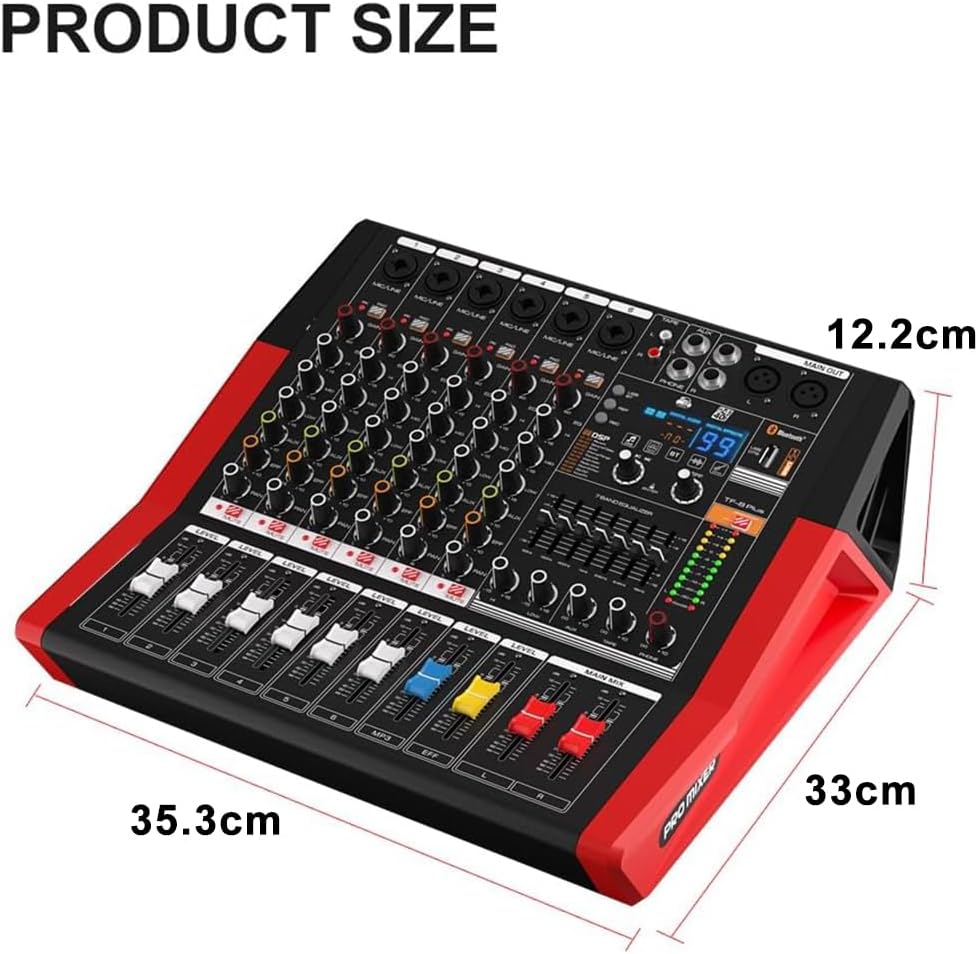
Figure 3.2.1: Front Panel Controls and Interfaces
Key Controls:
- MIC/LINE Inputs (1-6): XLR/6.35mm combo jacks for microphones and line-level devices.
- GAIN Control: Adjusts the input sensitivity for each channel.
- EQ (HI, MID, LOW): Three-band equalizer for individual channels.
- EFFECT Send: Controls the amount of signal sent to the internal DSP effects processor.
- LEVEL Faders: Adjusts the volume level for each input channel.
- MAIN MIX Fader: Controls the overall output volume.
- DSP Effects Section: Digital display and controls for selecting and adjusting 99 built-in effects.
- 7-Band Graphic Equalizer: For main output frequency adjustment.
- USB/Bluetooth Player: Controls for media playback, recording, and mode selection.
3.3 Rear Panel Connections
The rear panel provides power input, power amplifier outputs, and cooling fans.

Figure 3.3.1: Rear Panel Connections (Refer to bottom section of image)
- Power Socket: Connects to the main power supply.
- Power Amplifier Output: Connects to passive speakers.
- Cooling Fan: Ensures proper heat dissipation during operation.
4. Setup
4.1 Unpacking
Carefully remove the mixer from its packaging. Inspect the unit for any signs of damage during transit. Retain the packaging for future transport or storage.
4.2 Power Connection
- Ensure the mixer's power switch is in the OFF position.
- Connect the provided power cable to the power socket on the rear panel of the mixer.
- Plug the other end of the power cable into a suitable 220V AC power outlet.
4.3 Connecting Audio Sources
The mixer supports various audio input types:
- Microphones/Line-in: Use XLR or 6.35mm (1/4-inch) cables to connect microphones or line-level instruments to the MIC/LINE input jacks (1-6).
- USB Playback: Insert a USB flash drive containing MP3 audio files into the USB port.
- Bluetooth: Pair your Bluetooth-enabled device (e.g., smartphone, tablet) with the mixer for wireless audio streaming.

Figure 4.3.1: MIC/LINE Audio Interface

Figure 4.3.2: Bluetooth Connectivity
4.4 Connecting Output Devices
- Passive Speakers: Connect your passive speakers to the Power Amplifier Output jacks on the rear panel using appropriate speaker cables. The mixer provides 450W + 450W of power.
- Recording Devices: Use the Recording Output (RCA) to connect to external recording equipment.
- Headphones: Connect headphones to the PHONES jack for monitoring.

Figure 4.4.1: Mixer connected to speakers, demonstrating 450W+450W power output
5. Operating Instructions
5.1 Power On/Off
- Ensure all volume faders are set to their minimum position before powering on.
- Flip the power switch on the rear panel to the ON position.
- To power off, set all volume faders to minimum, then flip the power switch to OFF.
5.2 Channel Control
- GAIN: Adjust the GAIN knob for each channel to achieve an optimal input level. The PEAK LED should flash only occasionally.
- EQ: Use the HI, MID, and LOW knobs to adjust the tonal characteristics of each channel.
- LEVEL: Use the channel LEVEL fader to set the individual volume of each input.

Figure 5.2.1: Mono Channel Three-Stage Equalization
5.3 Main Output Control
- MAIN MIX Fader: Gradually raise the MAIN MIX fader to control the overall output volume. Monitor the main output level meters to avoid clipping.
- 7-Band Graphic Equalizer: Use the sliders on the 7-band equalizer to fine-tune the overall frequency response of the main output.

Figure 5.3.1: Main Channel 7-Band Equalization
5.4 DSP Effects Usage
- Use the DSP section controls to browse and select from the 99 available effects. The digital display will show the selected effect number.
- Adjust the EFFECT send knob on individual channels to apply the desired amount of effect to that channel.
- Adjust the overall EFFECT RETURN level to control the total volume of the effects in the main mix.

Figure 5.4.1: Digital Effects Display
The mixer offers 99 distinct DSP effects, categorized as follows:

Figure 5.4.2: List of 99 DSP Effects
5.5 USB/Bluetooth Playback and Recording
- USB Playback: Insert a USB flash drive. Use the controls in the USB/Bluetooth player section (Play/Pause, Next/Previous, Mode) to navigate and play audio files.
- Bluetooth Pairing: Activate Bluetooth on your external device. Select the mixer (e.g., "TF-600") from the list of available devices to pair. Once paired, audio from your device will stream wirelessly to the mixer.
- USB Recording: The mixer allows recording the main mix directly to a connected USB flash drive. Refer to the USB player section controls for recording initiation and management.
6. Maintenance
- Cleaning: Regularly wipe the mixer's surface with a soft, dry cloth. Avoid abrasive cleaners or solvents.
- Storage: When not in use for extended periods, store the mixer in a dry, dust-free environment, preferably in its original packaging.
- Ventilation: Ensure the cooling fans on the rear panel remain clear of dust and debris to maintain optimal performance and prevent overheating.
7. Troubleshooting
- No Power: Check the power cable connection and the power outlet. Ensure the power switch is ON.
- No Sound Output: Verify that the MAIN MIX fader is raised. Check connections to speakers and ensure they are powered on (if active). Check individual channel LEVEL faders and GAIN settings.
- Distorted Sound: Reduce GAIN settings on input channels and the MAIN MIX fader. Ensure input signals are not clipping (PEAK LEDs should not be constantly lit).
- No Bluetooth Connection: Ensure Bluetooth is enabled on your external device and the mixer is in Bluetooth mode. Try unpairing and re-pairing the device.
- No USB Playback/Recording: Ensure the USB flash drive is properly inserted and contains compatible audio files (MP3). Check the USB player mode.
8. Specifications
| Feature | Specification |
|---|---|
| Brand | Yamnweo |
| Model Number | TF-600 |
| Number of Channels | 6 |
| Power Output | 2 x 450W |
| Connectivity Technology | Bluetooth, USB |
| Power Source | Electric Cable |
| Voltage | 220 Volts (AC) |
| Output Connector Type | RCA, XLR |
| Audio Input | XLR |
| Item Dimensions (D x W x H) | 12.2 x 35.3 x 33 cm |
| Item Weight | 7.5 Kilograms |
| DSP Effects | 99 types |
| Equalizer | 7-band graphic EQ (main), 3-band EQ (channels) |
| UPC | 762849584089 |

Figure 8.1.1: Product Dimensions
9. Warranty and Support
This product is covered by a standard manufacturer's warranty. For specific warranty terms and conditions, please refer to the documentation provided with your purchase or contact your retailer. For technical support or service inquiries, please contact Yamnweo customer service through their official channels.