
1. Introduction
The iBasso Audio DC04U (Ultra) is a high-performance portable Digital-to-Analog Converter (DAC) and Headphone Amplifier (AMP) designed to deliver superior audio quality from various devices. This manual provides detailed instructions for setting up, operating, and maintaining your DC04U to ensure optimal performance and longevity.

Image 1.1: The iBasso Audio DC04U Ultra Portable DAC/AMP.
2. Key Features
The DC04U incorporates advanced technology to provide an exceptional audio experience:
- Ultra-High Output: Delivers a powerful maximum output of 980mW+980mW at 32Ω, capable of driving full-sized headphones with ease from smartphones or laptops.
- Dual CS43198 & Full-Balanced Architecture: Features two CS43198 DAC chips and a 4-channel full-balanced design for independent left and right channel processing, resulting in a wide soundstage and transparent audio quality.
- High-Precision FPGA + Femto Clock: Utilizes a proprietary algorithm with FPGA and a femto clock to significantly reduce jitter, ensuring pure and accurate digital signal processing.
- 0.96-inch Full-Color OLED Display: Provides real-time display of audio format and level meter. Allows for color selection and UI switching.
- Microphone Input & S/PDIF Output Support: The 3.5mm 4-pole terminal supports inline microphones. S/PDIF output is also supported for digital transmission.
- Dual Output Ports: Equipped with both 3.5mm single-ended and 4.4mm balanced outputs, offering versatility for various headphones and earphones. The 4.4mm balanced output provides powerful and detailed sound.
- Wide Compatibility: Connects via USB-C to Android, Windows, macOS devices, and gaming consoles (UAC1.0). The detachable cable design offers flexible connectivity.
- Multi-Function Button Operation & iBasso UAC App Support: Side buttons allow for volume control and operation. The dedicated Android app enables customization of EQ settings, filters, and gain.
- Premium Stainless Steel Casing: CNC-machined stainless steel body offers high durability, a smooth tactile feel, and robust construction.

Image 2.1: Overview of DC04U's core audio performance features.

Image 2.2: The dual CS43198 DAC chip configuration.
3. Package Contents
Verify that all items are present in your package:
- iBasso Audio DC04U (Ultra) Portable DAC/AMP
- USB-C to C OTG Cable
- USB-C to A Adapter
- Quick Start Guide
- Product Warranty Card

Image 3.1: DC04U and its accessories.
4. Setup Guide
4.1 Connecting to Devices
- Connect Headphones: Plug your headphones or earphones into either the 3.5mm or 4.4mm output port on the DC04U.
- Connect to Source Device: Use the provided USB-C to C OTG cable to connect the DC04U to your smartphone, tablet, or laptop with a USB-C port. For devices with a standard USB-A port, use the included USB-C to A adapter.
- Power On: The DC04U will automatically power on when connected to a compatible source device. The OLED display will illuminate.
- Initial Volume Check: Before playing audio, ensure the volume is set to a low level to prevent sudden loud sounds, especially during the first use. Adjust the volume gradually using the side buttons.
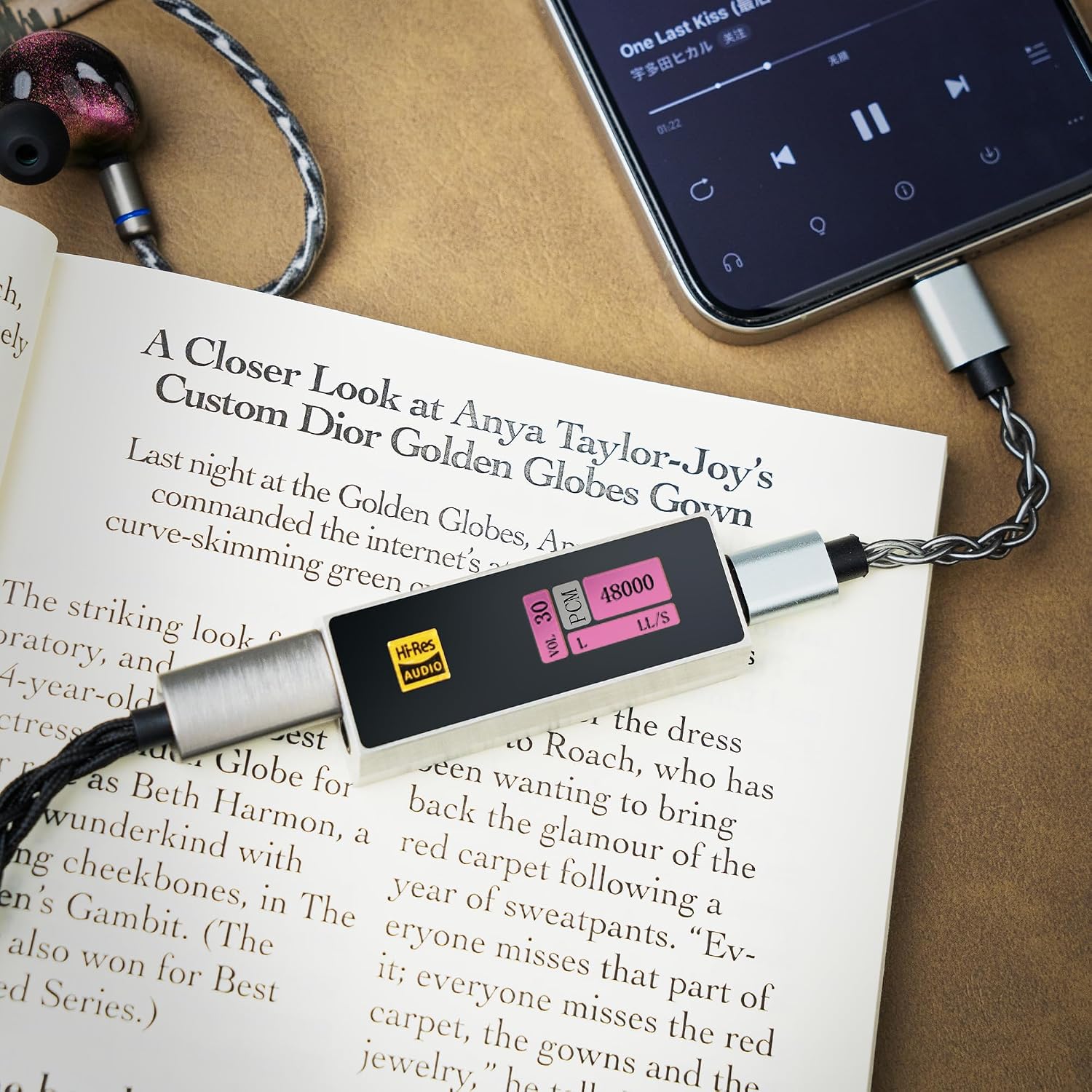
Image 4.1: DC04U connected to a smartphone.
4.2 Driver Installation (Windows/macOS)
For Windows and macOS, the DC04U is generally plug-and-play. However, for optimal performance or specific features, you may need to download and install the latest drivers from the official iBasso website. Refer to the iBasso support page for driver availability and installation instructions.
5. Operating Instructions
5.1 Controls
The DC04U features three buttons on its side for easy control:
- DAC Volume UP (Top Button): Press to increase the output volume.
- DAC Volume DOWN (Middle Button): Press to decrease the output volume.
- Function Button (Bottom Button):
- Short Press: Toggles the OLED display on/off.
- Long Press: Enters Settings Mode for advanced configurations.

Image 5.1: Side button controls.
5.2 OLED Display
The 0.96-inch full-color OLED display provides essential information at a glance:
- Volume Level: Indicates the current output volume.
- Audio Format: Shows the active audio format (e.g., PCM, DSD).
- Sample Rate: Displays the current sample rate of the audio being played.
- Gain Setting: Indicates the current gain level (e.g., High, Low).
- Digital Filter: Shows the selected digital filter.

Image 5.2: OLED display showing audio information.
5.3 iBasso UAC App (for Android)
For Android users, the dedicated iBasso UAC app offers extensive customization options:
- 10-Band Parametric EQ (PEQ): Fine-tune your audio with precise equalization.
- Digital Filters: Select from various digital filter options to tailor the sound signature.
- Gain Control: Adjust the gain level (High/Low) to match your headphones' sensitivity.
- LR Balance: Adjust the left-right channel balance.
- Other Settings: Access additional settings for display, microphone input, and more.
Download the iBasso UAC app from the Google Play Store or the official iBasso website.

Image 5.3: iBasso UAC app interface.
6. Maintenance
To ensure the longevity and optimal performance of your DC04U, follow these maintenance guidelines:
- Cleaning: Use a soft, dry, lint-free cloth to clean the device. Avoid using harsh chemicals, solvents, or abrasive materials.
- Storage: Store the DC04U in a cool, dry place away from direct sunlight, extreme temperatures, and high humidity.
- Handling: Handle the device with care. Avoid dropping it or subjecting it to strong impacts.
- Connections: Always grasp the connector when plugging or unplugging cables, not the cable itself, to prevent damage to the ports.
7. Troubleshooting
If you encounter issues with your DC04U, refer to the following common problems and solutions:
| Problem | Possible Cause | Solution |
|---|---|---|
| No sound or distorted sound | Incorrect connection, low volume, incompatible audio format, faulty cable/headphones. | Ensure cables are securely connected. Check volume levels on both DC04U and source device. Verify audio format compatibility. Test with different headphones or cables. |
| Device not recognized by computer/phone | Loose connection, driver issue (Windows/macOS), incompatible USB port. | Reconnect the USB cable. Try a different USB port. Install/update drivers if necessary. Ensure your device supports USB OTG (for smartphones). |
| Device becomes warm during use | Normal operation for high-power audio devices. | Some warmth is normal, especially during high-volume playback or with demanding headphones. If it becomes excessively hot, disconnect and contact support. |
| Initial volume is too high | Default volume setting. | Always lower the volume using the DC04U's buttons before playing audio, especially when connecting to a new device or after a reset. |
| OLED display is off | Display turned off to save power, or device is not powered. | Short press the Function Button to turn the display on. Ensure the DC04U is properly connected to a powered source device. |
8. Technical Specifications
| Feature | Specification |
|---|---|
| Model Name | DC04U |
| Brand | iBasso |
| DAC Chip | Dual CS43198 |
| Output Power | Max 980mW+980mW @ 32Ω |
| THD+N | -119dB |
| Dynamic Range (DNR) | 132dB |
| Signal-to-Noise Ratio (SNR) | 132dB |
| Max Sampling Rate | PCM 32bit/384kHz, DSD512 (Native) |
| Output Ports | 3.5mm (Single-ended, Mic Input, S/PDIF), 4.4mm (Balanced) |
| Display | 0.96-inch Full-Color OLED |
| Compatibility | Android, Windows, macOS, Gaming Consoles (UAC1.0) |
| Body Material | Stainless Steel |
| Included Accessories | USB-C to A Adapter, USB-C to C OTG Cable, Quick Start Guide, Product Warranty Card |
9. Warranty and Support
The iBasso Audio DC04U is covered by a manufacturer's warranty. Please refer to the included warranty card for specific terms and conditions, including the warranty period and coverage details. For technical support, driver downloads, firmware updates, or further assistance, please visit the official iBasso Audio website or contact their authorized service centers.
Manufacturer: iBasso Audio


