
Introduction
Welcome to the WIWB Prebuilt Gaming PC Desktop user manual. This guide provides essential information for the safe and efficient use of your new computer. Please read this manual thoroughly before operating the device and retain it for future reference.
This gaming PC is equipped with an AMD Ryzen 5 3500X processor, an AMD Radeon RX 560 graphics card, 16GB DDR4 RAM, and a 512GB SSD, designed for a balanced gaming and multitasking experience.
1. Setup Guide
1.1 Unpacking
Carefully remove the PC from its packaging. Ensure all components listed in the "What's in the Box" section are present. Remove any protective films or internal packaging materials from the PC tower.

Image: Front view of the WIWB Prebuilt Gaming PC Desktop, showcasing internal components and blue LED fans.
1.2 Connecting Peripherals
Connect your monitor, keyboard, mouse, and other peripherals to the appropriate ports on the PC. Refer to the port diagrams below for guidance.
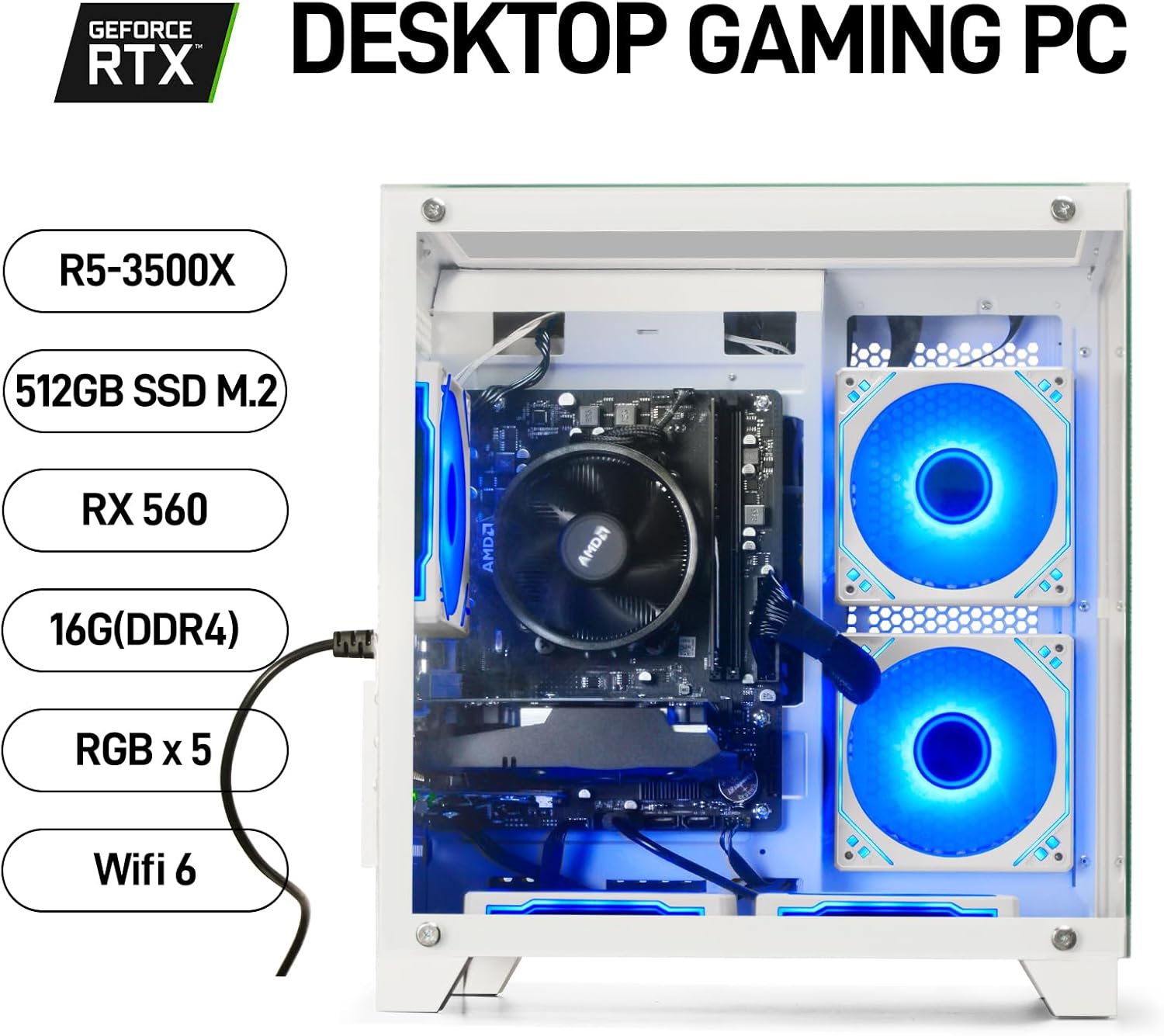
Image: Top panel of the PC with labeled ports including USB 3.0, USB 2.0, microphone, headphone, reset/RGB fans button, and power button.

Image: Detailed diagram of the PC's rear panel, illustrating various ports. Note the dedicated graphics card outputs (DVI, HDMI, DisplayPort) for monitor connection. Motherboard video ports are disabled when a dedicated GPU is present.
- Monitor: Connect your monitor cable (HDMI, DisplayPort, or DVI) directly to the graphics card ports on the lower section of the rear panel. Do not use the video ports on the motherboard (upper section), as they are disabled.
- Keyboard/Mouse: Connect to any available USB ports (USB 2.0 or USB 3.0).
- Audio: Connect headphones or speakers to the audio output jack.
- Network: For wired internet, connect an Ethernet cable to the network port. For wireless, ensure the Wi-Fi antenna (if included) is attached.
- Power: Connect the power cable to the PC's power supply unit and then to a wall outlet.
1.3 First Boot
Press the power button located on the top panel of the PC. The system will boot into the pre-installed Windows operating system. Follow the on-screen instructions to complete the initial Windows setup.
2. Operating Instructions
2.1 General Usage
Your WIWB Gaming PC is ready for use. You can install games, applications, and perform various tasks. The system is optimized for smooth performance in gaming and multitasking scenarios.

Image: A WIWB Gaming PC desktop setup on a white desk, demonstrating a typical user environment.
2.2 System Features
- Processor: AMD Ryzen 5 3500X (6 Cores, 6 Threads, 3.6GHz base, up to 4.1GHz boost) for efficient processing.
- Graphics Card: AMD Radeon RX 560 4GB GDDR5, suitable for mainstream esports and online games.
- RAM: 16GB DDR4 (3200MHz) for smooth multitasking.
- Storage: 512GB NVMe SSD for fast boot times and application loading.
- Connectivity: Integrated Wi-Fi 6 for high-speed wireless internet.
2.3 Port Overview
Familiarize yourself with the available ports for connecting various devices:
| Port Type | Quantity | Description |
|---|---|---|
| USB 3.0 | 2 (Front), 2 (Rear) | High-speed data transfer for peripherals. |
| USB 2.0 | 2 (Front), 4 (Rear) | Standard USB ports for keyboard, mouse, etc. |
| HDMI (GPU) | 1 | Video output for monitors. |
| DisplayPort (GPU) | 1 | Video output for monitors. |
| DVI (GPU) | 1 | Video output for monitors. |
| Audio Jacks | Multiple | For headphones, microphones, and speakers. |
| Ethernet (RJ-45) | 1 | Wired network connection. |
3. Maintenance
3.1 Cleaning
Regular cleaning helps maintain optimal performance and extends the lifespan of your PC.
- Exterior: Use a soft, damp cloth to wipe the exterior surfaces. Avoid harsh chemicals.
- Dust Filters: If your case has removable dust filters, clean them periodically (e.g., monthly) to ensure proper airflow.
- Internal Components: For internal cleaning, it is recommended to use compressed air to remove dust from fans and heatsinks. Ensure the PC is powered off and unplugged before opening the case. Exercise caution to avoid damaging components.
3.2 Software Updates
Keep your operating system, drivers (especially graphics drivers), and applications updated to ensure security, stability, and optimal performance. Windows Update will handle OS updates, and graphics drivers can be updated via AMD's official website.
3.3 Upgrades
Your PC is designed with future expansion in mind. You can upgrade components such as:
- RAM: Additional DDR4 memory slots are available for increasing system memory.
- Storage: An M.2 SSD interface and additional drive bays (if available) allow for adding more storage.
- Graphics Card: The PCI Express slot supports graphics card upgrades. Ensure compatibility with your power supply and case dimensions.

Image: Side view of the PC, illustrating the internal layout and space for component upgrades.
4. Troubleshooting
This section addresses common issues you might encounter.
4.1 No Power
- Ensure the power cable is securely connected to both the PC and the wall outlet.
- Check if the power switch on the back of the power supply unit (PSU) is in the 'ON' position.
- Try a different power outlet.
4.2 No Display on Monitor
- Verify that the monitor is powered on and its input source is correctly selected.
- Ensure the monitor cable is connected to the graphics card ports (HDMI, DisplayPort, or DVI) on the lower section of the PC's rear panel, not the motherboard ports.
- Try a different monitor cable or monitor if available.
4.3 Performance Issues / Freezing
- Check for overheating: Ensure the PC has adequate ventilation and that fans are spinning. Clean dust filters if necessary.
- Update graphics drivers and Windows.
- Close unnecessary background applications.
- Run a system diagnostic or check disk for errors.
4.4 Wi-Fi Connectivity Issues
- Ensure Wi-Fi antennas are securely attached (if external).
- Restart your router and modem.
- Check Wi-Fi settings in Windows to ensure Wi-Fi is enabled and connected to the correct network.
5. Specifications
| Component | Detail |
|---|---|
| Processor | AMD Ryzen 5 3500X (6 Cores, 6 Threads, 3.6 GHz base, up to 4.1 GHz boost) |
| Graphics Card | AMD Radeon RX 560 4GB GDDR5 |
| RAM | 16GB DDR4 (3200 MHz) |
| Storage | 512GB NVMe SSD (PCIE x 4) |
| Operating System | Windows (Pre-installed) |
| Wireless Connectivity | Wi-Fi 6 |
| USB Ports | 4x USB 2.0, 4x USB 3.0 (2 front, 2 rear) |
| Video Outputs (GPU) | HDMI, DisplayPort, DVI |
| Audio Ports | Microphone In, Audio Out (Front & Rear) |
| Network | Gigabit Ethernet |
| Dimensions | 18 x 17 x 13.5 inches (Package) |
| Weight | 19.16 pounds |
6. Warranty and Support
6.1 Manufacturer Warranty
This WIWB Prebuilt Gaming PC Desktop comes with a 1-year manufacturer warranty. This warranty covers defects in materials and workmanship under normal use. Please retain your proof of purchase for warranty claims.
6.2 Technical Support
For technical assistance, troubleshooting beyond this manual, or warranty inquiries, please contact WIWB customer support. Refer to the contact information provided with your purchase documentation or visit the official WIWB website for support details.
When contacting support, please have your product model number (wwr5go) and purchase date available.