
1. Introduction
This manual provides essential information for the safe operation, assembly, and maintenance of your TODIMART D5 Pro Electric Scooter. Please read this manual thoroughly before your first ride to ensure proper use and to maximize the lifespan of your scooter. Keep this manual for future reference.
2. Safety Information
Operating an electric scooter carries inherent risks. Always prioritize safety to prevent injury or damage. Adhere to all local laws and regulations regarding electric scooter use.
- Always wear a helmet and appropriate protective gear (knee pads, elbow pads) when riding.
- Do not ride in adverse weather conditions, such as heavy rain, snow, or icy roads.
- Avoid riding on slippery surfaces, loose gravel, or uneven terrain at high speeds.
- Maintain a safe distance from other vehicles, pedestrians, and obstacles.
- Do not exceed the maximum load capacity of 150 kg.
- Ensure both brakes are functioning correctly before each ride.
- Familiarize yourself with the scooter's controls before riding in traffic.
- The scooter has an IP55 water resistance rating, meaning it is protected against dust and low-pressure water jets. Avoid submerging the scooter or riding through deep puddles.
3. Package Contents
Upon unpacking, verify that all items are present and in good condition:
- TODIMART D5 Pro Electric Scooter
- Charger
- Installation Tool
- User Manual
4. Product Overview
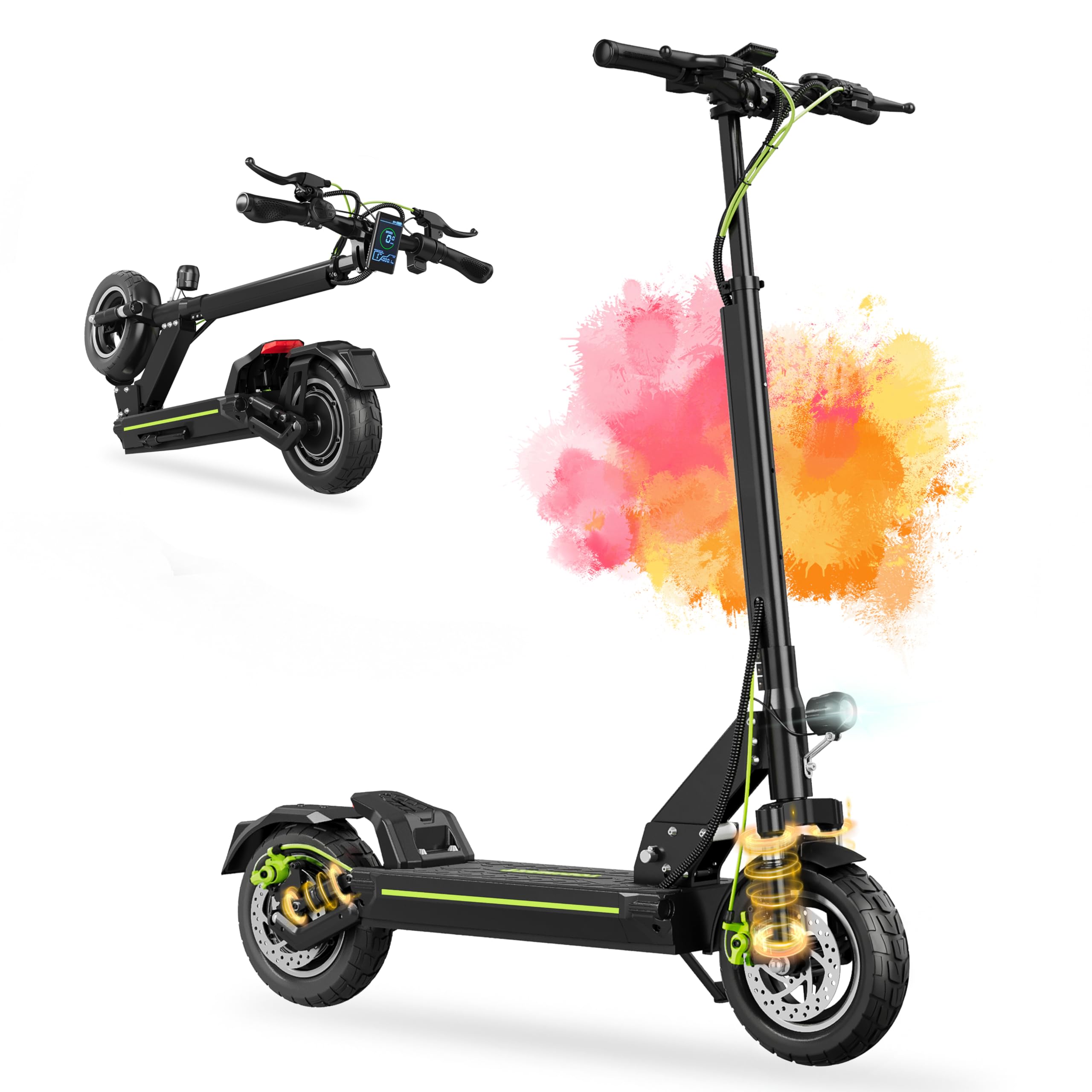
The TODIMART D5 Pro Electric Scooter features a robust design with advanced components for a reliable riding experience.
Key Components:
- Handlebars: Equipped with ergonomic grips, brake levers, and a digital display.
- Digital Display: Shows real-time speed, battery level, distance traveled, and allows for speed mode selection and cruise control activation.
- Motor: 500W brushless motor (800W peak power) for efficient propulsion.
- Battery: High-capacity 48V 13Ah lithium-ion battery.
- Wheels: 10-inch pneumatic all-terrain tires for various surfaces.
- Suspension: Dual front and rear shock absorbers for a comfortable ride.
- Braking System: Dual electronic and mechanical brakes for enhanced safety.
- Lighting: Powerful front LED headlight, rear flashing light, and left/right turn signals.
- Folding Mechanism: Two-step, three-second folding system for portability.


5. Setup
5.1 Unfolding the Scooter
- Place the scooter on a flat surface.
- Release the folding latch located near the base of the handlebar stem.
- Carefully lift the handlebar stem until it locks into the upright position. Ensure the locking mechanism is fully engaged.
- Adjust the handlebar height to your preference by loosening the quick-release clamp, extending or retracting the stem, and then securely tightening the clamp.
5.2 Initial Charging
Before first use, fully charge the scooter's battery. The charging port is typically located on the side of the deck. Connect the charger to the scooter and then to a power outlet. The indicator light on the charger will change (e.g., from red to green) when charging is complete. A full charge takes approximately 7 hours.
5.3 Pre-Ride Checks
Before each ride, perform the following checks:
- Ensure tires are properly inflated (refer to tire sidewall for recommended pressure).
- Verify that the brakes are responsive and engage effectively.
- Check that all lights (headlight, taillight, turn signals) are working.
- Confirm that the folding mechanism is securely locked.
- Inspect for any loose parts or unusual noises.
6. Operating Instructions
6.1 Powering On/Off
Press and hold the power button on the digital display to turn the scooter on or off.
6.2 Digital Display and Controls

The intelligent LED display provides crucial riding information:
- Speed: Real-time speed indication.
- Battery Level: Current battery charge status.
- Mileage: Total distance traveled.
- Speed Modes: Cycle through 3 speed modes using the control buttons.
- Cruise Control: Activate for a consistent speed without holding the throttle.
- Display Brightness: Adjustable via the control panel.
- Automatic Shutdown Time: Configurable setting.
6.3 Riding
- Place one foot on the deck and push off with the other foot to gain initial momentum.
- Once moving, gently press the throttle to engage the motor.
- Use the control buttons to select your desired speed mode. The maximum speed is limited to 25 km/h in compliance with regulations.
- To brake, gently squeeze the brake levers. The scooter features both electronic and mechanical brakes for effective stopping.
- Activate the front headlight, rear light, and turn signals as needed for visibility, especially at night or in low-light conditions.


7. Maintenance
7.1 Battery Care
- Charge the battery regularly, even if the scooter is not in use for extended periods (at least once every 30 days).
- Avoid completely draining the battery before recharging.
- Store the scooter in a cool, dry place away from direct sunlight and extreme temperatures.
7.2 Tire Pressure
Regularly check and maintain the recommended tire pressure for optimal performance and safety. Under-inflated tires can affect range and handling.
7.3 Brake Adjustment
If the brakes feel loose or too tight, they may require adjustment. Consult a qualified technician or refer to online resources for specific adjustment procedures. Ensure both electronic and mechanical brakes are properly calibrated.
7.4 Cleaning
Clean the scooter with a damp cloth. Do not use high-pressure water jets or corrosive cleaning agents. Ensure the charging port cover is securely closed before cleaning.
7.5 General Inspection
Periodically check all screws, bolts, and connections to ensure they are tight. Inspect the frame for any signs of damage or cracks.
8. Troubleshooting
If you encounter issues with your TODIMART D5 Pro Electric Scooter, refer to the following common problems and solutions:
| Problem | Possible Cause | Solution |
|---|---|---|
| Scooter does not power on | Low battery; loose battery connection; power button malfunction | Charge the battery; check battery connections; contact support if button is faulty. |
| Reduced range or power | Under-inflated tires; low battery charge; riding uphill frequently; heavy load | Inflate tires to recommended pressure; fully charge battery; adjust riding style. |
| Brakes feel weak or make noise | Brake pads worn; misaligned brake discs; cable tension incorrect | Inspect brake pads and discs; adjust brake cable tension; seek professional assistance if needed. |
| Unusual noises during operation | Loose components; motor issue; suspension issue | Check all fasteners; inspect motor area; lubricate suspension points if applicable; contact support. |
For issues not listed here or if problems persist, please contact TODIMART customer support.
9. Specifications
| Feature | Specification |
|---|---|
| Brand | TODIMART |
| Model Name | D5 Pro |
| Motor Power | 500W (Peak 800W) |
| Battery | 48V 13Ah Lithium-ion |
| Max Range | 50-55 Kilometers |
| Max Speed | 25 km/h (Adjustable) |
| Max Load | 150 Kilograms |
| Charging Time | 7 hours |
| Wheel Size | 10 Inches (Pneumatic) |
| Suspension Type | Dual (Front and Rear) |
| Brake Type | Electronic + Mechanical (Front and Rear) |
| Water Resistance | IP55 |
| Item Weight | 21.2 Kilograms |
| Dimensions (L x W x H) | 116L x 63W x 127H Centimeters |
| Frame Material | Aluminum |
| Handlebar Type | Adjustable |
| Recommended Use | Commuting |
10. Warranty and Support
10.1 Warranty Information
The TODIMART D5 Pro Electric Scooter comes with a 1-year limited warranty from the date of purchase. This warranty covers manufacturing defects under normal use. Please retain your proof of purchase for warranty claims.
10.2 Spare Parts Availability
Spare parts for the TODIMART D5 Pro Electric Scooter are available for up to 5 years from the date of purchase, ensuring long-term usability and maintenance.
10.3 Customer Support
For technical assistance, warranty claims, or inquiries regarding spare parts, please contact TODIMART customer support through the retailer where you purchased the product or visit the official TODIMART website for contact details.


