
Introduction
Thank you for choosing the Beuiouer I19 Pro Mini Mobile Phone. This manual provides essential information for setting up, operating, and maintaining your device. Please read it carefully to ensure proper use and to maximize the performance of your phone.
Package Contents
Upon unpacking, please verify that all items listed below are present and in good condition:
- 1 x Beuiouer I19 Pro Slide-cover Mini Phone
- 1 x Data Cable
- 1 x Li-battery (1050 mAh)
Note: Other products shown in promotional images are not included.
Product Overview
Familiarize yourself with the key components of your Beuiouer I19 Pro phone.
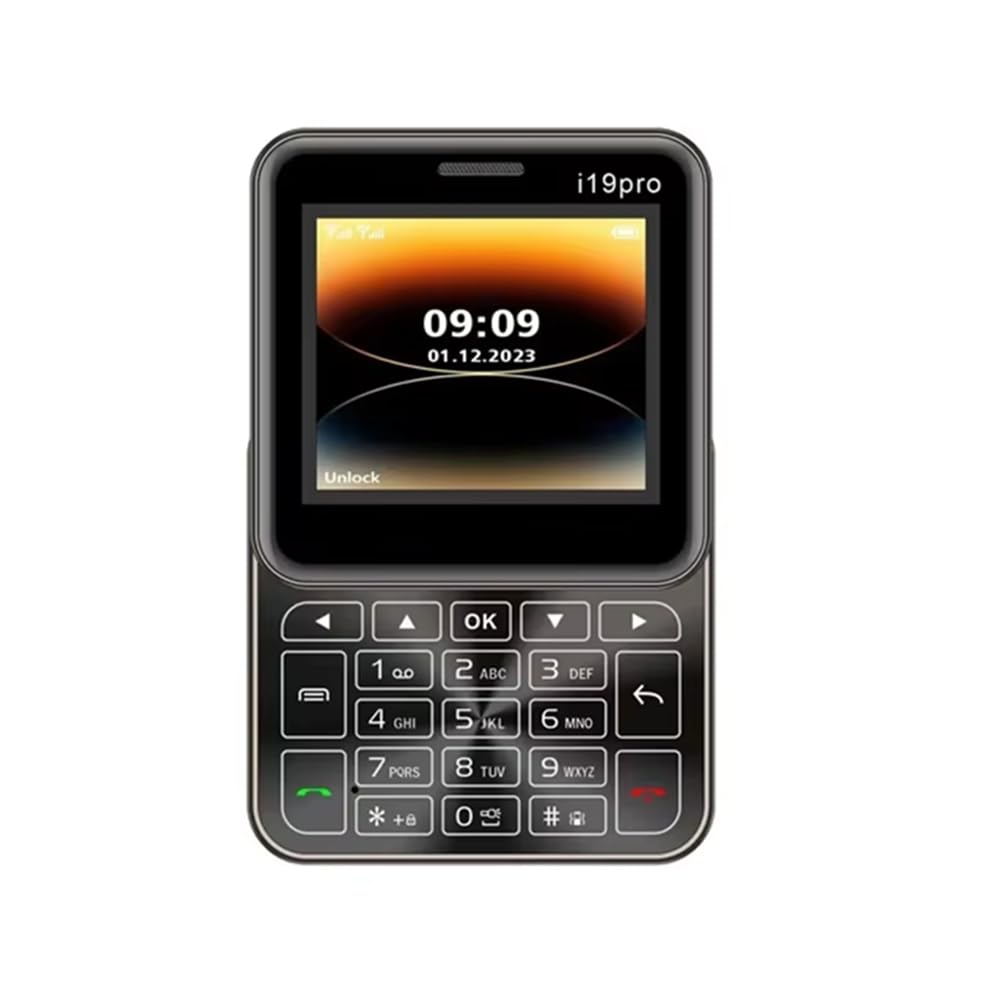
Figure 1: Multi-angle view of the Beuiouer I19 Pro Mini Mobile Phone, showing the front display with keypad, side profiles, and top/bottom edges.

Figure 2: Front view of the Beuiouer I19 Pro Mini Mobile Phone with the slide mechanism open, revealing the full keypad and display.

Figure 3: Front and rear view of the Beuiouer I19 Pro Mini Mobile Phone, highlighting the display, keypad, and the rear camera module.

Figure 4: Bottom view of the Beuiouer I19 Pro Mini Mobile Phone, showing the charging port.
Setup
1. Inserting SIM Card(s) and Battery
- Open the Back Cover: Gently slide or pry open the back cover of the phone.
- Insert SIM Card(s): Locate the SIM card slots. This phone supports dual SIM cards. Carefully insert your 2G GSM SIM card(s) into the designated slots with the gold contacts facing down.
- Insert Battery: Place the 1050 mAh Li-battery into the battery compartment, ensuring the contacts align correctly.
- Close Back Cover: Replace the back cover until it clicks securely into place.
2. Charging the Battery
- Connect the provided data cable to the charging port at the bottom of the phone (refer to Figure 4).
- Connect the other end of the data cable to a compatible USB power adapter (not included) or a computer's USB port.
- Allow the phone to charge fully before initial use. The battery indicator on the screen will show charging status.
3. Powering On/Off
- To Power On: Press and hold the Power/End Call button (usually marked with a red phone icon) until the screen lights up.
- To Power Off: Press and hold the Power/End Call button until the power-off options appear, then select "Power Off" or confirm.
Operating Instructions
1. Basic Functions
- Making Calls: Enter the phone number using the keypad and press the Call button (green phone icon).
- Answering Calls: When an incoming call rings, press the Call button (green phone icon) to answer.
- Sending SMS: Navigate to the "Messages" menu, select "New Message," enter the recipient's number and your message, then send.
- Navigation: Use the directional keys (up, down, left, right) and the "OK" button to navigate through menus and select options.
2. Camera
The phone features a rear 0.08MP camera.
- Accessing Camera: From the main menu, select the "Camera" application.
- Taking Photos: Frame your shot and press the "OK" button to capture an image.
3. Bluetooth
Connect your phone to other Bluetooth-enabled devices such as headsets or other phones.
- Go to "Settings" > "Bluetooth".
- Turn Bluetooth "On".
- Search for available devices and select the device you wish to pair with.
- Enter the passkey if prompted.
4. FM Radio
Enjoy your favorite radio stations on the go.
- Plug in a wired headset (acts as an antenna).
- Navigate to the "FM Radio" application from the main menu.
- Use the navigation keys to scan for stations or manually tune.
5. MP3 Player
Play your stored music files.
- Ensure you have music files stored on a TF card (if inserted) or the phone's internal memory.
- Access the "MP3 Player" from the main menu.
- Browse and select your desired music files for playback.
Maintenance
1. Battery Care
- Avoid exposing the battery to extreme temperatures.
- Do not puncture, disassemble, or modify the battery.
- Use only the provided data cable for charging.
- If the phone will not be used for an extended period, charge it to about 50% and store it in a cool, dry place.
2. Cleaning Your Phone
- Use a soft, lint-free cloth to wipe the screen and body of the phone.
- Avoid using harsh chemicals, cleaning solvents, or abrasive materials.
- Keep the charging port free from dust and debris.
Troubleshooting
- Phone not turning on: Ensure the battery is properly inserted and charged. Try charging for at least 30 minutes before attempting to power on again.
- No network signal: Check if the SIM card is correctly inserted. Ensure you are in an area with 2G GSM network coverage.
- Cannot make/receive calls: Verify SIM card activation and sufficient balance (for prepaid). Check network settings.
- Bluetooth pairing issues: Ensure both devices are in pairing mode and within range. Check if the correct passkey is entered.
- Phone freezes or becomes unresponsive: Remove the battery, wait a few seconds, and reinsert it to perform a soft reset.
Specifications
| Model | I19 Pro |
| Network | 2G, GSM 850/900/1800/1900MHz |
| CPU | MTK6261D |
| SIM Support | Dual SIM card dual standby |
| Display | 2.4 Inch TFT screen, 128*160px |
| Memory | RAM 32MB + ROM 32MB (Supports TF Card) |
| Camera | Rear 0.08MP |
| Battery | 1050 mAh Li-battery |
| Features | Bluetooth, MP3, FM Radio, Torch |
| Material | Plastic |
| Dimensions (Parcel) | 10 x 10 x 5 cm |
| Weight (Parcel) | 184 g |
| Country of Origin | China |
Warranty and Support
For warranty information and customer support, please refer to the documentation provided with your purchase or contact your retailer. Keep your proof of purchase for any warranty claims.
Manufacturer: Beuiouer
Manufacturer Contact Information: Beuiouer