
SnapFresh Q0M-DC-8P
SnapFresh 8V Cordless Rotary Tool Kit User Manual
Model: Q0M-DC-8P
1. Important Safety Instructions
Read all safety warnings, instructions, illustrations, and specifications provided with this power tool. Failure to follow all instructions listed below may result in electric shock, fire, and/or serious injury.
- Always wear appropriate personal protective equipment, including safety glasses, gloves, and a dust mask, especially when operating the tool.
- Keep the work area clean and well-lit. Cluttered or dark areas invite accidents.
- Do not operate power tools in explosive atmospheres, such as in the presence of flammable liquids, gases, or dust.
- Keep children and bystanders away while operating a power tool. Distractions can cause you to lose control.
- Avoid accidental starting. Ensure the switch is in the off-position before connecting to a battery pack, picking up, or carrying the tool.
- Disconnect the battery pack from the tool before making any adjustments, changing accessories, or storing power tools.
- Use the correct tool for your application. Do not force the tool.
- Maintain power tools and accessories. Check for misalignment or binding of moving parts, breakage of parts, and any other condition that may affect the tool's operation.
- Use the power tool, accessories, and tool bits in accordance with these instructions, taking into account the working conditions and the work to be performed.
- Do not expose power tools to rain or wet conditions. Water entering a power tool will increase the risk of electric shock.
- Charge only with the charger specified by the manufacturer. A charger that is suitable for one type of battery pack may create a risk of fire when used with another battery pack.
2. Package Contents
Verify that all items are present and in good condition upon opening the package.

Figure 2.1: Package Contents Overview
- 1 x SnapFresh 8V Cordless Rotary Tool
- 46 x Assorted Accessories (for sanding, polishing, cutting, grinding, drilling, carving)
- 1 x USB-C Charging Cable
- 1 x Storage Case
- 1 x User Manual
- 1 x Quick Start Guide
3. Tool Components
Familiarize yourself with the parts of your SnapFresh 8V Cordless Rotary Tool.
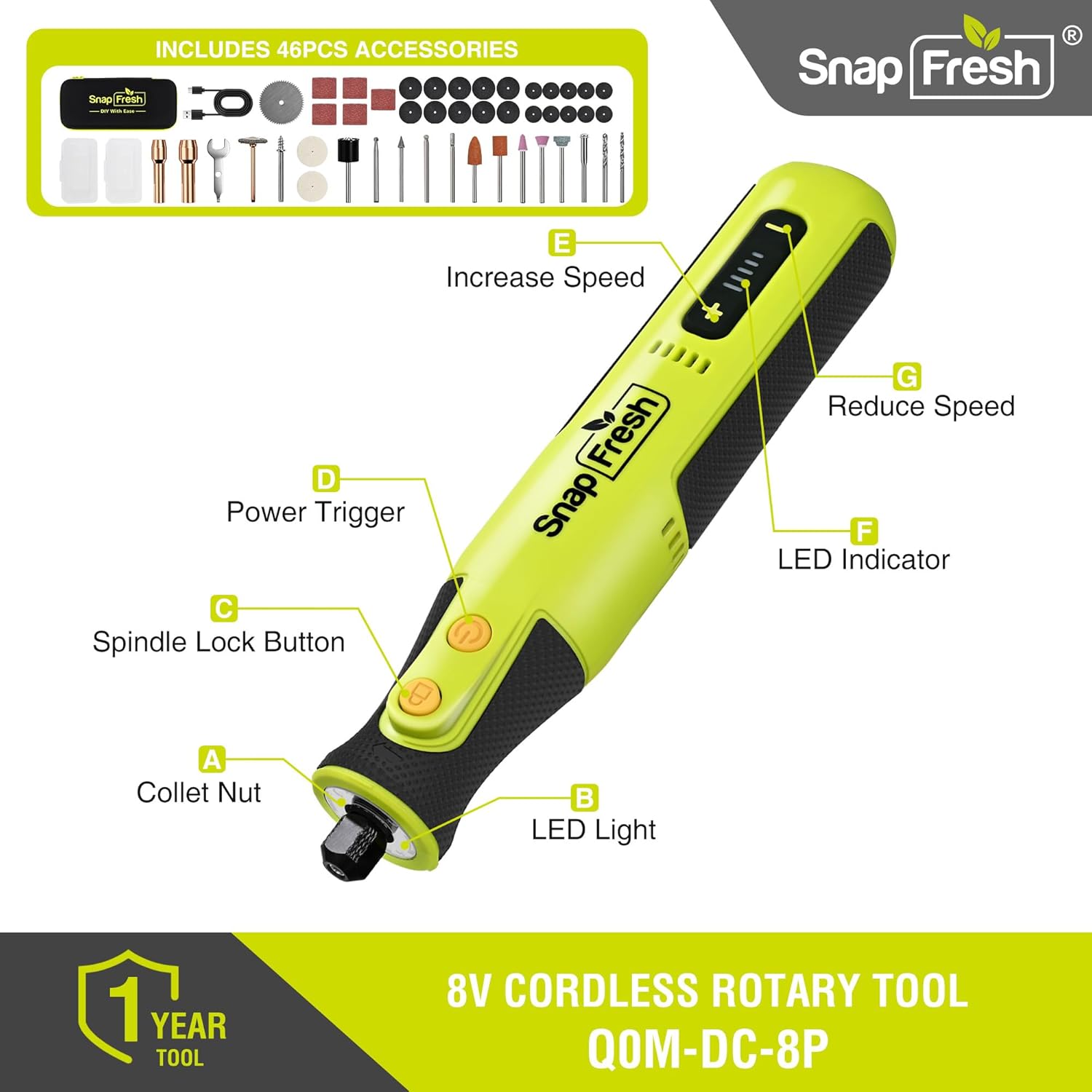
Figure 3.1: Rotary Tool Components
- Collet Nut: Secures accessories in place.
- LED Light: Illuminates the work area for improved visibility.
- Spindle Lock Button: Engages to lock the spindle for accessory changes.
- Power Trigger: Turns the tool on and off.
- Increase Speed Button: Increases the rotational speed.
- LED Indicator: Displays battery level and speed setting.
- Reduce Speed Button: Decreases the rotational speed.
4. Getting Started
4.1 Charging the Battery
The rotary tool is equipped with a rechargeable battery. Ensure the tool is fully charged before first use for optimal performance.

Figure 4.1: USB-C Charging
- Connect the provided USB-C charging cable to the charging port on the tool.
- Plug the other end of the USB-C cable into a compatible USB power adapter (not included) or a USB port.
- The LED indicator will show the charging status. A full charge typically takes approximately 70 minutes and provides over 80 minutes of runtime.
- Once fully charged, disconnect the charging cable.
4.2 Accessory Installation
Proper installation of accessories is crucial for safe and effective operation.

Figure 4.2: Easy Accessory Installation
- Step 1: Press and hold the Spindle Lock Button (C) to prevent the spindle from rotating.
- Step 2: Unscrew the Collet Nut (A) counter-clockwise.
- Step 3: Insert the desired accessory shank into the collet. Ensure the accessory is inserted as far as possible to minimize run-out.
- Step 4: While still holding the Spindle Lock Button, tighten the Collet Nut clockwise by hand. Then, use the provided wrench to firmly secure the nut. Do not overtighten.
- Step 5: Release the Spindle Lock Button.
Note: Always ensure the accessory is securely fastened before operating the tool. Use the correct collet size for your accessory shank.
5. Operation
5.1 Power On/Off and Speed Control

Figure 5.1: Precision Speed Control
- To Turn On: Press the Power Trigger (D). The tool will start at the last used speed setting (speed memory function).
- To Adjust Speed: Use the Increase Speed Button (E) or Reduce Speed Button (G) to select one of the 5 available speeds, ranging from 5,000 RPM to 28,000 RPM. The LED Indicator (F) will display the current speed setting.
- To Turn Off: Press the Power Trigger (D) again.
5.2 Using the LED Work Light
The built-in LED light provides illumination for detailed work in dimly lit areas.
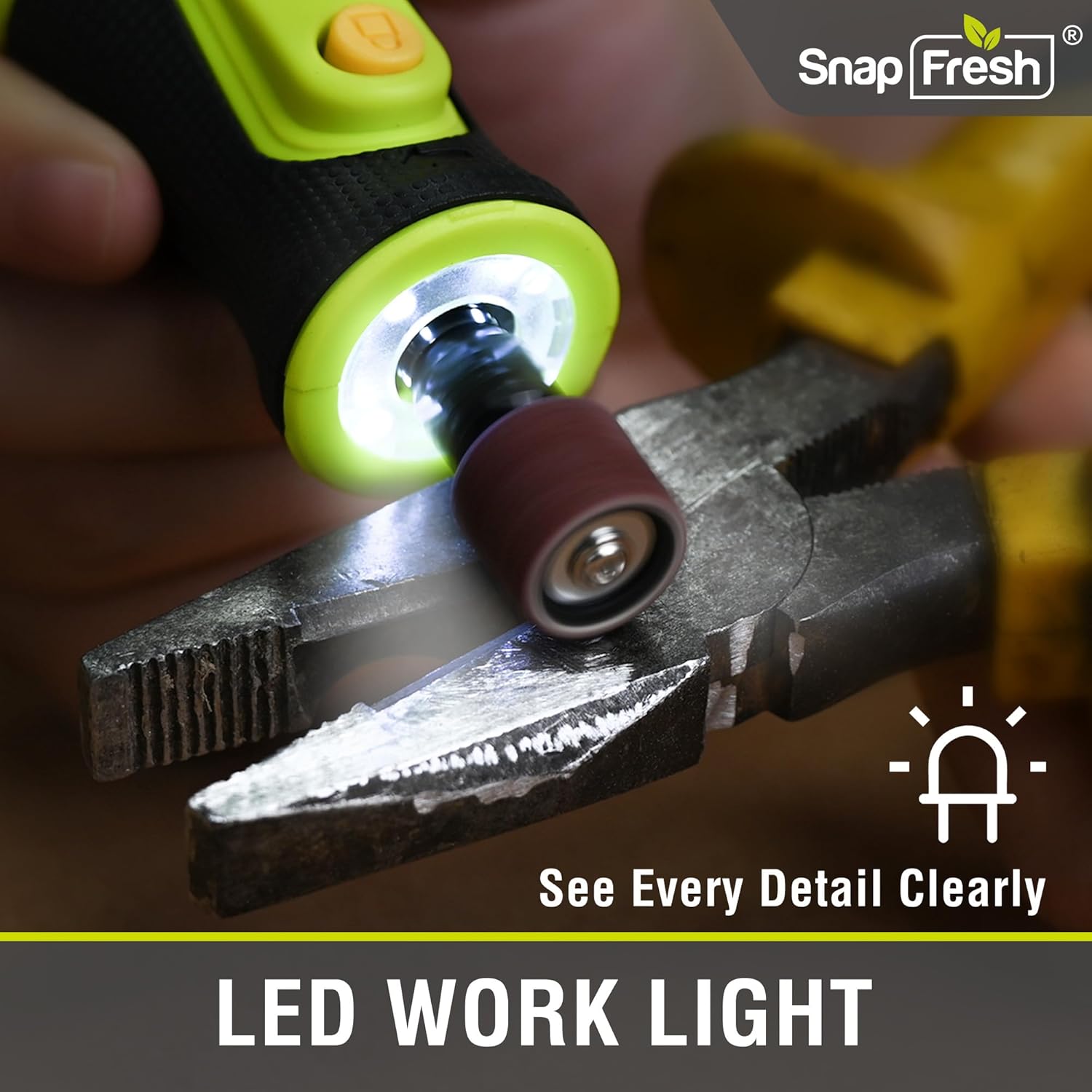
Figure 5.2: LED Work Light in Action
The LED Work Light (B) automatically activates when the tool is powered on, enhancing visibility for precise tasks.
5.3 Applications
The SnapFresh rotary tool is versatile and suitable for various tasks. Always select the appropriate accessory and speed for the material and application.
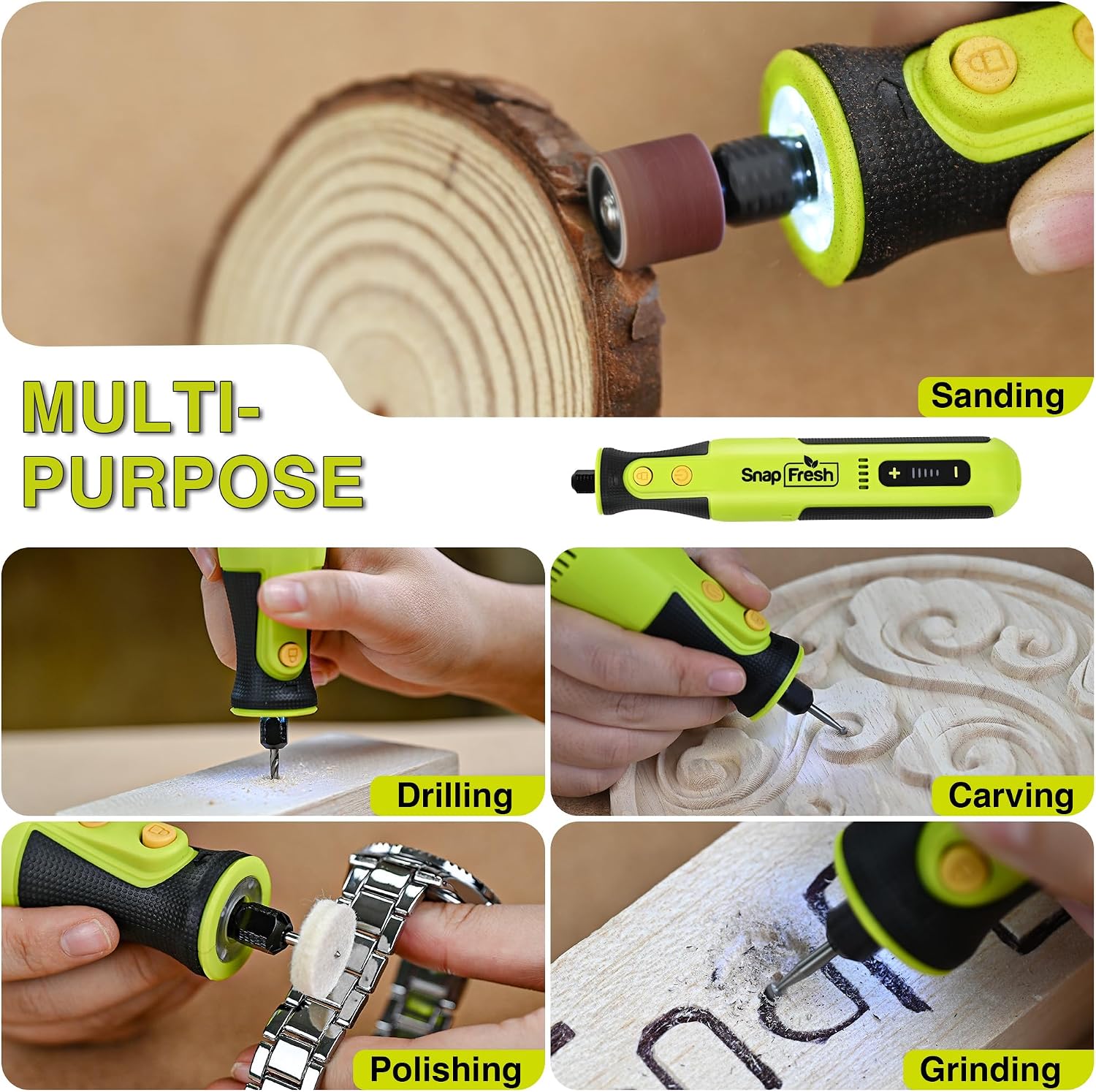
Figure 5.3: Multi-Purpose Applications
- Engraving: Use diamond burr bits for intricate designs on materials like wood, metal, glass, or plastic.
- Sanding: Attach sanding bands or discs for smoothing rough edges, shaping, or preparing surfaces.
- Polishing: Use felt wheels with polishing compound to bring a shine to metal, plastic, or jewelry.
- Drilling: Utilize drill bits for small holes in various materials.
- Deburring: Remove sharp edges or burrs from metal or plastic components.
- Cutting: Employ cut-off wheels for light cutting tasks on thin materials.
- Pet Nail Grinding: The low vibration and quiet operation make it suitable for safely trimming pet nails.

Figure 5.4: Carving a Wooden Figure

Figure 5.5: Included Accessories for Diverse Tasks
6. Maintenance
6.1 Cleaning
- Always disconnect the tool from any power source and remove accessories before cleaning.
- Use a soft, damp cloth to wipe down the exterior of the tool. Do not use harsh chemicals or abrasive cleaners.
- Use a small brush or compressed air to clear dust and debris from ventilation openings and the collet area.
6.2 Accessory Care
- Inspect accessories before each use for wear, damage, or dullness. Replace worn or damaged accessories immediately.
- Clean accessories after use to remove debris and extend their lifespan.
6.3 Storage
- Store the rotary tool and its accessories in the provided storage case in a clean, dry place, away from direct sunlight and extreme temperatures.
- Keep out of reach of children.
7. Troubleshooting
If you encounter issues with your SnapFresh rotary tool, refer to the following common problems and solutions:
| Problem | Possible Cause | Solution |
|---|---|---|
| Tool does not turn on. | Battery is depleted. | Charge the battery fully. |
| Tool stops during operation. | Overload protection activated. | Reduce pressure on the tool. Allow it to cool down. |
| Accessory wobbles or vibrates excessively. | Accessory not properly installed or damaged. Incorrect collet size. | Ensure accessory is fully inserted and collet nut is tightened. Replace damaged accessories. Use the correct collet. |
| Battery not charging. | Charging cable or adapter faulty. Tool or battery too hot/cold. | Check cable and adapter. Ensure tool is at room temperature. |
| Reduced performance. | Dull accessory. Low battery. | Replace accessory. Recharge battery. |
If the problem persists after attempting these solutions, please contact SnapFresh customer support.
8. Specifications
| Feature | Detail |
|---|---|
| Brand | SnapFresh |
| Model Number | Q0M-DC-8P |
| Power Source | Battery Powered (1 Lithium Ion battery included) |
| Voltage | 8V |
| Rotational Speed | 5,000 - 28,000 RPM (5-speed control) |
| Runtime | Up to 80 minutes |
| Charging Time | Approx. 70 minutes (USB-C Fast Charging) |
| Special Features | LED Work Light, Speed Memory Function |
| Item Weight | 0.26 kg (0.57 lbs) |
| Item Dimensions (L x W x H) | 25.4 x 12.7 x 7.6 cm (10 x 5 x 3 inches) |
| Included Accessories | 46 pieces |
9. Warranty and Support
Your SnapFresh 8V Cordless Rotary Tool Kit is covered by a 2-year manufacturer's warranty from the date of purchase.
This warranty covers defects in materials and workmanship under normal use. It does not cover damage resulting from misuse, abuse, neglect, unauthorized repair, or normal wear and tear.
Customer Support:
For warranty claims, technical assistance, or any questions regarding your product, please contact SnapFresh customer support through the retailer where the product was purchased or refer to the contact information provided in the Quick Start Guide.
Manufacturer Contact Information:
Ningbo Winbay Technology Co.,Ltd.
Rm.2802,Block A,Hebang Bldg.,
No.933 N.Tiantong Rd.,Ningbo,China
Please retain your proof of purchase for warranty purposes.
Related documentsQ0M-DC-8P

Ask a question about this manual
Ask about setup, troubleshooting, compatibility, parts, safety, or missing instructions. Manuals+ will review the question and use this page’s manual context to help answer it.